Rant Time: PlayStation Store Return Policy

Looking for that elusive PlayStation Store return policy? A lot of people have been asking, “Where and what is the PlayStation store’s return policy?” Let’s explore.
PlayStation Store Digital Goods vs Retailers
When you buy digital goods from an online store, you expect a similar return policy to what you find in a standard retail store. Retailers today mostly offer 15-30 days to return your purchase for a full refund. However, there are rules to boxed content such as video games and Blu-ray or DVD movies. If you crack open the shrink wrap, you own it. Once you crack that shrink wrap, you can only exchange the item for another like item. If the entertainment item remains wrapped (i.e., movie or video game), you can return it for a full refund so long as it’s still within the stated return window. Other physical items have usual refund windows of usually no less than 14 days and usually no more than 90 days. Still, these are reasonable return windows.
For digital goods, there is no such concept as a shrink wrap or even a plastic box. For these sales, you’re limited to whatever return policies the store offers. For Apple and Amazon, if you mistakenly make a digital purchase, they’ll happily refund you so long as you do so right away. For Sony’s PlayStation store, the waters here are much more murky.
Where is the PlayStation store refund policy?
That’s a really good question and, unfortunately, there’s not a good answer that covers the entire world. Sony has intentionally fractured the PlayStation store rules into world territories. This means that there is not a single return policy that covers the globe. Instead, return policies are by region.
In the US, Sony doesn’t actually publish an actual Return Policy. Instead, they rely on their “Terms of Service” agreement to cover their for their returns on digital good purchases.
Return Policy
I’m going to rant just a little bit on this topic before getting to the meat where to find the information you’re looking for. A Return Policy is just that. It’s a clear, concise, non-technical, non-legal statement that explains exactly what a store provides for after a sale. For example, Target’s return policy states:
Most unopened items sold by Target in new condition and returned within 90 days will receive a refund or exchange. Some items sold by Target have a modified return policy noted on the receipt, packing slip, Target policy board (refund exceptions), Target.com or in the item department. Items that are opened or damaged or do not have a receipt may be denied a refund or exchange.
Then, Target breaks this statement down into types of items and their specific return policy details such as…
Returns and exchanges without a receipt may be limited. Other restrictions may apply.
- If you’re not satisfied with any Target Owned Brand item, return it within one year with a receipt for an exchange or a refund.
- Target REDcard℠ debit and credit card holders will receive an extra 30 days to return nearly all items purchased with their REDcard at Target and Target.com. See Target.com/REDcard for full details and exclusions.
- All electronics and entertainment items must be returned within 30 days for a refund or exchange. For these items purchased between 11/1 – 12/25, the 30-day refund period will start on 12/26.
- All mobile phones must be returned or exchanged within 14 days. All items purchased with a carrier contract at a Target store must be returned or exchanged within 14 days and may be subject to early termination fees per carrier contract. Contract items and carrier plans must be sold and returned by a Target Tech Rep.
- All Apple® products, excluding mobile phones, must be returned within 15 days. For these items purchased between 11/1-12/25, the 15-day refund period will start on 12/26.
- … more
And so on… This is a short example of a Return Policy, this is not Target’s complete return policy. Please click the link if you’re really interested in reading that.
Anyway, this is to show exactly how a Return Policy should be written. It is written in clear, concise, everyday language. It is not written in legalese jargon that requires interpretation. Let’s compare this to what Sony considers a return policy for its digital goods.
Sony’s Return Policy which isn’t
The difficulty with Sony is that Sony US chooses not to create an actual store return policy and instead chooses to rely on its “Terms of Service” to cover for the lack of an actual return policy. When you ask someone on the chat service to give you a link to the PlayStation store’s U.S. return policy, they give you the following link.
Here’s the link to Sony’s “Terms of Service” agreement:
As you can see from this link, it is a legal document labeled “Terms of Service”. This is a legal agreement, not a Return Policy. Buried within this Terms of Service legal agreement, there is a section labeled Wallet. Here is where the return options are listed, but in fact, they aren’t really listed at all. Under the section Wallet, begins the information about purchases, which is about as clear a mud. But, let’s examine this mess they call a policy.
WALLET
Your Account has an associated wallet, and all purchases made on PSN Services, including purchases funded from an outside payment source (e.g., a credit card or PayPal account) at the time of the purchase, are made through the wallet. Your children’s Accounts that are associated with your Account do not have a separate wallet, and all purchases made by them will be made through your wallet. Wallet funds have no value outside PSN and can only be used to make purchases through PSN Services and certain Third Party Services. You can only hold a certain maximum amount of funds in your wallet as determined by us (“Limit”), using either (i) a credit or debit card; (ii) a prepaid card or promotional code with a specified value where available; or (iii) other payment methods approved by us and made available from time to time in each specific country. FUNDS ADDED TO THE WALLET ARE NON-REFUNDABLE AND NON-TRANSFERABLE EXCEPT WHERE THE LAW REQUIRES THAT WE TAKE THOSE ACTIONS. WE HAVE NO OBLIGATION TO REVERSE OR REFUND UNAUTHORIZED CHARGES MADE USING ANY PAYMENT METHOD TO FUND THE WALLET. WALLET FUNDS THAT ARE DEEMED ABANDONED OR UNUSED BY LAW WILL NOT BE RETURNED OR RESTORED.
blah blah blah… a bunch of legalese jargon that no one wants to read. But wait, there’s more to read….
TRANSACTIONS All transactions made through your Account or an associated Account of your child are solely between you and SIE LLC. By completing a transaction through your Account or allowing a transaction to take place through an associated Account of your child, you are (i) agreeing to pay for all transactions made by you or your children, , including recurring charges for subscriptions that are not cancelled; (ii) authorizing SIE LLC to deduct from the wallet and charge your credit card or other applicable payment instrument or payment mechanism all fees due and payable for all your transactions; and (iii) agreeing to any applicable Usage Terms and terms associated with use of the particular PSN Service. All transactions are final upon their completion and may be deemed to be governed by law and regulatory requirements applicable at the time the transaction was completed. PAYMENTS FOR ACCESS TO CONTENT OR SERVICES ARE NOT REFUNDABLE EXCEPT WHERE THE LAW REQUIRES THAT THEY ARE REFUNDABLE.
Pre-orders and Bundles. You may have the option to order a license for certain content in the form of bundles (such as seasons of television series) or a pre-order. We reserve the right to deduct funds from your wallet for any pre-order or bundle order at the time you order the content, but some or all of the content may not be available until it is released for license via the PSN Services.UNLESS OTHERWISE REQUIRED BY LAW, YOU MAY NOT CANCEL OR OBTAIN A REFUND FOR A PRE-ORDER OR AN ORDER FOR A CONTENT BUNDLE ONCE YOU PLACE YOUR ORDER, AND PRE-ORDERED CONTENT OR CONTENT INCLUDED IN A BUNDLE MAY BE CHANGED WITHOUT NOTICE.
Aha… here’s the meat of it!
Notice the ‘UNLESS OTHERWISE REQUIRED BY LAW’ provision. This is Sony’s legalese for telling you that they are leaving their return policy requirements in the hands of U.S. federal, state and local laws (if applicable). This means, it is your responsibility to understand and determine exactly what the laws govern returns in your jurisdiction. This is convoluted statement because most people aren’t knowledgeable or familiar with the laws that govern such returns in their jurisdiction. I have to assume Sony’s lawyers naively thought that no local jurisdictions legally covered this part of their “Terms of Service”.
Before I jump into what this statement means to you if you live in the U.S., let’s rant about why this is NOT a return policy. This document is a “Terms of Service” agreement. It is a legal document that governs your use of services. While it might cover some of what a return policy does, it in no way considered a comprehensive return policy. Compare this document to Target’s clearly written, concise, plain language readable policy above which clearly lays out classes of items and their respective return periods in explicit detail. A return policy is supposed to be written in plain language that anyone can understand. Sony’s “Terms of Service” document is anything but clear, concise and plainly readable. Sony’s document is designed to be read and interpreted by a lawyer, not a layman. Meaning, it is on you, the buyer, to understand all laws where you live.
Federal and State Laws
Before I begin here, I will state that I am not a lawyer and nothing in this article is intended to be construed as legal advice. If you have questions about laws in your jurisdiction, you should contact a lawyer where you live.
With that out of the way, because Sony has chosen to leave returns up to the laws in the buyer’s jurisdiction, thankfully it appears the US federal government has such a law that governs returns in these cases.
This federal rule that at first glance may be applicable to PlayStation store purchases seems to be the 3 day Cool-Down law. This is a contract law that states that you have the right to return anything within 3 days and receive your money back as long as you cancel the contract before midnight on the third day. However, it seems that this FTC rule doesn’t cover online sales, although in my opinion it should cover it. Regardless, it doesn’t mean you can’t make a complaint to the FTC regarding Sony’s refund policies.
State laws are a different matter. Because there are effectively 51 states (I’m including Puerto Rico as a state even though they haven’t yet gone through the statehood process), there are too many states to list each one’s return laws in this article. I will point you to this Findlaw article which has very concise information on the state by state laws regarding refunds and returns.
FTC Complaints and Consumer Protection
The primary methods that you have as a consumer for refund redress is 1) asking the company for a refund, 2) using the 3 day Cool-Down rule when applicable and 3) disputing the charge with your credit card company. Sony has control over all 3 of these. Because Sony has complete control over refunds, they can always deny them. Because the PlayStation’s stores sales are online, the 3 Day rule doesn’t apply. And finally, because a chargeback will lead Sony to terminate your PSN account in retaliation, you can’t perform chargebacks without losing all of your purchased content.
This is an unfair situation for the consumer. All of the possible consumer avenues to get a refund cannot be used against Sony. Sure, you can dispute with your credit card company if you’re willing to lose your PSN account. Most gamers are not willing to lose all of their digital content they’ve purchased over a single refund. This is really a scam that Sony has going here. Thankfully, state laws may apply.
California
I will cover California here simply because I have enough knowledge after reading California’s specific law regarding this issue. Keep in mind that all laws are open to interpretation such that a judge can interpret the subtleties and applicability of those laws to any circumstances and in any way that he or she deems appropriate. That means my interpretation isn’t necessarily the interpretation a court of law might rule for a given case. However, Sony does have a presence in California which strengthens California’s laws against Sony.
It seems that while physical presence retailers are bound by California law to post and maintain a comprehensive Return Policy within their place of business, this law appears to have not been updated to explicitly cover businesses performing online sales and which also have a presence in California. This means that online retailers may or may not have a loophole with regards to posting and maintaining a Return Policy. Though, if the law requires physical businesses to post a Return Policy, I don’t see any reason why it wouldn’t apply to online storefronts who also have a presence in California.
According to Findlaw, California law states that:
Retailers are required to clearly post their refund policy unless they offer a full cash refund, exchange, or store credit within seven days of the purchase date. Retailers failing this requirement are required to accept full refunds within 30 days of purchase.
Assuming that the word “Retailers” applies to online sellers who have a presence in California, this law may extend your refund rights to 30 days as Sony clearly doesn’t post an actual refund policy anywhere visible on either their storefront or on their main web site. If “Retailers” only applies to stores with a physical presence and this law does not apply to online retailers, then this provision wouldn’t apply. California seems a little behind on explicitly stating its laws also apply to online sellers doing business in California. This means that assuming California’s law applies to PlayStation store sales, it does so implicitly through interpretation of the law.
For this reason, you would have to talk to a lawyer and ask them to interpret California’s law and whether or not it applies to Sony’s online storefront. Personally, I’d interpret that this provision applies, but I am not a lawyer. I’d certainly argue that the law does apply when arguing for a refund with Sony when you also live in California. I also happen to know that Sony has a business presence within California in San Mateo which makes a difference when dealing with legal matters of business in California. If your state doesn’t have a Sony business presence, any laws governing “retailers” might not apply to Sony.
Not all states have consumer refund policy laws such as those in California. You’ll need to review that Findlaw article and look for your state to determine if such a law applies that might extend your refund rights.
Sony’s Cancellation Policy
You might be saying, “I just Googled and found this Cancellation Policy on Sony’s web site”. Remember when I said the return policies for Sony are fractured around the world? Well, here’s the example of this. While this web published Cancellation Policy is visible to the world (including U.S. residents), apparently it only applies the UK (even though it makes no mention of this in the article body itself).
Simply reviewing Sony’s Cancellation Policy, it states a refund policy of 14 days so long as the digital item has not been downloaded or streamed. It’s a reasonable policy if they enforced it in the U.S. However, they apparently do not offer this policy to U.S. buyers. Instead, if you talk to someone on Sony’s U.S. PlayStation Store chat service, they will point you to the above “Terms of Service” document for their return provisions. The U.S. PlayStation store reps claim the Cancellation Policy does not apply to U.S. store purchases.
By making this claim, it does two things, 1) it says Sony does not publish a comprehensive return policy anywhere on its web sites for U.S. buyers and 2) it states definitively that the published Cancellation Policy does not apply to U.S. buyers. This means that the “Terms of Service” provisions rule. This also means that if you live in a state with a law that states that failing to establish a visible return policy in a store front results in a 15-30 day return period. That also means Sony is obligated to uphold the legal requirements of that state. This is why the “UNLESS OTHERWISE REQUIRED BY LAW” statement is important to understand your return period for Sony PlayStation store digital goods.
This “Terms of Service” document squarely puts the burden on you the buyer to understand the laws in your jurisdiction governing Return Policies. Assuming your state extends your rights, you might have 15-30 days to return the item unopened.
Unopened Digital Items?
It’s best to follow the “Unopened” rule when asking for a refund of a digital item. What does “Unopened” mean on digital goods? It means you haven’t downloaded or streamed the product. Effectively, it is the same definition that’s in Sony’s UK-only Cancellation Policy. If you have downloaded or streamed the item, then the federal and state laws likely may not apply to the refund. To be safe and avoid arguments with Sony, stick to the unopened rule when attempting refunds. Pre-orders would automatically be considered unopened while still a pre-order.
Disputing Charges with your Card Issuer
Assuming you’ve bought your purchase directly with a credit card and not with wallet credit you bought via a gift card, you can always dispute this transaction with your card issuer. However, Sony has a provision in their “Terms of Service” for this:
Fees and Other Charges. We reserve the right to deduct from the wallet all bank fees related to any transactions or failed transactions (e.g, chargebacks from your bank or credit card provider) initiated by you or your children, including domestic and international transaction fees. We reserve the right to terminate your Account and any associated Accounts of your children for failure to complete transaction payments. In lieu of termination of your Account, we may elect to provide a mechanism by which you fund the wallet associated with your Account to prevent your Account (and any associated Accounts of your children) from being terminated.
What this says is Sony reserves the right to terminate your account over service fees or chargebacks. If you dispute a charge with your card issuer and your bank accepts your dispute, they will force a chargeback to Sony. This means Sony will likely retaliate against that chargeback and close your PlayStation Network account. If Sony does this, you will lose any wallet credit and any purchases that were linked to your account. If you had any significant amount of digital goods purchased, they’ll be gone. Weigh carefully the decision to dispute a charge through your bank. If you buy through PayPal, you do have PayPal’s buyer’s protection, but Sony may still retaliate against your PSN account if you dispute a charge via PayPal.
If you do choose to try a dispute, I’d suggest unlinking the card from your PSN account before you begin the dispute process with your bank. This may prevent Sony from easily tying the card back to your PSN account.
Buying Digital Goods
When you buy digital goods from stores like Apple, Amazon, Google, Microsoft and Sony, you need to carefully read and understand their rules. You’ll also need to understand the laws that govern where you live. Most digital sellers are reasonable for mistake purchases. However, Sony appears to be ruthless in not wanting to issue refunds at this point. In addition, they have the power to hold your PSN account hostage against your only means of consumer protection via credit card dispute. I’d complain to the FTC on this one alone. This is an entirely unethical business practice.
My point here is that you shouldn’t ever buy any digital goods from Sony. At least, not until they come to their senses and offer a reasonable return policy and publicly publish it on their PlayStation Store web site in a visible location.
If you get caught in a situation where you bought something you didn’t intend, try your best to get a refund. There are no guarantees Sony will honor any federal or state laws. If they choose to ignore these laws, report them to the FTC and to your state Attorney General’s office. If you don’t care if they close your PSN account, then by all means contact your credit card issuer and request a dispute against that charge. Good Luck.
Sony’s Corporate Legal Compliance and Responsibility
The “UNLESS OTHERWISE REQUIRED BY LAW” provision should be Sony’s legal responsibility. Legal compliance and maintaining compliance with all laws has always been and should remain a corporate burden. Since Sony has taken it upon themselves to state “UNLESS OTHERWISE REQUIRED BY LAW”, Sony should be required to keep a list of all laws in all jurisdictions and uphold those laws with regards to digital returns on PlayStation store purchases.
This means that when you call or chat into a Sony representative asking for a return, it should be the representative’s responsibility to ask you the city and state where you live, then pull up a reference document containing the laws for that jurisdiction. Then, determine if those local return window laws apply to your return before outright denying the return.
It should not be the buyer’s burden to inform the representative of local laws that apply in that jurisdiction. By forcing the buyer to inform the representative of applicable laws, it then forces the representative to make a decision regarding that return. If Sony has told their representatives to reject all such arguments as invalid, then Sony is in willful in violation of some state and federal laws. It also means that the burden of upholding laws has been left in the hands of phone or chat reps.
Sony, do you really want some of your lowest paid staff making corporate legal decisions for Sony and potentially putting Sony at legal risk?
As most corporations today are trying their best to mitigate legal risk, Sony seems to be willfully instigating legal risk at their own peril. Get with the program Sony and write a real Return Policy and post it on the checkout screen. It’s not hard! Otherwise, you need to take on the legal responsibility of informing your reps of which jurisdictions have laws that apply to digital returns.
To PlayStation Store Employees
If you work for the PlayStation Store as a chat or phone rep, you need to understand your own personal legal risks. Because you are being made to decide the fate of a return based on “UNLESS OTHERWISE REQUIRED BY LAW”, you could face personal legal penalties because Sony has placed you into this legally risky position. I’m pretty sure you didn’t sign any legal indemnity clauses when you hired onto the PlayStation Store. As an employee, it is not your responsibility to decide legal matters over the phone or via chat. If you make the wrong decision and that decision is illegal, you can be held personally liable for breaking that law in addition to Sony. Do you really need legal fines and jail time?
As a representative for Sony, you need to take this article to your management team and explain to them that you no longer wish to be legally responsible for Sony’s actions. Explain that you don’t want to be fined or jailed for making the wrong decision on the phone. That’s not part of your job. Your job is to answer the phone and perform returns. But, it is not your job to take on personal legal responsibility for Sony.
As a representative, you need to insist on corporate legal compliance. This means that you need to insist that it is Sony’s responsibility to provide you with all necessary legal information to ensure you always comply with federal, state and local laws for each and every return. Sony hires lawyers. Sony can get their lawyers to provide you with this legal compliance information. After all, those lawyers are getting paid a whole lot more than you as a representative. Let’s make those lawyers do some real work for a change. Better, ask your management team to publish an actual Return Policy on the checkout page of the PlayStation store, which fully describes return windows and avoids this entire legal problem.
I welcome comments regarding your personal experiences with Sony’s PlayStation U.S. store return policies. I’m also always interested in hearing any tricks you may have used that helped you get a refund.
↩︎
Whole Foods: Everything wrong with Amazon in a store.
When Amazon bought Whole Foods in 2017, I wondered exactly what that meant for Whole Foods as a brand and as a store. In 2018, I have found out, and so have the store employees. It’s not exactly what you might have predicted. Let’s explore.
Drastic Changes on the Aisles
One thing is clear, Amazon isn’t keeping Whole Foods stagnant. No, sir. However… are the changes being made inside the stores great? In many cases, no.
At one time, Whole Foods had a huge aisle of bulk tea ingredients. Today, they have maybe 10-15 jars total. Most of the jars are of the caffeinated varieties. Other than loose Rooibos, there was very little in the way of herbal tea ingredients. Whole Foods was the only real place where you could go get bulk tea ingredients. I was sadly disappointed at the state of affairs in visiting Whole Foods this weekend. The sad handful of jars seemed off, but I guess that’s what Bezos wants. In fact, the whole store seemed a little off.
Another department that has undergone drastic remodeling is the health and beauty area. Where they once carried clothing, scarfs, plush toys, mounds of loose organic soaps and various other eclectic HBA goods, today the area is nearly barren with only tiny amounts of certain items. They’ve also decided to do away with the HBA counter and rebuild a new kiosk for Customer Service there, so they can put in more cash registers. As if they need more registers… they barely man the ones they already have.
One other area of HBA (and other products) is product reformulations. I had been using the Whole Foods house brand of 365 glycerin bar soaps. Recently, I purchased new bars only to find a new label. After opening one of the soap bars I noticed a change in the fragrance. Clearly, Amazon is trying to cut costs by changing manufacturing of some of their house brands to new manufacturers.
I’ve also found other brands of products which have now changed. Where once Whole Foods had carried specific brands for years, these are now gone, no where to be found. Whole Foods was really the only place that stocked these brands. I can’t imagine what this has done to those brand sellers. Whole Foods was likely their lifeblood. Without Whole Foods, they’re dead in the water. Safeway has never considered ordering those brands and likely never will. Good luck trying to find those brands ever again as those manufacturers are likely out of business.
Also, Amazon has started adding in small lockup rollabouts stocking Echos, Fire Tablets and Kindles, among other electronic and gadgety things. This is a grocery store, not Best Buy.
Checkout Lanes
Another change is that the Express lanes were always open with at least 1 or 2 people manning them. In the last 2-4 months, this no longer is true. I’ve walked in in the morning or in the evening and the Express lanes are always closed. Now they are keeping a few regular registers open. Not sure what’s going on with this change, but it seems odd considering the majority of people unloading their carts had less than 10 items to buy. Express lanes make more sense.
Not All Changes Are Good
I never performed my whole house grocery shopping at Whole Foods. It was always too expensive for full cart shopping. I only visit Whole Foods for very specific items that I cannot find at Safeway or other supermarkets. Today, I do most of my grocery shopping at Target, to be honest. Since Target has fully built out a respectable grocery section, when combined with Cartwheel discounts and the extra 5% RedCard discount, it’s usually worth my while to grocery shop at Target. They may not be the cheapest at everything, but considering the amount of discounts I get there, it’s more than worth it in the end.
Why this diversion about Target? Because Amazon and Whole Foods are trying something similar, except they’re mostly failing at it. Certain sale items and items with blue cards give extra discounts if you’re an Amazon Prime member. Considering how few items actually end up on actually discounted with Prime, it’s really not worth it. If Amazon could see fit to offer something like Target’s 5% off the entire basket + extra discounts like with Cartwheel, it might be worth it. Even then, I still find Whole Foods prices to be well above where they should be and nowhere near competitive with Target.
Worse, while Amazon seems to have cut some quality products down in an attempt to make even more money, nearly all of the dry goods still suffer from what I call, “highender syndrome”. What that means is that these items are sold at prices that are intended to entice buyers of a certain affluence level or above and feel make them “special”. However, what I’ve personally found after trying these products is while the price is well above where it should be, these packaged foods when prepared are lackluster and mostly taste of cardboard. Anyone willing to shell out that kind of dough for cardboard food, I got a bridge to sell ya.
As this section began, not all changes are for the best. The changes that Amazon has been making to Whole Foods have been questionable and seemingly geared toward selling Amazon products in a retail store environment. Amazon, if you really want to open an Amazon store, then just open one. Don’t ruin Whole Foods to make it a platform for Amazon products.
Workers Seem Disenchanted
I spoke with one worker at Whole Foods recently who is just as disenchanted with Amazon’s changes as I am. One thing he mentioned was that before Amazon’s purchase, the store could restock individual items as necessary. This meant that items were almost never out of stock and aisles were always full. I certainly noticed this change recently. When I visited to buy my glycerin bars, I noticed the unscented bars were out of stock. I purchased a couple of the other bars to hold me over for a bit. I then visited a day later and they were still out of stock. I’d say all told, I visited the store about 3-4 times before I finally found them in stock.
This employee told me that after Amazon took over, Amazon’s changes stopped allowing individual item reorders. This leaves shelves bare of products until the next whole shipment arrives. This is one of the things I always liked about Whole Foods before Amazon. I could walk into the store and nearly be 100% certain that the item would be in stock. In fact, I can’t even remember a single time when I visited Whole Foods and those soap bars (or pretty much anything else.. especially house brand items) were out of stock before Amazon’s involvement.
Hot Food Bar Changes
At the hot food area, I spoke with another worker who was disenchanted to see the home cooked prepared meals area has disappeared. No longer can you find the hot foods like mashed potatoes, cooked lamb shanks, meat loaf, grilled veggies and other staple foods they carried there every day. Now they’re gone and have been replaced by a Pizza display area. If the food isn’t on the hot food buffet area, too bad, so sad. I always liked buying those mashed potatoes there. They were the best in the store. The mashed potatoes on the buffet bar were plain and flavorless, as is most of that hot food bar food. The home cooked food they made at the food counter was much, much tastier.
Shopping at Whole Foods
Amazon has made no efforts to reduce Whole Food’s overall prices. But, Amazon has done much to remove, change, reduce and limit availability of items. I’m uncertain of this chain’s longevity. One of the things about operating a higher end gourmet grocery store like Whole Foods is attention to customer service and attention to product detail. Amazon doesn’t get it. Draeger’s gets it. Piazza’s gets it. Bianchini’s gets it. I realize these are SF Bay Area high end gourmet markets, but I’m sure you have some like these in your area, too. Whole Foods used to get what it meant to be classed as a gourmet grocery store, but since Amazon, they don’t.
As for the store proper, the reduction in products, the change in brand formulations and removal of mainstay brands doesn’t say Amazon knows what Whole Foods is really about. You can’t just begin gutting the fundamentals that made this gourmet grocery store and expect it to survive. Amazon is playing with fire making these changes to Whole Foods this fast. So far, I still see a fair amount of people shopping here. With each and every product removal or switch, the store will lose more and more customers. Those customers who once frequented looking for that specific item only available at Whole Foods will end up over at Draeger’s, Bianchini’s or Piazza’s (or any of a number of smaller high end markets).
I know I’m not the only person who stops shopping at places when they kill my favorite brands and products that I relied on. Amazon hasn’t yet fully killed my last remaining reasons to visit Whole Foods, but changing soap manufacturers doesn’t bode well for at least one of those products. Let’s hope I can use the new formulation without skin problems. We’ll see. They’ve also changed their brand of unsweetened ketchup. Yes, they still carry it, but the new brand jar seems quite a bit smaller for the same price. So far, they still carry the Stevia liquid brand that I use and at a “reasonable” price.
Feedback and Thank You
If you’ve gotten this far into this article, I’d like to thank you for spending your time here reading Randocity articles. In this YouTube age with people putting their faces out there as hosts, I have also contemplated setting up a channel for Randocity. Each time I have considered this, I realize that writing this blog is what I enjoy about blogging. Vlogging has its own set of constraints, time sucks and technical problems that to me don’t seem very enjoyable, particularly buying all of the necessary equipment and spending hours editing videos together.
If your shopping experiences have changed as a result of Amazon’s purchase of and changes to Whole Foods stores, please leave a comment below explaining what problems you have encountered in your shopping experiences. I will consider extending this article to include quotes from various reader’s recent shopping experiences. I’m always interested in hearing reader feedback. If you work at Whole Foods and are willing to speak up, please leave a comment below.
If you would like to be notified whenever new Randocity articles are published, please click the Follow button in the upper right corner of the screen.
Lost with Apple’s iPhones for 2018?
 You might be asking, “What is an iPhone Xr? Why would I want that model?” Well, let’s dive right in to discuss what these phone models are and how they stack up. Let’s explore.
iPhone X models for 2018
What new models iPhones are there for 2018? Well, there are several new models this year. Here’s the rundown of these models. The new models include the iPhone Xs, iPhone Xs Max and the iPhone Xr. Yep, that’s it. No new iPhone 8. No iPhone 9. Nothing else for phones.

Let’s Talk Models
- iPhone Xs Max — This is by far the biggest iPhone X model so far. It sports a 6.5″ OLED display. It is about the same physical size as an iPhone 8 Plus.
- Pricing:
- 64GB = $1099
- 256GB = $1249
- 512GB = $1449 (really, Apple?)
- Pricing:
- iPhone Xs — This is the same size as the former iPhone X, its earlier sibling. This phone sports a 5.8 inch display, the same as earlier iPhone X.
- Pricing:
- 64GB = $999
- 256GB = $1149
- 512GB = $1349
- Pricing:
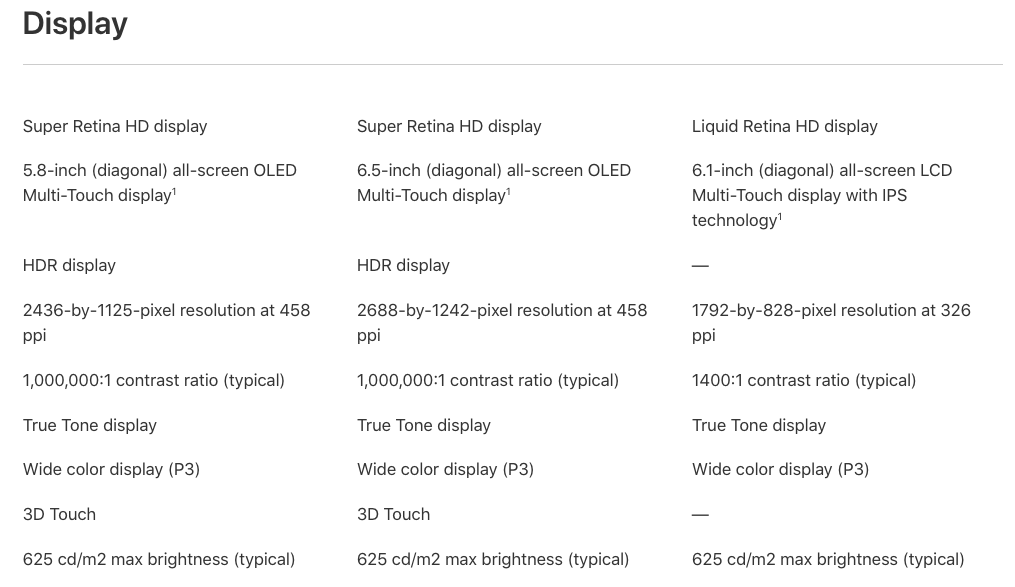
- iPhone Xr — This is a “brand new” model in the iPhone X lineup. It sports a 6.1″ sized display. It’s slightly smaller than an iPhone 8 plus. With the iPhone Xr, instead of using the more costly OLED tech, Apple has redesigned this model with a LCD screen. Unfortunately, as with most cost cutting measures, Apple has reduced the resolution by a LOT.
- Instead of resolution in the thousands, now it’s back in the hundreds at 1792 x 828. These are resolutions we’ve not seen since the iPhone 8 at 1334 x 750. Somewhat higher than the iPhone 8, yes, but this phone is a huge step backward for Apple.
- OLED has a contrast ratio of 1 million to 1 where LCD has a contrast ratio of 1400:1. This means that when viewing the iPhone Xr screen, you’re going to see that dull grey background whenever the screen is black.
- This model is also missing the following features:
- No 3D Touch
- 2 meter water resistance reduced to 1 meter
- No 512GB model.. tops out at 256GB
- No HDR display (not that this matters much as Apple has dumbed down the OLED display intentionally)
- No Dual Cameras — Single camera only
- Pricing:
- 64GB = $749
- 128GB = $799
- 256GB = $899
What it comes down to is that if you’re looking for a less expensive version of the iPhone X and you’re willing to forgo the above features, the iPhone Xr is probably what you want. Personally, I still want TouchID, which is still missing from these newest X models.
 There’s nothing really new here for me to jump for joy over. These models are entirely expected as next versions, though the prices are excessively high. Seriously, $1449 for a 512GB iPhone Xs Max? That’s the price of a notebook computer which has twice the features, twice the power and twice the number of applications. I shake my head at this pricing. Apple has completely lost it.
I still have my iPhone 7 Plus and it’s working like a champ. I’ve no need to jump into the X with that stupid black brow. I was hoping Apple would have gotten rid of that by the second generation. Nope. Apple, what the hell is going on over at 1 Infinite Loop? Are you guys too busy building circular buildings instead of focusing on actually building new innovative products?
Apple Watch
 Probably the most innovative thing that has come out of Apple for 2018 is the newest Apple Watch, with its somewhat larger display and a back that’s supposed to improve LTE service quality. That’s not saying much. Unfortunately, the larger size has the downside of actually making the watch even bigger. Do they think we really want to wear BIGGER watches? Though, a bigger watch may mean a slightly bigger battery and perhaps slightly longer run times. This is important for those of you who actually use the LTE feature. I don’t.
I was hoping for an actual round watch this time around. After all, Android has had these for years now. Where is Apple with a round watch? No idea, they keep focusing on these silly rectangular watches and adding stupid battery hungry technologies like LTE. You can’t really use a watch as a phone, so why bother with that? I guess someone finds the LTE part useful, but I don’t.
MacBook Pro
I’ll make this next 2018 intro short and sweet. It’s about friggin’ time Apple introduced the 32GB version of the MacBook Pro. Of course, the 2018 MacBook Pro also offers 6 core processors. That’s nice, but the 32GB of RAM is much more interesting. Though, by now these computers should be sporting 128GB of RAM, not a piddly 32.
Apple, where’s the touch screen on the MacBook Pro? Why the hell doesn’t this computer have a touch screen in 2018?
iPad 9.7″
 Apple reintroduces this size yet again. This size existed several years ago in the Pro format (supported Apple Pencil) and was discontinued. Now they’re introducing it again as though it’s some new thing. The only thing that makes this ‘new’ iPad special is that it now supports the Apple Pencil. Every iPhad… er iPad should have had Apple Pencil support the year after the Pencil was launched. In fact, every touch surface that Apple now produces should support the Apple Pencil including the iPhone, iPod touch, iPad, Watch and the MacBook Pro. By limiting which products support the Pencil is entirely stupid. Apple, don’t you want to sell your products?
What Apple chooses to do with its product lineup is always questionable, but in reality nothing truly innovative has come out of Apple since the first gen Apple Watch and the Airpods. Everything else has been limited extensions of existing products including “The new 9.7-inch iPad”, which is effectively a reintroduction of the 9.7″ iPad Pro sans the edge connector for the Smart Keyboard.
Lateral Innovation
I don’t consider extending an existing product as true innovation. I consider it lateral innovation. Lateral innovation is defined as copying the design of an existing product and then adding small features that don’t significantly improve the design. True innovation means new products that have never before existed. Apple hasn’t launched a truly new product since the Apple Watch and that was in April 24, 2015. That was over 3 years ago. Apple hasn’t launched a truly new product in over 3 years!
Man, get with the program Apple. Your relevance is waning. If you, the reader, want to find pricing of any of the other (ahem) “new” products, mosey on over to Apple.com and take a look for yourselves. You might be surprised… and not for the better.
↩︎
Rant Time: Apple Music vs Twitter
 I know I’ve been on a tirade with the number of rants recently, but here we are. I rant when there’s something to rant about. This time it’s about sharing Apple Music playlists on Twitter… and just how badly this feature is broken. Worse, just how Apple itself is broken. Let’s explore.
Twitter Cards
Twitter has a feature they call Twitter cards. It’s well documented and requires a number of meta tags to be present in an HTML page. When the page is shared via Twitter, Twitter goes looking at the HTML for its respective Twitter meta tags to generate a Twitter card.
A Twitter card comes in two sizes and looks something like this:
Small Twitter Card

Large Twitter Card

What determines the size of the Twitter card seems to be the size and ratio of the image. If the image is square in size (144×144 or larger), Twitter creates a small card as shown at the top. If the image ratio is not square and larger than 144×144, Twitter produces a large Twitter card. The difference between the cards is obvious:
- Small card has an image to the left and text to the right
- Large card has image above and text below
It’s up to the person sharing on Twitter to decide which size is most appropriate. Personally, I prefer the larger size because it allows for a much larger image.
Apple Music Playlist Sharing
Here’s where the RANT begins… hang onto your hat’s folks. Apple’s engineering team doesn’t get Twitter cards…. AT. ALL! Let me give an example of this. Here’s a playlist I shared on Twitter:

What’s wrong with this Twitter card? If you guessed the image is way too tiny, you’d win. Apple doesn’t understand the concept of producing a 144×144 image properly. Here’s the fundamental problem. In iTunes, my playlist image is uploaded with a 1200×1200 size image. This image is well large enough for any use on the net. Here’s how it looks in iTunes, albeit scaled somewhat small:

Note, iTunes retains the full image size, but scales the image as needed. If you look at the playlist on the web, it looks like this with a much larger scaled image:

As you can see, the image scales properly and still looks good even larger. Yes, even large enough to produce a 144×144 image on a Twitter card.
Here’s the Twitter card metadata on that Apple Music Preview page:
meta id="1" name="twitter:title" content="AstroWorld Pioneer by Klearnote" class="ember-view"
meta id="2" name="twitter:description" content="Playlist · 22 Songs" class="ember-view"
meta id="3" name="twitter:site" content="@appleMusic" class="ember-view">
meta id="4" name="twitter:domain" content="Apple Music" class="ember-view">
meta id="5" name="twitter:image"
content="https://is5-ssl.mzstatic.com/image/thumb/SG-S3-US-Std-Image-000001/v4/a2/c6/6f/a2c66fc6-a63b-f590-c6db-e41aebfc327c/image/600x600wp.png"
class="ember-view"
meta id="6" name="twitter:card" content="summary" class="ember-view"
You’ll notice that the text in red above is the piece that is relevant. Let’s look at that image now…

You’ll notice that the playlist image content is centered at 213×213 pixels in size centered in a light grey box that’s 600×600. Yes, that thick light grey border is part of the image. This is actually how the image is being produced by Apple on their servers. That would be okay if the image were scaled to the full 600×600 pixels. Unfortunately, it isn’t. Twitter will scale any image to its preferred size of 144×144 pixels for small Twitter cards. Here’s what a 144×144 image looks like when scaled by WordPress:
Small, but reasonably clear. Here’s Twitter’s crap scaled and unreadable version:

I have no idea what Twitter is using to scale its images, but it looks like absolute trash. The bigger problem isn’t that Twitter has scaled this image down, it’s that Apple has provided Twitter with such an already small and crap looking playlist image. Why have a 144×144 image if you’re only going to use 1/9th of the entire space? Apple, why wouldn’t you not want to use the entire 144×144 image space to make the image look like this:

That sized image would make the Twitter card look like this…

… instead of this absolute shit looking card…

How the Mighty Have Fallen
Apple used to be a well respected company who always prided itself on doing things correctly and producing high quality products. Today, they’re a shadow of their former selves. Producing products as crap as this only serves as a detriment to all of the other products they now offer. It’s clear, Apple Music is an afterthought and Apple seems to have only one engineer assigned to this software product… maybe none.
It’s also clear, Apple doesn’t respect the standards of anyone, not even themselves. I consider this absolute crap attention to detail. Seriously, who wants their images to be scaled to the point of being unreadable? No one!
Yet, when I called Apple Support to report this issue, I was told, “This is expected behavior”. Expected by whom? Who would ever expect an image to be scaled the point of nonrecognition? No one. If this is the level of software development effort we’re now seeing from Apple, then I don’t even want to think what corners are being cut on their hardware products.
What’s next? Apple watches catching on fire and exploding on people’s wrists? Phones taking out people’s ears? If I can no longer trust Apple to uphold the standards of high quality, then the mighty have truly fallen. There is no hope for Apple no matter how much crap they try to peddle.
Apple, Hear Me!
If you are serious about your business, then you need to be serious about all aspects including offering high quality products, services and features. This goes all the way to playlist sharing on Twitter. My experience with dealing with Apple in this matter was so amateur, including the way Apple Music itself is being handled, why should I continue to use your products? Give me a reason to pay you $99 for such shit service! Seriously, in addition to the above, I’m also finding what appear to be bootlegged music products on Apple Music and yet you’re pawning it off as official releases?
And as suggested by your representative, why should I contact Twitter for this issue? Twitter’s features work properly when provided with the correct information. As has been stated for years in software engineering, “Garbage In, Garbage Out”. It is you, Apple, who are providing Twitter with garbage information. It’s not a Twitter problem, it’s an Apple problem. Also, because this is an Apple engineering problem to solve, why should I contact Twitter on Apple’s behalf? I don’t work for you. You need to have YOUR engineering team contact Twitter and have them explain to you the errors of your ways.
This is just the tip of the iceberg here. There’s so much wrong at Apple, if you continue to entrust your family’s safety into Apple’s products, you may find one of your family members injured or dead. Apple, wake up and learn to take quality seriously.
The next time you are shopping for a computer or a watch device, you need to ask yourself, “Do I really trust Apple to provide safe choices for me or my family?”
Apple has now officially and truly reached the level of shit!
Broken Apple Image credit: The King of The Vikings via DeviantArt
↩︎
Rant Time: MagicJack – Scam or Legit?
 The magicJack company offers a voice over IP phone service. You can use it with an app on your phone or by a device plugged into an actual landline-type phone. It does require Internet to function. Either way you go, it’s VoIP and they have very questionable and deceptive billing practices. Let’s explore.
Internet Phone Service Choices
If you’re in need of phone services on a device that only has access to WiFi, then a voice over IP service (VoIP) is what you need. There are many different VoIP services available on the Internet. You can even make audio and video calls via Facetime on iOS, via Skype on pretty much any mobile or desktop computer or even via Google Hangouts. For this reason, magicJack is yet another VoIP phone service in a sea of choices.
Why would you want to choose magicJack? Initially, they were one of the lowest priced VoIP phone services. They also offered a tiny computer dongle that made it easy to plug in a standard home phone. That was then. Today, mobile devices make this a different story. Lately, this company has raised their prices dramatically and they’re performing some quite deceptive and questionable billing practices.
911 Service
As with any phone service that offers the ability to use 911, the service must tack on charges to the bill by the municipality. You’d think that part of the invoice that magicJack is already collecting in payment of services would also cover for those 911 services. I certainly did. Instead, magicJack isn’t willing to part with any of their service revenue to actually cover services that, you know, they provide as part of your phone service… like any other phone company does.
MagicJack seems to think they can simply pass on said charges right to you in an email invoice and have you pay them separately. Here’s where magicJack gets firmly into scam and deceptive billing territory.
I’m sorry magicJack, but you’re forcing the 911 service when we don’t really need it or want it on that magicJack VoIP phone line. If you’re going to force this service as part of the overall service, then damned well you need to suck it up and pay the expenses from what we pay you. There is no way in hell I’m going to pay an ‘extra’ bill simply because you are unwilling to use the collected service fees to pay for those bills, like any other carrier on the planet. It’s not my problem that you choose not to do this.
You, magicJack, need to pay those bills to the 911 service. It’s your service, you forced 911 onto my line and now you must pay the piper. If you can’t do this, then you need to go out of business. This means, you need to collect the 911 service fees at the time you collect the payment for your services. And you know what, you already collected well enough money from me to cover those 911 service fees many times over. So, hop to it and pay that bill. This is not my bill to pay, it’s yours.
MagicJack Services
Should I consider magicJack services as an option when choosing a VoIP phone service? Not only no, but hell no. This service doesn’t deserve any business from anyone! This is especially true considering how many alternatives exist for making phone calls in apps today. Skip the stupidly deceptive billing hassles and choose a service that will bill you properly for ALL services rendered at the time of payment.
MagicJack is entirely misinformed if they think they can randomly send extra bills for whatever things that they deem are appropriate. Worse, magicJack is collecting payments for that 911 service, but you have no idea if that money will actually make it to the 911 municipal services in your area. That money might not even make it there and you may still receive a bill. In fact, if the municipality does send you a bill, you need to contact them and tell them to resend their bill to magicJack and collect their fees owed from magicJack, which has already been collected in the funds to cover any and all phone services. If magicJack claims otherwise, they are lying. If you are currently using magicJack’s services, you should cancel now (even if you have credit remaining).
Is magicJack a scam? Yes, considering these types of unethical and dubious billing practices. Even though their VoIP service works, it’s not without many perils dealing with this company. As with any service you buy into, Caveat Emptor.
MagicJack Headquarters
Here is the absolute biggest red flag of this scam company. MagicJack claims their corporate headquarters address is located here:
PO BOX 6785
West Palm Beach, FL 33405
Uh, no. Your headquarters cannot be inside of a PO Box.
Yelp claims that magicJack’s US address is here:
5700 Georgia Ave
West Palm Beach, FL 33405
Better, but still not accurate. This is not their corporate headquarters. This is simply a US office address. Who knows how many people actually work there? We all should know by 2018 just how many scams originate from Florida.
When you visit magicJack’s web site, no where on any of the pages does it show their actual physical headquarters address. This is a HUGE red flag. Where is magicJack’s actual headquarters?
magicJack Vocaltev Ltd (opens Google Maps)
Ha-Omanut Street 12
Netanya, Israel
As a point of consumer caution, you should always be extra careful when purchasing utility and fundamental services from any Israeli (or other middle east) companies. Worse, when companies cannot even be honest about where their corporate headquarters are on their own web site, that says SCAM in big red letters.
Class Action Lawsuit
Here’s another situation where this company needs to be in a class action lawsuit. I’m quite certain there are a number of folks who have been tricked into this scammy outfit and are now paying the price for their unethical and scammy business practices. However, because they are located in Israel, setting up a class action lawsuit against this company may be practically impossible. Better, just avoid the company and buy your phone services from U.S. based (or other local) companies where they are required to follow all local laws.
Rating: 1 star out of 10
Phone Service: 5 out of 10 (too many restrictions, limits call length)
Customer Service: 1 star out of 10
Billing: 0 stars out of 10
Overall: Scam outfit, cannot recommend.
↩︎
Game Review: Spider-Man
 Here’s Randocity’s review of Sony’s 2018 Spider-Man (Insomniac Games) exclusively for the PS4. Unlike so many other game magazines, this review will be brutally honest. Unfortunately, other than photo mode, there’s not a lot to like here. This review will also be short and sweet and somewhat brutal. Let’s explore.
No Holds Barred
 To be perfectly fair, I wanted to like this game. I really did. Unfortunately, this game is one of the worst Spider-Man games I’ve ever played. The absolute worst Spider-Man game being Spider-Man: Shattered Dimensions. Dimensions looked great, played like crap. Same problem here, well mostly. Not only is Spider-Man incredibly weak, he dies at the drop of the hat even on casual play. Dying wouldn’t be quite so bad if it didn’t take ages to reload the game. Absolutely worse, the whole game simply devolves into a button masher. This is not why I buy Spider-Man games. I buy Spider-Man games to swing around the city and occasionally get in brawls. I don’t want to spend 90% of my time brawling as a button masher. Basically, this game effing sucks rocks.
Controls
The controls are, in fact, most of the reason this game sucks. I’m all for web slinging fun, but this goes way beyond into craptacular territory. The first mission is practically impossible to complete, even on easy mode. The game simply doesn’t give you enough moves (or health) to take these guys out quickly. The AI on the enemies is frustrating and nonsensical. Worse, the controls make so many mistakes. When I try to get away from enemy, instead, the game chooses to perform a slide under which puts me right next to the enemy… the exact opposite of what I’m trying to do.
Focus
The “focus” game mechanic is entirely unnecessary, distracting and so lamely implemented that it actually prevents you from using it as intended. What is focus for? Healing. In fact, you gain focus so slowly, you can’t even use it to heal. There is no other way to heal other than spending focus. Let’s let that sink in for a moment.

What the hell is with healing through focus, anyway? Whose brilliantly crappy game mechanic idea was this? Just let Spider-Man heal naturally on his own. Don’t make me have to take action to heal him. If Spider-Man needs healing by external means, then put first aid kits around the levels and let me just automatically pick them up and apply them. This whole gaining Focus mechanic is so sloppily implemented, I don’t even know how the game designers thought it would be useful. Why not just use health pickups, you know, like practically every other game? Why throw in something so convoluted that it’s useless?
Distracting Game Mechanics
Here’s my biggest pet peeve with these distracting and unnecessary game mechanics. While I understand that Insomniac wanted something new to add to their repertoire of features, game designers should never implement a new game mechanic solely because it’s new. Instead, game mechanics must enhance the game, not detract from it. Why does the focus mechanism fail so badly? It fails because now you’re requiring gamers to watch the focus and health bars constantly. This means moving your eyes away from an ever changing play field of AI enemies.
In this game, even taking your eyes off of the, admittedly, poorly designed and unrealistic AI enemy combat moves, will see your health drop from 100 to 20 (or less) in one blow (even on easy mode). Ignoring the fact that Spider-Man is a superhero in the Marvel universe, has super strength and is super resistant to injury, there should never ever be a mechanic designed that forces the gamer to take his/her eyes off of the combat field and then manually apply health.
Instead, if you’re planning on forcing a health recovery system, then the health system should either auto-regenerate or self-apply at critically low levels. I shouldn’t have to monitor my character’s weak health and manually apply anything. Spider-Man is a superhero… a Marvel SUPERHERO! Treat him as such and at least give him some level of auto-health generation. Seriously, what is the point in manual application of health in this game? It is absolutely not a challenge, it’s just stupid design.
Web Slinging Cooldown
What was the point in this game mechanic? You have six bars of web action that when depleted means you can’t use your web to subdue any more enemies. No NO NO! Why is there an arbitrary count of how many times you can use your web? Again, this doesn’t make the game challenging, it makes the game stupid. If he has the ability to create web, then it should work 100% of the time or until he runs out of web solution. If you plan to add a game mechanic here, then make it a mechanic that sees him run out of web entirely and need to change his web canisters. At least, that’s realistic. Though, why even do that? This isn’t intended to be a simulation, it’s intended to be a superhero game. Just let Spider-Man sling webs infinitely. There’s no point in this web cooldown system at all.
Spider-Man is Weak
The other big problem I have with this game is that Spider-Man isn’t treated like a Marvel superhero at all. He’s like a random schmoe who picked up a costume and decided to be a vigilante. Not only does it take many blows on an enemy to finally knock them out, Spider-Man loses health at an incredibly rapid rate, even from just one bullet or one enemy punch. This is entirely ridiculous. He’s a Marvel superhero, not a random normal guy in a costume.
Insomniac treated this version of the Spider-Man character with all of the grace of a bull in a china shop, bumbling their developmental way through to a game that, in my opinion, barely resembles Spider-Man.
Photo Mode
The one and only one redeeming feature of this game is photo mode. If you’ve used photo mode on Assassin’s Creed Origins, then you’ll feel right at home in this one as photo mode looks and behaves nearly identical. This feature doesn’t make the game worth playing by a long shot. But, the composition tool does have some cool overlays (see the first image in this article), assuming you can actually play enough into the game to use these overlays in some real way.
Overall
My rating for this game is 3 out of 10. It needs a whole lot more developmental time and it needed better usability play testing. It’s not worth playing. If you must play it, then rent it from Redbox or rent it someplace else. Or, wait for it to get to $15 at Gamestop. Don’t waste your money buying this trite piece of Sony garbage unless you truly enjoy torturing yourself with really bad games. If Insomniac can push out patches that can address all of these identified problems (doubtful), then maybe this game might improve. I wouldn’t hold my breath.
For me, this game goes back to Gamestop as a trade-in. I’ll wait until the game drops in price which will have given Insomniac plenty of time to release more patches… not that that will improve this game. Though, I’m willing to give it a second shot much later in the future.
Graphics: 8 out of 10
Audio: 8 out of 10
Voice Acting: 8 out of 10
Gameplay: 2 out of 10 (repetitive, nothing new)
Combat: 1 out of 10 (enemies swarm in unrealistic ways, manual health application)
Overall: 2 out of 10 (rent only)
If this article helped you, please leave a comment below.
↩︎
Recipe: Cinnamon Raisin Bread
 I don’t often discuss baking, but in this case, who wants to pay $6-9 for a loaf of cinnamon raisin bread? Anyone? To make this loaf, you can either do it by hand or in a bread machine. I prefer using a bread machine. Skip to the recipe. This recipe makes use of butter, if you want a healthier fat, skip to oil replacement and read before getting started. Let’s explore.
Prices and Specialty Loaves
While commercially baked white bread can offer some of the lowest prices at $1-2 a loaf, the specialty flavored breads can have some of the highest prices… with cinnamon raisin breads fetching between $6-9 a loaf at the store! Wow, that’s a big costly difference.
Cinnamon raisin bread is one of my favorite breads, by far. But, I’m not paying $6 for a loaf of it. I also like straight up cinnamon bread as well… just leave out the raisins. This recipe is quite yummy and no fuss. It’s nearly as simple as making plain white bread. It just takes some time. With a bread machine, this does all the work. You spend maybe 15 minutes or less prepping the ingredients.
Many cinnamon breads require you to roll the dough flat, then sprinkle cinnamon on one side and roll up the dough into a log. This gives that stripy swirled appearance. You can do that with this recipe if you like, but I’m not explaining how to do that here. With this recipe, the cinnamon is fully incorporated into the dough like all other ingredients, which gives the loaf an attractive uniform brown color.
Making your own cinnamon bread can save you a lot of money… and this recipe turns out a very tasty single cinnamon raisin loaf.
Time to Completion
You’ll want to make sure you understand that bread baking is somewhat time consuming. The timing of fresh baked bread is limited by the yeasty critters. All told, start to finish, it’ll take about 3 hours to complete a loaf of bread.
With rises, the colder the temp, the longer the rise takes. You can rise bread in the refrigerator, but it could take 6 hours in a fridge. Many bakers like the rise to take a long time because it adds to the flavor of the bread. If you’re time crunched and need your bread fast (relatively speaking), rising your dough in a warm environment is perfectly fine.
The timing breaks out like so:
- Ingredient prep: 10 minutes
- Mixing / Kneading: 8-10 minutes
- First Rise: 1 hour (or until dough has doubled in size at 100-120ºF temp)
- Punch down & Knead: 2 minutes
- Second Rise: 30 minutes (or until dough has doubled in size at 100-120ºF temp)
- Baking: 20-30 minutes (or until done)
- Cooling: 30 minutes
Total Time: ~3 hours
Bread Machine
This bread is by far easiest baked in a bread machine, particularly if you don’t want to spend time kneading and waiting for the bread to rise. I have an older Breadman bread machine. It’s functional and works well, but it’s not new. The newer Breadman machines now have fold down paddles to prevent that annoying hole in the bread after baking. Of course, you can avoid that hole if you use your bread machine to create dough, then transfer the dough into a bread pan and bake it in a conventional oven.
Personally, I prefer the convenience of having the bread machine do all of the work including the baking. I’m willing to live with that hole. While this recipe does require yeast, it is a no-proof recipe. This means you don’t need to foam up the yeast. If you have old yeast lying around, you’ll want to proof a small amount to make sure it’s still good or go buy some fresh yeast.
The ingredients are listed in the order you will pour them into the bread machine pan.
Ingredients
1 ¼ Cups lukewarm water (120ºF/48.9ºC is a good temp)
3 Tablespoons Butter minced up
¼ Teaspoon Salt
½ Cup Rolled Oats
¼ Cup Brown Sugar
3 Cups of Unbleached Flour (do not use self-rising)
3 Tablespoons Non-Dairy Dry Creamer or Low Fat Dry Milk
1 Tablespoon Ground Cinnamon (less or more as you prefer)
2 ¼ Teaspoons Rapid Rise or Bread Machine Yeast (i.e., Fleishmann’s)
½ Cup Raisins
Directions
- Bread Machine Baking Directions
- Bread Machine Dough + Oven Baking Directions
- By-Hand + Oven Directions
Notes
- Cold Oven Baking
- Hot Oven Baking
- Water Temperature
- Cinnamon and Creamer
- Oil Replacement
- Bread Machine Differences
➡ Directions for Bread Machine Baking
Pour in water, butter, salt, oats, brown sugar, flour and creamer into the bread machine pan, in this order. Next, pour a ring of cinnamon around the outside of the flour leaving the center without cinnamon. Make a shallow indent in the center of the flour and pour the yeast into this small indent. You’ll add the raisins a bit later.
To bake this recipe in the bread machine, set the bread machine to 1.5 Pound Rapid and press Start. Let the bread machine work until the dough is a solid ball. My Breadman has an ingredient notification timer. The machine will stop and beep. This is the time to drop in additional ingredients like nuts, raisins, dates or any other solid type ingredients.
In reality, you can drop the raisins in as soon as the bread machine has incorporated all of the ingredients into a solid ball of dough. No need to wait on an ingredient notification beep.
Because my bread machine isn’t always perfect at paddling the dough, I grab a plastic rice spoon (so the dough doesn’t stick) and press it on top of the dough lightly so the paddle works a bit more effectively to incorporate the raisins more quickly and evenly. After the raisins have incorporated, I close the lid and let the machine finish the cycle on its own.
The 1.5 Pound Rapid cycle on my machine takes about 2 hours and 20 minutes to complete, including baking. You can also run it on the 2 Pound Rapid cycle if you prefer. I prefer the way the bread comes out with the 1.5 Pound Rapid cycle.
➡ Bread Machine Kneading / Rising + Baking in an Oven
For this preparation method, follow the same instructions as the bread machine baking instructions above. Select the Dough or Bread Dough cycle on your bread machine. This cycle will knead the dough and rise it only, no baking. After the cycle is complete, you’ll punch the dough down removing the air, shape it into whatever your pan shape is and leave it for a final rise of about 20-30 minutes. You only need to punch the dough down to remove the air bubbles from the first rise, maybe 2-6 minutes at most. You’ll want to grease, butter or oil your pan before placing the dough into it, unless you’re using a high heat silicone baking mold.
Bake using the cold oven or hot oven method, your choice.
Because a bread machine also acts as a proof box by running the heating element at a low temperature during the rise cycle, this allows for consistent rising of the dough no matter the ambient temperature of your room. If you have a bread machine, this is the best way rise the dough consistently. It’s also hands off in that the machine does all of the kneading so you don’t have to. This is particularly useful if you have arthritis or carpal tunnel in your hands, thus making this kind of hand activity problematic.
➡ Kneading By Hand + Baking in the Oven
For this method, add the ingredients into a bowl all except for the raisins. Mix until you have a solid dough ball. You can do this with your hands or with a mixer. Once you have a solid dough ball, remove the dough from the bowl and begin kneading the dough on a flat and lightly floured work surface and incorporating the raisins while you knead. You’ll continue to knead the dough for about 10-12 minutes or until it has a solid and stretchy consistency. It’s more important that the dough has created solid glutenous bonds and has the proper elastic consistency. This is what will give the bread its proper spongy texture and preventing the slices from crumbling apart. Work the dough until the dough has this consistency. This part might take some practice to spot.
At this point, place the dough into a lightly oiled bowl to keep the dough from sticking and let it begin its first rise. This first rise will take about an hour or until the dough has doubled in size. Make sure the bowl is big enough to handle the dough double its size. You can do this rise in a proofing cabinet if you have one or you can let it sit out on the counter (covered with a towel) if you don’t. If the room is cool, it may take quite a bit longer. If the room is extra warm, it might be faster. You’ll need to watch and determine when the dough has doubled in size.
Once the dough has doubled, take it out of the bowl and knead it down again to remove the air pockets. You’ll only knead the dough for as long as it takes to remove the air pockets from the first rise, maybe 2-6 minutes at most. Form the dough into a log shape that will fit into your baking pan. Grease, butter or oil your pan. Next, place the log into the pan and let it begin the second rise. This rise takes about 30 minutes.
Bake using the cold oven or hot oven method, your preference.
Cold Oven Baking
If you start from a cold oven, the warming of the oven to the proper baking temperature will allow the dough to perform its final rise right before it begins baking. To bake, set the oven temperature to 350ºF/177ºC and turn it on. Then, put the pan into the oven with the oven still cold. Let it remain in the oven for about 45 minutes or until the bottom of the loaf thumps hollow and is golden brown. You can begin checking the loaf at around 25 minutes in. You’ll need to use oven mitts to handle the loaf and test for hollowness.
Hot Oven Baking
If you start from a preheated 350ºF/177ºC hot oven, you’ll need to rise the dough on the counter covered with a towel for 20-30 minutes before placing it into the oven. Once in the oven, bake for 30-35 minutes or until the bottom of the loaf thumps hollow and is golden brown, along with the sides and top.
Water Temp
I prefer the water temperature at 120ºF/48.9ºC because this is what the yeast package states is best. I use a microwave to heat the water to this temperature. It takes about 1 minute 30 seconds, but you’ll need to use a thermometer to check. Then, pop it in for 30 second intervals to raise it to that temp. If you don’t have a thermometer, just make sure the water is warmer than your skin and this will also work.
I prefer 120ºF/48.9ºC because pouring the water into the bread machine’s pan (or bowl) will cool it down just a bit. You still want the water warm so that yeast will rise the dough properly. I find this starting temperature gives a great rise in combination with the bread machine. It’s also the temperature recommended on Fleischmann’s yeast packaging. If you use a yeast that lists a different temperature, use the temperature that’s recommended on your yeast package.
Cinnamon Amount and Dry Non-Dairy Creamer
When I first published this article, I forgot to add the creamer to the ingredient list. I’m allergic to cow milk of any type, but I seem to have no allergies with non-dairy creamer. Dry creamer is an excellent substitute for low fat dry milk in this recipe (or really any bread recipe). It adds a richness that you don’t get without using it. You can find non-dairy creamer on the coffee aisle of your local supermarket. I typically buy the house brand as it’s usually the most cost effective. If you have no problems with milk, then feel free to use low fat dry milk instead.
I also prefer my bread very cinnamon flavored. Some recipes similar to this one call for 1 teaspoon. I prefer the flavor with 1 tablespoon. However, not everyone likes lots of cinnamon. I’ll leave it up to you to determine how much you want to add. Anywhere between 1 teaspoon and 1 tablespoon is fine. Be aware that the more cinnamon you add, the slower the bread may rise.
Differences in Bread Machines
Because bread machines are all slightly different, the proportions for this recipe may or may not work in your bread machine as is. If this loaf doesn’t turn out correctly in your bread machine, I suggest locating your bread machine’s recipe manual and change the above same ingredient amounts to match the proportions listed in your manual’s white bread recipe. This should allow the recipe to work properly in your bread machine.
Using Butter as an Oil in Bread
So, you want to use a healthier oil than butter? The difficulty with using butter as an oil in bread is that it hardens at cooler temperatures, but it also imparts a flavor and richness you can’t get any other way. When at room temperature, it can make the bread seem stale to the touch and the bread can seem dry when you cut it. To revive the bread, you’ll need to warm it until the butter is softened again. You can do this in the microwave in 10 second intervals or you can use a toaster, but a toaster will toast the bread. If you have a bread warmer, you can use that. If you’re not looking for toast and you don’t have a warmer, then using a microwave is the answer.
To avoid this hardening problem in baked goods, don’t use shortening, butter, palm or coconut oil in bread. Instead, use oils that remain liquid at all room temperatures. These reasonably available oils include avocado, peanut, vegetable, canola, olive and corn oil. If you use any of these non-hardening oils, you’ll need to cut down the amount of oil in the recipe by at least half or increase the amount of flour until the dough is no longer sticky. If a recipe calls for 3 tablespoons of butter, you’ll want to use about 1 to 1.5 tablespoons of oil. The reason is that butter is about 20-25% oil to 75-80% water. This means that you’ll need to use less oil than you do butter. Oil adds to the moisture content of the dough, so contrary to thinking you might need to add more water, it’s not necessary unless your dough ends up way too dry.
If you use a non-hardening oil, your baked goods will remain softer at room temperatures and won’t require warming. I’ve wrestled with this problem for a while until I realized it was the butter causing the baked good to feel hard (and stale) at room temperatures. This doesn’t mean your bread won’t eventually go stale, but it does mean baked goods made with non-hardening oils won’t feel stale (or taste dry) at room temperature like when using butter.
Happy Baking!
If you enjoy reading Randocity articles, please click the Follow button so you will be notified for new articles. Also, please like, share and comment, particularly if this recipe worked out well for you.
↩︎
How To: Killing Apps on iOS and Android
 Here’s a quick how-to tutorial. This tutorial will show you how to kill running applications on your Apple or Android phone or tablet device. Let’s explore.
Killing Apps
You might be asking, “Well, why would I want to do that?” There are times where apps misbehave or hang leaving a dead app on your phone or tablet. These can drag down the performance of your phone. For this reason, killing an app allows you to restart them to get them working again. Without further adieu, let’s get started…
Apple iOS
To kill apps on iOS 11, it’s simple. For Apple devices that have a home button (this excludes iPhone X), double click the home button. The home button is the button located at the bottom or side of your device (depending on orientation). It’s the only front facing button on the bezel. With the device logged in, double click this home button.
For the iPhone X, the line at the bottom kind of acts like a home button. From the line at the bottom, with your finger drag upwards to minimize the apps into a stacked list. This is similar to double clicking the home button.
Once in the stacked list, kill any specific app or all apps as follows:
- Press and hold your finger on top of one of the stacked app screens and with a fluid motion, drag your finger to the top of the screen.
- If you perform this motion correctly, the screen will disappear. The app is now killed.
- If you notice the screen moving side to side and not up and down, you dragged sideways.
- Scrolling side to side lets you selectively choose which app to kill. Try again to pull the app screen upwards.
- If you touch the app screen once, it will bring that app to the foreground.
- If you touch the background outside of the app, it will bring you to your home screen of icons.
- To kill all apps, perform this motion on each and every stack app screen until there are no more left.
- No, iOS does not provide a ‘kill all’ feature. You must kill app separately. Note, you can’t hear the double-clicking of the home button. Here’s an iOS demonstration:
Android
To kill apps on Android 6.x or above, you’ll need to locate the double rectangle button either on the bezel of your phone or on the display of your phone (at the bottom). This double-rectangle button drops you into the screen that shows you all of your currently running apps.
Click this button, then follow along based on the videos:
- To kill all apps at once, there is a single button. You’ll see it after you press the double-rectangle button… it has 3 lines with an X, but it may look different on your device. Here’s a quick demonstration:
- To kill apps one at a time, there is an X on the stacked app screen list. Click the X’s located in each window as demonstrated:
Obvious isn’t always
Because Apple and Android have both hidden this feature behind cryptic buttons, it isn’t sometimes obvious how to do this. Also note that even if you reboot your device, the apps may still continue to run from the state where they formerly were. To kill an app and start it fresh (particularly on iOS), the only way is to kill the app as described above. I find that, for example, I regularly have to kill Hulu as it likes to hang.
Good Luck!
As always, if you like what you read hear at Randocity, please click the follow button, like and comment below.
↩︎
Hottest Video Games for 2018
 The fall of the year is always the time when the majority of video games release. After all, kids are back in school and the holidays are right around the corner. The game industry waits until August to begin trickling out their biggest games, building momentum until the end of the year. As always, there are a number of games this year to consider. Let’s explore.
The games selected for Randocity’s top games list for 2018 only include games that I feel will be of high quality, will be fun and will offer the best play value for your money. Nothing is implied about any game that didn’t make this list. The lack of inclusion simply means that the game isn’t likely to offer the best play value for your money. Those other games are also usually for gamers who specifically look for those kinds of games. This is especially true if you’re considering using this as a gift guide. With pretty much any of these games you cannot go wrong giving them as a gift, with the exception of Fallout 76 due to its MMORPG nature. Without further adieu…
Randocity’s Top Video Game Picks for Fall 2018
PS4, Xbox One and Multiplatform Games
| Game | Platform(s) | Release Date | Rating | Publisher |
|---|---|---|---|---|
| Destiny 2 | PS4, Xbox One | September 4th |  |
Bungie |
| Spider-Man | PS4 Exclusive | September 7th | |
Sony Interactive Entertainment |
| Life Is Strange 2 | PS4, Xbox One | September 27th |  |
Square Enix |
| Assassin’s Creed Odyssey | PS4, Xbox One | October 2nd | |
Ubisoft |
| Mega Man 11 | PS4, Xbox One, Switch | October 2nd |  |
Ubisoft |
| Call of Duty: Black Ops IV | PS4, Xbox One | October 12th | |
Activision / Treyarch |
| Red Dead Redemption 2 | PS4, Xbox One | October 26th | |
Rockstar Games |
| Hitman 2 | PS4, Xbox One | November 9th | |
Warner Bros. Interactive Ent. |
| Fallout 76 (requires Internet) |
PS4, Xbox One | November 14th | |
Bethesda / Zenimax |
| Battlefield V | PS4, Xbox One | November 20th | |
Electronic Arts |
| Darksiders III | PS4, Xbox One | November 27th | |
THQ |
| Just Cause 4 | PS4, Xbox One | December 4th | |
Square Enix |
Nintendo Switch Games
| Game | Platform | Release Date | Rating | Publisher |
|---|---|---|---|---|
| Lifeless Planet: Premiere Edition | Nintendo Switch | September 5h | |
Stage 2 Studios |
| Wasteland 2: Director’s Cut | Nintendo Switch | September 13th | |
InXile Entertainment |
| Super Mario Party | Nintendo Switch Exclusive | October 5th |  |
Nintendo |
| Child of Light | Nintendo Switch | October 11th | |
Ubisoft |
| Dark Souls Remastered | Nintendo Switch | October 19th | |
Namco Bandai Games |
| Project Highrise: Architect’s Edition | Nintendo Switch | October 23rd | |
Kalypso |
| Pokémon: Let’s Go, Eevee! | Nintendo Switch Exclusive | November 16th | |
Nintendo |
| Pokémon: Let’s Go, Pikachu! | Nintendo Switch Exclusive | November 16th | |
Nintendo |
| Super Smash Bros. Ultimate | Nintendo Switch Exclusive | December 7th | |
Nintendo |
The games listed above are not all of the games that will release this year, but they are on this list because they will work well as gifts for just about any gamer. Note, some of the games on the Switch may have previously released on other console platforms. This particular year there’s not a whole lot of games that really stand out as must play games. But, there are a few… specifically Pokémon, Super Smash Brothers, Fallout 76 and Red Dead Redemption 2. These are the only true must play games on this list.
The rest of the games will likely be fun, but they’re not games that I feel must be owned day one. Though, they do make great gift ideas. Note that Fallout 76 is an MMORPG in similar form to The Elder Scrolls Online. It requires an internet connection and Xbox Live if playing on an Xbox One. Be careful when considering this game as a gift item if you don’t know whether the recipient has always-on Internet or Xbox Live. If you’re not sure whether your recipient meets these game requirements, you might should consider other games on this list. All of the other games should be safe without Internet, but always read the back of the box to be absolutely sure.
Enjoy!
↩︎
Rant Time: Netflix’s Stupid Ideas
 Netflix has had made some questionable product decisions recently. That is, since it has begun buying its own original content. At the same time, it has made some platform changes that don’t make any sense whatsoever. Seriously Netflix, WTH? Let’s explore.
Original Content
Netflix has been having a hard time as of late. It has been heavily dipping its collective toes into original programming. However, much of the movie programming content has turned out to be bombs. Not just everyday bombs, but you know the movie kind that make you cringe so hard, you want to throw something at the TV. Programs like the oh-so-forgettable The Cloverfield Paradox, Bright, Extinction, The Beyond and Tau. With these questionable movies, Netflix seems to be missing its mark so much of the time. So much, in fact, that I’m contemplating cancelling my membership with this service. I’m beginning to think that Redbox streaming might be a better alternative.
Until recently, the only way to find out exactly how crap the movies actually were was to read the Netflix movie reviews. This is not possible any longer.
Netflix Deletes and Closes Review System
In its infinitely stupid wisdom, Netflix has decided to close down its review system (deleting over 10 years worth of reviews in a day), citing that it is not being used by its subscribers. I call bullshit on that excuse, Netflix management team. I, and clearly many others, regularly used the review system all of the time to steer clear of these recent Netflix bombs.
Unfortunately, we can no longer do this thanks to Netflix flipping us subscribers the collective bird after not only closing the review system down, but dumping all of that user review content. If Netflix’s management team is trying to tear the company apart, they’re doing a bang up job at it.
A review system says that service cares about its users’ opinions and it values its users. It allows users to make their views known to the larger community. Unfortunately, Netflix has now deprived its user base of that valuable resource by dumping all of the reviews and no longer supporting a review system at all. In fact, removing the movie review system says Netflix no longer cares about its users.
Worse, Netflix has dumped its 5 star rating system in lieu of a stupidly simple thumbs up and thumbs down approach. This overly simplistic system which, in reality, does nothing at all to influence anything. What this change says to us members is that Netflix solely wants to be the entire wielder of content power. No longer can any content be influenced by external user opinion… or so Netflix management mistakenly thinks. Nope, that is absolutely not important to Netflix. Netflix wants to be able to target its crap content to us with impunity and without those pesky user reviews getting in the way… even if the Netflix original content is the dreckiest dreck ever to have been conceived, which most of it is.
Netflix’s Agenda
I’m really tired of businesses like Netflix always feeling that they need to get the upper hand in every situation. In fact, even with the review system, they already had an upper hand. Netflix’s ultimate agenda to remove the review system isn’t what they stated on the surface. They claimed that people weren’t using the system. False. New reviews were being written every day. People were reading them every single day.
If people weren’t using the system, they wouldn’t write reviews… and yes, people were actively writing reviews. In fact, if the the review system was being used less, it’s because of Netflix’s design choices. It’s not because users weren’t interested in using the review feature. It’s because Netflix kept burying the review system deeper and deeper under menus, making it difficult to find. If reviews were on the decline, it wasn’t that people didn’t want to use it, it was because your UI team made it hard to find. Even with that said, people were STILL finding it and using it. That’s tenacity. That means your valuable subscribers actually WANTED to use it and did.
This means that Netflix intentionally caused the decline of the system. They set the review system up to fail and then blamed it on lack of use by the users. No, it wasn’t for lack of use, it was that it was too hard to find and too hard to navigate. That’s not failure to use by the users, that’s failure of your UX design team. People will use features when they are easily available and front and center. Bury it under layers of menus and it’s certain that usage will decline.
The real agenda is that Netflix no longer wants users to influence content such its The Cloverfield Paradox and the rest of its poor quality original content. Netflix mistakenly believes that if people can’t see the reviews or write them that more people will watch its crap. False. Netflix was likely also reeling over the horrible user reviews being left on its own site. Netflix wanted to stop that problem and the only way they could do that is step 1) bury the feature so it’s hard to find forcing many users to stop using it and then step 2) remove the feature claiming no one used it. Not only is that a lie, Netflix’s UX team is actually responsible for its lack of use.
Review systems work when they’re well designed and placed in conspicuous, well trafficked locations. They don’t work well when they’re buried under layers of unnecessary UI clicking. That’s proven. In fact, if Netflix’s user experience team doesn’t understand this fundamental UX 101 concept, they should all be fired!
Crap on a Stick
Netflix needs to get their crap together. They need to fix their horrible UI system and provide a much more streamlined system. They also need to bring back the user review system and place it into a much more prominent front and center position. A place where people can find it right up front, not buried under many UI layers.
Movies and Reviews
Movies and reviews go together like a pea in a pod, coke and hot dogs and hamburgers and fries. They simply belong together. You don’t get one without the other. Netflix thinking that they can change this fundamentally ingrained concept is a huge misstep. This misstep is as huge as when Netflix renamed its DVD service to Qwickster. That naming and concept failed miserably. This one will too… and it will backfire on Netflix.
I don’t even understand how a movie site like Netflix can even think they get away with not having a review system. By their very nature, movies require reviews. A movie is not 3 minutes long like a pop song. No one will spend 2 hours of their life watching trite, predictable, boring, poorly written garbage. Storytelling is an art form that when done right can take us to places we cannot even imagine. Yet, when storytelling is done wrong (i.e., too many of Netflix’s crap originals), it wastes hours of valuable time. The review system is there to prevent that loss of time.
Sorry Netflix, if reviews actually give you that much butthurt, you either need to grow a pair and get over it, or you need to shut down Netflix. Perhaps Netflix should stop its purchase of its crap original programming and this will no longer be a problem.
↩︎


leave a comment