GTA Online: Kortz Center Heist Review
 The Kortz Center Heist is part of GTA Online’s 2026 update. This heist is similar to many other heists, but this article will discuss whether or not it’s worth the effort. Let’s explore.
Preface
The Kortz Center heist, like the Cayo Perico heist, supports 1 player in its job mission. It is now the only other heist that supports 1 player. However with 1 player, your maximum take is around GTA$2 million because of the loot bag size. There are other bugs that you may encounter during the heist that actually make completing the heist much more difficult than it should otherwise be.
The terrain around the Kortz Center also makes this mission into a captive area. When attempting to leave the area, you are forced to make your way down or up very steep hill terrain. There’s no way to make a clean getaway from this specific location in the game. There are also very few places to hide during the getaway.
This issue is compounded by the job mission saddling you with very limited types of weapons, very limited access to vehicles and that no Mechanic vehicles called during the mission will spawn on the Kortz Center hill. No, they won’t spawn in the parking lot area or on the road leading up to the Kortz Center. The closest spawn area for vehicles is on the road running in front of the Kortz Center entrance, a very very long way away if running. Don’t expect to call the Mechanic to deliver a vehicle to your position wherever you have exited.
Also, don’t expect to get down any of the hills quickly on foot. You will literally be running for minutes trying to run down the hills to get to a road.
It should also be noted that even though you can call the Mechanic for a vehicle and park it on the grounds prior to entering the Kortz center, that vehicle will be despawned upon exiting the Kortz center; it won’t be where you left it. You are forced to use the getaway vehicle you selected when you began the job, assuming you can even find where that vehicle is actually parked.
Prerequisites
As with all heists, you will need a number of prerequisites to even begin the heist. These prerequisites include the following:
- CEO (Agency property) OR Bike President (Clubhouse property) OR VIP (~GTA$1 million) (GTA$1-3 million)
- Own at least ONE Mansion property … PLUS (~GTA$3 million)
- Purchase the Art Studio expansion room for the mansion (~GTA$3 million)
- (Optional) Arcade Property with Drones
To get access to the heist mission planning board, you will need all of the above. These items above will cost you roughly GTA$9 million to GTA$10 million, not including the arcade property.
If you don’t have these, you can join in on someone else’s heist and still help them perform the heist. If you want to be the heist leader, you will need to own all of the above to launch it.
The Heist Setup
As with all heists, there are a number of heist setup missions required (and some which are optional) to begin the heist. I won’t get into the details of every single heist setup mission, but suffice it to say that if you’ve played any other heists, there are no surprises here.
These setups are mostly time wasting missions that really do nothing to help you complete the heist, nor do they provide you with any income. You perform them, waste time and then that “unlocks” some objective. Rockstar is primo at providing heist setups that do nothing to actually help the outcome of the heist itself. Such setups include unlocking heist getaway vehicles, unlocking various weapon loadouts and unlocking various entry and exit points for the Heist. This is not a complete list. Suffice it to say that there are no surprises. Most of the setup missions are relatively easy, but they often require you to traverse the entire map bottom to top to get to the area to complete the objective. You’ll need a fast helicopter, Opressor or Deluxo to move you around faster.
Note that while the heist setup missions allow you to use special vehicles and special weapons, the heist job doesn’t. Be warned.
The Kortz Center Heist Preplanning
The actual heist begins by pressing START on the mission board within the Art Studio on the lowest level of your Mansion. The START button will only become available once you have completed the above mentioned required setup objectives. There are around 5-10 of them. You don’t need to complete everything, but you might want to complete it all to unlock maximum choices during the heist.
This heist also requires that you start and abort it multiple times so you can actually learn things that you can only learn while actually playing through the heist. This includes things like guard placement, camera placement, camera and guard cones of vision, hiding places, sneaking places, how and where you can move without being seen and so much more. There is no way to learn this without starting and aborting this mission multiple times. It also includes learning which entry and exit points offer the best access to the vault.
Unfortunately, there is no way to abort this job without your character losing all of its lives via dying. If you abort the mission by leaving the game via “find new session”, Rockstar penalizes you as potentially a “bad sport” because this mission is started as a “job.” This is one of the bugs I have found with this mission. As a matter of course, there is NO WAY to run through a test mission in advance to learn all of the required details of the mission area. You simply have to deal with Rockstar’s stupidity.
To be able to complete this heist in the way that you prefer, you will need to need to run through the heist multiple times as “trial and error” to find the best ways to get into and out of the heist itself with maximum bank. Yes, that means getting to a specific point in the mission, then aborting it.
Sure, you can “wing” it and get away with whatever amount is left over, but using the actual heist to learn how to navigate through it is the only way to finish the heist with maximum bank.
Stealth Option?
The heist itself leads you to believe that there is a stealthy way to get through the heist, while also getting away clean and undetected. Don’t believe it! That option doesn’t exist. Upon exiting the building after getting through the vault undetected, Raf will say, “It looks like a silent alarm was tripped” followed by a cut scene cinematic of the entire Los Santos SWAT team pulling up in front of the Kortz Center.
Even if you manage to get through the entire heist undetected, get through the vault undetected, get through the laser grid undetected, get through EVERYTHING undetected, the SWAT is still called in and you are still required to “lose the cops”, while trapped on top of the Kortz Center Hill with no way to call any vehicles to you.
You may be saying, “But what about the getaway vehicles?” What about them? I have still yet to find where these vehicles get parked after exiting the building. Clearly, they are nowhere near the exit location chosen. The HUD visibility bug doesn’t help me locate where they are either.
Entry Points
There are 4 main entry and exit points that you can scope. These include the following:
- Rappelling through the Skylight on the roof
- Using the sewer manhole located in the Maze
- Using the employee entrance into the art gallery (upper or lower level)
- Using the basement entrance in an AlphaMail van and outfit
Rappelling
This is probably the most difficult entry point because it requires making your way to the roof, avoiding a number of guards and cameras getting up there. Then, once inside the gallery, you have to again avoid a number of guards and cameras to make your way down into the basement.
See the AlphaMail entry point below to learn more about the basement area. Ultimately, to rappel, you will need to visit and traverse through at least 3 heavily guarded areas before getting into the vault. Wearing any gear other than the AlphaMail or Hazmat suit will work for rappelling. Though you can probably rappel in those outfits. You must wear those two specific outfits for the AlphaMail disguise entry and the Sewer, respectively.
Sewer
The manhole sewer requires obtaining a manhole tool to open the manhole cover to enter into the sewer. It also requires wearing the Hazmat suit. You will need to perform the setup that obtains the Hazmat suit if you want to enter through the sewer.
Once inside, Raf will send you a text message describing the proper gates to enter to get into the basement area. You will need a weapon with a flashlight to be able to see the markings on the wall to enter the correct gates. This entry point lands you into the basement, but at a different entry point from the AlphaMail entry point.
Employee Entrance
The employee entry point requires a keycard to enter. You get this keycard during a heist setup mission. You will need to get past a number of guards and cameras to make your way to the employee entrance keypad. You don’t need to hack this keypad when you have a card. You will enter on either the first or second level of the gallery depending on which entry point you choose.
This entry point is very similar to the Rappelling entry point in that you’re in the gallery and you need to make your way down to the basement, which means avoiding a bunch of guards and cameras inside the gallery.
Note, for maximum haul inside the gallery, you will need at least two people. There is a gate that is down on the second level that must be opened using the CCTV camera room. It requires one player to handle opening the gate and another to get into the room to smash and grab. A minimum of two players is required for the upper gallery area.
AlphaMail Van and Outfit
This is the final entry point into the Kortz Center and probably the easiest of all entry points to use. There are limited guards and cameras that you need to handle along the way. This is the only of these four entry points that you can successfully sneak and stealth your way through.
With this one, you’ll wear an AlphaMail employee outfit and drive an AlphaMail van (you get this in the setup). This one gets you into the loading bay of the Kortz Center with no difficulties. You can even walk your way past the two initial loading dock guards with no combat. You will be required to get an employee card to unlock the door, but even doing that doesn’t alert the guards.
This entry point is, by far, the simplest and easiest. You only need to stun about 6 guards and shoot out one camera to get into the vault laser grid area. It’s super simple up to that point.
Getaway Vehicles
The getaway vehicles offered are 4 Manchez motorcyles (one for each team member), an Annihilator Helicopter or an armored Caracara 4×4. None are particularly better than any other in terms of getaway vehicles. I’ve never used the copter because I assumed it would be parked on the roof as a getaway vehicle.
From every exit point, it almost impossible to make your way back up to the roof to get into the copter. That getaway vehicle is nearly pointless, unless you want to lose nearly all of the contents of your loot bag. I have no idea where the Caracara gets parked nor the motorcyles. One thing is certain, they are parked nowhere near the underground exit when following the AlphaMail entry type.
Loot Bag
And here we come to the sour part of this heist. Each player has a loot duffel bag that they carry around as part of the heist. Each player can fill their loot bag with a limited amount of smash and grab gallery loot.
Unfortunately, Rockstar has intentionally made the loot bag size so small per player as to make the gallery area of the heist almost useless. One player loot bag can hold at most two cut paintings. Even though the gallery has probably 30-40 (or more) items that could be scoped and nabbed, the loot bag is so small that there’s no point in even going into the gallery when you’re the one handling the vault.
In fact, there are 4 paintings inside the vault besides the primary target painting (which doesn’t consume loot bag space), only two of those cut paintings will fit inside of the player’s loot duffel. Once you nab the three paintings from the vault, there is no reason to even enter the gallery to smash and grab. This not only negates the entire gallery area as a single player, it forces you to use multiple players to even consider entering the gallery area.
Heist Strategy
If you have 1 player only, the heist strategy should be to use the AlphaMail vehicle and outfit. This gets you straight into the basement and very close to the vault. Because the loot bag is so small, you should ignore the gallery area and focus solely on getting into vault and nabbing the primary target painting along with two of the other stored paintings. This will fill your loot bag.
If you have two players, the second player can loot portions of the gallery while one player loots the vault.
If you have four players, three of the players can focus on the gallery and nab whatever they can fill into their loot bags, with one player focusing solely on clearing out the vault. If attempting this with multiple players, don’t worry about stealth at all. Simply set the alarm off and get started nabbing and grabbing.
Entering the Laser Grid and Vault
There is nothing that you can pre-prep that will help you get past the laser grid. It’s simply a matter of timing to avoid the laser beams. It’s best if only ONE player attempts to get past the beams undetected. Multiple players will inevitably set off the beams.
Inside the laser beam area there are three switches covering three grid areas. Each switch turns off the laser grid behind the player. You will need to sneak your way through the beams to get to each switch.
It is definitely possible to get to the switches and turn them off without touching any of the beams. It simply requires precise timing. However, it’s also a very slow process and rando players joining into this heist may not be patient enough for this kind of stuff.
Also, two new player actions are available while in the beam grid area: 1) crouch flat and 2) jump-in-place. The jump-in-place feature is actually not needed here. The jump-in-place feature is as it sounds. You can ONLY jump in place, not while moving. If you time the area with the ground sweeping beam correctly, you can turn off the switch without needing to jump. The jump in place feature is also not very precise. Inevitably, it’s more difficult to attempt to jump the ground sweep beam than it is to avoid it by correct timing.
This laser grid area will require multiple plays through to get the timing down pat. This is why you may need to abort and reattempt this area multiple times to figure out the timing. It took me about 8-10 attempts to finally get through the entire laser grid undetected.
Once you get past all three laser grid areas and turn them off while undetected, Raf will commend you on getting past all three grids. However, it doesn’t really help with the vault area and it doesn’t buy you anything other than remaining undetected. There is still effectively a “thermal detection” timer to exit the vault before being detected. You’ll want to nab the primary target painting as fast as possible, then grab two other random paintings in that same area and exit the vault and laser grid area.
This is why it’s important to scope out all of the paintings in the entire Kortz Center area before attempting this heist. If you don’t pre-scope those paintings in the vault, you may not be able to grab them.
Once you are out of the laser grid doors, you can use the SecuroServ app to EMP blast the power and turn the lights off. This will help you escape the building easier. There are four exits from the basement including the way you came in, including the sewer, the gallery and the basement loading bay.
Bugs
Vehicle Disappears
There are many bugs present that help ruin the immersion of this mission. If you arrived via the AlphaMail van, that van will have disappeared in the loading bay area. You cannot use it to exit or leave the area. You must run your way up the loading dock road area and back to the exit. You will exit this garage on foot.
Guards Respawning After Vault
Even if you’ve taken out all of the guards in the basement before entering the vault, after exiting the vault and grid area, those guards will ALL have respawned. I recall that this even included fixing the cameras you have formerly taken out. This is a fairly big bug. If you’ve remained undetected this whole time, those guards shouldn’t respawn. If new guards have showed up while inside the vault, those new guards would have alerted that someone is breaking in because of all of the stunned guards. Yeah, big bugs.
Exiting from the Vault / Silent Alarm / No Stealth
Once you reach an exit, Raf says that a silent alarm was tripped and once outside you instantly have a 3 star wanted level. There is no exit that leads you off of the grounds. Meaning, no matter which exit you choose, you will face a 3 star wanted level with not only Kortz guards, but also SWAT and helicopters.
Don’t bother following Raf’s advice by using an Arcade drone to disable guards as that drone will instantly alert the guards that you’re there. Raf suggests using it, but it never works to remain stealthy. Use a stun gun instead. Basically, don’t take Raf’s advice at any point during the heist.
Touchy Alarms
The entire grounds of the Kortz Center is completely touchy for detection. You may find yourself doing nothing at all and still having the guards alert you for detection. It’s really annoying and touchy that this area can instantly alert everyone that you’re there. Like, for example, I drove my car up next to a wall where it can’t be seen like I had done several other times, and somehow it alerted the guards. I place the car up against this wall because I can stand on top of the car and then grab onto the wall. This allows me to get into an area to head up to rappel or use the employee entrance. It’s much faster to do this than having to walk nearly the entire grounds, avoiding many, many guards and cameras.
The touchy alarm nature of the Kortz area is incredibly frustrating. Once the alarm sounds, you’re forced to endure listening to that blaring alarm for the duration of the entire heist. This loud annoying alarm NEVER SHUTS OFF and NEVER quiets. You can’t even shut it off from settings. You have to mute audio on your entire rig. Yes, this is a bug and it needs an accessibility update.
Bad Sport
This part of GTA has been an ongoing bug for years. I’ve also reported this bug at least once. This “Bad Sport” aspect applies only to missions that start up as “jobs.” Not all missions operate as jobs, but many do. All heists operate as “jobs.”
Jobs are a special type of mission that allows for multiple players and for player matchmaking when in a public multiplayer lobby. Technically, you can only be a “bad sport” if you abort a multiplayer job, meaning that there are actually other players in the job with you. If you launched a job alone, you can’t be a “bad sport” because no other players are affected by your abrupt departure from the job. This “bad sport” issue is a bug that needs to be removed when players are playing jobs alone, especially when they’re playing it in an invite only server with one player. Single players should not be penalized after leaving “jobs” when no other players are participating.
Loot Bag Size
As mentioned above, the loot bag size is way too small for this heist. A real duffel bag would be capable of cramming in at least 10-20 rolled up paintings of the size allowed. This overly restrictive duffel bag size is blatantly obvious and I would consider this a bug.
Hard Game Freezes
This bug is unrelated to the heist itself, but instead affects general GTAO gameplay. Since the update that rolled out adding this heist and the Art Studio, the game now periodically hard freezes while moving around the map. The hard freeze happens at frequent intervals and lasts for between 5 and 10 seconds. While I can’t recall experiencing these hard freezes while inside of the heist, it happens often while near my Nightclub, Bail Office, Agency and various other random map locations. I’ve had something like a hard freeze about every couple of hours of play, but since this update, it’s increased in frequency to about every 5-10 minutes.
Radar HUD Unavailable
This bug is absolutely frustrating. When performing heists, I change my settings to use the bigger local map display on the HUD. It allows for better visibility of the guards and their cones of vision. The tiny HUD is just too small for this.
For regular playing, that tiny HUD is fine. For heists, it’s not. The problem is that sometimes the larger HUD remains stuck on the world map, not showing the local map. This means that you are forced to switch settings back to the tiny HUD map and then use the actual full screen map to see where the guards and cones of vision are. This is not optimal for game play. Both the tiny and the large overlay HUD map should display the SAME version of the local map.
Another related bug is that the local area map of the Kortz grounds doesn’t allow for moving very far from the player’s position. This is why I can’t see where the getaway vehicles are. The restricted limits of scrolling this local map means I can’t move it far enough to see where everything is. Even more than this, the local map has stupid view limits. Even if you can move it far enough away from the player, it stops displaying objects too far away from the player’s position. Moving to the world map is just as pointless and doesn’t show anything useful.
Effectively, there is no map that really works properly for this heist.
Gun Loadouts
For this heist, you get the choice of one of three different gun loadouts. Only one of the gun loadouts has a stun gun (Military). All three gun loadouts are very similar (Street, Military and Security), each with a different type of automatic weapon, a shot gun and a pistol. In the Military loadout, the pistol is replaced with a stun gun.
If you’re intent on trying a stealth approach, the stun gun is the only way this works. That means raiding Fort Zancudo to get this weapon loadout as part of heist prep. This weapon loadout is probably the most difficult to get of the weapon gathering heist preps.
The reason it’s great for stealth is that the stun gun drops a guard in ONE SHOT. Because the guards are wearing armor and helmets, it takes multiple shots to take them down with all other weapons provided. The stun gun is the ONLY weapon capable of one shotting the guards and preventing them from sounding the alarm. Keep in mind that some guards groan and gurgle loudly which can sometimes alert nearby guards, which will instantly set off the alarm. The stun gun works to subdue most of the time, but it is not perfect.
As mentioned in the bugs area, Raf does suggest, assuming that you own an arcade with drones, taking out guards with those drones. Trying to use a drone almost instantly alerts the guards that you’re there. Don’t do it. You don’t need to do this anyway.
Best and Worst Strategies
The best strategy to get into the Kortz center is using the AlphaMail van and outfit. This entry point gets you into the basement and into the vault area the easiest and fastest. This strategy requires avoiding only ONE set of guards to get inside. Two of those guards aren’t even combative in the loading area.
The worst strategies include rappelling and the sewer. Rappelling requires avoiding three different sets of guards to get into the vault. The first set is outside on the grounds. The second set is inside the gallery area. The third set is inside the basement area.
The sewer requires running around the grounds to find a sewer key. You can’t pre-prep this one stupid tool and bring it with you. Noooo. You have to find it on the grounds at the time of the heist in one of about 5 different spawn places. That means running around the grounds to each of these different spawn places to find it, increasing the chances of being detected. Once in the sewer, you exit into a different area of the basement that doesn’t make it any easier than using the AlphaMail van. Just stick with the van.
Commentary
Everything above describes mostly what’s needed to complete the heist. This area will discuss the problems and issues with this heist.
No Trial and Error
The first and foremost problem is the required “trial and error.” To be able to complete this mission correctly, it requires scoping out the entire heist actively while it’s live. This live “dry run” gives you information that you can get in no other way, like how many guards there are, where their cones of vision are, their walking patterns, how the cameras sweep and so on.
There’s literally no other way to gather this kind of information other than doing this during a live heist. Unfortunately, Rockstar gives no way to abort the mission other than by losing the character’s life. Rockstar also gives no way to “dry run” the heist and see the grounds as it is with a heist in progress. You’re simply left with two options, 1) do the heist without knowing anything or 2) to keep trying to do it for real over and over until you succeed. I always consider “trial and error” gaming a bug.
When will Rockstar finally allow us to launch a heist as a “dry run?” Meaning, a “dry run” that doesn’t allow for nabbing or grabbing or even completing it, but allows “trying out” various strategies against the guards to see what is successful and unsuccessful, try out various entry and exit strategies and try out other methods like stealth.
No Way to Abort the Mission
Note that calling Raf to request aborting the Heist doesn’t actually abort the live mission in progress. Instead, it resets the entire Heist as though you hadn’t started it at all. You will need to pay GTA$100,000 to re-initiate setup of the heist. Calling Raf is not what you want. This likely also means doing all of the setup and gathering missions all over again. Simply accept the “Bad Sport” consequences of hard “dry run” aborting and move on.
Too Complicated
This heading has many different aspects involved. From the poor choice in guns in each of the 3 loadouts to the lack of using special vehicles during the job mission. Rockstar always feels the need to overly hamstring the player by forcing them to use very limited weapons and limited vehicles, but also using up the player’s actual inventory of supplies, like ammo, armor and snacks.
This means that after the heist is over, whether aborted or completed, you’re going to need to buy more supplies, wherever you get them.
If we’re being forced into a job with limited and forced features, then the pool of supplies should be provided BY the job, not from the player’s inventory. When we exit out of the heist in whatever way, our actual supplies should remain untouched.
This heist also wouldn’t be this complicated if we could simply use our existing weapons, our existing vehicles and our existing perks, like calling Lester to call the cops off. That the heist forces us into these silly hamstrung situations and then restricts our ability to use basic features we already have, it’s stupid.
Is It Worth The Time?
This question is worthy of a debate, but in this author’s opinion, it’s a conditional no. Conditional, because it may be worth it IF you have enough players and IF you have the correct players who can help you through the heist properly.
Matchmaking Problems
Often, matchmaking throws in randos who not only sabotage the heist efforts, they actively play stupid games during the heist to try and cause it to fail. Because GTAO’s matchmaking feature is so poor, it’s really only worth playing this heist with people you know and whom you have specifically invited.
Poor Payout
As with all heists, the payout for The Kortz Heist is too low for the amount of money you’re required to spend up front to get started as well as all of the wasted time doing heist prep.
In this case, because you have to buy so many expensive properties just to be able to run this heist, getting maybe GTA$1.5 million out of the heist is simply not worth the GTA$9-10 million you had to put in. You’d have to run this heist at least 8-9 times to exceed what you had to pay to get access to the heist board.
The Art Studio heist board touts up to a GTA$4 million payout, when in fact the best that you get is around GTA$1.5-2 million per player. You can make this amount of money in an hour or two just doing non-job activities. You don’t need to waste time and frustration on this heist.
Lack of Stealth
Because GTAO intentionally negates the way stealth could be used to complete the Kortz heist, it’s not even worth trying a stealth methodology. With Cayo and the Diamond Casino heists, stealth is not really usable. With a museum heist, stealth is nearly a prerequisite. That is, performing the heist completely undetected. It’s worse, though. The game titilates you into thinking stealth is an option, but it really isn’t.
The game actively prevents this outcome when exiting. You are forced into a three (3) star wanted mode, but not just any three (3) star wanted mode. It’s a “special” five (5) star type of three (3) star wanted mode, with helicopters and SWAT and massive amounts of them… while trapped on the Kortz Center hill with very limited ways to leave.
Not only is the Kortz Museum grounds over-covered with too many cameras and far too many guards, the SWAT response at the end is a severe over-reaction. That painting stolen is not worthy of that level of police action. Rockstar overdid the response.
I realize why. Gamers expect a “hard” level experience, and that kind of police action at the end ensures that it’s difficult for the player to get away. Unfortunately, that over-reactive ending penalizes those of us who choose to want a stealthy option. Stealthy players should be able to end out this heist without a massive police action.
If you try to leave on foot heading downhill away from the Kortz center with the stars still flashing, the helicopters instantly find and target you. What’s worse is that because you’re saddled with a handful of piss poor weapons designed to help you against a handful of museum guards, these weapons do ABSOLUTELY NOTHING against helicopters shooting at you and SWAT teams in armored trucks. Rockstar, where was the pre-heist planning for this absolutely expected level of police action at the end?
You don’t have a homing missile launcher or any necessary long range accurate weapons needed to take down a helicopter. I’m uncertain if the Caracara 4×4 is still weaponized because I’ve not been able to even get to it after exiting the building. The Caracara 4×4 was weaponized when I picked it up from the Arena, but did Rockstar modify the vehicle at the Kortz Center? Even if it is, it’s not really enough to take down the multitude of helicopters flying around the Kortz Center. The Manchez bikes certainly aren’t. The Annihilator copter is really only good at sneaking away, but good luck at getting to wherever that getaway copter has landed.
Overall
This heist’s design is stupid and insipid. It’s exactly what you would expect from Rockstar, but the actual heist itself is stupidly designed. The loot bags are too small to be able to get away with much other than the main painting. Why even bother to head into the gallery itself when you can only fit two paintings in the bag beside the main target painting? Without a usable stealth outcome, the heist is again, stupid.
When all of this is combined with all of the bugs, it’s just not worth playing.
I’m also tired of Rockstar teasing players with a stealth option only to not provide or even allow a stealth closure to the heist. Stealth is actually the most difficult methodology to use because of the touchy nature of the entire area. It’s incredibly difficult to stay in stealth mode through the entire heist, but it’s incredibly easy to set off the alarm.
It’s like Rockstar laughs at all of the people who try to use stealth to make their way through these heists. It’s like Rockstar devs are saying, “Sucker!”
Yeah, no. Don’t bother with this heist… unless you really enjoy wasting your time.
Rating: 1.2 out of 5 stars (it could be much better)
As always, if you enjoy reading game reviews like this one, please leave a comment, like and subscribe.
↩︎
Fediverse Reactions


Randocity offers up various articles on various topics including tech, recipes, commentary and more.
How to Overcome Apple’s Face ID Lockouts
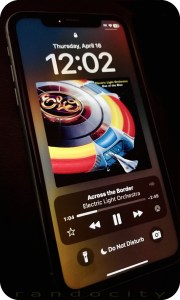 If you’re an Apple iPhone user, your phone likely utilizes Face ID biometrics to authenticate you and unlock your phone’s features. While this authentication system seems fine when it works, what happens when it fails? Not what you’d expect. Clearly, Apple didn’t think the failure design through. Let’s explore.
What is Face ID?
Face ID uses a series of hardware technologies including infrared, lidar and front facing cameras to scan your face and recognize you. It was touted by Apple as a better alternative to Touch ID, a fingerprint scanner, which was available on earlier iPhone models (and some current models too). Let’s just say that I prefer Touch ID over Face ID for various reasons, but I digress.
Face ID works fine under most circumstances, but there are conditions where Face ID could fail and prevent you from getting into your phone to perform critical diagnostic and/or troubleshooting features (or even backing it up onto your computer).
When you hold your phone to your face, the camera(s) scan your face for a number of key features which are then used to identify you no matter what angle or lighting (more or less) your face may be in. The reliability of this scanning technology is all dependent on the scanning hardware functioning 100% properly. We all know that hardware is prone to failure, either hard failure in the hardware itself or even soft failure by such things as poor lighting conditions, blocking the sensors or interference. Whatever the failure reason, Face ID has some important concerns and bugs that Apple needs to address.
Face ID Failure
This is the crux issue in Face ID that leads to all other related problems. Let’s begin with some relevant context. When you log into your favorite website or app, you’ll need credentials. Often, these consist of a username and password combination. There may be extended ways you can get authenticated beyond these two pieces of data, such as sending a one time SMS code, using an authenticator app, prompting you to press ‘accept’ in an app on another device or even using your voice, when calling into certain phone systems.
Typically, when one authentication type fails, developers offer one or more backup redundant authentication systems to help you get logged in. For example, if you’ve lost your password, sites allow you to reset your password. Resetting your password has you walk through various steps to identify that you own that account, usually by asking key questions like Name, Birth Date, Home Address or any other information that only you may know. You can often even call the support team at a website and ask them to help you get your password reset or cleared. These redundant designs prevent users from landing in dead end failures, as long as you have various other identifying data on hand to prove that you are you.
Not with Face ID… :(
Apple’s Bad Face ID Implementation
Apple created Face ID so that should Face ID fail to authenticate, it leads to a true dead end failure condition. There’s no additional way to authenticate with Face ID beyond that Face ID failure. When Face ID fails, it fails hard and it fails done. Even though the iPhone has the ability to access and request alternative identifying information, such a passcode, requesting and using your Apple ID credentials, requesting identity on other Apple devices and/or using an SMS code, NONE of these other authentication systems are used or available when Face ID fails! Nope. Apple just dead ends Face ID failures into nothingness. Face ID works or it doesn’t. When it doesn’t… yeah, here we open…
Pandora’s Box (aka Stolen Device Protection)
Apple Developers, in their infinite wisdom, have chosen to lock many critical troubleshooting and corrective features behind a successful Face ID verification. One might be thinking, “Well, that seems secure enough. So, what’s the problem?” Let me tell you.
One such feature locked behind Face ID verification is Device Protection under Face ID settings. If the Device Protection feature is toggled on, there are a number of things that Device Protection controls, including the ability (or not) to toggle Device Protection off. Another feature locked by Device Protection is the ability to use the Face ID Reset Data function, which becomes restricted and unusable when Face ID fails to verify.
This leads to a circular problem. Can’t verify with Face ID. Can’t reset Face ID’s biometric verification data to attempt to fix Face ID. Because the Reset Data function remains greyed out without a successful Face ID verification, you’re essentially locked out of the feature you need most to try to FIX Face ID. Not even Apple Support or the Apple Store can help you solve this dilemma.
Other critical features like a local Device Reset or a local Device Wipe are also locked behind Face ID when Device Protection is enabled. Once again, critical troubleshooting and corrective steps are eliminated simply because Face ID fails to verify.
How might this impact you?
There are a number of scenarios where Face ID failing to authenticate your face may affect you:
- You cannot attempt to fix Face ID if Device Protection is enabled and Face ID fails to authenticate.
- You cannot reset the device locally because Face ID fails to authenticate.
- You cannot wipe the device to factory settings because Face ID fails to authenticate.
- You can’t use many apps that rely on Face ID to authenticate you when Face ID fails.
And no, the passcode doesn’t help you here and neither does your Apple ID password. If you receive a used iPhone from a family member (or even from a used phone seller) and you want to wipe it and set it up new for yourself, you cannot do this. When Face ID was originally enabled, that means the phone will need to see the original owner’s face to unlock Face ID to enable a local factory reset and wipe options in settings.
This is particularly problematic when the device is shipped cross country and the Face ID person is not in close proximity. To solve, this means shipping the device back to the person, having them perform the wipe and then having the device shipped back. Let me just say here that SHIPPING IS EXPENSIVE! Best to avoid this back and forth shipping.
The unnecessary shipping can be avoided in used phone purchases if the seller fully wipes the device to factory defaults before shipping. However with family members, they often simply turn old phones off and forget about them. Then hand them over just as they are to other family members, leaving situations like the above.
But Wait, There’s More!!!
Apple does offer a feature that’s fairly sledge-hammery, but this feature will let you at least get the phone out of your Apple ID account as long as you own more than one iOS or MacOS device and the device exists in the “Find My” app OR you have a computer with a browser and can log into the iCloud.com website. The “Find My” app offers a critical security feature that allows you to remotely wipe your Apple devices to factory defaults, even if the device is not currently in your possession. The device will, however, need to be connected to the Internet to receive and perform the request. If the device is in your possession, there’s no problem at all. If it’s lost or stolen, it all depends on timing. If you can see the device is active and pinging in the “Find My” app, then you can wipe it.
When you buy a new iPhone, the first time you connect it to your Apple ID, this action automatically enrolls the device in the “Find My” app for tracking. You don’t need to manually add devices to this app. Apple often makes these things simple and easy for new users. This is one of those apps that “just works.”
The good thing about the “Find My” app wipe is that because it’s a remote wipe using another device on your Apple ID (usually performed because a device is lost or stolen, but can be used for other purposes), this remote wipe works around all security on the device itself, including Face ID. Meaning, no matter what security settings you have set up on the device, the remote wipe will do its thing without needing to touch the device at all.
There are some important things to consider about using “Find My” app to wipe your device, though. This wipe does as it sounds. It wipes all settings, data and information from the specific device. If you have photos or videos on the device, these will be wiped. The wipe feature erases everything back to factory defaults with the exception of ONE critical thing.
The wiped device will be placed into an Activation Lock (Cloud Locked) status. This means that in order to reactivate and use the device again, the original owner must type in their Apple ID credentials (login and password) to unlock the device for reuse. Once that’s done, the device is basically as if it’s brand new and is available to be set up again as though it were a new phone.
There are a few downsides, though. The wipe is just wee bit sledge-hammery when all you’re needing to do is something simple, like clearing out Face ID data. Because the “Find My” app lists ALL of your devices in a single convenient location, you will need to make absolutely sure that you have selected the correct device BEFORE sending out the wipe instruction. Don’t make a mistake here! Choosing the wrong device name means it will wipe that device instead. Make sure you name your devices properly for easy identification and double check that you’ve selected the correct device! You don’t want to wipe you or your spouse’s current phone accidentally. Caution is in order here.
However, the “Find My” wiping feature does mean that you can at least get your iPhone back into a workable state to begin setting it up again. If your phone has been backed up recently, then you won’t really lose all that much other than the time it takes wipe and restore the phone from your most recent backup, assuming you can get the phone back or you have it in your possession. You are backing up your phone’s data regularly, right?
How to Send a Remote Wipe Request to an iPhone
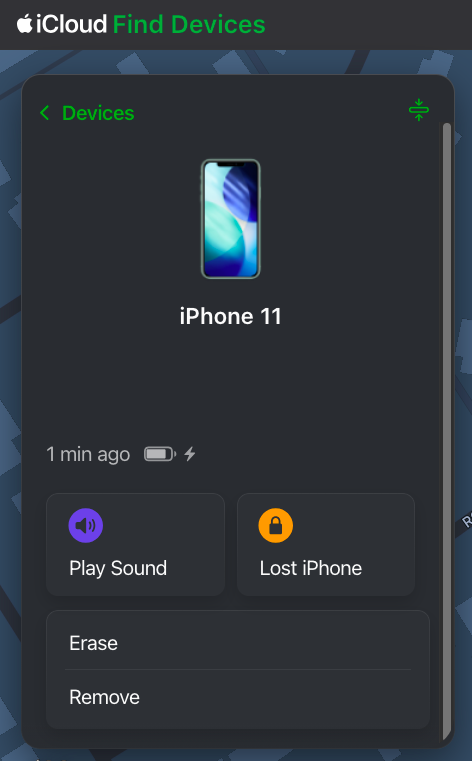 To wipe a device remotely using “Find My”, you will need to log into the “Find My” app on a different device under the Apple ID where that device is associated. You can do this on an iPad, iPhone, MacBook or via iCloud.com in a web browser. You don’t necessarily need to have another Apple device, but you will need access to a computer or phone with Internet access and a web browser to log into iCloud.com using the Apple ID credentials associated with the iPhone. For this purposes of this article, iCloud.com is used to show how to find and use the “Find My” feature. These options are also available in the “Find My” app on iOS devices.
Since iCloud.com is a website, it’s possible Apple may redesign this website from time to time. That means that the image shown here in this article may change. The “Find My” feature may remain available, but may be located in a different place and/or may present with a different user interface. If the user interface is different from what’s shown here, you will need to look for the “Find My” app in iCloud, open it and then determine how to get to and use the described features.
After logging into iCloud.com using the correct credentials, scroll down to the bottom of the page and you will see an array of available apps. One of the apps is “Find My”. Click it to open up the “Find My” app.
Once you have opened the “Find My” app, you will be given a number of options for each device when selected, including Play Sound, Lost Phone, Erase and Remove, at least for an iPhone. Different devices may be given more or less options, depending on the device type. The “Find My” web app may update a bit more slowly than the app available on an iPhone, iPad or Mac. You may need to wait a few minutes for the “Find My” web version to refresh fully for all of your devices to show active and online. You will be unable to send any remote commands to a device until that device is shown as online.
Once you have selected the device and opened it up, it will show you a control panel like the one shown above. The Erase option is the option you will need to remotely wipe the device. Again, make sure you have selected the correct device. I’d suggest playing a tone on the device using the “Find My” app to ensure that the correct device is chosen. However, if you’re erasing a device that is not in your possession (i.e., it’s stolen), don’t play a tone. You don’t want to alert the thieves that you’re looking at the device. In a stolen device case, check to see where the device is in the world on the map. If it’s not where you expect it to be, then you’ve selected the correct device for a wipe.
If you’re trying to solve the issue presented above and you have the device in your hand (or another person has it in their hand while you talk to them), play a tone to confirm the correct device. Once confirmed, send the erase command to the phone. If another person has the device in their hand, make sure they are talking to you on a separate device from the one that is about to be wiped. Once you send the wipe command, the phone will stop functioning. They will need to be on a different device talking to you for the duration of the wipe.
Remote Erasure — How does it work?
Once the Erase command is successfully sent to the device, the phone will immediately begin requesting to enter passwords with various popups. These popups indicate the command has been received by the phone. Ignore the popups and do nothing about them, though. At this point, the phone will need to be turned off and turned back on. Once the phone has been rebooted, the wipe will begin. The iPhone screen will turn black, a white Apple logo will appear and a small progress bar will appear just below the Apple logo.
The phone may reboot a couple of times during this wipe process, each with progress bars. Once the wipe process has completed, the device will go into Activation Lock (Cloud Locked) mode. When the phone is powered on after the wipe has completed, the phone may require setting up WiFi access before moving forward. However, at some point, you will be prompted to enter the Apple ID and Password of the person who originally owned the phone. This is a Cloud Lock. Entering these credentials will remove the Cloud Lock status and put the phone into a factory default setup mode to begin setting the phone up as if it were brand new. Once the Cloud Lock status has been removed, the phone is no longer associated with the Cloud Locked Apple credentials in any way.
Stolen Device Protection vs Cloud Locking
Here’s just a little bit of commentary about the Stolen Device Protection feature itself. I’m not exactly sure what Face ID’s Device Protection feature is actually trying to solve, honestly. Apple has already previously developed Cloud Locking. The Cloud Lock system is an effective deterrent for theft or loss. Should someone manage to get past the passcode and into your iPhone, they can’t wipe your device because the wipe process requires logging out of iCloud using the user’s Apple ID credentials and password. The wipe will stop and fail if the correct credentials are not input during the wipe process.
Unfortunately, Apple has taken this wiping problem one step further with Face ID’s Stolen Device Protection. With Device Protection enabled, not only do you still need to enter your Apple ID credentials during portions of the wipe to take it out of iCloud, but Face ID must function to even begin the wiping process.
Again, because Face ID dead end fails, this can lead to the possibility of never being able to actually remove a device from your Apple account in the expected way, by wiping the phone on the phone. Maybe you bought a new iPhone because your Face ID system stopped recognizing you. That’s fine and all, but now you cannot remove that device from your Apple ID because Face ID prevents wiping the device from the device itself. Yeah, this is Apple not thinking things through.
That is, until or unless you realize that the “Find My” app allows for remote wiping your device(s), which does solve the above Face ID dilemma. Just be cautious when selecting a device to wipe. Don’t pick the wrong one.
Conclusion
So, yes, there you have it. There is definitely a bug in Apple’s Face ID authentication system that can prevent you from locally wiping or locally fixing your Apple device. An authentication bug that should be considered oversight by Apple’s developers. However, all it is not lost. Apple has provided us with a sledgehammer approach in the “Find My” app to workaround this bug, as long as you have other devices that can initiate the wipe inside of “Find My” and assuming that the “Find My” feature is working correctly on the remote device. Lots of things need to line up properly for the “Find My” device wipe to function.
If you have run into similar issues regarding Face ID failures, please sound off in the comments. If this article was helpful to you, please follow, like and leave a comment below.
↩︎
Fediverse Reactions
Trump: America’s first illegally elected President
 America is about to make a massive mistake! The U.S. Constitution has a lot of words. I know, it’s seems difficult to read. It’s not. Let’s explore the constitutional problems with Donald Trump as President Elect and why the 2024 Election results are invalid. Let’s explore.
The 14th Amendment to the U.S. Constitution is a curious beast. It says a lot of things, but none more important than section 3 below:
No person shall be a Senator or Representative in Congress, or elector of President and Vice-President, or hold any office, civil or military, under the United States, or under any State, who, having previously taken an oath, as a member of Congress, or as an officer of the United States, or as a member of any State legislature, or as an executive or judicial officer of any State, to support the Constitution of the United States, shall have engaged in insurrection or rebellion against the same, or given aid or comfort to the enemies thereof. But Congress may by a vote of two-thirds of each House, remove such disability.
Highlights have been added for brevity and clarity. The 14th Amendment describes ALL of the qualifications necessary for a person to run for any elected office. Failing any of these requirements means that the candidate is INELIGIBLE to run. Note this previous statement because it becomes very important to America and the 2024 Election.
January 6th
… is widely understood as an insurrection. It fits all of the qualifications for it. It was violent. It was an uprising. The uprising was against the United States government. The uprising was intended to subvert the will of the voters. The uprising was intended to aid Mr. Trump in remaining in office past his term. The uprising was fomented and incited by Mr. Trump at the ellipse the morning of January 6th.
More than this, Mr. Trump decided to sit idly by for 4 hours and do nothing to stop it. This is aiding and abetting… the very definition of what’s written in the 14th Amendment.
As a result, even Congress was forced to consult with the Supreme Court on whether what Mr. Trump did was considered an insurrection. The problem is, it doesn’t matter what the SCOTUS believes, it only matters what Congress believes.
If Congress was required to ask another authority in the government about Trump’s conduct, then it’s clear that Congress is unclear on Trump’s eligibility. This means that Trump is and should be considered ineligible to run for office until this question is 100% cleared by using the 14th’s prescribed VOTING mechanism. Trump is now considered a “grey area” candidate at this point.
The 14th Amendment is CRYSTAL CLEAR on what is required to ensure any “grey area” candidate is eligible. “But Congress may by a vote of two-thirds of each House, remove such disability.”
It says it right here in the 14th’s text. Congress may choose by a 2/3rds vote to lift such a disability and make any such “grey area” candidate eligible to run for office. Until such a vote, the candidate must remain ineligible.
Congress failed to vote on this! (IMPORTANT)
Keep in mind that nowhere in the 14th Amendment does it allow or authorize the SCOTUS to chime in on such and make any definitive choices. The ONLY choice given by the 14th is to have Congress VOTE on it. Any questions involving any candidate’s eligibility automatically means that a Congressional VOTE is REQUIRED.
2024 Election
What does all of the above mean for the 2024 election? Let’s break it down.
Since Donald Trump was then and is now an ineligible candidate per the 14th Amendment and because Congress failed to vote on Trump’s eligibility because of his “grey area” status, that means Trump is and remains an illegal candidate on the ballot.
Trump shouldn’t been on the ballot because he’s ineligible due to the failure of Congress to follow the procedures outlined in the 14th Amendment; procedures that are quite crystal clear in their intent and in their required actions.
But the SCOTUS…
The SCOTUS doesn’t play into this. Nowhere in the 14th does it say that the SCOTUS can intervene and offer up their opinion. Think of it this way. The SCOTUS’s opinion is tantamount to you having committed a crime, then asking a judge if they believe you are innocent of the crime.
If a judge gives you their opinion as “innocent”, that doesn’t mean you aren’t still responsible for having committed that crime. That judge’s opinion absolutely DOES NOT let you off of the hook for having committed that crime. It’s just an opinion. What matters is what the LAW says is required.
If the law says you should be indicted and charged, that judge’s opinion absolutely 100% WILL NOT get you out of that predicament. You will still be held accountable for what you did in whatever way the law requires. Talking to a judge absolutely does not get you a “get out of jail free” card no matter what that judge says. The same for the SCOTUS. An opinion is just an opinion. It is 100% not binding. What is binding is what the written law requires.
Election 2024 continued…
Because Trump is a “grey area” candidate due to his involvement in January 6th AND because Congress had questions involving his conduct on January 6th AND because Congress did not rule on Trump’s eligibility, Trump remains ineligible to run for ANY office… period.
Until or unless Congress votes on Trump’s eligibility as the 14th Amendment requires, Trump remains ineligible to be on any ballot.
Let’s break this down further…
Because Trump was on the 2024 ballot as an ineligible candidate, the results of the election are, likewise, invalid. This means that the 2024 Election technically has no winner because the Election results must be tossed out in their entirety. Trump is not the President Elect because the 14th Amendment is clear on this matter. Trump is ineligible.
Kamala Harris is not the winner either because the entire election results must be tossed out entirely. It’s a fraudulent election because an ineligible candidate participated.
Re-Run the Election
Because the 2024 Election results are 100% invalid, the election must be rerun with 100% ELIGIBLE candidates. Trump can only be made eligible by a Congressional vote in both houses. That would need to be done BEFORE any Re-Run election. If the vote fails or if Congress is unable to hold such a vote, then Trump must remain off of the Rerun election ballot.
Accepting an Illegal President
If America moves forward with this illegal Presidential charade, then we are complicit in breaking down the will of the Constitution. The Constitution is completely clear on how candidate eligibility matters need to be handled.
If we accept Donald Trump as President Elect under these ineligible circumstances and accept the results of this invalid election, America will have voted in its first ILLEGAL President in U.S. History. It also means the Constitution is null and void. Democracy is dead if we proceed here.
Technicality
Technicalities matter and this one matters a great deal to both America and the United States Constitution. Do we stand with the Constitution and uphold it? OR, do we stand with Donald Trump and vote against our Constitution?
Because Congress made a procedural faux pas in this matter, it is on Congress to right this wrong. In fact, it’s on the entirety of the United States Government leaders to stand up for our Constitution and call the 2024 Election invalid and require a re-run election.
Let’s do the right thing here! OR, there’s no stepping back from this precipice! We are at America’s decision gate and most of us don’t even know it. There is a short amount of time to correct our course here, but it requires ALL Americans and all American Leaders to bring attention to this situation regardless of their partisanship.
Trump can still be America’s President, but it must be voted on in the Constitutionally correct way.
↩︎
America has made the wrong choice
Much to the chagrin of so many, Donald Trump has managed to win the election and become President, but not by a landslide. Donald Trump will spin it that way, but it isn’t true. One thing that is absolutely true, however, is that lies are winning over truth. Lies are how Trump won. Let’s explore.
Over-Analyzed
The news media outlets are now over-analyzing Trump’s win, pulling out all manner of random talking heads to say whatever they think. These randoms, most of the time, make zero sense with their inane arguments as to why Trump won.
For example, one of MSNBC’s talking head randoms claimed that Trump won because Democrats called the Trump base biggots and racists. I don’t recall any Democrat candidates saying this. Media outlets may have been making these arguments, along with many talking heads on media outlets, but I can’t recall a single Democrat candidate saying this. Feel free to point how how I’m wrong in the comments below, however.
One thing that is absolutely certain is that media outlets have been calling Trump a biggot and racist. This is true. It seems if these talking heads are so out of touch that they can’t recognize the difference between a news media outlet and a Democrat, they’re living in a cave. They’re also clearly not thinking.
Spinning Lies
Trump won, not because Democrats did or said anything wrong. Trump won because Trump and his cabal are able to spew lies about the Democrats that seemed truthful to the masses. That’s the gist of it at all. At the heart of the matter, it comes down to lies over truth.
People seemed to have forgotten one cliché, but very salient and prophetic quote:
If it seems to good to be true, it probably is.
No where is this quote more applicable than towards Donald Trump. Trump is a conman, first and foremost. The word “conman” has a lot of negative connotations, but let’s break it down. The “con” prefix in “conman” is short for “confidence”.
This means that a “conman” gains your “confidence” by saying things that, you guessed it, “seem too good to be true”, leading to an initial skepticism. Then, the conman follows up those skeptical words with words that try to allay your fears about his statement being “too good to be true.” In a very real sense, leading you down a primrose path made of up plastic flowers. They’re pretty and may seem real, just don’t get too close.
He then hauls out 2, 3 or more shills who all backup his claims as the conman. These shills are paid accomplices who say whatever the conman wants because they were paid off. Think of them as paid actors.
These shills who come rolling out are intended to prove to you that the conman’s words are truthful. Some people may still be skeptical at this point, unless some of the shills are people like a mayor, your police leader or even your pastor. That’s where a conman’s words get a huge boost to seem “truthful”, even though they’re still all just a pack of lies.
The Wrong Decision
It seems that the vast majority of America has now been conned by a man who has enlisted far too many confidence shills like Elon Musk and Ron DeSantis and Greg Abbott and Rupert Murdock (and sons) and this list goes on and on and on.
Gullible sorts believe what Trump says because they believe what his shills are saying. That rationale is, “if all of these people are saying the same thing, then it must be true.” Yet, shills are still shills perpetuating lies on behalf of the conman. Unfortunately, when so many are perpetrating the same lies, it can be difficult to undersatnd that these lies are, very much in fact, still lies.
Let’s not get bogged down into Trump’s continual lies.
4 years of Hell
America is literally in for 4 years of hell. You will begin to realize that the lies that Trump and his cabal have told are in fact truly lies. That you were, in fact, deceived by a legitimate conman. Unfortunately, you’re going to learn this fact in the most difficult ways possible. Let’s list out each of what Trump has made claims of “fixing” and then realize why he will be unable to actually do any of it. In fact, the economy will get far, far worse under Trump’s leadership than where we are right at this moment in time.
Trump’s lies:
- Trump will bring down inflation and restore what was the economy prior to Biden. This is both a lie and it is false. Trump has no ability to steer America’s economy to make it any better than it is right now. In fact, with Trump’s continual chaos, firings, distractions and age-related mental degeneration, America’s economy will actually get worse, not better. Expect higher rents, higher food costs, higher gas prices and higher inflation than where we are today. It could even get to twice higher than today.
- The Middle East and Russia wars will end. Lies. Trump has no influence to control or change the outcomes of what’s going on the Middle East or with Russia. The best he can do is attempt to befriend Putin again and play hardball with Netanyahu, neither of which will affect those wars in any way at all. Worse, though, is that for all of his meddling in these international affairs, he will see to it that No. 1 above absolutely comes true… a worsening economy, more inflation and higher prices. The only way that the Ukraine war ends under Trump is for the Ukraine to be handed over to Russia on a silver platter.
- Trump will deport many, many immigrants. Lies, mostly. Not in that he will deport people, but in HOW and WHO he will deport. While he may be able to round up immigrants and “deport” them, there’s no way to know what exactly he means by this. He could attempt to round up not only recent immigrants, but all immigrants of any nationality regardless of their legal citizenship status or how long they have lived in America. Then, deport ALL of them. MAGA isn’t just about “Making America Great Again”, it’s about “Making America White Again.”
- Trump will fix the border. Lies. Trump has no way to fix the border. Putting up a border wall will cost taxpayers trillions more in money. Instead of reducing taxes, you’re going to be paying even more to help put up that wall along the border… a wall, that incidentally, will do nothing to stem the tide of immigrants. Of course, Trump will lie about all of this and tell you it is working. Because you don’t live near the border, you will have to take his word at face value. Living near the border will tell you the real truth, but you don’t care about that because you don’t live near there.
- Trump will make the country better. Lies. Trump only cares about one person. Himself. Trump will make the country better for HIM only. Not for you, not for your family and not for anyone else you know. This ties back to No. 1 above, but it is markedly different because Trump wants to be President for not only the power he derives, but for the money he gains and the money he can skim from just about everywhere he can find. This, of course, costs the economy money and you, as a taxpayer, money. Trump wants to turn the country into a playground for the rich with those at the bottom becoming pawns for his pleasure, convenience and for the work he can make you do. He wants you to work even longer hours, get even less money in wages and effectively become slave labor to him. Well done voting for him.
Third World Nation
These above are the top things Trump has promised. However, he has also promised political retribution to his opponents. We’ll have to see how his political retribution ends, but that likely means completely getting rid of the Democrats entirely.
That above and his promise of toppling the constitution. These here are additional promises he has made. The problem is, toppling the constitution means toppling America. Toppling America means putting America into not only a great depression, but the biggest depression that America has ever seen. It also means America will cease to exist as a country and will instantly become a third world nation. The dollar will cease to have value across the globe. Think of what the peso is worth in Mexico and devalue the dollar by even more than that.
If the constitution is toppled, your rights are gone. Your home is gone. Your land is gone. Your money is gone. Everything you hold dear is absolutely, 100% completely and utterly gone. Without a constitution to protect your rights, you have no rights at all.
Trump can come in and seize everything you have and everything you own. Trump can then rearrange the state boundaries, remove voting entirely, disband the military or rearrange the United States to his will and effectively cause one of the most catastrophic changes to what was formerly known as America.
If we get to this point, and yes it is entirely possible we will in less than 4 years, Trump will have to begin selling off parts of American territory to continue to fund his own lifestyle choices, that and to avoid becoming part of a coup. That probably won’t work. Don’t bet that if we get to this point that Mexico, Russia, China and North Korea won’t eye our land for conquest. World War III? Forget that. We won’t be able to even defend our nation once Trump brings us to this point. Our military will be so disjointed and disbanded, that we won’t have a military to speak of. Nukes? They probably won’t even work.
You Voted For This!
This is exactly what you voted for. You bought into Trump’s con. You think he’ll make America better, but that’s not going to happen. He’s too old and too unstable to produce any results. Trump has no moral compass nor ethical boundaries. Trump is, as some media outlets have stated, transactional. He does things on a whim, but also does some planned things with as minimal planning as possible. When something is planned, it’s usually planned and executed in hours, with absolutely not enough time to judge the consequences.
Trump offers no real plans. He isn’t a planner. He’s not even a doer. He’s a leach and a conman. He takes and takes and takes. He almost never gives back.
This is what you wanted? No? It’s absolutely what you’re going to get.
The next 4 years are going to be a living hell for not just Democrats, but equally for all Republicans. You wanted to open Pandora’s Box. Well, now you did. Now we get to see exactly what’s inside of Pandora’s box… and no, it’s not going to be pretty.
↩︎
Inside Job? Suspicious Shooting at Trump’s Butler Rally
 As the investigation into what went on at Trump’s Butler, Pennsylvania rally progresses, one question that should be on everyone’s mind is, “Was this shooting was an inside job?” There are too many suspect things involving this shooting, least of all the 20 year old suspect.
Disclaimer: This article is intended to be speculative in its nature and in handling this sensitive topic as this situation is still unfolding. Not all information is yet available. This article is not intended to accuse or defame any individual person or entity stated. This article is only intended to ask the pertinent questions that need to be asked based on what we know so far.
Let’s explore.
What happened?
Trump, as he does on the campaign trail, was holding a political rally in Butler, Pennsylvania on July 13th. Trump was at the microphone at the time speaking. Several shots rang out and Trump’s ear was allegedly grazed by a bullet along with a bullet striking and killing one rally attendee.
Secret Service then stepped in to protect the former President by attempting to hold him down. Before that happened, he defiantly raised a fist, displaying his bloody ear.
Election and All Stops
Trump will pretty much stop at nothing to secure the Presidency. He’s already made that abundantly clear with the January 6th event using his failed attempt at halting the counting of the state electoral vote. Then, as a part of that, setting up and fomenting a violent riot that followed at the Capital.
The question then remains, “Was the shooting at Trump’s Butler, Pennsylvania rally an inside job?” Let’s see if we can at least understand better why this is even a question.
Inside Job?
Again, this is a speculative article in its nature. It’s not intending to accuse anyone. It is intended solely to ask questions. Let’s get right to the meat of this article. There are so many suspicious activities involving this Butler, Pennsylvania Trump shooting that we need to understand them all. Let’s make a bulleted list:
- The CIA and FBI are primo at sniffing out early notifications of possible mass shootings. Yet, they missed this one? No social media ramblings at all?
- The Secret Service didn’t scope out the crowd in advance or even during the event?
- The Secret Service didn’t wand or otherwise run the crowd through metal detectors?
- The Secret Service seemingly didn’t have close building rooftops covered to prevent someone from taking pot shots at Donald Trump or the crowd? Hmm…
- The Secret Service was able to neutralize the shooter in seconds? Even more, hmm…
- Donald Trump fist pumps for the camera with a bleeding ear after a supposed gunshot. Yeah, that’s a big hmm…
- That a 20 year old is able to circumvent Secret Service’s security measures? Okay, hmmm.
- Donald Trump’s sends up a defiant fist while Secret Service is attempting to secure him. Uh, nokay.
- Let’s label this what this really is, another a mass shooting.
Let’s break this all down. Neither the CIA nor the FBI had any advanced notice of a possible shooter at this rally? That’s suspect. It’s like no one said anything prior to the rally. I find it difficult to believe that a 20 year old doesn’t have a social media presence, let alone have potential discussions about what went on. Alone, this one miss isn’t a problem if other safeguards catch a would-be assailant. They didn’t.
It’s unclear if the Secret Service was able to properly vet the entire crowd through Magnetometers or by wand device, but it seems that at least one person slipped through that process. The question then is, what happened here? How did this happen? Did this assailant remain far enough away from the event to not need to be vetted by Secret Service?
The building where the shooter camped was not too far from the rally site to fire a weapon reliably, but also it was also not too close to be detected, apparently. I’m guessing that because of this distance, the Secret Service didn’t require vetting people at this distance? Really? Below is the alleged building involved where the suspected 20 year old shooter allegedly camped.

Unfortunately, there is yet another metric that supports that this may have been an inside job. It seems highly unlikely that this building wouldn’t have been fully secured (even the rooftop) in advance of the rally by the Secret Service, including either having SS staff on the rooftop or at least standing outside of this building location to prevent trespassing.
Clearly, at least according to various news media reports, the shooter was neutralized moments (seconds?) after the shots rang out by a Secret Service agent, with one of the suspect’s earlier shots allegedly grazing Trump’s ear while killing a rally participant.
Suspicious
This whole building security situation is highly suspicious. How did a shooter manage to get on top of a building that should have been fully secured by the Secret Service? That either means that Secret Service was not securing that building properly or, this is an even worse thought, that Secret Service ignored the individual as they traversed onto the rooftop with their weapons.
Yet, clearly the Secret Service was able to neutralize this rooftop target in moments after the shots rang out? Secret Service apparently had that rooftop covered as it has been reported that a Secret Service sniper was able to locate, take aim and shoot at the assailant all within a matter of seconds. All of this action by the Secret Service implies that this building was, indeed, being fully covered by Secret Service protection. Yet, a 20 year old shooter can manage to get past that security, pull out a weapon, take a position on the roof and begin firing shots… all without being detected? Yeah, this author is not buying that idea.
The question remains, how would such a shooter manage to get past Secret Service and traverse onto a rooftop of a building that was apparently so well secured? Yes, this is A really big and suspicious question.
Inside Job Part II
As we delve into all of the above, we come to realize that either the Secret Service was highly inept at performing their security responsibilities (doubtful) or that this was an inside job.
Donald Trump and all of his closest confidants, particularly the ones participating in the rally, would likely have known of the Secret Service’s plans (or at least many of them) to secure the rally site. Information that could potentially “leak”.
If the rooftop building was so well covered so as to neutralize the target in moments, it’s inconceivable that a random person could randomly and with extreme luck happen upon a Secret Service blind spot to infiltrate and make their way onto the rooftop all without being seen or, more importantly, heard by Secret Service. Again, either Secret Service was ignoring this situation or it seems likely that something else was going on here. It’s all too suspicious and this author is not buying it.
Why not a Lone Wolf Shooter?
For a person to cart a weapons bag onto a rooftop that is being actively secured by Secret Service and not be seen or heard doing this is infinitesimally small. By infinitesimally, I mean the chances are next to zero. Clearly, if Secret Service were able to neutralize this shooter as rapidly as they did, the Secret Service had coverage on or near the building involved. Having that level of coverage implies that the shooter may have had help to get around the Secret Service detail.
This means that the shooter would have needed to get help to find a blind spot in Secret Service coverage, a blind spot that only an inside person would know. That means that the shooter may have been fed this information prior to traversing onto the rooftop, which allowed that person to avoid being detected by Secret Service, arm up and then take the shots.
Fist Defiance
One highly suspect issue during this whole event is Trump’s behavior immediately following the shot where he realized a bullet had allegedly struck him. Instead of going into panic mode as one might do, he decided to stand up with a fist in the air for a photo opportunity. It’s almost like Trump knew that the threat was over, somehow. That’s not a normal behavior after having been shot and nearly assassinated. Instead, he should have wanted to leave the rally as quickly as possible to secure the safety of his person. Instead, he seemed willing to defy his Secret Service detail as they attempted to pull him to safety.
Seriously, who thinks about photo opportunities when someone is shooting a weapon in your general direction?
Trump involved?
This is a question, not an accusation. We already know that Trump is not avert in taking drastic and unusual steps to make a point and in his attempt to win and/or hold the Presidency. Just look at January 6th as an example. Disclaimer: this is question that must be asked. It is not intended to accuse.
Democrat Involvement?
Clearly, Trump’s sycophant Republicans are going to play the lone-wolf must-be-a-Democrat card, even though it has been confirmed that the now deceased 20 year old shooter was a registered Republican. It also seems like almost every time something happens involving Trump, it is inevitably Trump who had a hand in its outcome. Yet, Trump (and his sycophants) will inevitably and hypocritically blame it all on the Democrats in one breath, while calling for unity in another. Because of all of the suspicious goings on involving this shooting, the entire situation does seem highly suspicious and dubious.
Trump’s Repeated Calls for Violence
Trump has repeatedly used veiled words and rhetoric to call his “troops” into action. What troops you ask? Well, obviously troops like the Proud Boys and the Oath Keepers and other Republicans. Trump is willing to and understands that through various broad rhetoric, it will call “his” troops into action. His veiled words tell these various groups to do things up to and including performing violence when necessary. Again, look at January 6th as a prime example. It’s not the only example (e.g., NY trial), though.
As a person with the amount of public sway that Donald Trump holds, his seemingly innocent words are put into sometimes threatening and violent actions by his followers. Just look at the rhetoric that Trump used against various judges and various court staff and what ultimately resulted onto those people after Trump’s words were unleashed. His words even went so far as to force a judge to issue a gag order against Trump during his New York Trial. Rudy Giuliani, one of Trump’s biggest hired sycophant lackeys at the time of Trump’s Presidency, was even sued and lost a defamation suit against election workers as he spread many lies about those workers involving the 2020 election; lies that fomented negative action towards these workers by Trump followers. Rudy Giuliani has even been disbarred as a lawyer over his 2020 election lies.
While what Rudy Giuliani said didn’t personally result in threats and violence against those people, at least not by Giuliani’s own hand, it did foment many, many uncomfortable situations for these election workers by others from within Trump’s “troop” camp; well-meaning workers who were simply hired to do a job during an election. Fomenting these kinds of unchecked threats and violence against others is clearly something Trump (and his lawyers) shouldn’t be doing. And yet, perhaps one third to one half of the nation want to reelect this man?
Fomenting violence, regardless of how veiled the rhetoric may be, is still fomenting violence. It’s no wonder that eventually Trump’s own veiled words would turn back around on him. Trump likely knew that this would be an eventuality. Based on all of the suspicious goings on above, it seems more likely that what occurred may have been an inside job, taken as a step to quell that violence by potentially doing it as an inside job; one that looks like it isn’t? We just don’t know.
Unfortunately, one rally goer died as a result.
Is Trump, the Secret Service or his inner circle involved?
There’s no way to know, yet. But, this question must be asked and answered. This situation is still unfolding and we don’t yet have all of the details. This article is written solely using logical speculation based on the details known at the moment of this article and it is based solely on the logical deduction around these rather dubious situations so far. This article is not intended to accuse anyone. It is simply here to ask pertinent questions. After all, even as infinitesimal as it is, a 20 year old lone-wolf shooter managed to slip through Secret Service’s grasp and gain access to an unsecured rooftop to take shots at Trump? It’s not likely he did this without help.
Is it possible it could be done? Yes. Is it probable? No.
Secret Service is way too meticulous in planning its security details involving the former President. Either the Secret Service lapsed in its responsibilities for security at this rally or this was an inside job designed to circumvent the Secret Service.
Unfortunately, even if it was an inside job, the Government will likely squash all evidence of that to make it seem like it was strictly a lone-wolf operation. Only time will tell if the Government will be honest with us over what really happened.
↩︎
Is Apple’s Vision Pro worth the money?
 Let me preface this article by saying that this is not intended review the Apple Vision pro. Instead, it is intended as an analysis of Apple’s technology and the design behind the Apple Vision Pro headset. The Vision Pro’s hefty price tag also begins at $3500 and goes up from there depending on selected features. Let’s explore.
Price Tag vs Danger Target
The first elephant in the room to address with this Virtual Reality (VR) headset is its price tag. Because there is presently only one model of this headset, anyone who sees you wearing it knows the value of this headset instantly. This means that if you’re seen out and about in public wearing one, you’ve made yourself a target not simply for theft, but for a possible outright mugging. Thieves are emboldened when they know you’re wearing a $3500 device on your person. Because the Vision Pro is a relatively portable device, it would be easy to scoop up the entire device and all of its accessories in just a few seconds and walk off with it.
Like wearing an expensive diamond necklace or a Rolex watch, these items flaunt wealth. Likewise, so does the Vision Pro. It says that you have disposable income and wouldn’t really mind the loss of your $3500 device. While that previous statement might not be exactly true, it does have grains of truth in it. If you’re so wealthy that you can plop down $3500 for a Vision Pro, you can likely afford to buy another one should it go missing.
However, if you’re considering investing in a Vision Pro VR headset, you’d do well to also invest in a quality insurance policy that covers both loss from theft and damage both intentional and accidental. Unfortunately, a loss policy won’t cover any injuries you might sustain from a mugging. Be careful and remain alert when wearing a Vision Pro in public spaces.
The better choice is not wear the headset in public spaces at all. Don’t use it on trains, in planes, at Starbucks, sitting in the lobby of airports or even in hotel lobbies. For maximum safety, use the Vision Pro device in the privacy and safety of your hotel room OR in the privacy and safety of your own home. Should you don this headset on public transportation to and from work, expect to get not only looks from people around you, expect to attract thieves looking to take it from you, potentially forcibly. With that safety tip out of the way, let’s dive into the design of this VR headset.
What exactly is a VR headset useful for?
While Apple is attempting to redefine what a VR headset is, they’re not really doing a very good job at it, especially for the Vision Pro’s costly price tag. To answer the question that heads up this section, the answer is very simple.
A VR headset is simply a strap on 3D display. That’s it. That’s what it is. That’s how it works. Keep reading much further down for the best use cases of 3D stereoscopic displays. The resolution of the display, the eye tracking, the face tracking, the augmented reality features, these are all bells and whistles that roll out along side of the headset and somewhat drive the price tag. The reality is as stated, a VR headset is simply a strap on video display, like your TV or a computer monitor. The only difference between a TV screen or monitor is that a VR headset offers 3D stereoscopic visuals. Because of the way the lenses are designed on VR headset, the headset can use its each-eye-separate-display feature to project flat screens that appear to float convincingly both at a distance and at a scale that appears realistically large, some even immensely large like an IMAX screen in scale.
These VR flat screens float in the vision like a floating displays featured in many futuristic movies. However, a VR headset is likewise a personal, private experience. Only the wearer can partake in the visuals in the display. Everyone else around you has no idea what you’re seeing, doing or experiencing…. except they will know when using the Vision Pro because of one glaring design flaw involving the audio system (more on this below). Let’s simply keep in mind that all that a VR headset boils down to is a set of goggles containing two built-in displays, one for each eye; displays which produce a stereoscopic image. Think of any VR headset as the technological equivalent of a View Master, that old 1970s toy with paper image discs (reels) and a pull down lever to switches images.
How the video information is fed to those displays is entirely up to each VR headset device.
Feeding the Vision Pro
For the Vision Pro, this device is really no different than any of a myriad of other VR headsets on the market. Apple wants you to think that theirs is “the best” because Apple’s Vision Pro is “brand new” and simply because it’s brand new, this should convince you that it is somehow different. In reality, the Vision Pro doesn’t really stand out. Oh sure, it utilizes some newer features, such as better eye tracking and easier hand gestures, but that’s interface semantics. We’ll get into the hand gesture problems below. For the Vision Pro’s uses, getting easy access to visual data from the Vision Pro is made as simple as owning an iPad. This ease is to the credit of Apple, but this ease also exists because the iPad already exists allowing that iPad ease to be slipped into and then leveraged and utilized by the Vision Pro.
In reality, the Vision Pro OS might as well be an iPad attached to a strap-on headset. That’s really how the Vision Pro has been designed. The interface on the iPad is already touch capable, so it makes perfect sense to take the iPadOS and extract and expand it into what drives the Vision Pro, except using the aforementioned eye tracking, cameras and pinch gesture.
The reason the Vision Pro is capable of all of this is because they’ve effectively married the technology guts of an iPad into the chassis of the Vision Pro. This means that unlike many VR headsets which are dumb displays with very little processing power internally, the Vision Pro crams a whole iPad computer inside of the Vision Pro headset chassis.
That design choice is both good and bad. Let’s start with the good. Because the display is driven by an M2 chip motherboard design, like an iPhone or iPad, it has well enough power to do what’s needed to drive the Vision Pro with a fast refresh rate and with a responsive interface. This means a decent, friendly, familiar and easy to use interface. If you’re familiar with how to use an iPad or an iPhone, then you can drop right into the Vision Pro with little to no learning curve. This is what Apple is banking on, literally. The fact that because it’s so similar to their already existing devices makes it simple to strap one on and be up and running in just a few minutes.
Let’s move onto the bad. Because the processor system is built directly into the headset, that means it will become obsolete the following year of its release. As soon as Apple releases its next M2 chip, the Vision Pro will be obsolete. This is big problem. Expecting people to drop $3500 every 12 months is insane. It’s bad enough with an iPhone that costs $800, but for a device that costs $3500? Yeah, that’s a big no go.
iPhone and Vision Pro
The obvious design choice in a Vision Pro’s design is to marry these two devices together. What I mean by this marriage is that you’re already carrying around a CPU device capable of driving the Vision Pro headset in the palm of your hand. Instead, Apple should have designed their VR headset to be a thin client display device. What this means is that as a thin client, the device’s internal processor doesn’t need to be super fast. It simply needs to be fast enough to drive the display at a speed consistent with the refresh rates needed to be a remote display. In other words, turn the Vision Pro into a mostly dumb remote display device, not unlike a computer monitor, except using a much better wireless protocol. Then, allow all Apple devices to pair with and use the Vision Pro’s headset as a remote display.
This means that instead of carrying around two (or rather three, when you count that battery pack) hefty devices, the Vision Pro can be made much lighter and will run less hot. It also means that the iPhone will be the CPU device that does the hard lifting for the Vision Pro. You’re already carrying around a mobile phone anyway. It might as well be the driving force behind the Vision Pro. Simply connect it and go.
Removing all of that motherboard hardware (save a bit of processor power to drive the display) from inside the Vision Pro does several things at once. It removes the planned obsolescence issue around the Vision Pro and turns the headset into a display device that could last 10 years vs a planned obsolescence device that must be replaced every 12-24 months. Instead of replacing the headset each year, we simply continue replacing our iPhones as we always have. This business model fits right into Apple’s style.
A CPU inside of the headset will still need to be fast enough to read and understand the cameras built into the Vision Pro so that eye tracking and all of the rest of these technologies work well. However, it doesn’t need to include a full fledged computer. Instead, connect up the iPhone, iPad or even MacBook for the heavy CPU lifting.
Vision Pro Battery Pack
The second flaw of the Vision Pro is its hefty and heavy battery pack. The flaw isn’t the battery pack itself. It’s the fact that the battery pack should have been used to house the CPU and motherboard, instead of inside the Vision Pro headset. If the CPU main board lived in the battery pack case, it would be a simple matter to replace the battery pack with an updated main board each year, not needing to replace the headset itself. This would allow updating the M2 chip regularly with something faster to drive the headset.
The display technology used inside the Vision Pro isn’t something that’s likely to change very often. However, the main board and CPU will need to be changed and updated frequently to increase the snap and performance of the headset, year over year. By not taking advantage of the external battery pack case to house the main board along with the battery, which must be carried around anyway, this is a huge design flaw for the Vision Pro.
Perhaps they’ll consider this change with the Vision Pro 2. Better, make a new iPhone that serves to drive both the iPhone itself and the Vision Pro headset with the iPhone’s battery and using the CPU built into the iPhone to drive the Vision Pro device. By marrying the iPhone and the Vision Pro together, you get the best of both worlds and Apple gets two purchases at the same time… an iPhone purchase and a Vision Pro purchase. Even an iPad should be well capable of driving a Vision Pro device, including supplying power to it. Apple will simply need to rethink the battery sizes.
Why carry around that clunky battery thing when you’re already carrying around an iPhone that has enough battery power and enough computing power to drive the Vision Pro?
Clunky Headset
All VR headsets are clunky and heavy and sometimes hot to wear. The worst VR headset I’ve worn is, hands down, the PSVR headset. The long clunky cables in combination with absolutely zero ventilation and its heavy weight makes for an incredibly uncomfortable experience. Even Apple’s Vision Pro suffers from a lot of weight hanging from your cheeks. To offset that, Apple does supply an over-the-head strap that helps distribute the weight a little better. Even still, VR headset wearing fatigue is a real thing. How long do you want to wear a heavy thing resting on your cheekbones and nose that ultimately digs in and leaves red marks? Even the best padding won’t solve this fundamental wearability problem.
The Vision Pro is no different in this regard. The Vision Pro might be lighter than the PSVR, but that doesn’t make it light enough not to be a problem. But, this problem cuts Apple way deeper than this.
Closing Yourself Off
The fundamental problem with any VR headset is the closed in nature of it. When you don a VR headset, you’re closing yourself off from the world around you. The Vision Pro has opted to include the questionable choice of an aimed spatial audio system. Small slits in the side of the headset aim audio into the wearer’s ears. The trouble is, this audio can be heard by others around you, if even faintly. Meaning, this extraneous audio bleed noise could become a problem in public environments, such as on a plane. If you’re watching a particularly loud movie, those around you might be disturbed by the Vision Pro’s audio bleed. To combat this audio bleed problem, you’ll need to buy some Airpods Pro earbuds and use these instead.
The problem is, how many people will actually do this? Not many. The primary design flaw was in offering up an aimed, but noisy audio experience by default instead of including a pair of Airpods Pro earbuds as the default audio experience when using the Vision Pro. How dumb did the designers have to be to not see the problem coming? More than likely, some airline operators might choose to restrict the use of the Vision Pro entirely on commercial flights simply to avoid the passenger conflicts that might ensue because the passenger doesn’t have any Airpods to use with them. It’s easier to tell passengers that the device cannot be used at all instead of trying to fight with the passenger about putting in Airpods that they might or might not have.
It goes deeper than this, though. Once you don a headset, you’ve closed yourself off. Apple has attempted to combat the closed of nature of a VR headset by offering up front facing cameras and detecting when to allow someone to barge into the VR world and have a discussion with the wearer. This is an okay idea so long as enough people understand that this barge-through idea exists. That will take some getting used to, both for the Vision Pro wearer, but also for the person trying to get the wearer’s attention. That assumes that barge-through even works well enough to do that. I suspect that the wearer will simply need to remove the headset to have a conversation and then put it back on to resume whatever they were previously doing.
Better Design Choice
Instead of a clunky closed off VR headset, Apple should have focused on a system like the Google Glass product. Google has since discontinued the production of Google Glass, mostly because it really didn’t work out well, but that’s more because of Google itself and not of the idea behind the product.
Yes, a wearable display system could be very handy, particularly with a floating display in front of the vision of the user. However, the system needs to work in a much more open way, like Google Glass. Because glasses are an obvious solution to this, having a floating display in front of the user hooked up to a pair of glasses makes the most obvious sense. Glasses are light and easy to use. They can be easily put on and taken off. Glasses are easy to store and even easier to carry. Thick, heavy VR headsets are none of these things.
Wearing glasses keeps the person aware of their surroundings, allowing for talking to and seeing someone right in front of you. The Vision Pro, while it can recreate the environment around you with various cameras, still closes off the user from the rest of the world. Only Apple’s barge-through system, depending on its reliability, has a chance to sort-of mitigate this closed off nature. However, it’s pretty much guaranteed that the barge-through system won’t work as well as wearing a technology like Google Glass.
For this reason, Apple should have focused on creating a floating display in front of the user that was attached to a pair of glasses, not to a bulky and clunky headset. Yes, the Vision Pro headset is quite clunky.
Front Facing Cameras
You might be asking, if Google Glass was such a great alternative to a bulky headset, why did Google discontinue it? Simple, privacy concerns over the front facing camera, which led to a backlash. Because Google Glass shipped with a front facing camera enabled, anyone wearing it, particularly when entering a restaurant or bar, could end up recording the patrons in that establishment. Because restaurants and bars are privately owned spaces, all patron privacy needs to be respected. To that end, owners of restaurants and bars ultimately barred anyone wearing Google Glass devices from using them in the establishment space.
Why is this important to mention? Because Apple’s Vision Pro may suffer the same fate. Because the Vision Pro also has front facing cameras, cameras that support the barge-through feature among other potential privacy busting uses, restaurants and bars again face the real possibility of another Google Glass like product interfering with the privacy of their patrons.
I’d expect Apple to fare no better in bar and restaurant situations than Google Glass. In fact, I’d expect those same restaurants and bars that banned Google Glass wearers from using those devices to likewise ban any users who don a Vision Pro in their restaurants or bars.
Because the Vision Pro is so new and because restaurant and bar owners aren’t exactly sure how the Vision Pro works, know that if you’re a restaurant or bar owner, the Vision Pro has front facing cameras that record input all of the time, just like Google Glass. If you’ve previously banned Google Glass use, you’ll probably want to ban the use of Vision Pro headsets in your establishment for the same reasons as the ban on Google Glass. Because you can’t know if a Vision Pro user has or has not enabled a Persona, it’s safer to simply ban all Vision Pro usage than trying to determine if the user has set up a Persona.
 Why does having a Persona matter? Once a Persona is created, this is when the front facing cameras run almost all of the time. If a Persona has not been created, the headset may or may not run the front facing cameras. Once a Persona is created, the front facing LED display creates a 3D virtual representation of the person’s eyes using the 3D Persona (aka. avatar). What you’re seeing in the image of the eyes is effectively a live CGI created image.
The Vision Pro is claimed by Apple not to run the front cameras without a Persona created, but bugs, updates and whatnot may change the reality of that statement from Apple. Worse, though, is that there’s no easy way to determine if the user has created a Persona. That’s also not really a restaurant staff or flight attendant job. If you’re a restaurant or bar owner or even a flight attendant, you must assume that all users have created a Persona and that the front facing cameras are indeed active and recording. There’s no other stance to take on this. If even one user has created a Persona, then the assumption must be that the front facing cameras are active and running on all Vision Pro headsets. Thus, it is wise to ban the use of Apple’s Vision Pro headsets in and around restaurant and bar areas and even on airline flights… lest they be used to surreptitiously record others.
Here’s another design flaw that Apple should have seen coming. It only takes about 5 minutes to read and research Google Glass’s Wikipedia Page and its flaws… and why it’s no longer being sold. If Apple’s engineers had done this research during the design phase of the Vision Pro, they might have decided not to include front facing cameras on the Vision Pro. Even when the cameras are supposedly locked down and unavailable, that doesn’t preclude Apple’s own use of these cameras when someone is out and about used solely for Apple’s own surveillance purposes. Restaurant owners, beware. All of Apple’s assurances mean nothing if a video clip of somebody in your establishment surfaces on a social media site recorded via the Vision Pro’s front cameras.
Better Ideas?
Google Glass represents a better technological and practical design solution; a design that maintains an open visual field so that the user is not closed off and can interact and see the world around them. However, because Google Glass also included a heads up display in the user’s vision, some legislators took offense to the possibility of the user becoming distracted by the heads up display that they could attempt to operate a motor vehicle dangerously while distracted. However, there shouldn’t be a danger of this situation when using a Vision Pro, or at least one would hope not. However, because the Vision Pro is capable of creating a live 3D image representation of what’s presently surrounding the Vision Pro user, inevitably someone will attempt to drive a car while wearing a Vision Pro and all of these legislative arguments will resurface… in among various lawsuits should something happen while wearing it.
Circling Back Around
Let’s circle around to the original question asked by this article. Is the Vision Pro worth the money?
Considering its price tag and its comparative functional sameness to an iPad and to other similar but less expensive VR headsets, not really. Right now, the Vision Pro doesn’t sport a “killer app” that makes anyone need to run out and buy one. If you’re looking for a device with a 3D stereoscopic display that acts like an iPad and that plays nice in the Apple universe, this might suffice… assuming you can swallow the hefty sticker shock that goes with it.
However, Apple more or less overkilled the product by adding the barge-through feature requiring the front facing camera(s) and the front facing mostly decorative lenticular 3D display, solely to support this one feature “outside friendly” feature. Yes, the front facing OLED lenticular display is similar to the Nintendo 3DS’s 3D lenticular display. The lenticular feature means that you probably need to stand in a very specific position for the front facing display to actually work correctly and to display 3D in full, otherwise it will simply look weird. The front facing display is more or less an expensive, but useless display addition to the wearer. It’s simply there as a convenience to anyone who might walk buy. In reality, this front display is a waste of money and design dollars, simply to add convenience to anyone who might happen along someone wearing this headset. Even then, this display remains of almost no use until the user has set up their Persona.
Once the wearer has set up a Persona, the unit will display computer generated 3D eyes on the display at times, similar to the image above. When the eyes actually do appear, they appear to be placed at the correct distance on the face using a 3D lenticular display to make it appear like the real 3D eyes of the user. The 3D lenticular display doesn’t require glasses to appear 3D because of the lenticular technology. However, the virtual Persona created is fairly static and falls rather heavily into the uncanny valley. It’s just realistic enough to elicit interest, but just unrealistic enough to feel creepy and weird. Yes, even the eyes. This is something that Apple usually nails. However, this time it seems Apple got the Persona system wrong… oh so wrong. If Apple had settled on a more or less cartoon-like figure with exaggerated features, the Persona system might have worked better, particularly if it used anime eyes or something fun like that. When it attempts to mimic the real eyes of the user, it simply turns out creepy.
In reality, the front facing display is a costly lenticular OLED addition that offers almost no direct benefits to the Vision Pro user, other than being a costly add-on. However, the internal display system per eye within the Vision Pro sports around 23 million pixels between both eyes and around 11.5 million pixels per eye, which is slightly less than a 5K display per eye, but more than a 4K display per eye. When combined with both eyes, the full resolution allows for the creation of a 4K floating display. However, the Vision Pro would not be able to create an 8K floating display due to its lack of pixel density. The Vision Pro wouldn’t even be able to create a 5K display for this same density reason.
Because many 5K flat and curved LCD displays are now priced under $800 and are likely to drop in price even further, that means you can buy two 5K displays for less than than half the cost of one Vision Pro headset. Keep in mind that these are 5K monitors. They’re not 3D and they’re relatively big in size. They don’t offer floating 3D displays appearing in your vision and there are limits to a flat or curved screen. However, if you’re looking for sheer screen real estate for your computing work, buying two 5K displays would offer a huge amount of screen real estate for managing work over the Vision Pro. By comparison, you’d honestly get way more real estate with real monitors compared to using the Vision Pro. Having two monitors in front of you is easier to navigate than being required to look up, down and left and right and perhaps crane your neck to see all of the real estate that the Vision Pro affords… in addition to getting the hang of pinch controls.
The physical monitor comparison, though, is like comparing apples to oranges when compared with a Vision Pro headset (in many ways). However, this comparison is simply to show you what you can buy for less money. With $3400 you can buy a full computer rig including a mouse, keyboard, headphones and likely both of those 5K monitors for less than the cost of a single Vision Pro headset. You might even be able to throw in a gaming chair. Keeping these buying options in perspective keeps you informed.
The Bad
Because the headset offers a closed and private environment that only the wearer can see, this situation opens the doors to bad situations if using it in a place of business or even if out in public. For example, if an office manager were to buy their employee a Vision Pro instead of a couple of new and big monitors, simply because the Vision Pro is a closed, private environment, there’s no way to know what that worker might be doing with those floating displays. For example, they could be watching porno at the same time as doing work in another window. This is the danger of not being able to see and monitor your staff’s computers, if even by simply walking by. Apple, however, may have added a business friendly drop-in feature to allow managers to monitor what employees are seeing and doing in their headsets.
You can bet that should a VR headset become a replacement for monitors in the workplace, many staff will use the technology to surf the web to inappropriate sites up to and including watching porn. This won’t go over well for either productivity of the employee or the manager who must manage that employee. If an employee approaches you asking for a Vision Pro to perform work, be cautious when considering spending $3500 for this device. There may be some applicable uses for the Vision Pro headset in certain work environments, but it’s also worth remaining cautious for the above reasons when considering such a purchase for any employee.
On the flip side, for personal use, buy whatever tickles your fancy. If you feel justified in spending $3500 or more for an Apple VR headset, go for it. Just know that you’re effectively buying a headset based monitor system.
Keyboard, Eye Tracking and The Pinch
Because the Vision Pro is affixed to your head, Apple had to devise a way to obtain input within the VR environment. To that end, Apple decided on the pinch motion. You pinch your thumb and forefinger together in a sort of tapping motion. Each tapping motion activates whatever you are looking at (eye tracking). Whenever the headset “sees” (using its many cameras) your pinching motion, it activates wherever your eyes are focused. This means that in order to open an application from the iPad-ish icon list, you must be looking directly at the icon to activate it. If your eyes flutter around and you perform the pinch motion the instant your eyes look someplace else, the app will not activate. You might even activate something unintentional.
Keep in mind that this is still considered a beta product, which weird coming from Apple. This is the first time I can recall Apple explicitly releasing a beta product for review.
That said, there are definitely some improvements that could be had with this eye tracking system. For example, the system could detect and count linger time. The longer the eye lingers, the more likely it is that the user wants to activate the thing that the eyes lingered on the longest, even if the eyes are not currently looking at it. This means that even if your eyes dart away at the moment you pinch, the system would still understand that you want to activate the icon that was lingered on the longest. As far as I understand it, the OS doesn’t presently work this way. It only activates the icon or control you are presently looking at. Adding on a fuzzy eye linger system could reduce errors when selecting or activating the wrong things.
If you need to move a window around or expand the size of it, you must be looking directly at the control that performs that action. Once you’re looking at that specific control, the pinch and move will activate the control for as long as the pinch and move continues.
Unfortunately, this system falls down hard when you want to use the on-screen keyboard. This keyboard only works if you poke each key with your forefingers on each hand. This means hunt-and-peck typing. If you’re a touch typist, you’re going to feel horribly out of place being forced into using single finger hunt-and-peck. The Vision Pro will need to make much better improvements around keyboard typing.
On the flip side, it seems that the Vision Pro may want you to use the microphone and voice to input longer strings of text instead of typing. This means that for web searches, you’re likely going to fill in fields using voice dictation. I will say that Apple’s dictation system is fair. It works in many cases, but it also makes many mistakes. For example, most dictation systems can’t understand the difference between its and it’s, preferring to use it’s whenever possible, even though the selected usage is incorrect. Same problem exists with the words there, their and they’re and several similar type words when dictating. Typing is usually the better option over dictating long sentences of text, but it also means you’re going to need to pair a Bluetooth keyboard. Then, type on that keyboard blind because the Vision Pro won’t show you your hands or that keyboard in the VR display when the keyboard is sitting in your lap. Even if the keyboard is sitting on a desk, it might not show the keyboard properly without looking down at the keyboard instead of the window into which you’re typing.
For example, I would never attempt to blog an article this long using a VR headset. Not only would the headset eventually become too uncomfortable on my head, dictating everything by voice would get to be a pain in the butt because of all of the constant corrections. Even Apple’s active correction system leaves a lot to be desired, changing words from what you had actually wanted into something that doesn’t make any sense after you read it back. These problems will immediately be carried into the Vision Pro simply because these systems already exist in Apple’s other operating systems and those existing systems will be pulled into the Vision Pro exactly as they are, warts and all.
What Apple needs to create is a psuedo Augmented Reality (AR) keyboard. A keyboard where the VR system uses AR to pick up and read what you’re typing. Sure, the keyboard could be connected, but the AR system could simply watch the keys you’re pressing and then input those key presses via camera detection rather than via Bluetooth. In this way, the on-screen keyboard can still present and show which key is being typed in your vision, yet give you the option of touch typing on a keyboard.
Pinch Motion
The Apple chosen VR pinch motion seems like a fine choice and might become a sort of standard across the industry for other VR headsets and applications. Many VR headsets have struggled to produce a solid standardized input system. The pinch is a relatively easy, intuitive control and it works well for most use cases in the Vision Pro, but it’s definitely not perfect for all use cases. The cameras around the Vision Pro unit seem sensitive enough that you don’t have to hold your hands directly out in front in an awkward position like many VR headsets require. Instead, you can sit comfortably with your hands in your lap or on a desk and the unit will still pick up your pinch taps. You will need to move your hand(s) around, though, to activate resize and movement controls as well as when typing on the on-screen keyboard.
However, I do think it would be great for Apple to offer a lighted wand or other physical object that can supplement, augment and/or replace the pinch control. For people who don’t have access to fine motor controls with their hands, an alternative control method using an external device could be ideal for accessibility purposes.
VR Motion Sickness
One thing that cannot be easily overcome is VR motion sickness. It doesn’t matter what headset manufacturer it is, this problem cannot be easily overcome by software. Apple has done nothing to address this issue with the Vision Pro. If you have previously encountered VR sickness while wearing a headset, you’re likely to encounter it with the Vision Pro eventually. The transparent effect of showing you your present surroundings might help reduce this problem. If you replace your present surroundings with a forest or beach scene or some other fantasy environment, your body will be at odds with what your eyes are seeing.
VR motion sickness is typically exacerbated by rapid movements, such as riding a VR roller coaster or riding in a high speed car chase in VR. These are situations where the mind sees motion, but the body feels nothing. This disparity between the physical body sensations and the motion the mind is experiencing can easily lead to VR motion sickness.
If you stick to using the Vision Pro strictly for computer purposes, such as an extended monitor or for other productivity or entertainment purposes, you might not experience sickness. If you wish to get into full 3D virtual gaming, the reason most people want to purchase a VR headset, then you’re inviting motion sickness.
Keep in mind that VR motion sickness is not the same as real motion sickness. I can ride on planes, boats and even buffeting roller coasters, all without any sickness or issues. However, the moment I strap on a VR headset and begin riding a VR roller coaster or ride around in a fast VR car, the VR sickness begins to kick in. When it arrives, the only solution is to take off the headset and let it subside. It also means exceedingly short VR sessions. When the VR sickness comes on, it comes on rapidly. Perhaps even as fast as 5 minutes after experiencing a lot of motion on the VR screen.
If you’ve never bought into or tried a VR headset in the past, you should make sure you can return the headset should you experience VR sickness while using it.
Overall
The Vision Pro is a pricey VR headset. While the Vision Pro is not the most expensive VR headset on the market, it’s definitely up there in price. The question remains whether the Vision Pro is a suitable or efficient alternative to using a keyboard, mouse and monitor when computing. This author thinks that the presently clumsy, slow input systems utilized in VR headset systems (yes, that includes the pinch), when compared to a mouse and keyboard input, doesn’t make a VR headset the most efficient product for computing.
The best use cases for 3D stereoscopic VR headsets is for immersive 3D virtual gaming (assuming you can get past the motion sickness) and consuming movies and TV shows. The floating large screens in front of your vision are ideal for presenting flat and 3D movies as well as TV shows which make you feel like you’re watching entertainment in a theater environment. This aspect is actually quite uncanny. However, for consuming music, a VR headset is a fail. You simply need earbuds, such as Apple’s Airpods for that. You don’t need to spend $3400 to listen to music, even if the Vision Pro is capable of layering reverb and echo effects onto the music to make it sound more spatial.
Personally, I want to hear the music as it was crafted by the musician. I don’t want third party added effects that are more likely to detract from and muddy the final music product. If a musical artist as recorded a Dolby Atmos version of their music, then playing that version back exactly in its original recorded spatial form is perfectly fine, but devices shouldn’t layer anything else on top.
Overall, the Vision Pro is a fair addition to the VR headset space. However, it’s no where near perfect and it needs a lot of nuanced tweaking in subsequent models before it can become a real contender. This first released model is both overkill and naive all at the same time, adding bells and whistles that, while interesting, add to the hefty price tag without adding substantial benefit to the final product.
The built-in main board M2 computer ensures that the unit will become obsolete in 1-2 years and need to be replaced, adding yet more computer junk to our already overflowing landfills. Apple needs to firmly grasp and get behind product longevity in this product rather than planned obsolescence every 12 months. Decoupling the main board and placing it into the battery case would go a long way towards longevity AND allow for easy replacement of that battery and main board. This change alone would enable a Vision Pro headset’s display to remain viable for years to come, all while simply replacing an obsolete computer and battery that drives it. This one is a big miss by Apple’s design team.
Rating: 2.5 out of 5 (Apple tried to do too much, but actually did very little to improve VR. Apple’s design increases landfill chances; not a green product.)
Recommendation: Skip and wait for the next iteration
↩︎
Rant Time: Politics isn’t News!
 Seeing as how this is yet another Presidential election year, news channels cannot help themselves. Too bad for all of those poor news channels. They get so deep in the political weeds, they can’t even see the wild animals surrounding them. Let’s explore the tricky problem of incessant political news reporting.
Politics is absolutely not News!
One thing that cable news channels do not really seem to understand is that politics is politics. Political reporting may be considered a form of journalism, but it is absolutely, 100%, unequivocally not news. Politics is politics and will always BE politics. Let’s understand the problems with political reporting. To do that, we need to understand…
What is news?
News is goings on in the world. More specifically, it’s goings on outside of Washington, D.C. Washington, D.C. has always been a microcosm. It is and always will be its own tiny world of problems; political problems to be specific. While Washington, D.C. is a city and has its own city and local problems just as any other city, it is also the home of all things political around the nation. Thus, even though it is a microcosm of all things political, it also represents politics around the nation.
Let’s understand more about what is actual news. News is a pileup on a freeway. News is a mass shooting in a night club. News is the pandemic. News is an earthquake, tidal wave, Tsunami, hurricane or tornado touching down. News is a domestic squabble turned fatal. News is a dog biting and injuring someone. These are events that warrant and justify news reports. Politics is an ongoing, never ending, smorgasbord of mostly nonsensical drivel, punctuated using a lot of rambling so-called “expert” talking-heads; talking-heads who bluntly over-analyze everything, saying nothing at all useful.
When reporting news around the nation, or even around a local area, news is incident driven by what occurred today outside of politics. News reporting needs to ask itself, “Did something occur today [in politics] that warrants 24/7 political coverage?” If that answer is, “No”, then coverage should cease. And no, simply because it’s an election year doesn’t warrant 24/7 political coverage alone. The incident must still pass the criteria as being both news and newsworthy.
“What Is and What Should Never Be”
To borrow an apt phrase from Led Zeppelin’s The Lemon Song, News should almost always be new to the receiving audience. News should inform the audience about something they are unaware or have little to no knowledge. Like, for example, being stuck in a 2 hour traffic jam on the way home and then tuning into a local news station to find out what caused the massive delay. This means some people will have passing knowledge of an event, but they are seeking to become fully informed. This is what News reporting is all about.
In that goal, News reporting should always be something you’ve never heard of or have little to no knowledge. News also discusses what is. It does not and should not ever discuss or attempt to speculate on what might come to pass. What this means is that news is about the happenings of the day, not future speculation of what might come a month or three down the road. Speculation is best left to stock market analysts, futurists and fortune tellers. Speculation is never for news reporters. News reporting is intended to report on factual events that have already occurred. News reporting should never attempt to report on outcomes of possible futures. Future speculation is not news, it’s considered predicting the future. Predicting the future is a magic trick presented in Las Vegas. Prestidigitation is absolutely not now and should never become a news reporter’s job.
The only way someone in the nation might be uninformed about political goings on of the nation would be if they are new to the United States (just moved here) or if they’ve been hiding under a rock for the last couple of years. There is almost no chance that anyone even moderately informed wouldn’t have a fair amount of knowledge of what’s being said on these political segments. Even assuming total lack of knowledge, one day of watching these political ramblings would fully catch you up to 100%.
Obsessive Fixated Coverage
Unfortunately, for the last year or more, news networks have become fixated on reporting politics as their primary means of existence. Worse, they neglect reporting of actual news to fixate on political coverage around the election, around Donald Trump and around all of Donald Trump’s legal woes. They’re even now fixating on the Republican Caucuses as if their lives depended on it. Hint: they don’t.
Just because YOU want to report on all things political doesn’t mean WE want to consume it.
It gets worse. You’re probably thinking, “How so?”
Cable news networks like CNN, MSNBC, Fox News and now even NewsNation have fallen into the near 24/7 100% coverage trap of reporting solely on politics, with a heavy emphasis speculating on the future (see the section immediately above). When you can turn on the news any time of the day or night and hear the words “election”, “Nikki Haley”, “Donald Trump”, “Whitehouse” or “Biden” within the first 2 minutes of tuning in, you’re witnessing political fixation in action.
When that discussion spends a large portion of the segment with talking heads over election polls or of possible legal outcomes for Donald Trump, this is all 100% speculation. This is absolutely, positively, 100% fortune telling. No one can predict the full future to any degree and especially not reporters who have been trained in Journalism, not prestidigitation. This is also something news networks should absolutely NOT be doing simply for the reason that it is not news!
Repetitive
Worse, what can these news networks say that hasn’t already been said at least 1000 times before? Sure, it might be said by a different set of talking heads, but the words are effectively the same.
News is absolutely, 100% not about repetition. It’s about reporting on NEW news events… events that have never been reported previously. The word “new” is actually part of the word “news”.
Reporting on the same things over and over and over is absolutely not news, nor is it considered coverage or new. It’s considered fixation. News is not about fixating. It’s about reporting. It’s surprising to me that respected journalists who work for these organizations tolerate such political fixation and fortune telling. Hint: if you don’t like what your employer is doing, leave and find a new job.
As I said, it gets worse
When you can tune into shows hosted by Ari Melber, Wolf Blitzer, Chris Cuomo, Briana Keiler, Erin Burnett, Laura Ingraham or Hannity, when it turns politics, it’s all fixated speculative tunnel vision. Those things being said might be slanted to the left or to the right politically leaning audience, but they’re fixated, repetitive and completely inane nonetheless. How many times do you need to be told the same things about Donald Trump or Nikki Haley or even Joe Biden?
CNN and MSNBC are probably the two most fixated channels out there, but NewsNation and Fox News are not far behind. What is meant by this is that when it comes to prime time “news” programs, it almost always consists of back-to-back political chat… many times with many of the same talking heads “experts” being held over between each of the hourly segments. Not only will you hear the same discussions again and again and again, you’ll hear the same people saying the same exact things hour after hour after hour. It’s both mind numbing and nauseating. Again, this is absolutely not news.
Eclipsing Real News
What’s worse is that so many of these prime time opinion hours neglect reporting of actual news entirely. Yes, these so-called news hosts actually do neglect the actual goings on in the world to focus solely and completely on Biden or Trump or the Election or something else political. It’s absolutely sickening, maddening and, yes, frustrating. It’s also insane.
Feel Good Pieces
The one place where some news hosts seem to have a soft spot is reporting on various tear jerker segments. However, human interest stories are also NOT news. However, these hosts love to interject these eye rolling “human interest” segments in among their incessant political fixation. These tear jerker segments usually discuss a person who befriended a dog or saved a cat from a tree or some other such trivial nonsense, blown way out of proportion.
Fewer times, it’s a cancer patient were the news host is attempting to use their own celebrity status (and their network audience) to drive traffic to a GoFundMe campaign. That’s a noble goal, at least for the cancer patient, but sending money to the patient won’t help cure them. Only medical science can do this. Your money would be better spent and sent to medical research organizations seeking cures for cancer. These research organizations need this money a whole lot more to help fund their cancer cure research than sending it to a patient who can only use it to help make themselves more comfortable. That’s assuming that the person didn’t dupe the news program into believing a faked up cancer story.
Nothing wrong with tear jerker segments, but they are also absolutely not news… and they’re also produced for the wrong reasons.
News Producer Failure?
One would think that a news producer might want to vary the topics of discussions between news host segments hour over hour, but you’d be wrong. Instead, these news producers and their “programs” double down on the exact same political rhetoric hour after hour.
What you’ll end up seeing is these channels reporting on pretty much the same topic 24/7, but hammering it home incessantly beginning around 5PM and lasting until midnight. These channels love to fixate on repetitive political topics, especially during these hours… to the exclusion of all else. Yes, they actually DO exclude and neglect to report on actual news around the nation. Unless such news is a mass shooting, killing hundreds or there’s an earthquake, a random favorite sports celebrity or a fire that has leveled an entire city, these news outlets have no interest in reporting on it. Instead, they choose to fill their time slots with inane political drivel encompassing mostly future speculation.
In fact, far too much news goes unreported due to these news channel’s neglect and political fixations. This situation actually serves as a major disservice and distraction to the nation. This gratuitous and vomitous political reporting situation actually serves to divide the nation even more rather than bring it together.
For example, when the middle east broke out in “war” yet again, the news outlets temporarily halted their political coverage for about 2-3 weeks to give us a “war” play-by-play. They even went so far as to send their “top reporters” (ahem) to the front lines to report on smell-o-vision. A small, but unnecessary temporary reprieve from their political fixations. Since then, these channels have grown tired of that middle east smell-o-vision play-by-play, just as they grew tired of the Ukraine play-by-play and have moved their camera spigots 100% back onto politics, ignoring all else.
Unfortunately, that’s the state of our so-called cable “news” channels today.
Politics as a News Segment
In the 80s and 90s, politics was limited to a 1 hour segment in among various news reporting. This is actually the proper amount of coverage for politics. That’s also why C-SPAN was created… to report 24/7 on the goings on in D.C. Yes, C-SPAN still exists, now in 3 different channels. That amount of prime time coverage in combination with C-SPAN was perfect and served the nation well to discuss politics.
Unfortunately, the spigot has been slowly moving towards more and more political coverage on so-called mainstream “news” networks with less and less time focused on actual news. Today, political analysis programs make up at least 90-95% of the so-called “breaking news” coverage of CNN, MSNBC, NewsNation and Fox News Network… not that the Fox News Network was ever or has ever been a legitimate news organization. Regardless, these networks have become fixated on political analysis and speculation instead of reporting of legitimate news around the nation.
While news goes unreported, CNN and its ilk focus on Biden, Trump and now, the 2024 Election coverage. They’re even diving deep into the Republican caucuses, as if they even matter in the grand scheme. They might matter to Ms. Haley, but these caucuses don’t deserve 24/7 coverage. Politics doesn’t deserve 24/7 coverage, except on C-SPAN where it belongs.
A Good Example
CNN and the others reported that the Iowa Republican caucuses favored Donald Trump over any other candidate by some “astounding” lead. What they forgot to mention on the air was that only ~14% of Iowa’s entire registered Republican voters turned out to vote in those caucuses. That means the 86% of Iowa’s Republican voters haven’t been represented. That the caucus voter turnout was so low means voter apathy. It also means that the those who did show up were most likely avid Donald Trump fanatics and MAGA extremists, likely making their views not representative of the vast majority of registered Republican voters in Iowa.
Yet, these so-called politically leaning news networks went on with this charade anyway, attempting to sway their viewers that this 14% turnout was somehow indicative that Donald Trump is a clear winner. Sorry to say, 14% of Republican voters turning out won’t win a general election guys.
Cable News Charters
These cable news networks were originally chartered to report on actual news around the nation. At one point, CNN (and the rest) did that. Today, not so much. The same can also be said of pretty much any other cable news network.
At some point in the future, CNN and the rest are going to be bitten hard by this incessant, fixated political coverage. I don’t know how and I don’t know when, but at some point their coverage of politics 24/7 won’t serve these channels well. At some point soon, these channels will need to make a hard choice. Continue this stupidity or begin serving the nation again properly by reporting on actual news, thus putting politics back into an appropriate 1-2 hour segment per day labeled creatively enough “Politics”.
Disguising Politics as News
One thing that these channels seem intent on doing is labeling their political talking head opinion and analyses segments as “breaking news”. This is disingenuous, if not downright considered disinformation. This is tantamount to YouTubers using ClickBait to draw viewers in. This is also why YouTube has laid down the gauntlet on creators who intend to use ClickBait when that ClickBait is not included within the YouTube video.
The same should be said of Cable News. If these channels are trying to (mis)lead you into believing that a talking head political analysis segment is “breaking news”, then these channels are just as guilty of performing ClickBait on you. Unfortunately, there is no overall YouTube / Google company to lay the gauntlet down on these news organizations for perpetrating fraud on its viewers. And yes, ClickBait is a form of fraud.
Fraud is fraud whether perpetrated by an individual YouTube creator or by a large conglomerate news organization. Let’s call it for what it is: Fraud. When news channels insist on reporting on politics, it cannot ever be considered “breaking news” and should never carry this banner. The only exception to this rule is when a political figure dies. Their death may be considered breaking news, but only in the context of their actual death… not in the political goings on the day that the person died. As long as the political figure is living, their personal woes are not subject to “breaking news.”
If news channels won’t report on the personal woes of Hollywood celebrities as “breaking news”, then they shouldn’t report on personal woes of Political representatives. In fact, the primary outlet that actually does report on Hollywood celebrity woes is TMZ. Unfortunately, the primary outlet(s) for all things political has now become CNN, MSNBC, Fox News and NewsNation (formerly WGN). The word “news” is in the name of all four (4) of these cable news networks, yet they primarily seem intent reporting almost solely on politics. That right there should be considered perpetrating fraud on viewing audiences. That, or each of these networks need to change their names.
Politics is Absolutely Not News
If there’s one thing that should now be abundantly clear, it’s why politics and political reporting is absolutely not news. It’s information, yes, but it is not news. Whether repetitive political ramblings is actually useful for most people remains to be seen. Personally, it’s not useful to this author. I find it annoying and mind-numbing. I do not find it enlightening or useful. Because I can’t be the only one who feels this way, please sound off your opinion on this topic in the comment area below. We want to hear your thoughts on this topic.
If you like reading articles like this one from Randocity, please click the follow button in your browser or on your device and please leave a comment below.
↩︎
GTA Online: Salvage Yard Review

You might be asking, “Is the Salvage Yard worth the money?” in GTA Online. The Salvage Yard is a new property you can own in GTA Online. Some gamers may be asking if this property is worth the money. Let’s explore.
Is the Salvage Yard Worth the Money?
Yusuf is a recurring character in the GTA series. He actually introduces you to one of his kin, Jamal. Jamal is the person who you will interact with if you decide to buy the Salvage Yard. Who actually runs this property is inconsequential, to be honest. It could have been anyone and the outcome of this would be the same.
In answer to the question, let’s explore the kinds of missions you can expect to play from the Salvage Yard.
The primary mission type, which incidentally requires you to become a CEO or VIP (which also costs money to set up separately), requires you access a computer in the Salvage Area. Keep in mind that this is a chop shop. There is no fixing or repairing here. The only thing that happens to cars you bring here is that they get chopped up and/or sold.
When using the computer, you get a choice of 3 car recovery missions. With each of these missions, the ultimate goal is to bring the cars back to the Salvage Yard. Getting that to happen is where these missions are a literal pain in the ass… and I don’t mean just the combat. If it were just combat, I could deal with it.
Mission Board Activities
The computer is how to access the main mission board. These are, like the Auto Shop, structured missions. However, the problem I have with these missions is that they are overkill. You’d think you were preparing for a heist. Instead, you’re literally just jacking a car and driving it back.
For example, one of the missions required 3 separate primary setup objectives, 5 optional objectives and possibly one or two others. The 3 primary objectives of one was 1) scope out the site, 2) recover some vehicle that might or might not be useful during the heist and 3) gather and hide weapons. The 3 primaries on another were 1) scope out the site, 2) destroy gas masks and 3) obtain a large truck.
Optional objectives include obtaining masks, obtaining clothing to wear or obtaining key cards for access.
These mission board activities are, bluntly, useless and pointless. For example, you had to go obtain an 18 wheeler truck, drag it all over Los Santos and then hand it over to Jamal… all for what? To drive it a total of 5 feet, get out of and then enter the Arena? Another objective was to recover a police helicopter. Oh, but instead of being able to grab the police helicopter I’m standing next to on the roof right where I am… nooooo, I have to drive halfway across Los Santos to pick up the exact same model of helicopter, but in a very specific location. *eye roll* All for what? To simply use the helicopter for only a handful of minutes solely to arrive at the site. These fetch quests are highly useless, annoying and exceedingly time consuming.
Intro Missions
The Salvage Yard tricks you into thinking the missions will be free to launch. Nope! Once you’ve completed the intro missions, you’ll find that it costs GTA$20,000 to set up each new mission. Who really knows if Rockstar won’t cause this setup cost to become some random amount between $20k and $100k depending on the rarity of the car in the future. This cost in addition to all of the convoluted prep? It’s stupid.
Tow Truck Missions
Separately from the computer mission board, if you have opted to buy a tow truck (rusty or new), having this vehicle unlocks a second way to make money with the Salvage Yard property. This activity is also what drives how much income shows up in your Salvage Yard safe. Doing more tow truck missions increases the daily take.
You can make two tow truck missions about every 30-48 minutes (I haven’t timed it). Once the two salvage bays are occupied, you must wait until the chop shop finishes chopping up the two cars into parts. You have no control over the speed at which this happens.
The average payout of a single car being chopped up is around GTA$30k plus or minus a little. If you wish to partake in this activity, you must visit the Salvage Yard, hop into the tow truck and start the tow mission. You will exit and then be given a car type and location. You must drive over there, latch onto the car with the tow truck and drag it back to the Salvage Yard. Once you do this, the chop shop activity begins on that car until it finally pays out many IRL minutes later.
Questions and Answers
Can I Keep the Cars I Recover?
No. The long answer is, kinda… but, you can’t do anything with the cars. Once you recover a mission board car, it gets parked in a space in the Salvage Yard. The only interaction you are given with that car is to sell it or scrap it out. You can’t call the Mechanic to drive the car as the Salvage Yard isn’t considered a Garage. There’s no way to use the “prized” cars you’ve spent a lot of time and money retrieving. So, what’s the point here?
Does the Salvage Yard have Garage Space?
No. Even though the Salvage Yard is about obtaining cars, that’s where its usefulness as a garage ends. It has no car storage spaces at all. You can bring one personal car into the Salvage Yard just for kicks, but the car will soon be ejected back outside. Unlike a garage that marks that your car is now living in that location, the Salvage Yard space doesn’t do this.
The Salvage Yard is not an official garage at all and does not show up under the Mechanic properties. Thus, any cars you retrieve for Yusuf and/or Jamal at the Salvage Yard are only good for selling.
If you were hoping for more garage storage spaces, this is not the property to buy. There is zero garage space at the Salvage Yard for personal use.
Are the Salvage Yard Missions Easy?
No. Like Heists and their associated heist excessive prep, this is exactly how the car theft missions are structured. These missions have not only major overkill setup, but most of the required mission objectives don’t serve any purpose in the final carjacking. For example, you might be required to steal an 18 wheeler truck, but the truck won’t be used in the carjacking. Meaning, you’d think you’d load the car onto the truck to drive it back, but no. Instead, you leave that 18 wheeler behind and never see it again. Instead, you’re tasked with driving the actual car back to the Salvage Yard.
More than this, there are many, many stupid and overkill additions to these missions. For example, I was tasked with obtaining an Arena car. When I got into the Arena, not only did I have to kill a major number of combatants, I then had to locate the car with a telescope, sit down and use a drone to disable the car with an EMP, then head down to the arena floor to a whole new set of combatants. Then, go over to the car, jack it and then drive it out of ONLY ONE single very specific exit that was marked.
After that, we come to find that the car is rigged with a bomb setting up a 2 minute timer. Not only is there a huge crew trying to knock you off the road, you have to make it to a quick stop garage to diffuse the bomb (signified by a completely black screen and a bunch of tool sounds dropping on the floor), which then exit back to a driving segment with the combatants back again… only to drop it off at the Salvage Yard.
Convoluted. It’s a friggin’ car.
Rockstar has lost their minds. If GTA had started off with these complex jacking mechanics, that’s one thing. Trying to introduce them now is insane!
Are the Tow Truck missions easy?
Depends. Some might require a light bit of combat, but most don’t. The difficulty is simply dragging the car back to the shop. The tow truck cable is unwieldy and stupid. If the car begins wagging too badly, it will detach and you’ll have to go hook it up again.
It’s not like some of us haven’t already bought the Slamvan flatbed truck which would be ideal for tow truck missions. Nope. They have to give us a crappy chain lift tow truck type for the shop.
Overall
Considering the cost to buy into a Salvage Yard (~GTA$2 million) + about GTA$2 million for the tow truck and other rather useless additions, that totals around GTA$4 million for this property. All for what? To recover a “mission based” car worth about GTA$300k or recover junker chop shop cars that will part out for about GTA$30k.
This is definitely not a property I’d recommend first if you’re wanting quick cash. If you’ve already invested in most other properties like the Nightclub, Arcade, Executive Office, Auto Shop (which is incidentally broken in this update), Facility, Bunker, Casino and various Motorcycle Club businesses, then the Salvage Yard might be worth it. If you’re just starting out in GTA Online, this is not the business to start with first.
Rating: 1.5 out of 5 (Rockstar overthinks everything)
↩︎
Abortion: When absolute immunity isn’t?
 Kate Cox is a pregnant 31 year old Texas Resident. Her doctor has informed her that her pregnancy is at serious risk. Her fetus has a rare genetic disorder that is very likely to result in a stillbirth outcome. As a result, this stillbirth could ultimately render Kate’s health at serious risk, it could risk potential future fertility issues and it could even be potentially fatal for Kate herself. Let’s explore.
Judicial Review
Kate has sued the state of Texas for a stay to allow her to have an abortion in the State of Texas. A lower Texas court ruled in Kate’s favor by issuing a stay of Texas’s strict anti-abortion law, thus allowing her to have an abortion. However, Ken Paxton quickly intervened and petitioned the Texas Supreme Court to rescind that lower court’s stay.
The Supreme Court has issued a summary judgement against the lower court ruling to prevent Kate from having an abortion in the State of Texas. The ruling cited that Kate’s medical circumstances don’t justify the lower courts ruling and don’t allow for her to have an abortion. Here’s where the problems for these judges (and Ken Paxton) arise.
Suing Court Judges
Court judges are granted absolute immunity when performing their judicial job duties so long as what the judges are doing remains within their jurisdiction. What is jurisdiction? That’s a really good question, one that needs another court to truly decide and clarify in a case like this.
Jurisdiction is, in short, whether the judge’s responsibility of being a judge is actually at play when the judge’s ruling took place. Meaning, as long as the judge exercised his or her judicial responsibilities faithfully both within the jurisdiction of the court (locale) and within the judge’s own specific jurisdiction (handling of judicial responsibilities), then the judge and by extension, all court staff performing court responsibilities enjoy absolute immunity from lawsuits. This means that so long as jurisdiction remains in place, then the judge’s absolute immunity prevents the judge (and staff) from being sued for his or her judicial actions in that court.
Where does jurisdiction end?
Good question. A question that doesn’t really have solid answers. In Kate’s case, jurisdiction should theoretically end once court judges (and legislators) begin dispensing medical advice. Not only is dispensing medical advice a practice limited to licensed doctors and other licensed medical professionals, dispensing medical advice is well outside of a judge’s jurisdiction unless they are also a duly licensed medical professional. Nothing in any court of law should allow or authorize a judge to practice medicine without a license. Not only is a judge not a doctor, dispensing medical advice is not part of ANY judge’s job description.
What does this mean? It means that any judge who chooses to intervene in a medical case and who opines that a person doesn’t fit the medical criteria for any specific medical treatment, THAT is the very definition of dispensing medical advice and, likewise, the illegal practicing of medicine.
Medical Business
If judges wish to get into the business of dispensing medical advice to defendants, then they should be required to not only attend medical school, they must also take on a medical license by passing the medical board exams for their state. Justices are not medical doctors and have no rights to dispense medical advice, not even in their court of law as a judge… which is why any rulings that duly dispense medical advice sit well and truly outside of any judge’s jurisdiction. However, because this is a legal issue, it would require another court to rule if what the judge decided fits within or outside of that judge’s judicial jurisdiction. From where this author sits, dispensing medical advice is not and should never be within a judge’s job role (aka jurisdiction).
Immunity Undone
What does this mean for cases like Kate’s in Texas? It means that Kate and her lawyer should sue each and every judge sitting on the Texas Supreme Court because each and everyone who made that medical advice ruling firmly went outside of their jurisdiction to make that medical advice ruling. Why? Because they are not dispensing justice, they are dispensing medical advice. No one should ever mistake a judge for a doctor or vice versa. When judges get into the medical business, they’re firmly well outside of their judicial jurisdictional boundaries.
When a judge falls outside of their jurisdictional boundaries, their absolute immunity is vacated and they are firmly subject to lawsuits. Specifically in this case, practicing medicine without a license, reckless endangerment, negligent homicide (should Kate die) and perhaps several others.
In Texas, being found guilty of practicing medicine without a license is a third degree felony, punishable by 2 to 10 years in prison and a fine of up to $10,000. Ken Paxton could also be found guilty of practicing medicine without a license depending on what wording was sent over to the Texas Supreme Court to urge them to review this case.
Kate’s Health
If the Texas Supreme Court continues to hold that Kate’s medical case is outside of the boundaries of medical intervention to warrant a Texas stay, then the judges have dispensed medical advice against her actual licensed medical doctor’s own medical advice. Since when have judges become medical doctors? Since when do judges hold medical degrees and medical licenses? Since when do judges orders override a medical professional? They don’t when those orders are considered medical advice. Herein requires a court to make a ruling involving jurisdiction over these judges.
Meaning, Kate Cox needs to request her lawyer to sue each and every Supreme Court Judge (and Ken Paxton) for practicing medicine in the State of Texas without a license on the merit that the judges went outside of their jurisdiction by practicing medicine without a license. Again, practicing medicine without a license is and should be considered outside of a judge’s jurisdiction. No judge should be practicing medicine as part of their judge job duties. Thus, their judicial immunity is trumped by their practicing of medicine illegally.
Whether a lawyer would want to take on such a case to 1) establish if jurisdiction has been breached and if so, 2) if the judges practiced medicine without a license. Let’s let the court establish if these judges violated jurisdiction and, if so, then let Kate’s case against them proceed.
If Texas wants to play novel games with women’s health, then these judges need to have those same novel legal games played against them… and here is, just as Julie Andrews once sang as Maria von Trapp, “a very good place to start.”
Disclaimer: This article is intended strictly for informational purposes only. This article is strictly opinion and not intended to be, nor should be considered nor construed as legal advice in any way. Always consult a licensed attorney for legal advice.
↩︎
Facebook Puzzle: 6÷2(1+2)

Many puzzles that pop up on many social media networks are math problems. One of these older math “problems” is 6 ÷ 2(1 + 2). Let’s explore the difficulties and controversies surrounding this math problem.
PEMDAS, BODMAS, BIDMAS & BEDMAS
These are all acronyms for more or less the same ideology. This ideology is intended to help students solve math problems logically. Unfortunately, PEMDAS and its similar ilk all have problems when it comes to certain advanced mathematical constructs… constructs that are, in fact, intentionally ignored in PEMDAS for the sake of simplicity.
PEMDAS stands for Parenthesis, Exponents, Multiplication and Division, Addition and Subtraction. BODMAS, BIDMAS and BEDMAS all utilize this same ideology, using alternative words to describe these approaches to logical math problem solving. Interestingly enough, BODMAS, BIDMAS and BEDMAS all seem to place division before multiplication, unlike PEMDAS. However, multiplication and division, at least according these problem solving helpers are supposed to be equal and performed strictly in order from left to right. In effect, the ‘DM’ order in BODMAS (and similar) or ‘MD’ order in PEMDAS make no real difference because the math problem itself dictates the order in which to solve the problem, left to right. In other words, the order takes precedence, so the ‘DM’ or ‘MD’ order listed in these helpers don’t matter.
Why PEMDAS or similar?
The PEMDAS and similar helpers were created to help grade school students solve basic math problems. This would include simple math problems like 10 ÷ (5 – 3) or (5 + 2 – 1) x 2. For those unfamiliar, the ⇝ symbol should be read as “which leads to.”
For the first problem 10 ÷ (5 – 3) that would be solved by the helpers with the following:
Parentheses first: (5 – 3) = 2 ⇝ 10 ÷ (2)
Next drop the parentheses, then solve for MD/DM: 10 ÷ 2 = 5
Answer: 5
For the second problem (5 + 2 – 1) x 2
Parentheses solved first with + and – solved inside parens l-to-r: (5 + 2 – 1) = (6)
Drop parens, multiply 6 x 2 = 12
Answer: 12
These above are simple math problems that don’t involve one key concept included in the somewhat more advanced math problem 6 ÷ 2(1 + 2). The key math concept included is …
Multiplication by Juxtaposition (aka Implied Multiplication)
Multiplication by Juxtaposition adds a level of complexity that PEMDAS and BODMAS can’t always resolve. Let’s understand why.
Multiplication by juxtaposition is a concept that gets introduced during a student’s first Algebra class. Prior to taking algebra, the concept of implied multiplication isn’t involved. PEMDAS wasn’t designed to adequately support this advanced math concept. PEMDAS, thusly, isn’t the whole truth. PEMDAS is a ruleset that works for many math problems, but not for ALL math problems. This is why PEMDAS trips up many people when attempting to use it on problems like 6 ÷ 2(1 + 2).
Before getting into this specific math problem, let’s understand a few more implied multiplication examples. An implied multiplication example is 



The point here is not to get deep in the weeds of algebra, but instead to understand the intricacies of multiplication by juxtaposition when used in combination with PEMDAS. Juxtaposition is illustrated in problem like 
Juxtaposition is a method of writing equations without the need to include the * or x symbols which explicitly state multiplication. When choosing to use juxtaposition instead of explicit symbols, this is what is called using a “style guide” for mathematical equations.
Like map legends are used to describe such information as color coding and distances on maps, style guides in mathematics describe the proper order that an equation needs to solved. Why is a style guide important? Because of the ambiguities and disparities between PEMDAS and writing equations using these shorthand methods, such as juxtaposition.
Juxtaposition is intended to help simplify the printing of equations in printed texts as well as reduce the clutter when building such complex equations. When complex equations are written, then, a style guide reference discussing precedence, levels and order of operation is imperative. Without this information printed alongside a text book, this would leave the reader in the dark, forcing the reader to utilize their own knowledge to attempt to solve the written problem.
This is exactly the problem with the Facebook problem in 6 ÷ 2(1 + 2). Because no style guide is offered, this math problem has two valid solutions; solutions that depend on which style guide you are familiar. If you subscribe to only the PEMDAS helper style guide, the answer is 9. If you subscribe to the vast majority of scientific and technical literature style guides used by STEM professionals, the answer is 1.
Let’s understand why
6 ÷ 2(1 + 2) can be written in effectively two different ways depending on which style guide you choose. The PEMDAS style guide implies the following style should be applied:
6 ÷ 2 * (1 + 2), alternatively written as 
Mathematical professional style guides would apply the following:
6 / (2 * (1 + 2)) (adding another set of parentheses for clarification)
Let’s understand these styling differences.
Under PEMDAS styling, the equation is understood as:
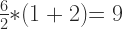
Using scientific and engineering style guide rules, the equation is understood as:

These two equations are markedly different both in their appearance, but also in how they are solved. Under PEMDAS styling, the answer is clearly 9. Under scientific styling the answer is obviously 1.
The question is, why are there two different style guides here?
Two Style Guides?
PEMDAS (et al) is a rudimentary style guide intended to teach grade school children mathematic basics. PEMDAS is not intended to carry the child’s mathematical knowledge all the way through their life. Think of PEMDAS like a set of training wheels on your bike. The training wheels keep you upright to get the hang of balancing on your bike. Once you’ve mastered the art of balancing, the training wheels are removed.
PEMDAS is simply a set of training wheels that eventually need to be removed.
To be perfectly fair, PEMDAS should really be written as 

This updated 4 component notation means MD are at the same level and equal priority, but evaluated in order left to right. AS follows the same logic as MD, but only after MD have been resolved.
The difficulty with PEMDAS is that it was designed to be used by students NOT working with either multiplication by juxtaposition (implied multiplication — an algebra concept) or by using a slash (/) in place of the division (÷) symbol (also an algebra concept). PEMDAS expects the primary four simple operators to be explicitly used: + – ÷ x. PEMDAS breaks down when advanced operators are used because PEMDAS has no proper solution when these advanced mathematical concepts are included.
The reason for these existence of these two style guides goes back to the history of order of operations, long before even PEMDAS was coined. Most engineering and mathematics texts define that multiplication by juxtaposition is to be handled BEFORE division. In PEMDAS terms, that means the acronym becomes 
instead of the PEMDAS understanding as
What does the division symbol ÷ mean exactly?
If you look at the ÷ symbol, it has a dot on the top and a dot on the bottom. As an abstract visual, it means “divide by”. As a literal symbol, it means move the left argument to the numerator and the right argument to the denominator. This turns 6 ÷ 2 into 

The ÷ symbol also has a sibling, the forward slash (/). This slash symbol can be used as a drop-in replacement for the ÷ symbol. When a slash is used, this then represents the two numbers as a sort of sideways or horizontal fraction, like 6/2. In STEM professional circles, both the ÷ and the x symbols are exchanged for alternatives when writing equations. Think of these changes as mature upgrades to mathematics. As we grow and learn, we adopt shortcuts which make life easier. In mathematics, juxtaposition and slash are two mature “shortcuts” in the way that equations get written. Instead of writing an equation as 6 ÷ 2(1+2), it would be written as 6/2(1+2) or if using TeX, it would appear more formally as 
Why are there TWO answers?
Good question. One that needs all of the above understanding to address. Style guides vary. The PEMDAS style guide given to early grade school students is intended to be used as a loose style guide only. Meaning, given our rudimentary understanding of mathematics at the time, PEMDAS is a helper tool that “guides” us in the right direction. PEMDAS isn’t an end-all be-all idea. It is simply a helper tool. If mathematical equations ended at the type given to us in grade school, PEMDAS is all that we would ever need.
However, moving into Algebra and higher mathematics like Trigonometry and Calculus, mathematical nomenclature must become more refined and mature… and so it does. In that goal, what PEMDAS taught us was basics. What we learn in advanced mathematics classes overrides what we learned with the basic PEMDAS logic.
Because math style guides acknowledge that there are more priority levels than the simple PEMDAS understands, our knowledge of PEMDAS must expand into that bigger understanding of more priority levels. We must take off the PEMDAS training wheels and let go of the past. We must acknowledge that there is more to mathematics than PEMDAS.
PEJMDAS is a good first step, but it doesn’t explain everything. For example, why does PEMDAS view the equation 6 ÷ 2(1+2) as 
The answer to this is really pretty simple. PEMDAS places ALL multiplication at the same level and priority as under the M. Because PEMDAS isn’t really aware of juxtaposition rules, it mistakenly moves even juxtaposed multiplication under M. PEMDAS then mistakenly turns the equation into
The problem is that PEMDAS is taught at a time in school when juxtaposed multiplication isn’t even a concept in mathematics. As a result of juxtapositioning not being understood at that moment in a student’s mathematical learning, the student would then assume, based on PEMDAS, that ALL multiplication must roll up under that M… that’s assuming the student even understands or had been previously explained about implied multiplication. Most students learning early mathematics would likely have to ask what 6 ÷ 2(1 + 2) means. More specifically, why is a 2 sitting directly next to the (1 + 2) parentheses without an operator symbol and also what it means in this equation? This is where juxtaposition multiplication would have to be explained to the student.
In reality, in many advanced academic mathematical style guides, something that a grade school student would not be aware of, these documents state that multiplication by juxtaposition must be calculated BEFORE division. With this academic rule in place, that changes 6 ÷ 2(1 + 2) into the more widely understood and accepted
Why is there even a question here?
Many insist that 9 is the correct answer. Yet, just as many insist that 1 is the correct answer. The disparity between these two camps comes because of one simple disagreement in math priority; a math priority that is defined by many academic and professional texts. Even many calculators have adopted this math priority rule as genuine and valid. The disparity whether multiplication by juxtaposition happens BEFORE division or whether it happens only when all general multiplication occurs in an equation is what gives rise to this equation’s dilemma.
When equations are not written in a left to right format, such as in
Why? Because many academic style guides adopt the rule that when using a slash (/) to describe division in an equation, equations like 6 / 2(1 + 2) become the same as
For example, 6 / 2 * (1 + 2) translates into 
Standards in Mathematics
What this article all boils down to is a failure to create a common ruleset of standards that everyone across all mathematical areas agree to. Thankfully, all areas of STEM professions agree by including style guide information when applicable. These style guide rules prevents confusion and misinterpretation on how to read and solve equations in a professional setting, such as in engineering, architecture and other critical areas.
What 6 ÷ 2(1+2) uncovers is the lack of generally agreed upon standards outside of professional environments. Grade school teachers and students believe that 9 is the correct answer because they’ve never been taught and have never used the style guides used by STEM professionals. On the flip side, STEM professionals don’t use PEMDAS as their leading style guide ever in their professional careers. Instead, because academia has defined specific priorities and rules regarding multiplication by juxtaposition, rules which many calculator manufacturers have adopted, this Facebook math problem only serves to uncover who was taught what.
Someone probably realized the disparity between the guide a STEM professional uses and the PEMDAS (et al) style guide(s) grade school teachers use. Then, this person decided to exploit this situation by creating this equation dilemma as a joke.
In reality, this equation only serves to show us all that consistent standards don’t exist even in mathematical circles. More than this, it shows that grade school math alone isn’t enough understand that there are two answers to this equation, with both answers being completely correct. In other words, this equation intentionally serves to disclose who follows PEMDAS and who follows more advanced mathematical style guides.
Calculator Dilemma
Some calculator manufacturers support PEMDAS, but many more support PEJMDAS as described above. As a result, unless you explicitly read the calculator user manual before you buy it, you may not understand why your calculator seems to be giving you the wrong results. In reality, it’s not giving you the wrong results. It’s giving you those results because of the disparity between the two differing style guides in use within different mathematical circles.
What does this all mean?
It means that there is no consistent teaching of the order of operations rules across all math classes across the globe. Because there are effectively two camps of people who were taught different orders of operation at differing priorities, your best bet is to write unambiguous math problems; problems that can’t have two potential answers. To do this, you’ll need to be aware of the above disparity in how order of operation is taught in mathematics in differing locations and under various instructors. Until you acknowledge that there is inconsistency in this area of mathematics, you can’t work around this problem.
The way to avoid such ambiguous problems as 6 ÷ 2(1 + 2), you can either write the problem more specifically like
If you are one of those stubborn folks who believes that there is and can only ever be once correct answer. Sorry to pop your bubble, but in this reality, there are technically two answers based entirely upon which style guide you adopt and/or which teacher taught you mathematics.
Are you a student?
A small disclaimer here for students. If you’re a student still in school reading this, know that there are two answers…. but also know that you need to follow your teacher’s lead. If your teacher is teaching you the “answer is 9” approach, always follow your teacher’s lead. The same goes for teachers who adopt “the answer is 1”. You want to get the best marks and that means catering to your math teacher’s approach. Know that there are two approaches that can work here, but don’t use the counter approach with your teacher unless you enjoy fighting with your teacher over your marks. As a general rule of thumb AND to make your school life a whole lot easier, always cater to your teacher’s wants, requests and whims to get the best marks and make them happy… even if you recognize those whims to be stupid.
As a student, be comfortable in your knowledge that you have recognized there are sometimes multiple ways of doing things. Know that there is absolutely nothing wrong in recognizing and booking this alternative knowledge. However, there is also no reason to fight with your instructors over knowing this information when it’s absolutely not necessary to get good marks in your class. Yes, you can be smart and know something your teacher may not. It’s also not necessary to pick a fight with your teacher over that knowledge. You never know how a teacher may respond when presented with information that’s contrary their lesson plans. You may find that many respond adversarially. It’s simpler to avoid this adversarial problem and go along with the lessons as written.
This is the trick to getting through school unscathed while also acknowledging the downsides and limitations of school curriculum. If you’re really interested in the above topic, wait until you’re in college to write and publish a paper on this very topic. Doing it this way, you can get college credit for disclosing such problems in your paper, but you can also get good grades from your teachers at the same time without being adversarial involving their teachings. Just make sure to write it for your English writing class and not as a paper for your math instructor, who might end up taking the paper far too personally or as an insult. It’s never a good idea to insult instructors, even if it’s through a well written, well researched paper.
Recap
To recap this article, the two answers for 6 ÷ 2(1 + 2) are 1 AND 9 respectively depending on which style guide you choose to adopt. Both style guides are entirely valid. Like map legends define what a map is telling you, a math style guide tells you how to solve any specific math problem.
If you are a student taking a mathematics class, only use the style guide your teacher permits. If you follow their style guide, you will always solve problems they give you with the correct answer. As for calculators, make sure the calculator you choose to buy also follows your instructor’s style guide. That means reading the calculator manual and, if possible testing the calculator. If the calculator doesn’t work as expected, return it for one that follows your teacher’s style guide.
↩︎


leave a comment