How to Overcome Apple’s Face ID Lockouts
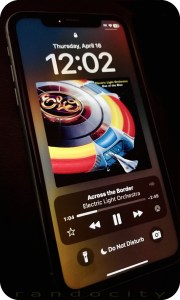 If you’re an Apple iPhone user, your phone likely utilizes Face ID biometrics to authenticate you and unlock your phone’s features. While this authentication system seems fine when it works, what happens when it fails? Not what you’d expect. Clearly, Apple didn’t think the failure design through. Let’s explore.
What is Face ID?
Face ID uses a series of hardware technologies including infrared, lidar and front facing cameras to scan your face and recognize you. It was touted by Apple as a better alternative to Touch ID, a fingerprint scanner, which was available on earlier iPhone models (and some current models too). Let’s just say that I prefer Touch ID over Face ID for various reasons, but I digress.
Face ID works fine under most circumstances, but there are conditions where Face ID could fail and prevent you from getting into your phone to perform critical diagnostic and/or troubleshooting features (or even backing it up onto your computer).
When you hold your phone to your face, the camera(s) scan your face for a number of key features which are then used to identify you no matter what angle or lighting (more or less) your face may be in. The reliability of this scanning technology is all dependent on the scanning hardware functioning 100% properly. We all know that hardware is prone to failure, either hard failure in the hardware itself or even soft failure by such things as poor lighting conditions, blocking the sensors or interference. Whatever the failure reason, Face ID has some important concerns and bugs that Apple needs to address.
Face ID Failure
This is the crux issue in Face ID that leads to all other related problems. Let’s begin with some relevant context. When you log into your favorite website or app, you’ll need credentials. Often, these consist of a username and password combination. There may be extended ways you can get authenticated beyond these two pieces of data, such as sending a one time SMS code, using an authenticator app, prompting you to press ‘accept’ in an app on another device or even using your voice, when calling into certain phone systems.
Typically, when one authentication type fails, developers offer one or more backup redundant authentication systems to help you get logged in. For example, if you’ve lost your password, sites allow you to reset your password. Resetting your password has you walk through various steps to identify that you own that account, usually by asking key questions like Name, Birth Date, Home Address or any other information that only you may know. You can often even call the support team at a website and ask them to help you get your password reset or cleared. These redundant designs prevent users from landing in dead end failures, as long as you have various other identifying data on hand to prove that you are you.
Not with Face ID… :(
Apple’s Bad Face ID Implementation
Apple created Face ID so that should Face ID fail to authenticate, it leads to a true dead end failure condition. There’s no additional way to authenticate with Face ID beyond that Face ID failure. When Face ID fails, it fails hard and it fails done. Even though the iPhone has the ability to access and request alternative identifying information, such a passcode, requesting and using your Apple ID credentials, requesting identity on other Apple devices and/or using an SMS code, NONE of these other authentication systems are used or available when Face ID fails! Nope. Apple just dead ends Face ID failures into nothingness. Face ID works or it doesn’t. When it doesn’t… yeah, here we open…
Pandora’s Box (aka Stolen Device Protection)
Apple Developers, in their infinite wisdom, have chosen to lock many critical troubleshooting and corrective features behind a successful Face ID verification. One might be thinking, “Well, that seems secure enough. So, what’s the problem?” Let me tell you.
One such feature locked behind Face ID verification is Device Protection under Face ID settings. If the Device Protection feature is toggled on, there are a number of things that Device Protection controls, including the ability (or not) to toggle Device Protection off. Another feature locked by Device Protection is the ability to use the Face ID Reset Data function, which becomes restricted and unusable when Face ID fails to verify.
This leads to a circular problem. Can’t verify with Face ID. Can’t reset Face ID’s biometric verification data to attempt to fix Face ID. Because the Reset Data function remains greyed out without a successful Face ID verification, you’re essentially locked out of the feature you need most to try to FIX Face ID. Not even Apple Support or the Apple Store can help you solve this dilemma.
Other critical features like a local Device Reset or a local Device Wipe are also locked behind Face ID when Device Protection is enabled. Once again, critical troubleshooting and corrective steps are eliminated simply because Face ID fails to verify.
How might this impact you?
There are a number of scenarios where Face ID failing to authenticate your face may affect you:
- You cannot attempt to fix Face ID if Device Protection is enabled and Face ID fails to authenticate.
- You cannot reset the device locally because Face ID fails to authenticate.
- You cannot wipe the device to factory settings because Face ID fails to authenticate.
- You can’t use many apps that rely on Face ID to authenticate you when Face ID fails.
And no, the passcode doesn’t help you here and neither does your Apple ID password. If you receive a used iPhone from a family member (or even from a used phone seller) and you want to wipe it and set it up new for yourself, you cannot do this. When Face ID was originally enabled, that means the phone will need to see the original owner’s face to unlock Face ID to enable a local factory reset and wipe options in settings.
This is particularly problematic when the device is shipped cross country and the Face ID person is not in close proximity. To solve, this means shipping the device back to the person, having them perform the wipe and then having the device shipped back. Let me just say here that SHIPPING IS EXPENSIVE! Best to avoid this back and forth shipping.
The unnecessary shipping can be avoided in used phone purchases if the seller fully wipes the device to factory defaults before shipping. However with family members, they often simply turn old phones off and forget about them. Then hand them over just as they are to other family members, leaving situations like the above.
But Wait, There’s More!!!
Apple does offer a feature that’s fairly sledge-hammery, but this feature will let you at least get the phone out of your Apple ID account as long as you own more than one iOS or MacOS device and the device exists in the “Find My” app OR you have a computer with a browser and can log into the iCloud.com website. The “Find My” app offers a critical security feature that allows you to remotely wipe your Apple devices to factory defaults, even if the device is not currently in your possession. The device will, however, need to be connected to the Internet to receive and perform the request. If the device is in your possession, there’s no problem at all. If it’s lost or stolen, it all depends on timing. If you can see the device is active and pinging in the “Find My” app, then you can wipe it.
When you buy a new iPhone, the first time you connect it to your Apple ID, this action automatically enrolls the device in the “Find My” app for tracking. You don’t need to manually add devices to this app. Apple often makes these things simple and easy for new users. This is one of those apps that “just works.”
The good thing about the “Find My” app wipe is that because it’s a remote wipe using another device on your Apple ID (usually performed because a device is lost or stolen, but can be used for other purposes), this remote wipe works around all security on the device itself, including Face ID. Meaning, no matter what security settings you have set up on the device, the remote wipe will do its thing without needing to touch the device at all.
There are some important things to consider about using “Find My” app to wipe your device, though. This wipe does as it sounds. It wipes all settings, data and information from the specific device. If you have photos or videos on the device, these will be wiped. The wipe feature erases everything back to factory defaults with the exception of ONE critical thing.
The wiped device will be placed into an Activation Lock (Cloud Locked) status. This means that in order to reactivate and use the device again, the original owner must type in their Apple ID credentials (login and password) to unlock the device for reuse. Once that’s done, the device is basically as if it’s brand new and is available to be set up again as though it were a new phone.
There are a few downsides, though. The wipe is just wee bit sledge-hammery when all you’re needing to do is something simple, like clearing out Face ID data. Because the “Find My” app lists ALL of your devices in a single convenient location, you will need to make absolutely sure that you have selected the correct device BEFORE sending out the wipe instruction. Don’t make a mistake here! Choosing the wrong device name means it will wipe that device instead. Make sure you name your devices properly for easy identification and double check that you’ve selected the correct device! You don’t want to wipe you or your spouse’s current phone accidentally. Caution is in order here.
However, the “Find My” wiping feature does mean that you can at least get your iPhone back into a workable state to begin setting it up again. If your phone has been backed up recently, then you won’t really lose all that much other than the time it takes wipe and restore the phone from your most recent backup, assuming you can get the phone back or you have it in your possession. You are backing up your phone’s data regularly, right?
How to Send a Remote Wipe Request to an iPhone
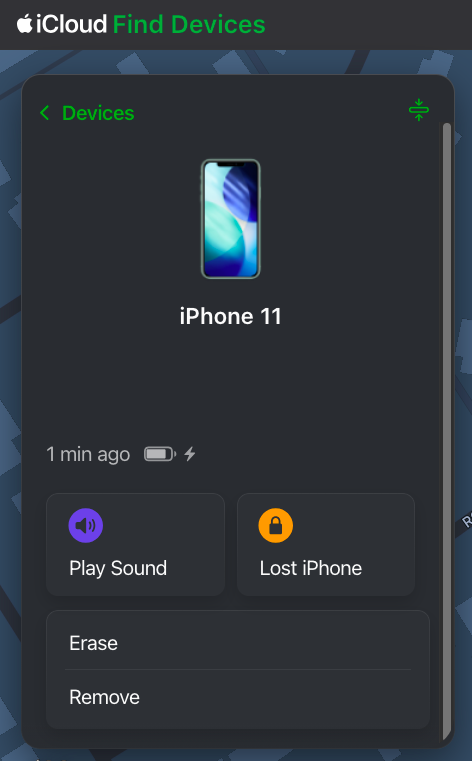 To wipe a device remotely using “Find My”, you will need to log into the “Find My” app on a different device under the Apple ID where that device is associated. You can do this on an iPad, iPhone, MacBook or via iCloud.com in a web browser. You don’t necessarily need to have another Apple device, but you will need access to a computer or phone with Internet access and a web browser to log into iCloud.com using the Apple ID credentials associated with the iPhone. For this purposes of this article, iCloud.com is used to show how to find and use the “Find My” feature. These options are also available in the “Find My” app on iOS devices.
Since iCloud.com is a website, it’s possible Apple may redesign this website from time to time. That means that the image shown here in this article may change. The “Find My” feature may remain available, but may be located in a different place and/or may present with a different user interface. If the user interface is different from what’s shown here, you will need to look for the “Find My” app in iCloud, open it and then determine how to get to and use the described features.
After logging into iCloud.com using the correct credentials, scroll down to the bottom of the page and you will see an array of available apps. One of the apps is “Find My”. Click it to open up the “Find My” app.
Once you have opened the “Find My” app, you will be given a number of options for each device when selected, including Play Sound, Lost Phone, Erase and Remove, at least for an iPhone. Different devices may be given more or less options, depending on the device type. The “Find My” web app may update a bit more slowly than the app available on an iPhone, iPad or Mac. You may need to wait a few minutes for the “Find My” web version to refresh fully for all of your devices to show active and online. You will be unable to send any remote commands to a device until that device is shown as online.
Once you have selected the device and opened it up, it will show you a control panel like the one shown above. The Erase option is the option you will need to remotely wipe the device. Again, make sure you have selected the correct device. I’d suggest playing a tone on the device using the “Find My” app to ensure that the correct device is chosen. However, if you’re erasing a device that is not in your possession (i.e., it’s stolen), don’t play a tone. You don’t want to alert the thieves that you’re looking at the device. In a stolen device case, check to see where the device is in the world on the map. If it’s not where you expect it to be, then you’ve selected the correct device for a wipe.
If you’re trying to solve the issue presented above and you have the device in your hand (or another person has it in their hand while you talk to them), play a tone to confirm the correct device. Once confirmed, send the erase command to the phone. If another person has the device in their hand, make sure they are talking to you on a separate device from the one that is about to be wiped. Once you send the wipe command, the phone will stop functioning. They will need to be on a different device talking to you for the duration of the wipe.
Remote Erasure — How does it work?
Once the Erase command is successfully sent to the device, the phone will immediately begin requesting to enter passwords with various popups. These popups indicate the command has been received by the phone. Ignore the popups and do nothing about them, though. At this point, the phone will need to be turned off and turned back on. Once the phone has been rebooted, the wipe will begin. The iPhone screen will turn black, a white Apple logo will appear and a small progress bar will appear just below the Apple logo.
The phone may reboot a couple of times during this wipe process, each with progress bars. Once the wipe process has completed, the device will go into Activation Lock (Cloud Locked) mode. When the phone is powered on after the wipe has completed, the phone may require setting up WiFi access before moving forward. However, at some point, you will be prompted to enter the Apple ID and Password of the person who originally owned the phone. This is a Cloud Lock. Entering these credentials will remove the Cloud Lock status and put the phone into a factory default setup mode to begin setting the phone up as if it were brand new. Once the Cloud Lock status has been removed, the phone is no longer associated with the Cloud Locked Apple credentials in any way.
Stolen Device Protection vs Cloud Locking
Here’s just a little bit of commentary about the Stolen Device Protection feature itself. I’m not exactly sure what Face ID’s Device Protection feature is actually trying to solve, honestly. Apple has already previously developed Cloud Locking. The Cloud Lock system is an effective deterrent for theft or loss. Should someone manage to get past the passcode and into your iPhone, they can’t wipe your device because the wipe process requires logging out of iCloud using the user’s Apple ID credentials and password. The wipe will stop and fail if the correct credentials are not input during the wipe process.
Unfortunately, Apple has taken this wiping problem one step further with Face ID’s Stolen Device Protection. With Device Protection enabled, not only do you still need to enter your Apple ID credentials during portions of the wipe to take it out of iCloud, but Face ID must function to even begin the wiping process.
Again, because Face ID dead end fails, this can lead to the possibility of never being able to actually remove a device from your Apple account in the expected way, by wiping the phone on the phone. Maybe you bought a new iPhone because your Face ID system stopped recognizing you. That’s fine and all, but now you cannot remove that device from your Apple ID because Face ID prevents wiping the device from the device itself. Yeah, this is Apple not thinking things through.
That is, until or unless you realize that the “Find My” app allows for remote wiping your device(s), which does solve the above Face ID dilemma. Just be cautious when selecting a device to wipe. Don’t pick the wrong one.
Conclusion
So, yes, there you have it. There is definitely a bug in Apple’s Face ID authentication system that can prevent you from locally wiping or locally fixing your Apple device. An authentication bug that should be considered oversight by Apple’s developers. However, all it is not lost. Apple has provided us with a sledgehammer approach in the “Find My” app to workaround this bug, as long as you have other devices that can initiate the wipe inside of “Find My” and assuming that the “Find My” feature is working correctly on the remote device. Lots of things need to line up properly for the “Find My” device wipe to function.
If you have run into similar issues regarding Face ID failures, please sound off in the comments. If this article was helpful to you, please follow, like and leave a comment below.
↩︎
Fediverse Reactions
Randocity Tech Holiday Shopping Guide
 In the spirit of the upcoming holidays, I offer the Randocity Tech Holiday Shopping Guide otherwise known as the How-to-avoid-technology-pitfalls Guide. Let’s explore.
Purpose
The purpose of this guide is two-fold. First, it’s designed to help you choose various electronics and video game gifts. Second, it’s design to keep you from falling into pitfalls with said gift purchases, to help minimize returns / exchanges by selecting an incompatible item and to help avoid making you look like you don’t know what you’re buying.
Let’s get started…
Xbox One Wired Microphone + Headset
Here’s one gift where you might think it would be easy to locate a functional item. Thanks to Microsoft, you would be incorrect.
🛑 Pitfall: Even though the Xbox One does have a 3.5mm jack on the controller, it only accepts certain compatible chat headphone accessories. If you’re planning on buying a chat headset for someone with an Xbox One, you should check the box for the words Universal, Xbox One and/or Samsung / Android compatibility. The problem… The Xbox One is only compatible with headsets wired for use on Samsung / Android devices or devices specifically labeled compatible with the Xbox one.
👎 This means you cannot buy any Apple compatible headphones with a 3.5mm jack and have the microphone work. The stereo output will work, but the microphone will not. If you’re unsure of the compatibility of the headset, ask the store, search the manufacturer’s web site or find another brand.
✅ Instead, look for and purchase wired headsets that list Samsung, Android, Xbox One or Universal on the box only.
🔥 Note that it is getting more difficult to find boxes labeled for Android or Samsung as most Android devices understand this incompatibility and have built their latest devices to support either headphone type. This has caused more confusion rather than helping solve the problem.
👍 Gaming headsets change yearly and offering a specific recommendation means this advice will be out of date by this time next year. I will say, Turtle Beach quality isn’t great so steer clear of this brand. If you stick with Sony branded headsets for the PS4, you should be good there. Microsoft doesn’t make high quality headsets, so you’ll have to buy from third parties for the Xbox One. I personally have a Plantronics RIG 500 Pro HC and can recommend this as a good basic quality headset. The fidelity is decent, but not perfect. Some reviewers of this headset have complained of the microphone breaking quickly.
PS4 or Xbox One Wireless Chat Headsets
Here’s another gift idea like the above, but it too has a big pitfall. I’ll break it out by console version.
🛑PS4 Pitfall: While the PS4 does have Bluetooth capabilities, it doesn’t support the AVRCP or A2DP profiles. Instead, the PS4 only supports the HSP (HeadSet Profile). This profile is a lesser used profile throughout the industry and it doesn’t support the same quality stereo output as AVRCP and A2DP. For this reason, you can’t go and buy just any Bluetooth chat headset and assume it will work. For example, the Apple Airpods do not work on the PS4. Randocity recommends not even looking at Bluetooth headphones for the PS4 as greater than 97% of them won’t work.
✅ Instead, you’ll need to buy headphones specifically designed for the PS4, and these typically come with a dongle for Wireless. For example, Sony’s Gold Wireless headphones. There are other brands from which to choose, but be sure that the box is labeled with either PS4 or Universal console compatibility.
🛑Xbox One Pitfall: The Xbox One doesn’t support Bluetooth at all. This makes it a little bit easier when gift shopping in that you can entirely avoid looking at Bluetooth headphones at all.
✅ Instead, you’ll want to look for wireless chat headphone boxes that have either Universal and/or Xbox One printed on it. As long as you make sure to look for this printing on the box, then this headphone will work.
🔥 Many places don’t allow you to listen to a gaming headset’s sound quality. You’ll have to buy the headset untried. Whether any specific headphone sounds good, that’s a personal preference. You can’t take into account your gift recipient’s personal tastes in how they like their headphones to sound. However, if you avoid buying headphones priced below $40, the headphones should provide fair to good sound quality. Below the $100 price point, don’t expect those deep rich bass drivers, though. Though, headphone drivers have drastically improved in recent years and the sub $100 price point tends to be much better quality than what you would have found in the early 00s and 90s.
👍 Randocity recommends a visit your local Best Buy or Gamestop or even Amazon and see which wireless gaming headphones are on sale. I might suggest a gift card which avoids the situation and lets the gamer pick their own brand.
Video Game Controller for iPad or iPhone
Here’s another area that would seem easy, but it isn’t. Apple requires a specific hardware certification for all game controllers called MFi. This makes it a little more tricky to find a controller that works.
🛑 Pitfall: There are many game controllers on the market including Microsoft’s Xbox One controller, PlayStation 4’s DualShock controller and even Nintendo’s Pro controller. Don’t be fooled into thinking you can get these to work. Even though all of the aforementioned controllers are Bluetooth, that doesn’t mean they’ll work on the iPad. None of them have the MFi certification. Avoid buying one of these “other” controllers as you cannot get it to work.
✅ Instead, look for and buy only MFi certified controllers, such as the SteelSeries Nimbus controller. Not only does this controller charge using a Lightning cable, it is fully compatible with all Apple devices including the iPhone, iPad, Apple TV and even MacOS.
👍 Randocity recommends the SteelSeries Nimbus controller for Apple devices as it feels the most like a PS4 or Xbox Controller.
Newest iPad and Headphones
With the introduction of the latest iPad using USB-C, this throws yet another dilemma into the works for gift purchasing. This problem also underscores why Apple should never have removed the headphone jack from its devices.
🛑 Pitfall: With the introduction of the current home-buttonless iPad, you’ll also find the unwelcome surprise of a USB-C charging port. This means that any Apple headphones (other than the Airpods) won’t work on this newest iPad. To use either a pair of Lightning or 3.5mm jack headphones, you’ll need an adapter.
✅ Instead, pick up a pair of Bluetooth headphones which will remain compatible with all Apple devices going forward.
🔥 Apple insists on changing its port standards regularly. As a result, you should not buy into any specialty jack wired Apple headphones. If you want to buy any wired headphones, buy the 3.5mm jack version and eventually Apple will create an adapter to its newest port. Since every other device on the planet still supports a 3.5mm jack, you can use these headphones on every other device. Buying Lightning or USB-C headphones means you’ll be extremely limited on where those can be used… and when Apple decides to change its port again, those USB-C or Lightning headphones will be useless.
👍 Randocity recommends gifting Apple Airpods for Apple devices. Not only do they sound great, they’re easy to use (mostly) and they’ll remain compatible with future Apple devices… unless, of course, Bluetooth is replaced with a wireless protocol of Apple’s design. The Bluetooth Airpods are also fully compatible with many other Bluetooth devices, including the Amazon Echo. Skip the wires, the hassle and the expensive dongles and go wireless with Apple devices.
DVD, Blu-ray and UltraHD 4K Blu-ray
I find it funny that we still have so many optical disc entertainment formats. DVD as a format was introduced in the late 90s and has survived for so many years. Yet, we also now have Blu-ray and UltraHD Blu-ray.
🛑 Pitfall: Be sure to read the disk case carefully. Even though DVD is typically sold in a different sized case, packaging standards in movie entertainment are loose at best. Be sure to read the package carefully so you are getting the disc you think you are getting. For example, both UltraHD 4K Blu-ray case packages and DVD use black plastic cases. If you’re eyeing the case strictly by color, you could accidentally pick up an UltraHD version of the movie when you wanted the DVD version.
✅ Choose the best format that can be played by your gift receiver’s equipment.
🔥 During the Holiday season, particularly on Black Friday weekend, you’ll find all sorts of content on Doorbusters. Take advantage, but be careful to read the packaging. You don’t want your gift receiver to be surprised that you bough them a Blu-ray when they only have DVD or that you bought them an UltraHD 4K Blu-ray when they only have Blu-ray. Be a careful shopper and read the box and also know what your gift receiver has.
It’s likewise just as bad if you buy a DVD for someone who has an UltraHD 4K TV and Blu-ray player. They won’t want to watch your DVD and will return it for credit towards something else.
Additionally, if you give a DVD or Blu-ray, you may find that they have access to Amazon Prime, Hulu or Netflix. They might already have access to the film or have already watched. So, be cautious.
👍 I’d recommend a gift card intended towards the purchase of a movie. This allows the recipient to buy whatever film they want in whatever format they have. Though, you’ll want to go look up the film and determine its price, then give a gift card that covers that purchase price.
Video Games
Here’s another one you might think can be an easy gift. Unfortunately, it isn’t.
🛑 Pitfall: Video games are very much personal to the gamer. Because there are so many genres and types of games, it can be impossible to choose a game that not only does the gamer not already have, but impossible to choose a game they might actually like.
✅ Instead, because most games are $60, you’ll be safe to give a gift card in the amount of $60 to cover the purchase of the game.
🔥 If your recipient is an adult, the purchase of any game shouldn’t be a problem. However, if your recipient is a minor, then you’ll want to give a gift card to avoid any ESRB rating or content issues that a parent might not want within the game. Avoid becoming “that aunt” or “that uncle” by buying an inappropriate game for a minor. Because video games are a personal taste situation, buying any game blind could end up with a return. I do realize that gift cards are an impersonal gift, but in some situations like video games, it is well worth it to play it safe.
👍 Randocity recommends buying gift cards over buying physical game copies, particularly for minors. If you happen to have a specific game request by the receiver and the parent has approved the game, then by all means buy it. If you’re simply shopping blind, then a gift card is Randocity’s recommendation to avoid this pitfall.
Giving the Gift of Music
Here’s another one that should be easy, but it isn’t. If you’re thinking of buying CDs for your tech savvy friend, you might want to ask some questions first.
🛑 Pitfall: Because of music services like Apple Music and Amazon Unlimited where you get access to nearly Amazon and Apple’s full music catalog, subscribers no longer need to buy CDs. As long as they remain subscribers of these music services, they now have instant access to the most recent music the day of its release.
✅ Instead, it might be wise to avoid this type of content purchase, particularly if you know the person is affluent and a music buff.
🔥 Be careful and ask questions if you’re thinking of gifting a CD. If they have access to Apple Music, Spotify or Amazon Unlimited, buying them a CD may result in a return.
👍 Randocity recommends giving gift cards to iTunes or Amazon instead of buying a specific CD. If you give a gift card, they can apply the amount towards their membership or whatever other merchandise or music they wish. This avoids the awkward look you might get once you find out they already subscribe to Apple Music.
Giving the Gift of an Apple Watch
Thinking of giving someone an Apple Watch for the the holidays? You need to understand the pitfall here.
🛑 Pitfall: An Apple Watch is entirely dependent on an iPhone to function. In order to even get the Apple Watch setup and working as a watch, it must be configured using an iPhone. Further, because the Apple watch only pairs with an iPhone, don’t give it to someone who only has an iPad, iPod touch or iPhone 4 or below. It won’t work. It also won’t work for someone who owns an Android phone.
✅ Instead, if you’re not sure if your gift recipient has an iPhone that will work, I’d suggest getting them a different watch. If the person owns an Android, you’ll want to choose one of the Android watches instead. The Apple Watch doesn’t work at all with Android.
🔥 If you do decide to chance that they own an iPhone, be sure to give them a gift receipt as they may need to return it if they don’t have one.
👎 Randocity recommends avoiding the purchase of an Apple Watch as a gift, particularly if you know the person doesn’t have an iPhone or has an Android phone. This is a particularly tricky gift item and is likely to end up returned if the person doesn’t have an iPhone. If you know the person doesn’t have an iPhone, then you’ll need to gift them both an iPhone and an Apple Watch… which is a whole lot more expensive of a gift than you might have expected to give. For this reason, I thumbs down 👎 giving the Apple Watch as a blind gift. If you are absolutely 100% certain the person you are giving the Apple Watch to has an iPhone, then go for it.
Gift Receipts
👍 Randocity always recommends asking the store for a gift receipt. Then, include it with any gift you give. This allows the recipient to trade it in should they happen to get two copies of the same item.
Happy Holidays!
↩︎
Rebuttal to Jack Dorsey’s Women in Tech
Twitter co-founder Jack Dorsey recently offered up some thoughts on women in tech. Or, more specifically, about there not being enough women in tech. I’m happy he’s bringing up the topic, but unfortunately, he hasn’t brought up the whole topic that needs to be addressed. With plenty of personal experience under may own belt in the professional world, having worked in tech since 1991 and with first hand experience working with many women along the way, here are some observations about women working in tech. Let’s explore.
Young Women and First Jobs
As women in their 20s and 30s seek their first, second and third jobs, they also seek something else to fulfill their lives: love, a relationship, a partner, marriage and kids. There’s nothing wrong at all with seeking to have a family. There’s nothing wrong with getting married. There’s also nothing wrong with getting a job. I’m all for having both a career and a family. But…
Jobs and Family
There is something wrong with getting a job just to support your maternity goals. I call that scheming. And, of that, I do not approve. If you are intent hiring onto a job, you need to plan to be there at least 1-2 years (preferably longer) before ever considering having a baby. Yes, I realize biological clocks are ticking, but if that’s your primary concern and not your employment, you shouldn’t be working at all.
So comes one primary issue with women in tech and this situation becomes painfully obvious when specifically hiring women who’ve never had a child. This specific problem typically manifests at the most inopportune time, usually when they are a valued and relied on team member…. and then they get pregnant. When the baby is due, that leaves a hole in the team for at least 3-6 months while she goes on maternity leave and has no contact and does no work. Worse, it leaves the company obligated to hold that position open unfilled while she’s on leave which ultimately makes the situation even worse for the remaining team members.
Unfair to those who still have passion for tech
This is a completely unfair situation to the team who still has their jobs to get done during her maternity period, but now that team is forced to function with one member less. It also makes it doubly more difficult if that person happened to be a significant contributor. It also means that now-on-maternity co-worker, who may have been a star producer, is now a zero producer during maternity leave.
Career or Family
I have no qualms with women wanting to have children, but I would expect them to also use some professional and common courtesy. Don’t sign onto a job and then 9 months later leave the rest of your team in the lurch while you’re off having child for 3-6 months. I find this behavior completely ludicrous, yet it is fully tolerated. In fact, the laws mandate that it be tolerated by the company. This behavior wouldn’t be tolerated at all out of a man, yet women get special dispensation in this area. If you already know you are planning to have a child, don’t join onto a job simply to ‘take advantage’ of the maternity perk 9 months later. While the laws force businesses to support maternity leave, it also leaves that team off balance until she gets back. So then, it’s no wonder that there are women who come back only to find they’ve now been moved into a role that doesn’t matter. Not to mention, being gone for 3-6 months requires the returning team member to spend another month catching back up on all of the new projects and the work that they missed. It’s like hiring the position all over again. Tech moves far too fast to support that long of an absence away from a company.
Firsthand experience
In this, I have personally witnessed a woman who went from being a star code producer, to getting pregnant and going on maternity leave (a zero producer). When she returned, her attitude had completely changed and she was no longer that star producer. On top of her lack of passion, she set off a series of unreasonable demands for extra time off to tend to both of her children, higher pay, working remotely and after not producing for several months, was ultimately fired. This isn’t really because of the baby more than because of her views on work-life balance. Instead of having passion for and focusing on the work, she chose instead to focus on child and family instead of work. The tech job then becomes secondary and the star player who used to do whatever it took to get something done at work becomes an average to low producer, working only 8 hour days (or less), doing the minimum and taking more time off to tend to family matters. And again, leaving the team in the lurch to find a new star player. It happens far too often than not. While this can happen with men and family, it happens far less often with men than with women.
[Update: 12/17/2014] I have just had this same exact experience described above a second time. Another co-worker recently had a child. Her second child. She took approximately 6-8 weeks time off for her maternity leave. When she returned, a week later than when she said she would return, she worked at the office for 2 weeks. She then suddenly needed a month off to return to her home country for a family crisis. She was again gone for another month. When she returned this second time, it was obvious her work ethic had substantially changed and it was inevitable that she would request yet more time off. She asked for four additional months off. Her manager didn’t allow it which left her to make a choice. Stay on and do the work she was hired to do or leave the company. She opted to leave. This is apparently an all-too-common thread among some mothers. It seems that this is especially true of mothers with two small children at home. This is the almost the identical scenario that played out in the first example above.
It’s clear, having children and hiring female tech workers don’t mix. Any hiring manager who chooses to hire a female tech worker must weigh these risks. If you’re looking for someone who has long term staying potential with the company, hire a male. If you wish to hire a female to be long term, you should hire females beyond their child bearing years or who have already had all the children they plan to have. Hiring a female who is still in the getting married-having child phase, you’re opening yourself up to scenarios exactly like the above, ultimately letting that person go and leaving a new hiring hole to be filled. A hiring hole, that I might add, that may take months to fill.
Courtesy first
As a comment about society in general, values have changed, manners have been lost and far too many people have lost any idea of professional and common courtesy for their fellow man especially when it comes to the workplace. For many people, it’s now only about what the company can do for them, not about what they are doing for (or to) the company. Courtesy and manners have been lost and devices like cellphones prove that fact out. I digress.
For these reasons, I encourage any woman who is contemplating having a child (or who is already pregnant) to remain out of the tech workforce until your baby days are behind you, you have your tech career passion back and you have your work and career priorities straight. Let your husband carry the maternity expense on his company’s health plan. If, as a woman, you want to have a long career in tech, and specifically you like the position you are currently holding and wish to have longevity in that job, you need to rethink any baby decision you may be contemplating. Once you’re pregnant, it’s too late to be thinking about your career.
Yes, I understand why women use maternity leave in companies in the way that they do, at the same time it also makes those who are active contributing team members resent you during that long absence and for your lack of work passion when you return. While your team is generally happy that you had a baby, the reality is your team doesn’t care that you now have a family. Your co-workers only care that you get your job done timely, that you do it well and that you continue to do it well after you return from your maternity leave.
Loss of Passion
Having a baby is stressful and time consuming. We get that. You need to change diapers, feed and clothe the baby, cuddle it, nurse it, keep it healthy and do all the right things to make your baby happy and grow into a toddler, child, young adult and ultimately an adult. We get all of that. However, at a workplace, that’s not anyone’s problem but your own. And, you need to leave that at home. Unfortunately, having a child is a huge time commitment that isn’t to be taken lightly. Yet, many women jump into it not realizing how much time, energy and money is drained by being a parent. Additionally, we also get that you want to spend as much time with your child as possible. But, that leaves less time for giving passion to your job at work.
Passion requires focus. Worrying about whether your baby is doing well, is being properly cared for, etc, diverts attention away from focusing on the tech job whether that be writing code or managing systems. Focus is important to do a job well, do it correctly and remain attentive to details. Diversions easily cause loss of focus and loss of details.
Split Attentions
Unfortunately, there are many women are not good at a split focus situation. And, something usually gives. When the choice has to be made, it is usually home and family life which is given preference. This clearly becomes evident when projects are delayed, work isn’t getting done timely, pieces of projects are being held open or other people have to do your work because you are at home dealing with home and family issues. As I said, the star player who was previously dedicated to work and getting things done amazingly well is now focused on continually wondering if little baby fell down and got bruised. While that is important as a parent, it’s not important to getting work done.
Laws have forced companies into keeping returning mothers on board when they are no longer the contributor they once were (at least to a point). However, don’t expect to come back from maternity leave and have everything exactly as it was. That won’t happen. Projects move on, managers change, people reorganize and the company changes. Oh, your payroll job will be there as mandated by law, but the job you’d hired into may not. You may find that you’ve been put into a role that has nothing to do with why you were hired. That’s what can happen when you have an extended absence. Time and work marches on with or without you.
High tech and after hour requirements
Let’s just get right down to the heart of the matter. As a member of a high tech profession, one thing you will quickly realize is how much extra time, effort and stress is involved. And, I’m not talking about the 9-5 hours. I’m talking about what happens outside of that. If you write code and that code breaks, you need to expect to be called looking for a fix at any time of the day or night. You are expected to drop whatever it is you are doing, including sleeping, open your computer and look for a fix. It could be 2PM or 2AM.
Now consider being a mom with a newborn. If your baby is continually waking up all hours of the night and you get called to fix your code, what are you going to do and how will you respond? Additionally, when on conference calls under a ‘fix it’ situation, the rest of your team really doesn’t want to hear your newborn burst into the cry song the entire conference call, nor do we want you to leave the call every 2 minutes to attend to your baby. Split attentions don’t work in these situations.
I know this may seem heartless, but business marches on and the company needs undivided attention from team members to solve problems quickly. Just think of this section as your wakeup call to reality. Having babies and being in high tech don’t mix. They both require similar hours and similar attentions, but you’re one person and can only divide your attentions so far. For this reason, you need to fully grasp what it takes to write code for a service that’s 24/7 always on. And, you need to grasp what’s most important, your career or your family. If you answer family, you need to find a job that is not in a high tech startup. You need to find a job where you aren’t required to be on-call to fix your code. You need to find a job where you can stroll in at 9 and stroll out at 5 (or whatever 8 hour period works within your day care requirements) and forget your job until 9 the next day.
Hiring into a high tech job won’t be a long term career goal for you unless you are 100% committed to the job and you are willing to let someone else manage your home and family (like dad or a nanny).
Non-performers and tech
There is no real resolution to this problem from an HR perspective. HR is simply required to comply with all laws. However, that doesn’t mean that every company will tolerate lack of work ethic when a woman gets back from maternity leave. Some companies are very stringent towards non-performers and get rid of them quickly. If you are contemplating working in a tech career, you need to find out what that company’s stance is on non-performers. Some companies are willing to pay very high salaries, but only to the best performers. Anyone not performing sees the door and quickly. You also need to evaluate your own personal views on having a baby. If you think your own views will sway towards family once the baby is born, you should not hire onto a job in high tech which demands tons more time and attention than you may be able to give once your baby is born. You should, instead, look for a job role that is already 9 to 5, limits after hour requirements and doesn’t require staying late.
Career Goals
It makes no sense to commit to a 9 month stint at a high tech company strictly so you can have a baby, which may ultimately end your career in high tech. Placing yourself into this position with a company and your co-workers, you are doing a disservice to yourself, your co-workers, the company and your professional career. It also means you may have to put a firing on your resume. This is never a good thing for a resume. Do yourself a favor and properly plan your career and look for jobs that work on concert with your family goals.


1 comment