Game Review: Assassin’s Creed Syndicate
Warning: This review may contain spoilers. If you want to play this game through, you should stop reading now.
 While Ubisoft got some parts of this game right, they got a lot of the parts very very wrong. And, this game cheats, badly. Let’s explore.
The Good
As with most Assassin’s Creed games, Syndicate is filled with lots of very compelling gameplay in its open world environment. The stories are decent, but short and the assassinations make it feel like Assassin’s Creed I (mostly). They’ve done well to bring back a lot of what made Assassin’s Creed I fun. Unfortunately, there’s also a whole lot of bad go with that fun. And, if you’re sneaky enough, you get the chance to use cover assassinations, air assassinations and haystack assassinations with much more regularity. Unfortunately, this game is about equally outweighed by the bad and the ugly.
The Bad
Controls
As with every single Assassin’s Creed game, the controls get harder and harder to work as the game progresses. And by harder and harder, I mean the designers require much more fine grained control over button presses or else you miss the opportunity to do whatever it is they have you doing. This usually means you miss your opportunity do take down an enemy, you fall off of a building, you can’t escape a fight or whatever.
For example, a person steals something and you have to tackle the thief. Unfortunately, as you happen to be running after the thief, if you also happen to straddle along side a carriage, the carriage will usurp the tackle button and you’ll end up stealing a carriage (all the while letting the thief get away). The really bad part is that you cannot break out of the carriage stealing maneuver and attempt to continue on with the thief chase. Oh no, you have to watch the entire motion capture playback from beginning to end all while your thief you were inches away from tackling runs away.
As another example, there are times where you begin a fight and a ton of enemies surround you. Then, one of them takes a swing and practically knocks you out with one blow. You don’t even get enough time to press the medicine button before you’re dead or desynchronized.
On top of this, the game still does not tell you every side mission requirement in advance. You only find them out after you’ve failed them.
Zipline Gun
And this is not the only incident of these types of bad controls. Once you get the zipline gun, it’s handy to use for quick getaways to the top of a building. That is all except, when the designers prevent you from using it. And they do prevent its use intentionally in some areas. Meaning, you can stand in front of some buildings and the zipline control appears. In others, nothing. This is especially true in areas where you have to complete a mission. So, you’ll be down on the ground and spotted, the first thing to do is find a rooftop to zipline to the top. Unfortunately, you can’t in a lot of mission areas. In some you can, in others you can’t.
Ubisoft, if you’re going to give me the zipline gun, let us use it on any building of any size. Not just those you randomly allow. This is so frustrating.
Calling Attention
When you’re sneaking around as an assassin, the pedestrians around you are constantly saying things like, “I hope he knows he can be seen” and other stupid things. While it doesn’t bring attention from enemies, it’s just nonsensical and stupid. Most people would merely ignore someone doing something like skulking around. Worse, it’s not like we have control over day or night in this game. Clearly, for most of the work of an assassin, it should be done at night under the cover of darkness. Instead, you’re out doing this stuff at noon.
Syndicate
Syndicate? What syndicate? Sure, you have a gang that you can find and call together on the street, but you barely ever get to use them alone let alone on missions. You can rope in a few at a time, but it’s almost worthless. When you enter into any place, they only thing they end up doing is drawing attention to you. As an assassin, that’s the last thing you want. You want stealth kills, not big grandiose street kill events. This is not Street Fighter. Other than that, there is no other syndicate. It’s not like you can switch to and play Greenie, which would have been a cool thing. It’s not like there were other assassins roaming the city that join in on the cause. I was hoping the syndicate would have been a huge group of assassins who all band together to get something done. Nope.
Recognition
On some levels, you don’t get recognized quickly. On others, it’s almost instantaneous. It’s really frustrating that there is not one level of recognition that you get with this game. Instead, it’s random and haphazard based on the level designer’s whim.
The Ugly
Glitchy
While it may not be anywhere near as bad as Unity, it’s still bad enough that you have to start (and restart) missions over to complete them. I’ve had glitches which locked my character up in a move that I had to quit out of the game to stop. I’ve had glitches where Jacob falls off of a rooftop merely by standing there. I’ve had glitches where I stand inches from an enemy and don’t get the assassinate action. I can hang below windows with enemies standing in front of me with no assassinate action. I’ve fallen off of the zipline for no reason.
The controls get worse and worse as the game progresses, to the point that if you want to get anything done, you nearly can’t.
Cinematics you can’t abort
Throughout the game, you’ll find that when you click a button to enter a carriage or zipline to the top of the building, you cannot break out of that action until it’s fully complete. If you were trying to do something else and accidentally launched into one of these cinematics, you have to fully complete the action entirely before you get control back.
Character Levels
The introduction of character levels is just plain stupid. I understand why they are in the game, but the reality is, they make no sense. Fighting a level 9 versus a level 2 is not at all realistic. You don’t have levels in real life. You have people who are more skilled than others, but not levels. These enemies are no more skilled than any other. If I walk into an area, my level should not dictate how hard it is to kill an enemy. I should be able to perform moves on a level 2 or level 9 in the same way and take them down at the same rate. In fact, enemies shouldn’t even have levels.
Bosses & Gang Wars
As you complete a section of the city, it unlocks a gang war segment. So, your gang fights their gang. Except, it’s not really a gang war. Instead, it’s half a gang war. The first segment starts out as a gang war where your gang fights theirs and you get to participate. After that first segment is complete, you must fight 5 to 6 of their gang members alone (including the boss). That’s not exactly a gang war. That’s an unfair fight. Where is my 4 to 5 other gang members to help me out. If it’s a gang war, make it a gang war. If it’s to be a 1 on 1 fight then make it so. Ganging up 5 or 6 against 1 is not a gang war and is in no way fair. I know some gamers like beating these odds, but I find it contrived and stupid. If it’s supposed to be a gang war, make it a fight between gangs.
The only consolation is that the game gives you one shot at taking down the section boss right before the gang war. If you can manage to kill them then, you don’t have to do that segment during the gang war. Still, a gang war should be about gangs.
Desynchronization and Load Times
This is one of the most ugly parts of this game. If you fall off a building and die, you have to wait through an excruciatingly long load time. So long, in fact, you could go make yourself a cup of coffee and be back in time for it to finally load. I mean, this is a PS4 and the game is loaded on the hard drive. Yet, it still takes nearly 2-4 minutes just to reload a level? I’m amazed (not in a good way) at how long it takes to reload. Once the game finally does reload, it drops you off some distance away from where you were. This is also frustrating. Why can’t you drop my character exactly in the location or at least close enough that I don’t have to run a ton just to get back there.
Starrick Boss Level
This level is ultimately the most asinine fail level of the entire game. Once you finally find the shroud (which is the whole point to the present day piece of this game), the game should immediately stop and move to present day. No. Instead, you have to attempt to assassinate Starrick in one of THE most asinine levels I’ve ever played in a game.
Evie and Jacob, the two twins, have to be the two most stupid people on Earth. Otherwise, they would simply realize they could cut and drag that shroud off of him with a good cut of their knives and then stab him. No. Instead, you have to attempt to wear-him-down while wearing the shroud. As if that were possible with the supposed healing shroud. If it were truly as healing as it is shown to be, there would be no way to wear his health down ever. I’m not sure what the writers were thinking here, but this level is about as stupid as it gets.
Worse, there are times where Starrick gets these hammer-on-your-character-without-fighting-back segments. Starrick just punches your character and you just stand there taking it. Really? There’s no reason given for these segments. These just wear down your health without any method of fighting back, breaking out of it or countering it. Now that’s just plain out cheating from a game. There is absolutely no need for this part of the fight. When in real life would this ever happen? Like, never. It makes the ending twice as hard without any real payoff.
Either of the twins could cut and pull the shroud off of him. It’s very simple. Then just assassinate him like anyone else. Why is it that you must melee this guy to death? These are assassins who kill from the shadows or by using other stealth methods. Assassins are not street fighters. That the game turns AC into Street Fighter is just plain stupid. This is NOT WHY I BUY Assassin’s Creed games. If I wanted a fighting game, I’d go buy Mortal Kombat or Street Fighter. The game devs have lost it. Whomever thought it would be a great idea to end this Assassin’s Creed game by turning it into a stupid fighting game should leave the game development field and specifically be fired from Ubisoft. That person has no business making gaming choices for this (or any) game franchise.
Overall
I give this game 4.0 stars out of 10. It’s a reasonable effort in places, but it’s in no way innovative and the ending plain out sucks from so many perspectives. The zipline is cool, but it doesn’t really help you as much as it needs to. There’s way too much carriage driving. The boss levels are mostly okay up until Sequence 8 as a Street Fighter ending… especially considering that the ‘present day’ part only needed to confirm where the shroud was located. After locating the shroud, the game should have immediately transitioned to present day. There is absolutely no need to kill Starrick, especially in a Street Fighter way. These people are assassins, not fighters. Sure, they can fight, but this tag-team-switching-melee-brawl-that-only-intends-to-wear-down-health is just insanely stupid, especially considering just how quickly that fight would be over by cutting that shroud off of him. I don’t even know how many times either of the two of them had gotten close enough to yank that thing off of him. Yet, the game insists on throwing punches to bring him down.
Ultimately, it has an insanely stupid ending that is majorly out of character for a game franchise that deserves so much better and which offered so much promise. And, of course, where is the Syndicate in all of this melee stuff? Why is it the gang is not there? Instead, Starrick should have been killed by a standard overhead assassination by both of them simultaneously through instant decapitation. I’d have preferred if Greenie had been in on the action and then have all three of them take Starrick out. Even the most healing shroud in the world couldn’t heal a severed head… and it should have been done in one big maneuver by both or all three of the assassins at once. That would have been an ending befitting of the name Assassin’s Creed.
Recommendation: Rent
Rant Time: Event planning and food
In recent months, I’ve visited several corporate events. One thing I find that is becoming increasingly common place is the way food is being described at these events. Not only is this a disturbing trend, it’s amazingly discourteous to the attendees. Let’s explore.
Catered Events
If you’re an event planner and you put the word Dinner on your invitation, you need to serve an actual full sit down dinner meal. So, whether that’s catered from a buffet style table or directly from the kitchen of a restaurant using a menu, a full sit down meal is what your guests are expecting when you use the word Dinner. However, DO NOT use the word Dinner on your invitation and solely serve appetizers, finger foods and small plates. Unfortunately, this is becoming an all too disturbing trend in event planning.
Appetizers, Small Plates and Finger Foods
When guests attend your sponsored event at dinner time (6-10PM), you need to feed them some kind of meal… especially if they’re paying you for the event. There is nothing worse than showing up for an event only to find out that the food consists of small fried unhealthy average to low quality food. Your guests attend your event not only for whatever the event represents, they attend for the meal as well.
If you have no intention of supplying a meal and you only intend to supply small appetizer plates, then you need to let every guest know that in advance. Stating this on your event notification is sheer common courtesy. It might dissuade some attendees from attending by making this notification, but that’s better than having your guests walk in the middle of your event. Not only will they walk, they will never attend another one of your events due to your stunt. Tricking people into a Dinner only to serve them appetizers is not only a low thing to do, it’s just not cool. Your guests are like everyone else, they want to eat a healthy meal not a bunch of fried foods. In fact, when you preempt their dinner time with your event, they are expecting to eat dinner there. So, don’t abuse that expectation and serve them a crap meal.
Be Honest
When you send out your invitations, be honest with your guests. If you only intend to serve appetizers and small plates, kindly state that on the invitation. It’s not only courteous to your guests, it lets them know exactly what to expect when they get there. It also allows your guests to make an informed choice whether to attend your event and how to plan their meals. There is no point in letting your guests think they’re about to be served a meal and then serve them tiny hors d’oeuvres all night. Doing this is a sure fire way to make your guests realize just how cheap your event is.
Don’t lead your guests into your event and then pull this kind of stunt. This will completely backfire on you and your organization. In other words, don’t expect those people to ever attend again or indulge in whatever your company has to offer.
Cheapskate Events
I fully understand why it happens. I do. You’re at the run of your event and this is your ‘last thing’ and your budget has run out. So, the best you can afford is appetizers. Fine, let your guests know that this will be an appetizer only event. And specifically, if it’s roaming appetizers (i.e., people carrying them around the venue), you need to let your guests know that too. Roaming appetizers typically mean some of your guests will get an unfair share of food and other guests will get very little.
In fact, if you can at all avoid roaming appetizers, do so. Roaming appetizers do not at all help your party. Sure, it looks cool to have the staff roaming around with plates. Let’s be honest, it’s not the best way to serve your guests their food. Sure, you can start off with a couple of roaming appetizers, but then have the rest brought to tables where guests can serve themselves.
If you do intend to serve appetizers all night, then make damn sure you serve enough for every person at that event at least three times over. You also need to make sure the kitchen has enough to serve the most popular item at least 5 times over. In the end, your appetizer only event might actually cost you more than if you had just served a more satisfying meal.
Event Planning and Courtesy
If you’re in the event business, you need to understand just how discourteous it is not to inform your guests of the venue, the types of foods that will be served and how and when they will be served. If your event is short, is planned after the dinner hour, and you make no mention of food or dinner, then people won’t assume they will be fed a meal. This is a perfectly fine expectation to set. Just make sure to set the right tone regarding food when sending out your invitation. Don’t rope people into an event by making them think they’re going to get a dinner and then serve them a small handful of finger foods.
I don’t know what this trend is all about, but it needs to stop. It’s probably one of the worst trends I’ve seen recently in party planning and it’s definitely one of the worst if you want your guests to actually listen to what you have to say. That even assumes your guests stay along enough to hear your message.
In so many cases today, common courtesy is entirely dead. More and more, I see event planners playing this game. This is not a game that will win anyone over to whatever it is your event is supposed to represent.
Don’t let your event become a victim of this huge event fail.
Rant Time: iOS 9.1 and iCloud Backup == Fail
 This rant will be relatively short and sweet. I recently upgraded my iPhone to iOS 9.1. Not only were there some stupid issues around their new and improved upgrade process, iCloud backup is entirely broken. Let’s explore.
Pre-upgrade problems
Apple has introduced an upgrade after-hours process. What that means is that you need to agree to some terms and then the iPhone will upgrade between 2AM and 4AM as long as your phone is plugged in. I thought, “yay” until I got the agreement screen at which time I promptly yelled, “what the hell?”. Let me explain…
Apple forces on top of all else this automated upgrade agreement screen. It even disables the home button so you can’t get out of that screen by accidentally pressing the home button (like that would ever happen). That means you’re firmly planted on that screen (or so it seems). Anyway, on the agreement screen, you have to type in your Apple login credentials to verify you and to help you with that process, the iPhone conveniently pops up an on-screen keyboard like it typically does. Except, the Apple developers forgot one crucial detail. They forgot to give you a way to get rid of the keyboard when you’re done. Pressing the Enter button at the bottom right of the keyboard does absolutely nothing. The keyboard remains firmly planted on top of, you guessed it, the submit button. This means you cannot press the submit button… and, you can’t press the home button… and, you can’t do anything else.
So, now you’re literally stuck. You can’t press the submit button to complete the action and you can’t get out of this screen, or so it seems. I decided to take matters into my own hands. I pressed and held the power button until the Slide to Power Off slider appeared. Lo and behold, doing this actually made that screen go away. This entire debacle should have been my warning. But noooo. I didn’t listen to that little voice saying not to upgrade now.
Can’t use Automated Update
So now that I forced my way out of that screen with the power button, there is no way to go back in and resume the process. You’re probably wondering why I might want to do that? I had planned on hooking up a bluetooth keyboard to the phone so that on screen keyboard would not present. This would allow me to enter the data and then have access to the submit button, but noooo. Can’t make it that easy now can we Apple? So, I performed the upgrade in the normal way, by going into Settings=>General=>Software Update and used the standard method.
iCloud backup and 9.1 fail
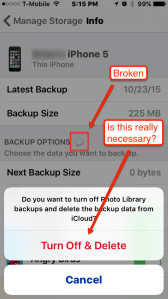 To a lesser degree, I had this same problem in 9.0.4 (or whatever the last 9.0 version was). When I attempted to backup my phone to iCloud, for whatever reason the iPhone decides to back up every app on your phone by default. Mind you, I have several gigs worth of apps on my phone on top of the 15G or so of images/videos in my library. I spent a good day working on getting my iCloud backup working on 9.0.x. It took me the better part of several hours working through stupid Settings app bugs just to get all of my apps excluded from backups. Let’s understand that Apple requires you to manually disable each and every app separately from being backed up. Let’s also understand that in order to do so, each time you click to green slider to the OFF position, you have confirm a popup that asks ‘Turn Off and Delete’ for every single app separately. Let’s consider that my phone has hundreds of apps installed. So many apps, in fact, that Settings crashes about 1/4 of the way through the ‘Turn Off and Delete’ confirmation banners. It’s an arduous task at best and it’s frustrating and aggravating at worst.
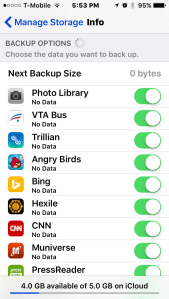 Yet, rolling into 9.1, Apple promptly reverts everything I spent 1-2 hours doing and now defaults back to turning every app ON (see left image) for backup yet again. How do I know? I get that very annoying ‘Not Enough Storage’ notification on my lock screen. I spent valuable time setting all of that up and Apple promptly forgets my settings. The very definition of bad user experience (UX). Instead, this time I can’t even stop the backups of any apps. Apple only gives 5GB of data storage for free. I had all of my devices comfortably making backups on iCloud using maybe 3.1GB total (4 devices), after the excruciatingly aggravating task of finally excluding all of the unnecessary crap that Apple insists on including. Perfect… until 9.1.
Now, I’m in a catch 22. I can’t make a successful backup because iOS continually resets all of my apps and forces me to back up everything to the iCloud the first time. Yet, iOS won’t allow me to change settings to deselect the apps because it must have a successful backup first. FAIL. You can go try to deselect apps, but that’s all for show. It doesn’t actually work. Oh sure, the green ON buttons turn OFF, but it’s not as if that actually works. It doesn’t respect that those apps are now OFF and the backup fails. Once it fails, all of those buttons you’ve spent tons of times clicking to OFF will all be automatically reenabled after the backup failure.
I have no idea what Apple was thinking here, but they clearly had their heads in the iClouds. This problem has gotten progressively worse with each release and has culminated in iCloud backup being entirely unusable unless you feel the urge to spend at least $1/mo for 50GB of storage so you can work around Apple’s stupid bugs. I have no intention of working around any developers bugs by spending money. Either provide workable functionality or don’t. But, there is no way I will ever spend money to a company to work around bugs in software. Apple, if you really want to force us to pay you to get more than 5GB, then just charge us up front for any space issued. Don’t beat around the bush by introducing bugs that make the freebie you’ve given become worthless. Let’s just be honest here.
If this is about spending yet more money with you to get people to buy into your iCloud storage, then just tell us that’s what you want. Don’t force us to go buy more because you want to force everything on our phones to back up. That’s not how you do it. Just change the terms and send everyone a notice that the 5GB storage you’ve issued us is no longer free and at the end of the month you lose it or you pay for it. Just tell the consumers what you want. You don’t need to do it by introduction of bugs that forces phone owners to backup everything on their phone.
Seriously… 5GB?
In this day and age when Google is giving practically terabytes of storage for free, Apple can only afford 5GB a month? Really? How much money does Apple make off of their products and they’re going to be that stingy with storage? On top of that, they force you to backup your entire 16/32/64GB phone over to iCloud. Not only is that stupid from the 5GB free perspective, it’s just asinine that I can’t control my bandwidth to this service. Seriously, I don’t want to send over 10-20GB of data across my network bandwidth. I want to control what I send and how much I send. Since I can no longer do that…
Buh Bye iCloud Backup.. it was nice knowing ya!
I’m done with iCloud backup. Not only is it stupidly designed, what real purpose does it serve at 5GB? I can backup my entire phone’s contents on iTunes on my local machine(s) as many times as I wish. There are no bandwidth constraints or disk space issues. Yet, I can barely backup my contacts on iCloud at 5GB. I have no intention of dropping $1/mo to get to 50GB, which is still only a pittance, let alone $10/mo for 1TB. Who knows how secure the data really is in iCloud? One breach and Apple will be run out of town on a rail.
I’m tired of dealing with Apple’s stupid developers who can no longer code their way out of a paper bag. I’m tired of dealing with bugs that shouldn’t even exist on a device that used to be the most intuitive device built. Now it’s a device that is merely following behind Android’s, ahem, innovation. So, I’ll happily head back to the time before iCloud existed. I’m done with that service for backups. I prefer to keep my backups local anyway. Buh Bye iCloud backups.
Apple, figure it out !
Hot Collectible Toys and Scalping
I’m tired of it and I really don’t much tolerate it anymore. I’m a memorabilia collector, specifically film franchises and video games. Yet, what I find continually frustrating is the hoarders and scalpers. You know, you go to the store looking for something to be there, but there’s nothing there. But, then you find that collectible on eBay or Amazon in droves marked up to at least twice the price. I’m sick of this. Let’s explore.
Collectibles
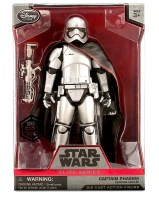 Star Wars The Force Awakens is right around the corner (December 18th) and the toys and other collectibles are now hitting the store shelves. Yet, you’ll be lucky to find much of it due to hoarders / scalpers. In the 70s, scalping was limited to concert tickets. Since Kenner introduce Star Wars toys, these same folks have now jumped from ticket scalping to collectible scalping. A practice of which I do not approve. I realize what it is. People want to make a few bucks on something. I get it. But, it’s not exactly fair to those of us who actually want to find the item in the store and buy it at retail price. We don’t want to have to resort to shopping on eBay from some would-be scalper at hugely inflated prices.
I really dislike heading over to eBay and finding page after page after page of that item marked up by 50% or more. It would be great if stores could do something about this. I’m glad to see that at least one store is doing something about this. Enter Toys R Us. While it may not be the perfect answer, it’s at least a step in the right direction.
Skylanders Superchargers
 Many stores are now releasing exclusives for the Skylanders franchise. For example, Toys R Us tends to get Legendary exclusives. The Legendary Skylanders are typically painted navy blue and gold. Target gets the Nitro series. This series also looks like the Legendary series, dark blue and gold. Sometimes the stores get individual characters, sometimes they get combo packs and sometimes they get play sets. For example some Supercharger exclusives this year include:
- Target => Nitro Stealth Stinger Vehicle
- Best Buy => Steel Plated Smash Hit


- Toys R Us
- Legendary Hurricane Jet-Vac
- Legendary Sky Racing Pack (includes Legendary Astroblast, Legendary Sun Runner and Sky Trophy)
I don’t think Walmart has ordered any Superchargers exclusives yet, but I could be wrong. Though, it is guaranteed there will be more store exclusives in the coming months.
Star Wars The Force Awakens
Since Disney has now taken this franchise and plans on reviving it with at least three new films over the next several years, we will see all sorts of Star Wars merchandise and toys hitting the store shelves, including exclusives at the Disney store. Yes, the Disney store has its own line of exclusives. Specifically, a line of die cast 6.5 inch figures labeled Elite Series (see Phasma above).
Again, you’ll be lucky to find these Elite Series at the Disney store or online. In general, heading into any of these retailers, you’re not likely to easily find these exclusives. Why?
Scalpers and Collectibles
The primary problem is that stores order far too little stock for the number of people who want to buy them. Secondarily, scalpers make off with at least half, if not 3/4 of the limited stock fully intending to place the items onto eBay or Amazon at well inflated prices. Likely only 25-50% of the stock (perhaps even less) actually makes it into actual collector’s hands at retail price. The rest of that stock makes its way onto eBay, Amazon, Craigslist or into comic book shops on consignment at sometimes double the retail price.
Scalping isn’t the intent of these collectibles. The intent is to get the collectibles into the hands of collectors who will actually appreciate the toys and who want to display them, open them and enjoy them. Not into the hands of scalpers who don’t care about the item and whose only motive is to make some quick cash from selling the item.
Let’s understand, though, speculating that a toy will make you any money is about as risky as taking your money to Vegas and playing the slots. You might get something, you might not. You might end up keeping those toys as worthless. What may seem scarce today may end up being the peg warmer tomorrow after the mass shipments arrive. Of course, if you return the item to the retailer before the return period expires, you can get your money back from the store. But, that holds stock back from those who were looking for it. As a scalper, you should be careful about returns. Excessive returns could flag your credit card.
Countering the Scalpers
Because stores can’t know purchasing intent of any individual, they must sell the item to the person with the cash. So, there’s really no way to know if a person is a scalper or if they are a legitimate collector. However, there are other ways to counter this problem and Toys R Us has found the perfect way to do it… by opening an eBay store.
 For example, Toys R Us’s Legendary Sky Racing Pack (mentioned above) is available exclusively on eBay from Toys R Us at retail price ($35.99). In among the listings for this pack, you’ll see a lot of eBayers with their scalped packs marked at $50, $60 and even $70 plus shipping. You may or may not find this pack in the Toys R Us stores and it is definitely not on their web store. It seems to be exclusively available in the eBay store. For collectors, this is the perfect counter to would-be scalpers. As long as Toys R Us continues to operate an eBay store putting ‘hot toys’ up at retail prices, this will undermine the excessive pricing of those attempting to scalp on eBay. This means those other sellers may have to pull their listing down and will hopefully discourage future scalping attempts.
I wholeheartedly applaud Toys R Us taking this action. It’s not only ingenious selling, it’s the perfect way to stop this problem. I wish even more stores would do this to thwart retail scalping at its source. By not placing that stock onto their web site and instead placing these ‘hot items’ into their eBay store at retail prices, this means is that would-be scalpers have to either drop their prices to match Toys R Us, thus not making any money, or they must eat the toy purchase (or otherwise return it to the store to get their money back).
Excessive Returns
If I were Toys R Us, and when these returns start rolling in, I’d place the people who are returning these ‘hot’ items on a watch list. If they exhibit this same behavior of returning ‘hot collectible toys’, especially in larger quantities, I’d place those people onto a do not sell list across the entire chain. Deny their credit card purchase for future sales of hot collectibles. It’s very easy to tag what’s a hot collectible, so it’s also easy to identify those trying to scalp through returns and then deny sales of future items to these individuals. For those of us collectors who never return our items, this whole issue would never affect us. It would only affect scalpers intent on scalping and returning when ‘things don’t work out’.
Countering unnecessary high prices
Of course, Toys R Us could run out of stock at some point and force people to contemplate a higher priced alternative. As long as Toys R Us keeps the item in stock, those scalper listings won’t ever sell.
I would love to see the Disney Store, Target, Walmart, Gamestop and other retailers exacting this same selling strategy for their exclusive or hot selling items. Pull the items out of the store and put the stock on eBay and Amazon at retail pricing. Make sure you have well enough stock on hand to keep this store stocked continually. Would-be scalpers would need to think twice about using these outlets to perform their scalping efforts going forward. To Toys R Us, I say, “Bravo”… in attempting to counter this problem at its source. You should expand this concept and do this in more places where scalpers sell. I’d personally like to see the toy and collector scalper market shut down entirely for first run retail collectibles.
When do ‘collectibles’ become actual Collectibles?
Of course, once the stores have discontinued selling the item, the item is no longer available and the items can no longer be returned to the retailer (past the return period), this fully opens up the collectible sales market. However, until first run retail stock is discontinued and depleted and the item is no longer carried by the retailer, I don’t considered it a collectible in the sense that it should command a higher than retail price tag. Though, mistakes and variants have their place as unique, these can command whatever price someone is willing to pay. But, for non-special retail items, it is not a collectible as long as it is carried in the store.
As a collector, I don’t believe any item deserves to be opened up to the collector’s market until the item reaches 10 years in age past first run. But, I do understand that people want to rush their collectible to market to “sell it now”. I just don’t believe that any item should command the true collector price tag until after it reaches the 10 year mark. Though, some collectors rush to complete their collections at all costs. It doesn’t help that some buyers are willing to shell out nearly any amount of cash for something that could be had at a retail store for retail prices. These buyers are just feeding into the scalping frenzy which only serves to keep this cycle going. I’m quite happy to see Toys R Us is taking steps to help shut this market down, at least for the toys and collectibles that they sell. Well done Toys R Us.
Gallery
How to stop Mac dock icon bouncing
 When an application starts up in MacOS X Yosemite, it bounces the application dock icon a few times, then stops bouncing once the application has started. For me, this is perfectly fine because at least there’s a positive response. Positive response is never a bad thing in operating system design.
Unfortunately, Apple decided to overloaded this same bouncing behavior for notifications to get your attention by bouncing a dock icon. For me, this is definitely not wanted. Not only is it extremely annoying, it never stops until you go touch that icon. It also performs this bouncing way too frequently. There are much better ways to get user attention than by bouncing the dock icon. Thankfully, there’s a way to stop this annoying and unwanted UI behavior. Let’s explore.
Defaults Database
Apple has what’s known as the user defaults database. It is a database of settings not unlike the old UNIX .files system, but much more extended. Unfortunately, most developers don’t document which settings can go into the defaults database and many of the settings may be hidden. However, you can easily find them by reading the values by opening terminal.app and then typing:
$ defaults read com.apple.dock | more |
This command will spew out a lot of stuff, so you’ll want to pipe it to more to page through it. Each app has its own namespace similar in format to com.apple.dock that you can review. Not all apps support changing settings this way. For other apps, simply replace com.apple.dock with the appropriate application namespace and you can read up the settings for that application. If you decide to change any of the values, you may have to kill and restart the application or log out and log back in.
In short, there is a way to stop the bouncing using the defaults command. To do this, you will need to update the defaults database for com.apple.dock with the correct setting to stop it.
Stop the Bouncing
 To stop the bouncing of dock icons, open a terminal shell and at a command prompt, type the following:
$ defaults write com.apple.dock no-bouncing -bool TRUE |
|
$ killall Dock |
Keep in mind that this is a global setting. This stops the dock icon bouncing for every application on your system for all notifications. The launch icon bouncing is not controlled by this setting. For that, you should visit the preferences area.
You can always reenable the bouncing at any time by opening terminal and then typing:
$ defaults write com.apple.dock no-bouncing -bool FALSE |
|
$ killall Dock |
Note that the defaults database is stored locally in each user account. So, if you log into several different accounts on your Mac, you’ll need to do this for each of your accounts.
Please leave me a comment below if this doesn’t work for you.
Elon Musk: Brilliant or Snake Oil salesman?
I’ve read a number of comments that people consider Elon Musk and his Tesla empire as brilliance at work. But, is this really brilliance at work? Let’s explore.
Brilliance is in the eye of the beholder
Oh, Elon Musk is definitely a brilliant man, no doubt. But not for the reasons most people think. Like many entrepreneurs who head to Silicon Valley to set up an empire, Elon is yet another in a long line of them.
Most people think he’s brilliant because of his Tesla electric cars. I would be the first to consider him brilliant with electric cars had he been the first to come up with the idea or a significantly better battery technology. Unfortunately, he missed the invention boat by just slightly less than 200 years. Also, no substantial new battery technologies have emerged from Tesla. Most certainly, he’s taken this nearly 200 year old idea and capitalized on it and modernized it. Unfortunately, his push to drive mainstream electric vehicle infrastructure has been a snail’s pace journey. Though, it is farther along in part due to Tesla.
So then, where is his brilliance?
Salesman Extraordinaire
Like many people before him and many more to come, he has capitalized on the phrase ‘There’s a sucker born every minute’. This is his brilliance. This is what makes his name in the world of automobiles.
I don’t know of many people who could have actually put a distortion field around a vehicle with a top distance of approximately 250 miles and suggest charging ~$100,000 (or more) for it.
What exactly is a car designed to do?
A car is designed to take you from point A to point B offering reasonably long distance before needing to refuel. That’s a car’s primary goal. The second goal is to be able to find fuel for the vehicle readily and fill it rapidly so you can continue performing your car’s primary goal ad infinitum. We have this infrastructure in place for gas engine vehicles already. Attempting to bring cars to market without building this infrastructure first is a problem.
Yet, Elon hasn’t even really solved the first goal. While 250 miles is respectable for a commuter vehicle, it’s not so great for cross country traveling. The second goal has not at all been solved by Elon; though, it’s not for lack of trying. For someone like Elon, that has to be extremely frustrating especially considering that in order to sell boatloads of vehicles to the masses you need goals 1 and 2 solved. What makes this even harder is when consumers can go buy a gas or hybrid vehicle and get much better distance and similar amenities for far less money.
Note, I do acknowledge that there are car buyers who buy cars to drive for pleasure and recreation. This driver profile is significantly different than those who drive for transportation. However, most people in the US buy vehicles for transportation, not recreation.
So, the car makes the distance, then what?
For electric vehicles, let’s keep in mind that this part is all hypothetical. Electric infrastructure is not yet close to being satisfied. However, what’s left after the goals are satisfied is car amenities. Oh, the Tesla cars are most definitely chock full of amenities, like a 17″ touch screen display, lots of cool looking LEDs and a bunch of pick-up when you mash the accelerator. Though, pretty much any electric vehicle will offer lots of torque just because of the drive train of electric motors.
It’s gets worse still. While you’re driving that Tesla around, you quickly realize you’re passing gas station after gas station. You might pridefully think, “Wow, I never have to use another one of those again”. Instead, the thought you should be thinking is, “What happens if I run out of power?” When you do run out of power, that fleeting and mildly prideful thought quickly turns to sheer terror when you realize that you are stranded. It’s not just any old version of stranded either. You’re now stranded and you need a tow truck. In fact, you’ll pretty much wish you could push your $100k Tesla over to that gas station, fill it up and be back on the road in 5 minutes. Nope. Expect your Tesla to be towed a very long distance to the next charging station. A charging station where you’ll be stuck for the next several hours. If you want a full charge, that could be 4-6 hours. Of course, if you’re close to home, you might get away with 30 minutes or an hour to get just enough charge to get home. I don’t know about you, but I don’t relish the thought of sitting in my car for several hours waiting for the battery to charge up.
Don’t expect AAA to carry around a portable generator to ‘fill up’ your Tesla. That’s not gonna happen. Though, AAA might be willing to drag your car to the next charging station. Although, that might be a lot farther distance than you expect. Depending on your AAA plan, it might or might not cover the towing distance. So, you should definitely opt for the longest distance roadside assistance plans that Tesla offers, especially if you plan on traveling.
Let’s not even discuss the shame of riding shotgun in that tow truck with your Tesla dragging behind you. For those of us continuing on our journeys in our gas or hybrid vehicle watching that Tesla in tow, be thankful you are still using the existing infrastructure that’s available.
Where is that infrastructure? (aka. the Apple syndrome)
While it’s easy to find gas stations, it can be almost impossible to find workable charging stations.
Like Apple, Elon is heavily trusting that infrastructure can be built timely. Elon is relying on the same idea as Apple. When Apple introduces a new technology that no one else is using, Apple hopes other manufacturers will quickly adopt and use it within 1-2 years. Sometimes that works, sometimes it doesn’t. Though, technology transitions every 12 months in computers. So, it’s feasible that manufacturers could transition to include that new technology reasonably quickly.
For Elon, relying on this concept is a bad idea. Fuel station infrastructure is no where near this nimble. It might take 10-20 years before a vision of charging stations all across the country is realized. Let’s understand why. The Tesla cars (and many other electric vehicles) require 240v to charge in any reasonable time frame (4-6 hours). To set up a charging station requires digging up the pavement, running cabling, installing charging stations and tapping into the mains (which also, of course, requires power usage metering and approvals by the local power company). It probably even requires building permits by the city and county. It may even by subject to zoning or approvals by the county or city.
Here’s where Elon’s vision (and brilliance) fails. Yes, I know that he’s been desperately trying to build infrastructure to support his business model, but that’s been an extremely tough row to hoe. Trying to get the tried and true gasoline industry to do anything around or for electric vehicles is like trying to ask McDonald’s to advertise for Burger King. Not gonna happen. I’ve yet to drive into a single gas station and find a charging station. Yet, it makes perfect sense to marry these two refill stations if for nothing other than standardization. People would naturally expect to find fuel of all types, including electric charging stations at the corner ‘gas’ station. But, nope. These charging stations are, instead, popping up on shopping center parking lots and on corporate business parking lots.
This means you either need a map to find them or you just have to already know where they are. Worse, it means leaving your expensive Tesla sitting in an empty parking lot where it can be broken into or, worse, stolen.
Having Elon’s company take that fight to Washington is not going to be much more successful either. The government has no incentive to help Elon realize a vision of electric vehicle infrastructure. Why? Because electric vehicles are no more clean than gas vehicles. Instead of exhaust coming out of that catalytic convertor tailpipe attached to your vehicle, it’s now coming out of stacks of coal or natural gas power plants that have no catalytic converter. Electric vehicles just push those emissions somewhere else. This short-sightedness is what will ultimately doom the electric vehicle supply chain. Of course, that’s a problem that isn’t of much concern to Elon. His concern is making sure people continue to buy his expensive short distance cars. After all, $100k for a vehicle is not exactly chump change.
Snake Oil
Back in the day, salesmen would ride into town attempting to sell a concoction of ingredients that would “fix your ailments”. While those days are mostly long past, with the exception of ‘As Seen On TV infomercials’, Elon’s Teslas are at once a bit cool and a bit snake oil. Selling his $100k vehicles with the idea that you can drive long distances is almost certainly a form of snake oil. He’s more than happy to go right ahead and pull that wool right over your eyes in hopes you forget all about those pesky infrastructure problems while traveling.
Unfortunately, you’ll learn the hard way when your car runs out of power in the middle of an interstate or worse, in some rural back road with no cell service. Good luck in finding a power charger in the middle of nowhere on someone’s farm. Thinking about visiting Burning Man in your new Tesla? You might want to think again or you should consider dragging a diesel power generator along, because you’re not going to find any access to a power grid in the middle of the Nevada desert (or in any place close to Burning Man). Though, if your car does run out of power at Burning Man, you might find some kind person willing to let you charge your vehicle off their generator, for a fee. Or, you might not.
What about Fuel Cell vehicles?
Fuel cells are a great concept. Unfortunately, they have several significant failings including fuel and the infrastructure to obtain that fuel (same problem as electric vehicles). Fuel cells require hydrogen. Not only is it next to impossible to find hydrogen fuel anywhere, it’s expensive. Why? Like electricity creation, the extraction of hydrogen requires burning fossil fuels. Perhaps using even more than in electricity creation.
For all of the same reasons as listed above for electric infrastructure, hydrogen fuel will suffer the same fate. On top of that, fuel cells are heavy. Placing this entire battery infrastructure in a vehicle forces the vehicle to weigh a lot more than a gas or electric powered vehicle. The heavy weight limits maximum speed, limits how much you can carry and makes the vehicle more dangerous in a wreck (both from weight and from the hydrogen perspective… think of the fiery Hindenburg). Wrecking a fuel cell vehicle could lead to a rapid and intense fire that quickly consumes the entire vehicle.
At this juncture in our transition towards alternative fuel vehicles, those vehicles that make the most sense offer gas powered generators to recharge along the way. These vehicles make the most logistical sense for anyone considering cross-country travel. At least with a gas powered generator, with a little gas from AAA, you can get back on your way in a few minutes. With electric only, expect your car to be towed. Let’s not even discuss AAA and fuel cells.
Salesman of the Decade
Suffice it to say that Elon’s claim to fame should be as a salesman. A very good salesman at that. How many other salesmen could possibly build a car that has no infrastructure, offer a 250 mile maximum distance and still rake in over $100k for a car? Not many.
I’m not saying that the Tesla vehicles aren’t well made. In fact, it seems that they are very well made. It’s not the quality of the vehicle that matters here. What matters is the ultimate convenience to use the vehicle. If the primary two goals are not being met, then it is very difficult to justify buying this car. For example, many apartment complexes offer no charging stations at all and have no intention of installing any. This means that if you want to own an electric vehicle and you live in apartment, you’re forced to charge it in some parking lot somewhere away from where you live. This also means you need transportation to and from your car. If your complex has garages, you might be able to get away with charging with 110v, but that might take two days to fully charge. Again, not feasible.
Elon’s task should have been infrastructure first, then cars. Instead, he chose the opposite path. Build the cars, sell them and hope the infrastructure follows. So far, that’s been more of a pipe dream than reality. Yes, more and more charging stations are appearing, but at no where near the rate it should be to fully support an electric vehicle future. But, one thing is perfectly clear, Elon epitomizes the perfect salesman and should probably be named Salesman of the Decade.
Power Grid
Finally, it’s definitely wise to discuss the aging power grid. As more and more vehicles transition to sucking their power from the grid, that means more load on the grid. We’re talking 240v loads. Just how many of these cars can the local grid actually support? We might need to talk to the owl. Hopefully, it’s more than 3. Eventually, the grid infrastructure may become overloaded and not be capable of handling that load. I’d expect to see a lot of grid growing pains as electric vehicles become more commonplace. As gas cars become replaced by electrics, that’s ever more load on the grid. We do not yet know the ramifications of or the peak of that load. Though, one thing is certain. When we do find that peak on the grid, we’ll start seeing blackouts, burnouts and exploding transformers until the power company can get it back under control. Power companies are almost never proactive in adding capacity. Capacity costs money and until that capacity is reached, it is not deemed a problem.
There is a lot of old infrastructure out there built long ago that handles the grid. Yet, putting more and more heavy device users onto the grid, such as a Tesla, could mean failing grids. Failing grids from which the power companies are not willing to touch until they’re forced to. Old gear is almost never replaced until it fails. I’d expect power companies to remain complacent until this whole issue comes riding back to bite them in the ass. And, bite them hard it will.
These are all things that Elon is not considering when he is selling his vehicles on the market. He just wants to sell vehicles, not worry about whether the grid can support the number of vehicles he wants to sell this year or whether there’s enough chargers around the country to support cross country travel. Yes, he puts up the pretense that he’s looking into the battery swap program, but what is the status of that program? I’d also like to know how Tesla plans to personally handle stranded motorists when one of their cars runs out of power.
There are far too many questions unanswered here to really call Elon a brilliant visionary. Instead, I’ll stick to the term salesman extraordinaire. Like most salesman, it’s about making the sale. Not about actually delivering on the promises you made to the customer during the sales process. In answer to the question whether he’s selling snake oil or selling brilliance, I’ll end by saying he’s a little of both, but only as far as sales.
Can the Xbox One catch up to the PS4 this year?
 We all know that Sony’s PS4 has outsold the Xbox One fairly substantially. However, will moving into this holiday season help or hurt the Xbox One? Let’s explore.
Halo 5
In October, we will see the next installment of Halo 5 released. This is unusual in that this title usually releases in November. I’m assuming that Microsoft is attempting to gain an early head start in console sales. I’m also certain that Microsoft is hoping that Halo 5 (an exclusive Xbox One title) will push consoles off the shelves. The problem is, however, UltraHD 4K.
4K TVs and Consoles
With HDTVs rapidly dropping in price and especially 4K TVs (there are several sub $1000 models), this spells a big problem for console manufacturers. I’m sure it wasn’t expected to see prices of 4K TVs dropping this rapidly this soon. None of the Xbox One, PS4 or Wii U currently support 4K content or 4K TVs. This is shaping into a much bigger problem and is especially a problem for Microsoft and Sony. Without the ability to deliver 4K content to these sub $1000 4K TVs, many people are going to be hard pressed to justify the investment in a $500 console that doesn’t support 4K. So, not even Halo 5 may be able to budge many of those consoles off the shelves, at least not to existing Xbox One owners.
Personally, I’m not planning on investing in any new console systems until there’s 4K support. When Sony and Microsoft can finally get off their collective butts and release a 4K HDMI 2.0 or HDMI 2.2 console version, I will definitely consider replacing my existing consoles, but not until that happens.
Of course, I already own a PS4 and Xbox One. I got both day one, but I’ve recently bought a 4K TV. Barring Netflix and Amazon, there’s effectively no 4K content. Still, it does make my 1080p content look amazingly clear without all that annoying pixelation so common in 1080p TVs.
Console Purchasing and the Holidays
Because 4K TVs are now becoming more commonplace and because 1080p TVs will likely be mostly a distant memory in even just 2 years, it’s hard to justify a $500 expense only to replace it in 6 months or a year. It’s not worth it. Additionally, you can buy a video game at any time after it’s released, but it doesn’t have to be on day one. You can just as easily play Halo 5 in spring of 2016 as you can in the fall of 2015. Yes, there are a lot of day-oners out there (must have it the moment it’s released), but because of the deluge of titles in the fall, it’s easy to pick and choose which ones to leave for later. This means you can delay that console purchase or buying that game until the 4K version arrives.
Yes, Halo 5 will push some consoles off the shelves. But, those looking for a 4K version will likely wait. I’m definitely waiting for the console refresh from Sony and Microsoft. For whatever reason, both of these companies are taking their sweet time to provide this refresh. In fact, Sony should have pushed out this refresh as part of the fall game launch. Sony being at the forefront of the 4K revolution makes it ever more important for Sony to finally get this refresh out the door. It’s even more important to get this refresh out for holiday purchases even if we can’t take advantage of the 4K content yet. Though, I know that Sony’s video on demand services for use with the Sony 4K UltraHD Media Player already offers a very large number of 4K movies. There’s no reason not to get this technology into the PS4 and widen that audience. Not only will it widen the audience for their movie services, it also immediately widens their game playing audience. In this case, were Sony to release this 4K refresh faster than Microsoft, Sony would have tremendous advantage both in sales and in gaming.
Sales Advantage
It’s clear, which ever company gets out their 4K refresh faster, they will have a sales advantage. As I said, considering Sony’s involvement in 4K, it makes perfect sense for Sony to get this refresh out now.
I don’t believe even Halo 5 sales could argue with a Sony 4K hardware refresh. People would think twice about buying an Xbox One until Microsoft also provided a 4K Xbox One refresh themselves. Should Sony release first, it would push Sony’s PS4 much higher in sales numbers because many existing PS4 owners would immediately replace their existing PS4. I know I would. So, that means double sales. Sales to everyone who already has a PS4 and to those who don’t. Of course, this would happen with the Xbox One as well once their 4K refresh is available.
Though, should the Xbox One and PS4 4K edition release together, I would still buy the PS4 version first unless Microsoft released the Xbox One 4K version with a 4K 60Hz playable version of Halo 5. There is currently no franchise title that Sony owns that is that compelling. But, were Black Ops III or Fallout 4 to support 4K, I’d be hard pressed not to consider a 4K PS4.
I personally believe that Sony is currently more likely to release a 4K refresh sooner than Xbox One. Microsoft doesn’t embrace new technologies quickly, especially when Sony is one of the primary proponents of that new technology.
Ultra HD 4K Content
Today, there’s not much 4K content. The drought of 4K content is about as severe as California’s rainfall levels. This can all change with a console refresh. Consoles are quickly becoming the ubiquitous media outlet for the home, especially for children. With a console refresh from Sony, that immediately picks up a relatively large number of 4K movies. With the addition of developers taking advantage of 4K gaming, that opens up a huge new door (literally pixel-wise). While that number of pixels is immense, it offers a brand new immersive level of gaming that hasn’t yet been achieved. Yes, it requires producing much bigger content, but the games will be spectacular, the environments breathtaking and the realism levels achieved would be astounding.
The problem today is that most developers can’t even grasp 1080p. So, I do not expect 4K gaming any time soon. Perhaps from the Call of Duty brand and possibly from Microsoft’s Halo (if 343 can figure it out). But, smaller companies like Atlus and even larger ones like Bethesda struggle with high def gaming. If we can get one HD title out of a developer per year, I consider that a win. With Ultra HD 4K content, I’d expect it might even take 2 years per title. That would suck at not having a new game every year, but 4K is where we’re going and Sony, Microsoft, Bethesda, Ubisoft, EA, Square Enix and the rest would do best to take heed. Not only does gaming want 4K, we need it to move forward. In fact, it should have been included in the original PS4 as Sony already had a 4K TV available at the time the PS4 was released. If Sony had had the foresight to create the PS4 with 4K, I wouldn’t even be writing this article.
Ultra HD’s Time Has Come
 Sony, release your 4K refresh with the Ultra HD blu-ray spec. Microsoft, release your refresh with a 4K Halo 5. Because these two consoles are on the cusp of 4K, I’m anxiously awaiting their release. I won’t consider a new console purchase until these are out. Because they are so close, I would suggest you wait also. I would love to see any 4K console refresh for this holiday season. I’d love to see Halo 5 running in 4K. In fact, I’d love to play pretty much any of this holiday’s season games including Fallout 4, Halo 5, Black Ops III, Just Cause 3 and Star Wars in 60hz 4K. That would be an amazing holiday gift this season.
How not to run a business (Part 10.2) — Case Study: Trust
A business is as good as the trust it practices. Trust is a crucial element in gaining new business. If prospects cannot trust you or what you offer, trust that your business is genuinely there to help your customer, trust that you will provide a high quality service, your business will not succeed. Trust is mission critical to business success. Let’s explore.
Kickstarter
Recently, you may have heard about the H+ Holus project on Kickstarter. Its premise is to create a display device that can provide a wide variety of viewing angles. Some words used to describe the device include ‘holographic’, ‘holographic experience’ and ‘3D’. From the link above, the description states,
Holus provides a blend between the digital and real world by converting any digital content into a 3D holographic experience
To visually get the point across, H+ uploaded some CG representations of what the finished product might look like… including this video….
By Day 3 of this Kickstarter project, the project had already been funded the amount of $200k CAD. So here’s where things get a little dicey with both this project and Kickstarter when complaints begin to roll in. At the end, the Holus project raised $297,790 CAD. Some sites are already asking if the Holus is the most expensive scam in Kickstarter history. Reddit readers state these grievances of the Holus device.
Kickstarter’s rules are clear on misrepresentation. In the above video, it is clearly shown that as the camera moves, so does the 3D of the imagery. With Pepper’s Ghost and a flat screen, this is not possible which misrepresents the capabilities of this device. In other words, Kickstarter doesn’t allow realistic 3D rendered concept photos or videos as part of the project. Including photos of the prototype or drawings of the concept is perfectly fine. However, 3D realistic images depicting a concept are not acceptable and Kickstarter’s rules prohibit the use of such imagery.
3D Displays
We all know what these are. They’re basically your flat screen TV with shutter glasses. They’re cumbersome to use, give you headaches and, in general, are mostly a novelty. Yet, this is the state of 3D displays in 2015. No, we do not yet have floating displays such as what’s shown in Minority Report or Avatar. These displays, if even possible, are years away from becoming reality. Yet, here we are on Kickstarter with a small company claiming they’re about to produce a 3D Holographic display. Frankly, it’s not possible. What Holus offers is no better than Pepper’s Ghost.
Pepper’s Ghost is a technology that dates back to 1862 and is named after John Henry Pepper who discovered the illusion. A Pepper’s Ghost display has no relationship to holograms or holography, further misrepresenting the display. What Holus offers is a flat screen reflected off of a transparent surface. Because the screen located in the roof of the cabinet is flat, it’s definitely not 3D (without using glasses). Worse, there are already devices like this available on Amazon right now for the iPhone for $10.99. Visit Amazon and compare.
Holus Deception
Whether the H+ folks intended to deceive or were naïve about what they could show on Kickstarter, it doesn’t really matter from a fraud management perspective. The listing violated Kickstarter’s rules. Yet, Kickstarter did nothing to stop or prevent this listing from continuing. In fact, it seems that Kickstarter even awarded the Holus Kickstarter Project as a staff pick at some point. When this listing was brought to Kickstarter’s attention for misrepresentation, they ignored the warnings and allowed the project to fund anyway.
Trust
As a CEO, it is important to maintain trust with all of your customers. If you don’t attempt to maintain that trust, your business is hopelessly lost. Case in point… Kickstarter CEO Yancey Strickler leaves a comment on Joanie Lemercier’s ‘covering up a scam’ blog article after she and several others unsuccessfully attempt to bring this misrepresented project to the attention of Kickstarter. Strickler’s comment is defensive and deflecting. Here’s what Strickler has to say (full comment below):
Hi Joanie —
Yancey from Kickstarter here.
I’m responding, in part, to thank you for the attention you’ve paid to the Holus project. We’ve seen a lot of debate and strong feelings around the project, and we’ve heard a lot of questions about our policies and how we enforce them. I’d love to clear up a few things about how we did so in this case.
Part of the issue we’ve seen with this project revolves around words like “hologram,” “holographic,” and “holographic experience,” which people have come to use in so many different colloquial ways. Some of our most-discussed “holograms” — Tupac Shakur’s appearance at Coachella, CNN’s election-night guests — aren’t holograms at all. Even Microsoft bills its HoloLens as a holographic product. There’s an odd lack of clarity involved in what many people mean and understand when they say the words.
So in this case, our approach was to focus in on how Holus actually worked. We asked the Holus team to post an update that demonstrated, clearly and openly, exactly what they were working on. They responded with a public update that outlined the technique they use. That update was emailed to backers of the project, to help make sure everyone involved was fully clear on what they were supporting and what they could expect.
Then there’s the question of our rules for hardware projects. First, we require creators to show prototypes of their work. Second, we prohibit them from using photorealistic renderings.
Holus satisfied the first rule, posting a number of demo videos and documentation showing working prototypes. But when the project originally launched, it included CGI renderings. We informed them that this was strictly prohibited; they promptly removed the material. They also emailed backers to clarify their process, including a video demonstrating their iterative prototypes.
And last, there’s the question of the staff pick. Holus was originally selected as one, until we spotted and received reports about CGI renderings. We immediately removed the staff pick status, and asked the Holus team to remove the badge they’d added to their project image. (Staff pick badges aren’t a part of our system; we don’t create them or provide them. Actually, we strongly advise creators not to use them at all.) They promptly did so.
In other words, the project conformed to our stated rules, added more information on request, and made a transparent, good-faith effort to thoroughly inform backers about the nature of their work. Based on that, we continued to monitor it, but allowed it to remain on the site. The question then became: were people interested in backing it?
And this is the part where you — and the broader Kickstarter community watching these projects — become invaluable. One of the reasons Kickstarter uses all-or-nothing funding is because it gives everyone involved in a project time to really research what the creators are doing, discuss it with others, and come to a collective decision about whether it’s still worth supporting. Ultimately, it’s backers who decide what gets funding, not us.
That’s why we’re always grateful to anyone who joins in the public debate about projects, asks tough questions about the claims they’re hearing, and shares their expertise with other backers. That kind of discussion is crucial, especially when it comes to new technology. It helps our Integrity team monitor projects for problems or violations of our rules — as we did throughout the Holus campaign. It helps backers vet ideas and make the most informed decisions possible. It holds creators to a high standard, and helps them build stronger communities. It does all these things no matter what action Kickstarter winds up needing to take, and whether projects succeed or fail.
And that’s why I’d like to thank you — and to say that, if you’ve chosen not to get involved in any more projects, we’re sad to hear it. The role you played in this one is incredibly important. Members like you are welcome in this community any time: you make things better for everyone involved.
Cheers
Yancey
This is not the type of diatribe I expect to hear from a CEO. CEO’s are the top agent of the company. They are the person who investigates wrongdoing and the person who puts a stop to it. No where above did Yancey even mention investigation, taking the strictest action or in doing anything to prevent such an occurrence in the future. Sure, they requested the prohibited content removal, but only after the project was already mostly funded. Kickstarter also didn’t apparently require full disclosure of this content removal to the backers.
Instead, he defends the project and states that it is the backer’s responsibility to post meaningful discussions, debate the project and then choose or not choose to back based on these comments. That’s all well and good until Joanie points out in a later blog post that in among other behaviors by Kickstarter to ignore the project and let it proceed, Kickstarter also
…DELETED the embarrassing questions asked in the project comments (see screenshots).
When Kickstarter deletes comments that could help backers make informed decisions, that ultimately means that Kickstarter no longer respects the backers and is in it to make sure the project succeeds whether it’s a real project or not. This also means that Kickstarter is in it for the money they will get from the project rather than protecting backers from fraud. This is a serious breach of trust and one that should resonate to every backer who has ever backed a project at Kickstarter.
In fact, Joanie points out all of the trust related issues around this Kickstarter project:
– YOU DID NOT REPLY to the official ‘reports’ made from day 1 (except email auto-replies).
– YOU DID NOT LISTEN to the experts: Jason Sapan has been making real holograms in NYC for over 40 years, he warned you about the fraud.
– YOU DIDN’T CARE TO COMMENT the 3 in-depth articles (1 – 2 – 3) written by Raphaël de Courville about his investigations on the scam.
– YOU DELETED the embarrassing questions asked in the project comments (see screenshots).
– YOU DID NOT MODERATE messages from suspicious accounts (1 – 2) and Holus partner comments (1) who broke another rule.
– BACKERS WERE NEVER INFORMED about the replacement of prohibited CGI and removal of staff pick status.
There were probably even more behaviors not documented here, but these are enough to show that even though Kickstarter was made aware of the project early in its life, Kickstarter ignored it all and even colluded in making sure the project appeared to be legitimate.
Even Yancey’s comment to Joanie attempts to justify the above actions in an obtuse fashion.
Business Don’t — Don’t allow fraud on your service
This is probably one of the biggest business don’ts I’ve ever documented in this series. You don’t do what Kickstarter did. If you establish rules by which the community must follow, then you need to ensure they are enforced regardless of outcome. Even if you stand to lose 20% of that 200k or whatever Kickstarter’s commission is, that is chump change compared to the trust you’ve lost from your community and the possible legal ramifications you face (which I guarantee will cost you more money than any commission you’d make from the fraud). Your community keeps you in business. For this reason, this trust case is worth studying. It’s worth realizing what not to do when running your business.
In Kickstarter’s case, the appropriate action would have been to delist and refund all backers before the project closed. Then, request the project owner to relist the project using drawings or other imagery that doesn’t violate Kickstarter’s terms… instead of silently requesting the images be removed without letting the existing backers know… instead of removing key discussions from the project to inform backers of what this project really is… instead of ignoring emails ultimately saying that the project is fraudulent.
Fraud is a very real possibility anywhere and everywhere, especially with crowdfunded projects. Fraud is intentional misrepresentation of something. It’s against the law in the US and the US government investigates and takes legal action against those who commit fraud against buyers. Allowing fraud to exist on your own web service and then doing nothing about it once you become aware is collusion and makes your business as much liable as the person who set up the fraudulent listing in the first place. The one thing you cannot know is intent and intent is the difference between innocent misrepresentation and outright fraud. However, to the government, intent doesn’t matter, only the outcome. As a business, you must error on the side of caution and assume the intent is intentional misrepresentation, which means taking the strictest action possible and forcibly removing the offensive content from your site. If your business cannot protect its own customer, then no one will and you’ve lost your customer’s trust. They trust you to be their advocate against thieves, scams and fraud when they are using your service. When you fail at protecting your customer from fraud, your company has failed.
Were someone to bring legal action against Kickstarter and H+ for the alleged fraud of this project, there is definitely enough evidence that Kickstarter could be held liable and culpable in this activity.
Enforcing Business Rules
Once you establish business rules by which your clients must abide, you need to absolutely enforce those rules by the strictest of actions in every case. If you allow even one client to slide by the rules, your business could end up in court. If you are on the other end of a Kickstarter project and you choose not to deliver on your backer rewards, the US Government will come after you. Fraud is a federal crime and can lead your business into a lot of federal legal problems. Ed Nash found this out the hard way when his company, Altius Management, failed to deliver the $25k Kickstarted funded Asylum card game in 2012.
Failure to provide the necessary level of trust through enforcement of your rules could lead your business into bankruptcy. In this case, Kickstarter’s woes are just starting. How this all ends for Kickstarter is yet to be known, but it’s probably not going to end well. How this ends for H+ and the Holus device is yet to be seen, but delivering a Pepper’s Ghost to backers will likely lead to outrage.
← Part 10 | Chapter Index | Part 11 →
How to pair your PS4 controller wirelessly
 We all know the drill. You’ve just run out and spent $65 for that new and oh-so-cool Limited Edition DUALSHOCK 4 controller. Well, now you’ve got to go through that hassle of pairing it with your console. Check out this article if you need to do this on the PS5. But, can I pair my controller wirelessly? Most definitely. Let’s explore.
USB Pairing
The Sony recommended procedure of pairing your new controller to your PS4 is by plugging it into the console with the Sony USB cable and powering the PS4 with the power button. While that’s all well and good (or at least so Sony thinks), it’s a complete and utter hassle… especially when you have other controllers already working. If this is your only DS4 controller (i.e., no others working), you have two choices:
- Pair your new controller with a cable
- Pair it using flat screen’s remote control using HDMI-CEC (jump to CEC)
If you don’t have a flat screen with CEC or CEC is not enabled, you better go find that USB cable.
However, if you have more than one working controller, you can skip this hassle and go to …
… wait for it …
Wireless Pairing
PS4 DUALSHOCK 4 controllers are bluetooth devices and like all bluetooth devices you can pair them wirelessly. Of course, you can’t pair the device if it is the only device (see above), but if you happen to have other working devices to control your PS4 (like another controller or a media remote), you’re good to go to with wireless pairing.
Before you start this process, go to the PS4’s Settings => Devices => Bluetooth Devices area and leave it on this screen. On this screen you’ll see all your paired devices and this is also where all new unpaired devices will appear. Unpaired devices will have no grey or green dot next to them.
 How to begin? Press and hold the PS button and the sharing button simultaneously. The sharing button is the small black oval button to the upper left of the touch pad labeled creatively enough SHARE. Press and hold the PS and sharing buttons until the lightbar begins to strobe quickly (approximately 3-5 seconds). While it’s quickly double strobing, it’s in the pairing state like any other bluetooth device. If the strobe is a slow on and off, then the controller is trying to connect to your PS4 or PC. This isn’t what you want. If it’s slow strobing, then you’ll need to wait until it stops to try again. Pressing the PS button before the share button could lead you into slow strobing. So, I would suggest pressing and holding the share button slightly before you press and hold the PS button to avoid triggering the slow strobe.
Once it’s double strobing, look at your screen under Bluetooth Devices and look for the DUALSHOCK 4 that has no dot (probably at the bottom of the PS4 screen). Using a working controller or remote, select the new controller and complete the pairing on the next screen.
If you don’t see your DUALSHOCK 4 device in the list, check to make sure the device is still in pairing mode. If not, put it in pairing mode. If it’s still in pairing mode, back out of that screen and then go back into it. This will force a search refresh for new devices. Hopefully it will appear now. If not, move closer to the PS4 with the new controller. If this all fails, use the USB pairing method above… again, time to go dig out that cable.
Once paired, you can now use the controller normally.
Don’t have access to your PS4?
I’ve had a number of comments on this article regarding corruption or rebuilding of a PS4 after a new hard drive insertion. Before you lose access to your PS4 entirely either because you failed to power off the unit properly, because the hard drive failed or because you replaced the hard drive, you should make sure you have some alternative form of PS4 XMB menu control. You have to remember to set this up while you still have a working PS4. You won’t be able to easily do some of these steps after you lose access and cannot find or do not have a proper microUSB pairing cable.
Note, if you are replacing the PS4’s hard drive, setting anything up in advance probably won’t work as the new hard drive will need to be reinstalled with a new operating system. So, any settings will be lost on hard drive replacement… skip down to Wired Controller below or be prepared with a PS4 compatible micro USB cable.
HDMI-CEC (control your PS4 with TV remote control)
Many flat screens today support control of the PS4 through the HDMI cable using your TV’s remote control. This is called HDMI-CEC or simply CEC. You must enable this on both your TV and on the PS4 while you have a controller that works. To enable this on your PS4, go to Settings=>General=>HDMI link and check this box. Now, go to your TV and enable CEC / HDMI Link to control the connected PS4 with your TV’s remote. Not all TV manufacturers call it CEC, some call it something with the word ‘Link’ in the name, but the protocol is standard. Once enabled, reboot your PS4 and then turn your TV off and then on.
 CEC control has changed in a recent PS4 system update. When you have CEC enabled, the remote is now considered a controller. Once you flip over to the PS4’s HDMI port on your TV, the PS4 should turn on. Once booted up, the remote control should present as a controller (see screenshot to the right). The screen should show your login ID. Press your ENTER or OK key on the remote to enter into the XMB menu. Apparently, Sony realized this intrinsic problem with CEC and updated the PS4 to now allow the remote control to be recognized as an XMB controller on the bootup screen. What this all means is that you can now fully control your PS4 with your TV’s remote control without needing a DS4 controller at all. With CEC, you can now pair your controller using your TV’s remote through settings. Though, I wouldn’t recommend trying to play games using your TV’s controller.
If the PS4’s screen does not show the login ID panel and simply has the words “Press the PS button to use the controller” in the middle of the screen, the PS4 has not recognized a controller. This can be for several reasons. If you powered the PS4 on before flipping to it via HDMI, the PS4 doesn’t see the TV as the controller. The device that powers the PS4 on is the device presented on the boot up screen. When you use a DS4 to power it on, the DS4 will show as the controller on the boot screen. When you use the the TV to switch to and power on the PS4, the TV’s controller becomes the default on this screen. If you can’t get the TV’s controller to show up at all, then you will need to skip down to the next section for pairing with a USB cable.
As mentioned above, you will need to set CEC up on your TV and the PS4 in advance to use this feature. If you have no functional gamepad controllers, your TV doesn’t support CEC or you haven’t set CEC up in advance, skip to USB pairing.
MicroUSB pairing cable
If you’re looking for something right away, you can stop by a store (or order online) and purchase a microUSB pairing cable. Sony offers an official cable that costs around $10. You can get a cable from the following places:
Wired Controller
If you’ve completely lost control to your PS4 through your Dual Shock 4 and you don’t have any other way to activate a PS button and you can’t seem to get your DS4 controllers paired with a cable, you will need to use a wired controller. There are only a few PS4 wired controllers on the market, but Hori makes a couple of gamepad versions.
While these gamepads are not as full featured as a Sony Dual Shock 4 (i.e., no light bar, no rumble, no speaker, no headset jack, etc), they will at least let you control your PS4 when nothing else will. Amazon also offers a few PS4 wired arcade-style stick controllers that may work. Make sure they have a PS button to launch the PS4’s XMB menu. Also, you will need to double-check that they are, in fact, wired controllers. While most third party controllers are wired, you’ll definitely want to read through the product description in the listings carefully to make sure it doesn’t use a wireless dongle. Though, a wireless dongle may work for controlling the PS4 for a short period of time, they may not work for long gaming sessions as they have tendencies to time out forcing the controller to be reconnected often.
Hori Pad FPS Pro Gamepad
I recently picked up a Hori Pad FPS Plus. This is a very nice controller with the exception of two things. First, the shoulder buttons take getting used to because they are pressure sensitive in a different way from the DS4’s trigger shoulder buttons. Because it takes a different amount of pressure to activate them, it feels different from the trigger controllers on the DS4. Once you get used to the pressure needed for these shoulder buttons, everything else is pretty much spot on including the touch pad. And, I like the reversed placement of the D-Pad and the left joystick (like the Xbox controller). This game pad is also well made and quite light in weight because it doesn’t have the lightbar, rumble or battery. I also like that I can continue to play without worry of running out of battery. The second issue, it won’t turn on the PS4 with the press of the PS button when the PS4 is off. For me, this is only a small problem because I have CEC enabled. Simply switching to the PS4’s HDMI port turns the PS4 on. Otherwise, you’ll need to get up and touch the power button or use a DS4 to turn it on and then use PS button on the Hori to get into the menu (the DS4 controller will automatically turn off when the Hori Pad logs in).
Note that there are other things the Hori Pad doesn’t have, like a headphone jack or a speaker. While I do like the speaker on the DS4, for me it doesn’t ruin the game without it. Yes, it is kind of cool when GTA5’s phone comes out of the DS4’s speaker, but it’s mostly a gimmick.
Dualshock 4 and Computers
Note, you can use this same pairing approach to pair this controller to other operating systems. For example, a Mac or Windows. The trouble, while the DS4 does pair, you still need a driver to map the buttons to make the controller useful. For this reason, it’s not that useful on a Mac yet, but you might try Joystick Mapper. I know the Joystick Mapper devs were working on an update to drive the DS4 controller on a Mac. For Windows, there’s InputMapper that does work.
As for pairing and using it on iOS or Android, it might pair but won’t be useful. Yes, some have managed to pair it, but it doesn’t seem to have any kind of drivers or support. I’d like to see Sony create a PS Vita gaming tablet that fully supports the DS4. That would be the best of all worlds. Skip iOS and Android and go right for a full out Sony gaming tablet. But, Sony definitely needs to get more gaming devs on board to bring the blockbuster titles. But, that’s another topic entirely.
Documentation
While I understand Sony’s reluctance to document a wireless pairing guide like this due to the need for an already working controller, I really don’t like having to locate that special Sony microUSB cable for this process. Not all microUSB cables are equal. If you don’t have the correct Sony PS4 (or compatible) cable, the pairing process above won’t work. Because this cable looks like all other black microUSB cables, you can easily mix them up or lose them. For that $65, I don’t understand why Sony can’t include a 3′ compatible cable in the box with the controller since the PS4 is so finicky about which cable will work.
I also don’t typically leave dangling cables hanging from my console for a variety of reasons including safety. So, locating this special pairing cable is not always quick in my house. I mean, one black cable looks like any other. Sony doesn’t specifically mark the cable well, so digging through a ton of microUSB cables trying to find that special Sony cable isn’t something I want to spend my time doing… especially when I already have a working controller.
When you have at least some kind of a functional controller, wireless pairing is a perfectly acceptable (and more efficient) alternative. Yet, Sony’s site mentions nothing of this process. That’s the reason I document it here.
If this article helped you, please leave a comment below. If you had difficulties pairing your device, please let me know that too.


leave a comment