Beware of Silicon Valley Clean Energy and energy slamming
If you live in California, you need to read this. This situation has scam written ALL OVER IT. Let’s explore.
State / City Mandated ‘Clean Energy’
Apparently, as a result of city voting, some cities (such as Cupertino) have decided to force residents in that city to change their power generation provider to a third party instead of PG&E. In my case, it ends up being the scam outfit Silicon Valley Clean Energy. Why are they a scam? Here’s what happened.
First, they enrolled my electrical generation service under SVCE’s generation service without my permission. Then, SVCE waited over 60 days to notify me of my enrollment into their power generation service. Because they offered opting out at less than 60 days for free, this means I am not only being assessed a $5 exit fee from SVCE and I am now being put under PG&E’s transitional rates (which are likely to be higher than normal PG&E rates for at least 6 months). Oh, it gets even better.
Second, because I was force exited from PG&E’s generation services, PG&E gets to assess a Power charge indifference adjustment (PCIA) charge (effectively it is an exit charge for leaving PG&E’s power generation services). This charge on my last bill was $25.60. If you add this charge together with SVCE’s power generation charges, the total generation fee becomes identical to PG&E’s generation charges. If you spread this fee out over 12 months, SVCE’s charges aren’t as low as they seem. Also, this PCIA seems to be assessed once a year (or as frequently as the CPUC allows PG&E to assess it). Basically, this is a charge that PG&E gets to assess to cover generation fees they lost because you moved to a competitor. And, they get to do it each year.
Third, SVCE’s crap web site would not accept my opt-out request. Their opt-out form is entirely broken. I ended up calling their phone and opt-ing out there. Unfortunately, I have no idea if they really got my opt-out request because this fly-by-night outfit only has 9-5 call-center business hours. So, I have to wait until the following day and contact them.
Fourth, I was only notified of my ‘enrollment’ in this service because of a cheap card sent to me in the mail over 60 days after my enrollment.
Fifth, they make a lot of bold claims about using wind and solar energy for generation, but do not back up those claims anywhere. They could simply be buying PG&E generated power and reselling it.
Charges and electric slamming
Not only does PG&E get to assess random charges as a result of the customer now using a third party power generation company, the power generation company gets to assess random exit charges for leaving their service when I never voluntarily joined it in the first place.
This entire situation smells of CLASS ACTION LAWSUIT. So far, I will have been assessed around $35 in fees plus an unknown amount for rates (up to 6 months) simply because SVCE grabbed my service without notifying me timely. This is the exact thing that long distance phone companies were doing in the 90’s. It is called slamming. This scam type is just another form of state / city endorsed slamming, now with the electric service.
The Feds need to jump on board and stop this slamming activity quick and force the same payback charges on the company who slammed the customer. Here’s what long distance providers were forced to do if they slammed someone onto their service and the end user paid the bill:
If you have been slammed, but discover it after you HAVE paid the bill of the slamming company, the slamming company must pay your authorized company 150 percent of the charges you paid the slamming company. Out of this amount, your authorized company will reimburse you 50 percent of the charges you paid the slamming company. Or, you can ask your authorized company to recalculate and resend your bill using its rates instead of the slamming company’s rates.
Electric generation companies need to be held accountable for slamming in the same way as long distance providers. Companies like SVCE riding on the coattails of city votes shouldn’t get a pass to switch services without permission. Slamming is slamming whether it’s for telephone service or power generation. No matter what it is, it’s a rip off unless the change is by consumer permission. If there are fees involved, the customer MUST authorize the change in advance. Otherwise, it is slamming.
Is the iPhone X Innovative?
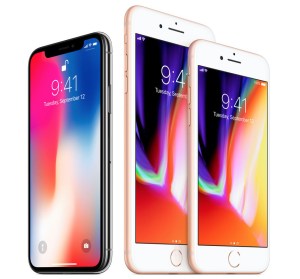 Clearly, Apple thinks so. I’m also quite sure some avid Apple fanboys think so. Let’s explore what innovation is and what it isn’t and compare that to the iPhone X. Let’s explore.
What is innovation?
Innovation effectively means offering something that hasn’t been seen before, either on other devices or, in fact, at all. I’ll give an example of this. If I create a transporter that can rearrange matter into energy and safely transmit it from point A to B and reassemble it into a whole, that’s innovation. Why? Because even though the concept has existed in the Star Trek universe, it has never existed in the real world. This is true innovation and would ultimately change transportation fundamentally as we know it. Though I won’t get into the exact ramifications of such an invention, suffice it to say this technology would be a world game changer. This example is just to show the difference between true innovation and pseudo innovation. Innovation should be a world game changer to be true innovation.
So then, what is pseudo innovation? This type of innovation, also known as incremental innovation, is to take an existing device and extend it with a natural progression that people expect or, perhaps, have even asked for or because other devices on the market have already added it. As an example, this would be taking a traditional blender and exchanging the blender bowl with a small single service container that can double as a cup. This is a natural progression from an existing blender to a more useful and functional device. This is the kind of change that doesn’t change the world, but solves a small problem for much smaller subset of people.
iPhone X Design
Let’s dissect this design from top to bottom to better understand it better and understand why the iPhone X is not in any way truly innovative and only presents pseudo or iterative innovation.
In fact, none of what has been included on the iPhone X is in any way newly created ideas by Apple. Apple is firmly playing catchup with the Joneses (or in this case, Samsung). Samsung has already produced phones with every single one of the technological advances that Apple has put into the iPhone X.
Fanboys might claim that the iPhone X is all new. No, it’s all nuances. Apple is simply catching up with existing technologies and ideas to improve their new phones (and I use the word improve loosely). There is nothing actually innovative about the iPhone X. In fact, from a design perspective, it’s probably one of the ugliest phones Apple has yet produced. The brow seals that fate. If there were such Razzie awards for design, Apple would win it for 2017.
iPhone 8
This is one of those things that always irks me about Apple. That they’re releasing the iPhone 8 at all is a bit of a mystery. If you’re introducing a new phone, why keep this line of phones at all? Bet the bank on the new model or don’t do it. This is what Apple has always done in the past. That Apple is now hedging its bets on two different models seems a bit out of ordinary for a company that has typically bet the bank on new ideas. I guess Apple is getting conservative in its old age.
Other than wireless and fast charging introduced into the iPhone X, nothing else has trickled its way into the iPhone 8. Effectively, the iPhone 8 is simply a faster iPhone 7 with Qi wireless and fast charging support.
Let’s talk about wireless and fast charging a little here. While the iPhone 8 is capable of both wireless and fast charging, it won’t come with it out of the box. In fact, Apple’s fast wireless charging pads won’t be released until sometime (probably late spring) 2018. While there are other Qi Wireless chargers you can buy now, these chargers won’t fast charge. Worse, the iPhone 8 still ships with the standard Lightning USB cable and standard speed charger. If you want fast charging, you’re going to need to invest in the extra accessories (cables and chargers) to get that faster charging performance. Until Apple releases its wireless charging pad, you can’t even get wireless and fast charging together. In addition to your phone’s cost, expect to dump an extra $100-200 on these accessories (several times if you want something now and then again when Apple releases its accessories).
Mac Computers
Just to reiterate the point of lack of innovation, I’ll bring up one more point. The MacBook and Mac line of computers has been so stagnant and so far behind the times, I’m not even sure Apple can catch up at this point. While every other non-Apple notebook on the market (even the cheapest, smallest model) now includes a touch display, Apple continues to ship its Mac computers without touch surfaces in defiance of that trend. There’s a point where you have to realize that touch surfaces actually are a necessity to computing. The ironic thing is, we have Apple to blame for this dependency by Apple introducing the original iPad.
Yet, Apple’s stubborn stance on introducing touch displays on the Mac has actually become a sore point with these devices. Apple, lose your stubbornness and finally release touch friendly MacBook computers at the very least. Though, I’d like to see touch screens on every Mac computer. You’ve had Spotlight on the MacOS X for years now (the first step towards touch displays), yet here we are with one computer that has a Touch Bar. The Touch Bar is such a non-innovation as to be a step backwards.
Let’s just get rid of the worthless Touch Bar and finally introduce Macs with touch displays, which is what we want anyway. Since we’re playing catchup, let’s finally catch the Mac line up to every other non-Apple notebook.
Apple’s Worms
It’s clear, Apple has lost its innovative ways. Apple is now relying entirely upon existing technologies and ideas, firmly throwing together half-assed ideas and calling them complete. The iPhone X idea should have been tossed before it ever saw the light of day. Had Jobs been alive to see it, the iPhone X idea would have been tossed out the window in lieu of a new idea.
The iPhone and Mac are only half-assed integrated with one another. The best we get is USB connections and Airdrop. The Universal clipboard only works about half the time and even then it’s not always useful depending on copied content. The single app that works quite well is iMessage. In fact, the entire reason this integration works at all is because of iCloud.
Additionally, Apple’s technology ideas across its product lines are entirely fractured:
Innovation is about putting together ideas that we’ve never before seen and that take risks. It’s about offering risky ideas in creating devices that offer the potential of changing the game entirely. There’s absolutely nothing about the iPhone X that’s a game changer. Yes, I do want an iPhone with an OLED display because I want the super high contrast ratio and vibrant colors. If that had been available on the iPhone 8, I’d probably have upgraded. For now, there’s no reason to upgrade from any of Apple’s most recent products. Wireless charging just isn’t enough. A hobbled OLED display is just not worth it.
↩︎
Elon Musk: Brilliant or Snake Oil salesman?
I’ve read a number of comments that people consider Elon Musk and his Tesla empire as brilliance at work. But, is this really brilliance at work? Let’s explore.
Brilliance is in the eye of the beholder
Oh, Elon Musk is definitely a brilliant man, no doubt. But not for the reasons most people think. Like many entrepreneurs who head to Silicon Valley to set up an empire, Elon is yet another in a long line of them.
Most people think he’s brilliant because of his Tesla electric cars. I would be the first to consider him brilliant with electric cars had he been the first to come up with the idea or a significantly better battery technology. Unfortunately, he missed the invention boat by just slightly less than 200 years. Also, no substantial new battery technologies have emerged from Tesla. Most certainly, he’s taken this nearly 200 year old idea and capitalized on it and modernized it. Unfortunately, his push to drive mainstream electric vehicle infrastructure has been a snail’s pace journey. Though, it is farther along in part due to Tesla.
So then, where is his brilliance?
Salesman Extraordinaire
Like many people before him and many more to come, he has capitalized on the phrase ‘There’s a sucker born every minute’. This is his brilliance. This is what makes his name in the world of automobiles.
I don’t know of many people who could have actually put a distortion field around a vehicle with a top distance of approximately 250 miles and suggest charging ~$100,000 (or more) for it.
What exactly is a car designed to do?
A car is designed to take you from point A to point B offering reasonably long distance before needing to refuel. That’s a car’s primary goal. The second goal is to be able to find fuel for the vehicle readily and fill it rapidly so you can continue performing your car’s primary goal ad infinitum. We have this infrastructure in place for gas engine vehicles already. Attempting to bring cars to market without building this infrastructure first is a problem.
Yet, Elon hasn’t even really solved the first goal. While 250 miles is respectable for a commuter vehicle, it’s not so great for cross country traveling. The second goal has not at all been solved by Elon; though, it’s not for lack of trying. For someone like Elon, that has to be extremely frustrating especially considering that in order to sell boatloads of vehicles to the masses you need goals 1 and 2 solved. What makes this even harder is when consumers can go buy a gas or hybrid vehicle and get much better distance and similar amenities for far less money.
Note, I do acknowledge that there are car buyers who buy cars to drive for pleasure and recreation. This driver profile is significantly different than those who drive for transportation. However, most people in the US buy vehicles for transportation, not recreation.
So, the car makes the distance, then what?
For electric vehicles, let’s keep in mind that this part is all hypothetical. Electric infrastructure is not yet close to being satisfied. However, what’s left after the goals are satisfied is car amenities. Oh, the Tesla cars are most definitely chock full of amenities, like a 17″ touch screen display, lots of cool looking LEDs and a bunch of pick-up when you mash the accelerator. Though, pretty much any electric vehicle will offer lots of torque just because of the drive train of electric motors.
It’s gets worse still. While you’re driving that Tesla around, you quickly realize you’re passing gas station after gas station. You might pridefully think, “Wow, I never have to use another one of those again”. Instead, the thought you should be thinking is, “What happens if I run out of power?” When you do run out of power, that fleeting and mildly prideful thought quickly turns to sheer terror when you realize that you are stranded. It’s not just any old version of stranded either. You’re now stranded and you need a tow truck. In fact, you’ll pretty much wish you could push your $100k Tesla over to that gas station, fill it up and be back on the road in 5 minutes. Nope. Expect your Tesla to be towed a very long distance to the next charging station. A charging station where you’ll be stuck for the next several hours. If you want a full charge, that could be 4-6 hours. Of course, if you’re close to home, you might get away with 30 minutes or an hour to get just enough charge to get home. I don’t know about you, but I don’t relish the thought of sitting in my car for several hours waiting for the battery to charge up.
Don’t expect AAA to carry around a portable generator to ‘fill up’ your Tesla. That’s not gonna happen. Though, AAA might be willing to drag your car to the next charging station. Although, that might be a lot farther distance than you expect. Depending on your AAA plan, it might or might not cover the towing distance. So, you should definitely opt for the longest distance roadside assistance plans that Tesla offers, especially if you plan on traveling.
Let’s not even discuss the shame of riding shotgun in that tow truck with your Tesla dragging behind you. For those of us continuing on our journeys in our gas or hybrid vehicle watching that Tesla in tow, be thankful you are still using the existing infrastructure that’s available.
Where is that infrastructure? (aka. the Apple syndrome)
While it’s easy to find gas stations, it can be almost impossible to find workable charging stations.
Like Apple, Elon is heavily trusting that infrastructure can be built timely. Elon is relying on the same idea as Apple. When Apple introduces a new technology that no one else is using, Apple hopes other manufacturers will quickly adopt and use it within 1-2 years. Sometimes that works, sometimes it doesn’t. Though, technology transitions every 12 months in computers. So, it’s feasible that manufacturers could transition to include that new technology reasonably quickly.
For Elon, relying on this concept is a bad idea. Fuel station infrastructure is no where near this nimble. It might take 10-20 years before a vision of charging stations all across the country is realized. Let’s understand why. The Tesla cars (and many other electric vehicles) require 240v to charge in any reasonable time frame (4-6 hours). To set up a charging station requires digging up the pavement, running cabling, installing charging stations and tapping into the mains (which also, of course, requires power usage metering and approvals by the local power company). It probably even requires building permits by the city and county. It may even by subject to zoning or approvals by the county or city.
Here’s where Elon’s vision (and brilliance) fails. Yes, I know that he’s been desperately trying to build infrastructure to support his business model, but that’s been an extremely tough row to hoe. Trying to get the tried and true gasoline industry to do anything around or for electric vehicles is like trying to ask McDonald’s to advertise for Burger King. Not gonna happen. I’ve yet to drive into a single gas station and find a charging station. Yet, it makes perfect sense to marry these two refill stations if for nothing other than standardization. People would naturally expect to find fuel of all types, including electric charging stations at the corner ‘gas’ station. But, nope. These charging stations are, instead, popping up on shopping center parking lots and on corporate business parking lots.
This means you either need a map to find them or you just have to already know where they are. Worse, it means leaving your expensive Tesla sitting in an empty parking lot where it can be broken into or, worse, stolen.
Having Elon’s company take that fight to Washington is not going to be much more successful either. The government has no incentive to help Elon realize a vision of electric vehicle infrastructure. Why? Because electric vehicles are no more clean than gas vehicles. Instead of exhaust coming out of that catalytic convertor tailpipe attached to your vehicle, it’s now coming out of stacks of coal or natural gas power plants that have no catalytic converter. Electric vehicles just push those emissions somewhere else. This short-sightedness is what will ultimately doom the electric vehicle supply chain. Of course, that’s a problem that isn’t of much concern to Elon. His concern is making sure people continue to buy his expensive short distance cars. After all, $100k for a vehicle is not exactly chump change.
Snake Oil
Back in the day, salesmen would ride into town attempting to sell a concoction of ingredients that would “fix your ailments”. While those days are mostly long past, with the exception of ‘As Seen On TV infomercials’, Elon’s Teslas are at once a bit cool and a bit snake oil. Selling his $100k vehicles with the idea that you can drive long distances is almost certainly a form of snake oil. He’s more than happy to go right ahead and pull that wool right over your eyes in hopes you forget all about those pesky infrastructure problems while traveling.
Unfortunately, you’ll learn the hard way when your car runs out of power in the middle of an interstate or worse, in some rural back road with no cell service. Good luck in finding a power charger in the middle of nowhere on someone’s farm. Thinking about visiting Burning Man in your new Tesla? You might want to think again or you should consider dragging a diesel power generator along, because you’re not going to find any access to a power grid in the middle of the Nevada desert (or in any place close to Burning Man). Though, if your car does run out of power at Burning Man, you might find some kind person willing to let you charge your vehicle off their generator, for a fee. Or, you might not.
What about Fuel Cell vehicles?
Fuel cells are a great concept. Unfortunately, they have several significant failings including fuel and the infrastructure to obtain that fuel (same problem as electric vehicles). Fuel cells require hydrogen. Not only is it next to impossible to find hydrogen fuel anywhere, it’s expensive. Why? Like electricity creation, the extraction of hydrogen requires burning fossil fuels. Perhaps using even more than in electricity creation.
For all of the same reasons as listed above for electric infrastructure, hydrogen fuel will suffer the same fate. On top of that, fuel cells are heavy. Placing this entire battery infrastructure in a vehicle forces the vehicle to weigh a lot more than a gas or electric powered vehicle. The heavy weight limits maximum speed, limits how much you can carry and makes the vehicle more dangerous in a wreck (both from weight and from the hydrogen perspective… think of the fiery Hindenburg). Wrecking a fuel cell vehicle could lead to a rapid and intense fire that quickly consumes the entire vehicle.
At this juncture in our transition towards alternative fuel vehicles, those vehicles that make the most sense offer gas powered generators to recharge along the way. These vehicles make the most logistical sense for anyone considering cross-country travel. At least with a gas powered generator, with a little gas from AAA, you can get back on your way in a few minutes. With electric only, expect your car to be towed. Let’s not even discuss AAA and fuel cells.
Salesman of the Decade
Suffice it to say that Elon’s claim to fame should be as a salesman. A very good salesman at that. How many other salesmen could possibly build a car that has no infrastructure, offer a 250 mile maximum distance and still rake in over $100k for a car? Not many.
I’m not saying that the Tesla vehicles aren’t well made. In fact, it seems that they are very well made. It’s not the quality of the vehicle that matters here. What matters is the ultimate convenience to use the vehicle. If the primary two goals are not being met, then it is very difficult to justify buying this car. For example, many apartment complexes offer no charging stations at all and have no intention of installing any. This means that if you want to own an electric vehicle and you live in apartment, you’re forced to charge it in some parking lot somewhere away from where you live. This also means you need transportation to and from your car. If your complex has garages, you might be able to get away with charging with 110v, but that might take two days to fully charge. Again, not feasible.
Elon’s task should have been infrastructure first, then cars. Instead, he chose the opposite path. Build the cars, sell them and hope the infrastructure follows. So far, that’s been more of a pipe dream than reality. Yes, more and more charging stations are appearing, but at no where near the rate it should be to fully support an electric vehicle future. But, one thing is perfectly clear, Elon epitomizes the perfect salesman and should probably be named Salesman of the Decade.
Power Grid
Finally, it’s definitely wise to discuss the aging power grid. As more and more vehicles transition to sucking their power from the grid, that means more load on the grid. We’re talking 240v loads. Just how many of these cars can the local grid actually support? We might need to talk to the owl. Hopefully, it’s more than 3. Eventually, the grid infrastructure may become overloaded and not be capable of handling that load. I’d expect to see a lot of grid growing pains as electric vehicles become more commonplace. As gas cars become replaced by electrics, that’s ever more load on the grid. We do not yet know the ramifications of or the peak of that load. Though, one thing is certain. When we do find that peak on the grid, we’ll start seeing blackouts, burnouts and exploding transformers until the power company can get it back under control. Power companies are almost never proactive in adding capacity. Capacity costs money and until that capacity is reached, it is not deemed a problem.
There is a lot of old infrastructure out there built long ago that handles the grid. Yet, putting more and more heavy device users onto the grid, such as a Tesla, could mean failing grids. Failing grids from which the power companies are not willing to touch until they’re forced to. Old gear is almost never replaced until it fails. I’d expect power companies to remain complacent until this whole issue comes riding back to bite them in the ass. And, bite them hard it will.
These are all things that Elon is not considering when he is selling his vehicles on the market. He just wants to sell vehicles, not worry about whether the grid can support the number of vehicles he wants to sell this year or whether there’s enough chargers around the country to support cross country travel. Yes, he puts up the pretense that he’s looking into the battery swap program, but what is the status of that program? I’d also like to know how Tesla plans to personally handle stranded motorists when one of their cars runs out of power.
There are far too many questions unanswered here to really call Elon a brilliant visionary. Instead, I’ll stick to the term salesman extraordinaire. Like most salesman, it’s about making the sale. Not about actually delivering on the promises you made to the customer during the sales process. In answer to the question whether he’s selling snake oil or selling brilliance, I’ll end by saying he’s a little of both, but only as far as sales.
Rant Time: Google+ is finally dead
All things must come to an end, some sooner than others. Google+ is now officially dead and being withdrawn from Google’s product suites one at a time starting with YouTube. To Google I say, thank you.
Good riddance to bad rubbish
I’m not saying that Google+ wasn’t well conceived, it just wasn’t well designed. As with a lot of Google’s products, they are created with the best of intentions, but the actual deployment of the idea leaves a lot to be desired. Google+ was definitely one that falls into the leaving-lots-to-be-desired category. It’s sad too because had Google done it right, they could have overtaken Facebook.
Instead of turning Google+ into a system that was actually useful, they used it as a back end single-signon product. Meaning, instead of being actually usable as a social platform to meet and discuss cool things with people you didn’t know, it ended up being just another single-signon tool. Yet another profile to be managed in thousands of other profiles. Not only that, they tied it into every product in the Google chain. This meant that in order to use any other Google product, you were forced to sign up for a Google+ account whether you used it or not.
The Real Problem? YouTube
Google+’s main bane was YouTube. Once Google got it into their heads that this was the end-all-be-all platform, they integrated it into YouTube in a way that made YouTube practically impossible to have discussions any longer. So, you would watch a video and then try to comment. In some cases you could, in other cases you couldn’t. The Reply link was sometimes there and sometimes not. I realize the reason why. It had to do with Google+ permissions. If the user didn’t allow people outside the ‘circles’ to comment, their thread was closed. This made it almost impossible to have decent conversations with people. Additionally, all of the old YouTube comments prior to the Google+ integration were entirely closed. You couldn’t comment on these at all (even if they were a month old). Frustrating.
A Social Platform?
Hardly. While Facebook isn’t the best at being a social platform, it is still a whole lot better than Google+ ever was. In fact, Google+ was so convoluted, you’d sometimes get comments from YouTube, sometime from Google+ and sometimes from both in your inbox. There was no rhyme or reason as to why it was this way. It just was.
I know what Google was trying to do here, they just didn’t do it well. Their version of a social platform was so all-over-the-place that it just wasn’t fun to use. It was even harder to find people on it, though they tried to make it easy through the Google contacts and circles. But, it just wasn’t easy or fun to use.
Google’s overreaching TOS
Worse, violating Google+’s terms and conditions could get your Google account closed, no ifs, ands or buts about it. If you valued your Google account, you really didn’t want to muck with Google+ for fear of writing the wrong thing and triggering the wrath of Google down on your account. With Facebook, no problem. If your Facebook account is closed (not likely), it wouldn’t affect your email accounts or any thing else in Google’s network. With Twitter, also no problem. If either of these social accounts are closed, it’s an inconvenience. If your email account closes, that’s a major problem.
Tying this supposed social platform to all of Google’s terms meant you were very limited in what you could say or do without accidentally triggering the wrath of the Google admins. If you did manage to trigger the wrath of the Google admins and they closed your account, there was no easy appeals process. It was simply better to play it safe than endanger your email account. It was far easier to participate in Twitter and Facebook and not worry about that problem.
Distractions
At best, Google+ was an unnecessary idea that didn’t need to be realized. In fact, for far too long Google has been distracted. Distracted with Android, distracted with Google+, distracted with Gmail, distracted with Google Apps, distracted with Postini, distracted with Blogger and distracted with Ad Words. It’s not that these other platforms aren’t worth it to the people who use them, it’s just that Google’s bread and butter is still Search. But, what of Search? When was the last time Google really made any innovations around search or in making searching better? Not recently. The last innovation to Search was Ad Words and that was less about innovation and more about monetizing it. That was also a very long time ago.
It’s time for Google to shed many of these silly distractions and get back to their core business… Search. Let’s get rid of these unnecessary distractions like Google+ and shed the baggage that has been encumbering Google as of late. Until Google can really focus on its core products, it will continue to flounder with these dead and dying products like Google+.
It’s long overdue for Google to kill off some of these useless unnecessary products and I’m glad to see that Google+ is the first to go. Perhaps Google is now on its way to recovering from this string of recent bad decisions it has been making. Though to see this, we will have to wait as only time will tell.
For now, I say with passion, “Good riddance to bad rubbish. Goodbye Google+.”
Apple’s newest MacBook: Simply Unsatisfying
 It’s not a MacBook Air. It’s not a MacBook Pro. It’s simply being called the MacBook. Clever name for a computer, eh? It’s not like we haven’t seen this brand before. What’s the real trouble with this system? A single USB-C connector. Let’s explore.
Simplifying Things
There’s an art to simplification, but it seems Apple has lost its ability to rationally understand this fundamental concept. Jobs got it. Oh man, did Jobs get the concept of simplification in spades. Granted, not all of Jobs’s meddling in simplification worked. Like, a computer with only a mouse and no keyboard. Great concept, but you really don’t want to enter text through an on-screen keyboard. This is the reason the iPad is so problematic for anything other than one-liners. At least, not unless there’s some kind of audio dictation system. At the time, the Macintosh didn’t have such a system. With Siri, however, we do. Though, I’m not necessarily endorsing that Apple bring back the concept of a keyboard-less computer. Though, in fact, with a slight modification to Siri’s dictation capabilities, it would be possible.
Instead, the new MacBook has taken things away from the case design. More specifically, it has replaced all of those, you know, clunky, annoying and confusing USB 3.0 and Thunderbolt port connectors that mar the case experience. Apple’s engineers have now taken this old and clunky experience and ‘simplified’ it down to exactly one USB-C port (excluding the headphone jack.. and why do we even need this jack again).
The big question, “Is this really simplification?”
New Case Design
Instead of the full complement of ports we previously had, such as the clever magsafe power port, one or two Thunderbolt ports, two USB 3.0 ports and an SD card slot, now we have exactly one USB-C port. And, it’s not even a well known or widely used port style yet.
Smart. Adopt a port that literally no one is using and then center your entire computer’s universe around this untried technology. It’s a bold if not risky maneuver for Apple. No one has ever said Apple isn’t up for risky business ideas. It’s just odd that they centered it on an open standard rather than something custom designed by Apple. Let’s hope that Apple has massively tested plugging and unplugging this connector. If it breaks, you better hope your AppleCare service is active. And since the unplugging and plugging activity falls under wear-and-tear, it might not even be covered. Expect to spend more time at the Genius bar arguing over whether your computer is covered when this port breaks. On the other hand, we know the magsafe connector is almost impossible to break. How about this unknown USB-C connector? Does it also have the same functional lifespan? My guess is no.
I also understand that the USB-C technology automatically inherits the 10 Gbps bandwidth standard and has a no-confusion-plug-in-either-way connector style. But, it’s not as if Thunderbolt didn’t already offer the same transfer speed, though not the plug-in-either-way cable. So, I’m guessing that this means Thunderbolt is officially dead?
What about the Lightning cable? Apple recently designed and introduced the Lightning connector for charging and data transfer. Why not use the Lightning connector by adding on a faster data transfer standard? Apple spent all this time and effort on this cool new cable for charging and data transfer, but what the hell? Let’s just abandon that too and go with USB-C? Is it all about throwing out the baby with the bathwater over at Apple?
I guess the fundamental question is… Really, how important is this plug-in-either-way connector? Is Apple insinuating that general public is so dumb that it can’t figure out how to plug in a cable? Yes, trying to get the microUSB connectors inserted in the dark (because they only go in one direction) can be a hassle. The real problem isn’t that it’s a hassle, the real problem is that the connector itself was engineered all wrong. So, trying to fit in a microUSB cable into a port is only a problem because it’s metal on metal. Even when you do manage to get it lined up in the right direction, it sometimes still won’t go in. That’s just a fundamental flaw in the port connector design. It has nothing to do with directionality of it. I digress.
Fundamentally, the importance of a plug-in-either-way cable should be the lowest idea on the agenda. What should be the highest idea is simplifying to give a better user experience overall and not to hobble the computer to the point of being unnecessarily problematic.
Simply Unsatisfying
Let’s get into the meat of this whole USB-C deal. While the case now looks sleek and minimal, it doesn’t really simplify the user experience. It merely changes it. It’s basically a shell game. It moves the ball from one cup to another, but fundamentally doesn’t change the ball itself. So, instead of carrying only a power adapter and the computer, you are now being forced to carry a computer, power adapter and a dock. I fail to see exactly how this simplifies the user experience at all? I left docks behind when I walked away from using Dell Notebooks. Now, we’re being asked to use a dock again by, of all companies, Apple?
The point to making changes in any hardware (or software) design is to help improve the usability and user experience. Changing the case to offer a single USB-C port doesn’t enhance the usability or user experience. This is merely a cost cutting measure by Apple. Apple no longer needs to add pay for all of these arguably ‘extra’ (and costly) ports to the case. Removing all of those ‘extraneous’ ports now means less cost for the motherboard and die-cuts on the case, but at the expense that the user must carry around more things to support that computer. That doesn’t simplify anything for the user. It also burdens the user by forcing the user to pay more money for things that were previously included in the system itself. Not to mention, requiring the user to carry around yet more dongles. I’ve never ever known Apple to foist less of an experience on the user as a simultaneous cost cutting and accessory money making measure. This is most definitely a first for Apple, but not a first for which they want to become known. Is Apple now taking pages from Dell’s playbook?
Instead of walking out of the store with a computer ready in hand, now you have to immediately run to the accessory isle and spend another $100-200 (or more) on these ‘extras’. Extras, I might add, that were previously included in the cost of the previous gen computers. But now, they cost extra. So, that formerly $999 computer you bought that already had everything you needed will now cost you $1100-1200 or more (once you consider you now need a bag to carry all of these extras).
Apple’s Backward Thinking?
I’m sure Apple is thinking that eventually that’s all we’ll need. No more SD cards, no more Thunderbolt devices, no more USB 3 connectors. We just do everything wirelessly. After all, you have the (ahem) Apple TV for a wireless remote display (which would be great if only that technology didn’t suck so bad for latency and suffer from horrible mpeg artifacting because the bit rate is too low).
Apple likes to think they are thinking about the future. But, by the time the future arrives, what they have chosen is already outdated because they realized no one is actually using that technology other than them. So, then they have to resort to a new connector design or a new industry standard because no other computers have adopted what Apple is pushing.
For example, Thunderbolt is a tremendous idea. By today, this port should have been widely used and widely supported, yet it isn’t. There are few hard drives that use it. There are few extras that support it. Other than Apple’s use of this port to drive extra displays, that’s about the extent of how this port is used. It’s effectively a dead port on the computer. Worse, just about the time where Thunderbolt might actually be picking up steam, Apple dumps it in lieu of USB-C which offers the same transfer speeds. At best, a lateral move technologically speaking. If this port had offered 100 Gbps, I might not have even written this article.
Early Adopter Pain
What this all means is that those users who buy into this new USB-C only computer (I intentionally forget the headphone jack because it’s still pointless), will suffer early adopter pains with this computer. Not only will you be almost immediately tied to buying Apple gear, Apple has likely set up the USB-C connector to require licensed and ID’d cables and peripherals. This means that if you buy a third party unlicensed cable or device, Apple is likely to prevent it from working, just as they did with unlicensed Lightning cables on iOS.
This also means that, for at least 1-2 years, you’re at the mercy of Apple to provide you with that dongle. If you need VGA and there’s no dongle, you’re outta luck. If you need a 10/100 network adapter, outta luck. This means that until or unless a specific situational adapter becomes available, you’re stuck. Expect some level of pain when you buy into this computer.
Single Port
In addition to all of the above, let’s just fundamentally understand what a single port means. If you have your power brick plugged in, that’s it. You can’t plug anything else in. Oh, you need to run 2 monitors, read from an SD card, plug in an external hard drive and charge your computer? Good luck with that. That is, unless you buy a dock that offers all of these ports.
It’s a single port being used for everything. That means it has a single 10 Gbps path into the computer. So, if you plug in a hard drive that consumes 5 Gbps and a 4k monitor that consumes 2 Gbps, you’re already topping out that connector’s entire bandwidth into the computer. Or, what if you need a 10 Gbps Ethernet cable? Well, that pretty much consumes the entire bandwidth on this single USB-C connector. Good luck with trying to run a hard drive and monitor with that setup.
Where an older MacBook Air or Pro had two 5 Gbps USB3 ports and one or two 10 Gbps Thunderbolt ports (offering greater than 10 Gbps paths into the computer), the new MacBook only supports a max of 10 Gbps input rate over that single port. Not exactly the best trade off for performance. Of course, the reality is that the current Apple motherboards may not actually be capable of handling 30 Gbps input rate, but it was at least there to try. Though, I would expect that motherboard to handle an input rate greater than 10.
With the new MacBook, you are firmly stuck to a maximum input speed of 10 Gbps because it is a single port. Again, an inconvenience to the user. Apple once again makes the assumption that 10 Gbps is perfectly fine for all use cases. I’m guessing that Apple hopes the users simply won’t notice. Technologically, this is a step backward, not forward.
Overall
In among the early adopter problems and the relevancy problems that USB-C has to overcome, this computer now offers a more convoluted user experience. Additionally, instead of offering something that would be truly more useful and enhance the usability, such as a touch screen to use with an exclusive Spotlight mode, they opted to take this computer in a questionable direction.
Sure, the case colors are cool and the idea of a single port is intriguing, it’s only when you delve deep into the usefulness of this single port does the design quickly unravel.
Apple needs a whole lot of help in this department. I’m quite sure had Jobs been alive that while he might have introduced the simplified case design, it would have been overshadowed by the computer’s feature set (i.e., touch screen, better input device, better dictation, etc). Instead of trying to wow people with a single USB-C port (which offers more befuddlement than wow), Apple should have fundamentally improved the actual usability of this computer by enhancing the integration between the OS and the computer.
The case design doesn’t ultimately much matter, the usability of the computer itself matters. Until Apple understands that we don’t really much care what the case looks like as long as it provides what we need to compute without added hassles, weight and costs, Apple’s designers will continue running off on these tangents spending useless cycles attempting to redesign minimalist cases that really don’t benefit from it. At least, Apple needs to understand that there is a point of diminishing returns when trying to rethink minimalist designs…. and with this MacBook design, the Apple designers have gone well beyond the point of diminishing returns.
How to make iTunes 12 look and act like iTunes 10
iTunes 12 has been out since just about the release of Yosemite. In the fall, out of the box iTunes 12 looks like iTunes 11, with that horrible all new interface that Apple foisted onto us. Well, all is not lost. You can now make iTunes 12 look and act a whole lot more like iTunes 10. Though, keep in mind that it’s not a perfect reincarnation of iTunes 10, for most purposes it is still very functional. Let’s explore.
The New Interface
When you first kick off iTunes 12 (or 11 for that matter), you’ll see that it shows your albums as large icons. If you click an icon, it expands and shows track listings below it in a split screen setup.
Here’s a tutorial video that shows what can be done. This video is HD, so you should expand it full screen to see the detail.
Obviously there are still differences between iTunes 12 and iTunes 10, such as the row of buttons moved to the top rather than in the left playlist sidebar. But, these are more cosmetic than a problem. As long as I can get to list mode that I am most familiar with using, this was my biggest gripe with the the new iTunes views. I’m glad they’re back.
Searching, Movies and Playlists
Searching has changed somewhat. When you search, you will get search results by song and by album. This is relatively handy when creating a new playlist. You simply drag the album over and drop it on playlists and it will create a new playlist. Though, the playlist info is shown on the right including renaming it. Once you click ‘Done’, it will be saved into the playlist sidebar and you can edit it there the normal way.
You can also create playlists that now contain movies. So, you can drag your favorite trilogies over and create a playlist of these films. It will them play the playlist in order. These will also show in the left sidebar under Playlists when on Movies. The Playlists view is in the center section.
Changing Art
If you highlight all of the tracks in list view then right click and ‘Get Info’, you can paste the art in the upper right corner with the keyboard (as long as it’s on the clipboard already) and then save. It will then apply the art to every selected track. This is not much different from iTunes 10 if you used the get info panel. However, if you used the drag and drop method in the lower left of the window, that method is no longer here.
Cover Flow
Unfortunately, Cover Flow is still not back in iTunes 12. It’s funny too, because Cover Flow is still available as an option in MacOS X Yosemite in Finder. I don’t fully understand why it was removed from iTunes 11, but for whatever reason was left in MacOS X. This is inconsistent and odd. Apple is usually very consistent in UI design, mirroring whatever is in the OS in the applications. For whatever reason, the iTunes engineers have inexplicably removed Cover Flow from iTunes. I know that there was a lawsuit against Apple for the use of Cover Flow. So, it’s possible it was removed from iTunes 11 to satisfy that patent lawsuit. Apple, just pay the friggin’ patent trolls off and put Cover Flow back in.
iTunes 10
While I still like iTunes 10 for many reasons (full screen artwork), the small art panel in the lower left, etc. These are small concessions when considering an upgrade to iTunes 12 when you need to manage your library and you need to sync your latest iOS devices. Most all of the functionality I used is now back in iTunes 12 and I’m glad that it’s there. The ugly horrid album view is, mostly, a memory for me. I use that view only for films because it makes sense. I want to see the movie poster to know that’s the movie I want to watch. For albums, I want the track lists in the original way that made it easier to manage.
So, there you go. It’s now easy to get your iTunes 12 install very close to the way iTunes 10 use to work. Of course, there are still some things that haven’t been added back in. Though, the list view that looks like iTunes 10 is the thing that allowed me to finally upgrade to this this latest version.
Update for iTunes 12.4+
As of iTunes 12.4, Apple has once again rearranged the UI interface in Apple’s never ending revisionist tendencies. So now they’ve have added more buttons and buried some functions. They also removed the drop down available on playlists to make for easy configuration. The option is still there, but it’s now buried in a menu.
To change the playlist look-and-feel, you must now use the View=>Show View Options menu selection or use the ⌘J keystroke to bring up the options window.
 As you can see in the image to the left, the top most portion is what is most important for playlist setup. Click ‘View As’ to change the way the playlist looks. This drop down was formerly at the top of the playlist bar, but has now been removed. The only place where this option is now is in the View Options panel.
I guess Apple is now taking pages from Microsoft’s book of UI design. Meaning, they are now choosing to bury things under tons of mouse clicks which is extremely inefficient from a movement and time perspective. This does not in any way make moving around in this UI interface any faster. It is now firmly more cumbersome and pointless.
I just don’t even get what Apple is trying to accomplish here with these stupid and unnecessary design changes. If Jobs were alive, he’d be not only bringing some of these people to tears, but some of them might even see the door. It’s quite clear, there is no clear direction at Apple. If this is the work of Jony Ive, then please, let’s walk him to the Apple Campus door as fast as physics allows.
There seems to be no bad design depths to which Apple will now reach. I shake my head at just how far this malus domestica has fallen.
‘Tis the season to be breached
As we roll into another holiday season just having passed through Black Friday, it’s wise to understand how to best protect yourself from these accidental data breaches at retailers (see: Bebe’s Data Breach). Let’s explore.
What is a data breach anyway?
A lot of people shop with credit cards without first understanding what they are or how they really work. By this statement I mean, I think people understand that the purchase extends credit for the items in advance and then pay the actual bill later to the credit card company. But, that’s not what I’m talking about. I’m talking about what happens when you swipe your card at a terminal. Let’s understand payment processing.
When you enter a store and swipe your card, information is exchanged between the terminal and the cash register. That information is whatever is on the back of the card (the card number, expiration, name, etc). All of that information is now accessible by the register (and cashier). Additionally, stores have networks that connect all of their registers (a type of computer system) to a central controller and ultimately to a company wide network. The company wide network may be connected to the Internet, but may only have direct connections to payment authorization providers.
When you swipe your card and that information is exchanged by the register, a program takes your card info along with the payment amount, securely asks a remote payment authorization service whether the card has sufficient funds to support the transaction (at least this part is secure). If your bank says yes, the transaction is approved and given a transaction number. This is a payment authorization and it instructs your bank to hold this dollar amount aside until the closing paperwork arrives (around 24 hours). If the paperwork never arrives, the authorization falls away and the money being held is released back into your account.
Now, if you don’t have enough funds (or for other reasons), the payment service receives a decline from your bank. The retailer and payment authorization service never know the reason for the decline, only that the transaction was declined. You will need to contact your bank to find out the reason for the decline. Declines can range from not enough funds to bad expiration dates on cards to reissued cards to fraud detection holds. Again, you will need to contact your bank to determine the reason and then rectify it. Note that if you are significantly over your limit and your card hasn’t seen a payment for several cycles, the screen may request the cashier call into a number. The person on the other end might request the card be taken and cut up. This typically means the account has been closed by the card issuer and you are no longer authorized to use the card. It is always wise to pay your bills if you value using that card.
Card Info Data Transit
The problem with data transit on a network is that, depending on the network and who built it, it could be designed to transmit your data as encrypted or in clear text. Let’s understand the difference. Encrypted data means that a key is needed to unlock the data to view it. This means that only devices that have the proper key can view and use the data. However, many network operators don’t use this type of security. A lot of people who build internal networks for corporations feel they are inherently ‘safe’ and choose to use clear text transit. What is clear text? Clear text is just like this blog article. It’s humanly readable without any extra work. Thus, many companies fail to adequately protect data transit between internal network devices under the assumption that no one should have internal access except authorized internal devices. In other words, because of the external border protections such as firewalls that prevent unauthorized inbound traffic, internal networks should be a ‘safe place’, thus adding extra safeguards only serves to slows down processing and, if you happen to be a retailer, could make the customers wait at the register longer.
Internal networks designed with limited or no encryption are a hacker’s paradise. If they happen to get into a network like this, everything is easy to read, easy to find and easy to download. It’s basically a dream come true for the malicious hacker. With little to no constraints on viewing data, it’s a kid in a candy store and that’s exactly how and why data breaches begin.
How do hackers get into a network then?
Because most companies today require their computers to have internet access, especially retailers who need access to payment authorization services, bugs in network and computer devices are impossible to squash. Internally, companies typically hire IT and operations teams to manage their network systems. They also typically hire security teams to help protect their networks. The security teams do their best to mitigate attacks and watch for data breaches, but it is the operations and network teams that manage the network gear and keep them updated. Because the security team and operations and network teams are separate sets of people, getting equipment updated with the latest-greatest version isn’t always expedient. This means that companies could be running one, two or five versions behind the latest version.
It happens for a lot of reasons. It could be old equipment that simply won’t support the latest update. It could be that there are thousands of servers that could be impacted by a single update. It could be that that single update might break custom software written by the company. There are a lot of internal factors as to why any piece of equipment is not on the latest version. Yes, sometimes it’s even a matter of complacence.
How do you protect yourself?
Before strolling into your latest big box retailer, you should arm yourself with knowledge. Knowledge like the above to better understand how your data gets moved around in company networks. Then, you can better understand when to take the risk to use your card and when to use another form of payment.
Use Store Cards
First and foremost, the safest card to use at a retailer is a store card without a Visa/Mastercard logo. These cards can only be used at the retailer where they were issued. They cannot generally be used anywhere else (unless the company owns several retail shops and shares the card among them). So, if you purchase at Target or Macy’s or Sears with a local store card, if there is a data breach, your ‘store card’ card number is no longer the lowest hanging fruit. The lowest hanging fruit are the Visa, Mastercard and Amex branded cards. With store cards, it will take time for a hacker to understand what that card is and how to use it. Also, once they realize that it only works at that single retailer or at that retailer’s web site, it’s much less appealing. Especially considering that many hackers today don’t live in the US. They might be living in China or Korea or Russia where that store may not exist and where they may not ship abroad.
So, sticking with store issued cards is really your safest bet when shopping at big box chains. Using a Visa or Mastercard or Amex branded card, if stolen, can be used anywhere around the globe (unless you call your bank an explicitly ask to prevent its use outside of your country). Note, not all banks can stop international transactions on branded credit cards, but most can. Call your issuing bank and ask.
Of course, should you plan travel abroad, you will need to make sure your bank authorizes international use before you leave. If you forget to call from home before you reach to your destination, you could have problems.
Limit transaction amounts
You can also limit your per day transaction amount to a much smaller amount. This can make it difficult if you want to buy a big ticket item with your card, so you’ll need to weigh just how often you make large purchase (and how big they are). However, lowering your per day transaction amount to $500 or less limits how much a hacker could put on the card per day. Again, your card would then no longer be low hanging fruit. Hackers want cards with high dollar amount transaction limits to they can spend a lot of money per day quickly and get away from it. As soon as a hacker tries to buy something expensive and they get a decline, that card is marked as not usable and they move onto trying another card.
Use gift cards
Because there are now Visa and Mastercard branded gift cards, you can put a dollar amount on the card that you wish to use while shopping. If this card number is lost to a hacker, it’s has limited liability (because of the logo) and it limits how much damage they can do to you financially. Also, because it’s a gift card, there’s limited personal information they could obtain about you in relation to this card. So, identity theft is much reduced by using gift cards. You should read Visa, Mastercard and Amex branded logo gift cards carefully. Some require fees after 1 year. So, you will need to use up the balance on the card within 1 year or you could start losing your balance to the monthly fees.
There are also store branded gift cards without any logos such as iTunes, Sears, Amazon, etc. These gift cards can only be used at their respective issuers. Again, these cards offer limited liabilities if stolen.
Though, if a gift card number is stolen, you will also want to read the terms and conditions with the card issuer. Not all of them assume replacement liability. So, if your gift card is stolen, you may be out whatever money was on them. So, you should always read gift card terms and conditions carefully.
Use good ‘ole cash instead
While cash does have its uses, I don’t believe holiday shopping is really one of those times. Because you’re typically buying large ticket items for holiday gift-giving, carrying a wad of crisp $100 bills around to pay for them can be downright dangerous. During the holiday season, you may be trading your financial safety for personal risk. For example, the first store you visit could lead someone seeing your cash, stalking you and taking your money and gifts from you by mugging…especially if you just happened to walk out of an Apple store. Depending on the city where you live, it’s sometimes not worth trading the potential safety of your financial security by putting your personal safety at risk. If you are mugged, they’ll likely steal your cards too, which also leaves your financial safety at risk.
And, if muggers rip off your cash, there is no replacement at all. It’s gone. Using credit cards, especially Visa, MC and Amex branded cards, these cards offer limited loss liability. So, if someone steals your card number and begins using it, your total loss is quite limited. The bank will pick up the tab on your behalf and then chase down the perpetrators for their involvement attempting to get the money or merchandise back.
Basically, cash is unsafe and insecure if carried in large amounts. Whipping out your wallet and flashing that set of crisp $100s once is all it takes during a busy shopping season to get you mugged.
Use a debit card
Last, but not least, use a debit card. Though, while liability on your debit card might be higher (check your debit card terms), you have a known pin code that is required to buy anything. A pin code is a lot stronger of a protection than a signature on a credit card. Basically, stores are not required to collect signatures from purchases. They can simply state ‘signature on file’ when that may not be true. This is how you can buy with a credit card from Amazon or Newegg without ever having to sign for your purchase. Even some retailers today are not asking for signatures on cards if the transaction amount is under $50.
Debit cards always require a pin for the transaction. With web site access today, pin codes are also relatively easily changed. You can also usually get the pin code changed long before the hackers are dipping into these cards to make purchases. Again, hackers prefer low hanging fruit. This means that most hackers would opt to use Visa, MC or Amex branded cards rather than trying to use someone’s personal debit card.
Though, keep in mind most debit cards issued by banks today contain a Visa or Mastercard logo. So, that means the card can be used like a credit card with a signature alone. Instead, you should ask your bank to send you a debit card without the logo. This card can only be used where debit cards are accepted or at ATM machines. It cannot be used to buy at places that don’t accept debit cards. Again, this keeps your card from becoming the lowest hanging fruit.
Limit your shopping days
When you do shop, keep your receipts so you know the date and time that you shopped and where. Keeping receipts is always smart if you need to return something, but it’s even smarter when there’s a data breach so you know if you may have been affected.
Also, limit your shopping to a limited number of places and keep record of when and where (use receipts or write it down). Four months after the holiday shopping season when a breach is announced, you might not remember that you shopped at that random store that lost data which then subsequently led to some random hacker racking up a large bill on your Visa card. In fact, you might only discover the breach yourself after you notice the large bill on your card.
If you limit the number of times you shop and use cards as suggested above, you can help eliminate your cards as being the easiest to rob.
Shop where breaches have previously occurred
This may seem counter to safe practices, but companies have have endured breaches are less likely to be breached again. This is especially true of big box retailers such as Target, Walmart and the like. These retailers have a whole lot to lose if they are breached a second time. It’s very likely that these companies networks are a whole lot more secure after the breach than before it.
Shopping at companies who have not yet had a breach doesn’t mean that their networks are insecure any more than they are secured. Yes, it could mean that. But, it could also mean that these yet breached companies are lucky not to have been targeted. If hackers focus their sights on a victim, they will chip away at the security until they find a way in. They also have plenty of time to do it. Let’s also note that way into a network may not be through the front door. The hackers could get in just as easily through an executive’s lost or stolen cellphone or notebook or a third party vendor (like HVAC, plumbing or other contractor who’s network might be less secure). Note that hackers may also work on several company networks at the same time until they find one to breach.
What about Sony?
Sony is a bit of an unusual case. Instead of strengthening their network security across the board, it seems their management team may have decided to only tightened security on the division that was compromised. Sony is a very large corporation containing many different entities all over the world. SCEA (the games division) was where the last breach occurred prior to this latest breach on the Motion Picture Group. So, anyone who has read through the MPG spreadsheet of salaries knows that there are at least 6 people in the US alone that are taking home well more than $1 million dollars a year in salary. You would think that these highly paid staff would understand the risks of computer networks and make it their top priority to secure their personnel and other records through best security practices. Nope. For example, an easy best practice is to use a password to open a spreadsheet. Sure, these can be easy to crack, but that’s extra effort required on the part of the hacker.
Unfortunately, these people are not doing their jobs. Some could argue, it isn’t their job. Their job is to be Senior or Executive VP of blah. Part of being a Vice President is to make sure your company is secure. If you can’t ensure that your division is secure, then you shouldn’t be taking home a million dollars in salary. It’s quite simple. These people are way overpaid for the job they perform for Sony. I digress.
Sony is clearly a situation where the left hand doesn’t know what the right hand is doing, and frankly they don’t care as long as they walk away with their pay. So, what about Sony? Here’s the takeaway.
For any company that has been double or triple breached (like Sony), you should stay as far away from that company (like Sony) as you possibly can. Sure, you can buy Sony products at a retailer because the retailer is responsible for the transaction. But, you should not use Sony products that require storage of credit cards for payment. You should also not purchase software from any site that Sony owns. It’s crystal clear, Sony cannot be trusted and they seriously don’t care about data security. If you must purchase something from Sony, use a Sony branded gift card, Paypal, Google or Amazon checkout. These payment systems are not owned or operated by Sony, but can send payment to Sony for whatever it is you need to buy. But, don’t buy directly from Sony (or any other company) that has repeatedly been breached.
Best Practices for Personal Finances
While these are but a few best practices to protect your home finances, there are plenty more common sense approaches to keeping your finances secure. Here are a few top examples of how to secure your own finances:
- Keep your credit cards in a safe place.
- Regularly check your bank statements for unauthorized transactions. Some banks now offer email notification of suspicious activity, use it.
- During the holiday season, make sure you know what stores you shopped by keeping receipts in a handy place.
- Open a second bank account to move small amounts of money in when you need to purchase items online or in stores. Secure your primary account using limited access to services like debit cards, ACH and other third party access. Use the second account much smaller account for these services. It’s easy to move money between accounts in the same bank using your phone app or on the web, so take advantage of this extra security.
- Call the bank immediately if you’ve lost or stolen your card. You should write down the number on the back of the cards into your smart phone so you have it in case the card is stolen or lost. Don’t write the account numbers down next to the phone number.
- Make use of the free credit report you can get once a year and check your credit every year.
- Don’t purchase from any retailer where they are not following proper credit card practices. For example, they should not have to double swipe your card, write the numbers down or ask for any further information aside from looking at the back of the card.
- Don’t allow any retail cashier to walk away with your card. They should only need to hold the card long enough to look at it or swipe it once at the register.
- While it is a regular practice for waitstaff to walk way with cards and bring them back to the table as a convenience, you should be wary of this practice. In fact, it might be best to take the check to the cashier at the place where they ring up your meal and watch them ring up your bill. Allowing waitstaff to walk away with your card out of sight means it could be duplicated, swiped through a cell phone or written down.
- Throughout the holidays, you should search through a major news site for data breaches at least once a week. As soon as you hear of any store that has breached where you may have shopped, you should ask for a replacement card if logo branded or change your pin immediately if debit. For Visa, Mastercard or Amex logo branded gift cards that may have been used at that retailer, you should call the number on the back to have a replacement sent immediately. Unused gift cards are not a problem.
- Request your bank place a fraud watch on your account if you suspect anything amiss with your cards. You should also request a replacement card if you have any reason to believe your card number has been lost. Yes, I know that can be a hassle during the holiday season while you wait for a new card, but it can potentially save you thousands of dollars lost to a hacker.
Overall
It is up to you to secure your own home finances. Using the above best practices should help aid you in achieving that goal. But, you should immediately become suspicious of anyone who attempts to do anything out of the ordinary with your card. If a cashier asks to do something with your card that doesn’t make sense, you should immediately ask for the card back and call over the store manager to clarify what’s going on. If they are the only person in the store, you should leave without making the purchase, step out of the store and immediately call your bank and put a fraud watch on your card.
As the Holiday shopping season gets fully underway, you need to be ever vigilant over your finances because the stores won’t do this for you. Worse, because there are many people who need money to meet their own bills and cover holiday shopping expenses, fraud and theft can be anywhere from anyone. That’s not to say that most people working at retail establishments aren’t screened and trustworthy, but for some people, the temptation of all of that money gets the better of them and they resort to taking other people’s money. By far and away, though, data breaches are the biggest problems of all because you don’t know who or where the attacker is. So, this is where you need to watch your finances closely and use your card very limited amounts over the holidays. Use cash where you can, but don’t jeopardize your personal safety by carrying too much cash.
Wishing a Happy and safe holiday season to everyone from Randosity!
Apple Watch: A commentary
 I had not planned to write anything about the newest Apple announcements, but I’ve decided there are few things that need to be said about the Apple Watch. Let’s explore.
Apple Watch
So, this is the one thing that’s on everyone’s mind. I mean, it basically stole the show, but not necessarily in a good way. Why is that? Let’s start by saying that phones are the new watches. Most people don’t need to wear watches any longer because the phone itself suffices for that purpose. I mean, why carry around two different devices each needing their own battery charges when you can carry around one? I think this is where Apple assumes their distortion field is enough to overcome people’s recent aversion to wearing watches.
It’s not like the Apple Watch has reinvented something new. It’s a bloomin’ watch for chrissake. Its most basic feature is to tell time. It’s not like that’s new or revolutionary. It’s all the extra bells and whistles that come along for the ride that make or break the deal. Are those extra bells and whistles worth it? For some maybe yes, for others likely no. I mean, if you don’t need the pulse monitor or step tracker and you don’t really plan to use it as an iPhone controller, then you’re cutting about 60% of its functionality right off the top. For the $349 price tag, that’s quite pricey for a bulky thick watch.
Yeah, it’ll have a music player, but how much storage? We’re not really sure yet. But, if I know Apple, it’ll go out on the cheap and we’ll get 8G or some piddly amount like that. Just enough to hold a tiny music collection, but not enough to really be useful nor is that storage in keeping with a $350 price tag. It might also play movies, but why? Who wants to watch a movie on that tiny watch screen? Not me. That’s why I bought an iPod touch, though I don’t really much like watching moves there either. So that’s why I also bought an iPad.
Watch Failure?
Adoption of this device will be tough for Apple primarily because it will be difficult to retrain so many people to embrace the need for the Apple Watch. I mean, people have done without watches for the last decade just fine. For those people who love to wear watches, though, the Apple Watch might appeal to them. But, at that price tag, it might not. I mean, you’re going to be wearing a $350 device on your wrist in addition to carrying around a $500 valued iPhone. After all, what’s the point in buying this watch unless you have an iPhone? The other problem Apple faces is name brand watches. There is no way Apple will push aside such luxury brands as Rolex, Cartier, Patek Philippe, Tag Heuer or others. For the person looking for a luxury brand, they won’t think twice about looking at their favorite luxury brand. The Apple Watch won’t even factor in other than just having it as a novelty item. I guarantee the red carpet crowd will still show off their Rolex watches and not the Apple Watch when showing off their newest duds waltzing down the red carpet.
However, there will be a core group of Apple early adopters who will invest in this technology from Apple just because it looks cool and is new. After those people are done shelling out the cash, what then? We may find that the Apple Watch fares no better than sales of any other watch brands, which are not doing all that well today (other than the super ritzy brands of which the celebs adore).
Battery Life?
Apple faces a whole new set of problems when introducing this new device. Obviously, the battery will be a big deal clincher for a lot of people. If the battery lasts 3-5 hours, that’s just not enough to be useful or you’ll be yanking that watch off your wrist to charge it up frequently. This would be the absolute kiss of death for this device. No one is going to put that much time and effort into keeping it charged constantly.
Knowing that this device has Bluetooth and possibly WiFi, both of these wireless protocols are absolute battery hogs. There is no way around it. If you have Bluetooth and WiFi enabled, you can say goodbye to any decent amount of battery life on a device.
For example, when I cut off WiFi and cellular data on my iPhone 4s, I can typically get at least 3 days worth of charge out of the battery. With cellular data on, you might get a day at best. With WiFi on, you’ll get a day at best. These wireless protocols are out and out battery killers. For this reason, that’s why it wasn’t on the original square iPod nano. And, the battery on the iPod nano (aka. first gen Apple watch) lasted amazingly long.
Overall
This new Apple Watch itself is bulky, and bulbous. Though, I like some of the features, like the less breakable crystal. But, there are things I don’t like, like the icon vomit on the main screen. It’s easily one of the most ugly eyesores I’ve seen on an Apple device yet. I’m also not sure that Apple can sufficiently overcome this last decade of training people to use mobile phones as watches. Apple even ironically ushered in this trend with the iPhone itself. Now they’re trying to undo this? Good luck. I’ll wait and see just how the sales do on this long term, but I’m not holding out much hope with this first version of the watch.
Perhaps Apple can fix a lot of these problems in the 2G version of the watch. Personally, I’d rather see them do a pocket watch edition. Now that would be more useful. The screen would be bigger, you can hold it in your hand like you do a pocket watch and it has that cool button at the top which could be used for so many things (including opening a flap covering the display like a normal pocket watch). Not to mention, there are many people who collect pocket watches over standard wrist watches. We’ll just have to wait and see how well this all turns out.
Review: Man of Steel
 While the Man of Steel has been out of the theaters for a while and is now available on blu-ray, I’ve decided an analysis of this film is now in order. It also showcases what’s wrong with Hollywood blockbusters in general. Man of Steel is an excellent poster child of the problems associated with today’s storytellers populating Hollywood. It’s all about the money and never about the quality. Though, let me start by saying the Superman suit is the least of this film’s problems. In fact, even though the suit is not at all in keeping with Superman, the suit itself is probably one of this film’s best features. Go costume department! Let’s explore.
Lois Lane
The script pieces surrounding Lois are quite unexpected. There’s nothing specifically wrong with Amy Adams’s portrayal of Lois Lane in terms of acting. In fact, she did a respectable job of acting Lois within the context of the role. Still, Margot Kidder’s and even more so Noel Neill’s Lanes seem much more human and in-line with being an actual reporter.
Unfortunately, the story behind Lois Lane in Man of Steel has created far more questions than answers. For example, every time Superman has landed after a long drawn out battle, flying at enormous speeds all over the city and destroying parts of perhaps 10s of buildings and then ultimately landing who knows where, Lois can be found standing right there within moments of touchdown. There is no way that’s possible unless Lois is not from Earth.
Also, she (seemingly) reluctantly agrees to be captured by Zod after a taunting comment by Colonel Nathan Hardy. After being taken aboard Zod’s ship, her lack of awe and concern seems dubious if not down right suspicious. Worse, she is pinpoint accurate firing a particle weapon (not found on earth) and not at all phased by it let alone killing said individual she fired upon. Most people put into that situation would not only have crumbled, but many might have fainted or gotten sick. Not Lois. She is as stoic about the whole thing as Superman. In fact, in some ways she is more stoic. It’s almost as if she knows what was going to take place in advance and her part in it.
Hidden Identity
We all know that Superman has his ‘hidden identity’ in Clark Kent, but that’s not the hidden identity to which I refer. In fact, we know that Superman is not good at hiding his identity. He practically opened up to Lois about the whole deal almost immediately upon meeting her. He certainly displayed his powers to her to heal her. Though, he verbally confirmed everything after the second meeting.
The fact that Lois is there at the discovery of the crashed Kryptonian scout ship in the ice means something suspicious with Lois is already afoot. How did she get there, how did she even know about it and how did she come to learn of that ship being there in the first place? If it’s a classified military secret operation, which it seemed to have been, why would a reporter have been notified? Also, why was Clark there? I think he was explained off as ‘yet another job’. But, that’s a separate issue entirely. The whole ‘dig up the 18000 year old ship from the ice’ plot device was far too convenient. But, that’s part of the reason Hollywood fails at making movies great. Things are inserted strictly for plot convenience, not because it makes sense.
In fact, I believe the true hidden identity here is Lois Lane. I don’t know if she an occupant from the original scout ship that landed there 18000 years ago (somehow preserved for many years), if she’s a descendent from someone on that ship (in which case there are probably more than a few) or if she’s from another world entirely. But, she’s definitely not of Earth. There’s just no way she can be all things considered.
Lois Lane from Krypton?
In fact, she seems to have the power of teleportation (being exactly where Superman is within moments). The power of clairvoyance (knowing where Superman is at all times). The power of people manipulation (able to convince military personal that she should be part of their secret projects and on board military aircraft). The power of memory manipulation (making people believe she’s always a helpless victim). She may even be a form of succubus seducing Superman at the end of the film.
There’s just no other way to explain how the Man of Steel Lois can end up doing the things she does. She cannot be of Earth. Yet, she’s obviously very good at hiding her true identity. For the same reason that Clark explains the need to work for the Daily Planet, it makes perfect sense for Lois to be there for that same reason. She can easily keep her finger on the pulse of the world and know where she needs to be and what she needs to do.
Though it’s quite clear. Lois doesn’t save people or interfere with humanity directly. She just watches, reports (within the limits of a real reporter) and lets mankind do whatever it’s going to do. That is, with the exception of Superman to which she has some kind of fascination and is willing to do all kinds of interfering. Of course, Superman is not of Earth and Lois knows this. So, if she has an official non-interference policy with the locals, then she can interfere with Superman all she wants as he’s not indigenous to Earth.
Lois Lane’s agenda?
Here’s the kicker. We don’t know. It’s clear that Lois seems to be on Earth for some agenda involving Superman. Perhaps she wants something Superman has or perhaps she knows he has the Kryptonian genetics key and needs it. Whether she’s malevolent or benevolent, we don’t yet know. Clearly, her manipulation of Superman is key to whatever reason she’s on Earth. But, it’s likely she’s from a planet that knows of Krypton and its fate.
This is not the same Lois we have come to know from the original Superman comics or indeed the Lois portrayed in the 50s, 60s or 70s. No, this Lois is a Lois who has powers of her own, but exercises them sparingly and out of sight. When she does use them in front of someone, she quickly manipulates their mind to cover what they saw (including the ability to manipulate Superman’s mind at certain emotional times). Though, it seems Superman can unknowingly resist her abilities.
Man of Steel destruction
On a separate topic, there’s all of the destruction surrounding Superman and Zod’s actions. It’s quite clear that the amount of destruction and human casualties in Man of Steel was quite large. While Superman always prides himself on saving people, the sheer carelessness of Superman in Man of Steel was quite unnecessary and appalling. We are seriously to believe that Superman would willingly throw an indestructible person through several buildings knowing they can’t be harmed or injured? And then do it again and again and again?
It’s clear that at the point where Superman first gets a hint that there might need to be violence, he would have excused himself and flown to, for example, the moon or a barren desert to battle it out. There is no other way to stop the unnecessary destruction than taking it somewhere remote. Why carry out such destruction in the middle of a city like Manhattan? Superman is way smarter than that. Of course, Zod could have insisted on destroying a large city anyway with his ships, but he can’t battle Superman if he’s not there.
Instead, this whole film treated Superman as if he didn’t have a brain in his head. That he was just some conflicted teenager unable to make heads or tails of any of his situations. That he’s some bumbling idiot with no thought to that level of destruction. No, Superman is a whole lot smarter and more reasoned than that. In fact, he’s probably the smartest person on earth, he just didn’t have the proper Kryptonian teaching. He should be able to at least make the proper strategic decision involving moving fights to places that cause the least amount of casualties and destruction.
Military
The whole film jumped the shark when Colonel Nathan Hardy proudly announces at 1:39:28, “This man is not our enemy”. Wait.. what? You’re standing in a pile of smoking burning rubble. He just caused enormous destruction and death in the middle of a city and that’s not considered being an enemy? Really? Yes, Zod was involved and aided in that destruction, but Superman could have easily moved the battle simply by flying somewhere else less populated.
Again, this influence on the Colonel must be the Lois Lane powers at work. There is no other explanation except Lois Lane’s protection of Superman. Even Superman has an incredulous look on his face when he says this. Lois is clearly protecting Mr. S for some reason and purpose yet to be explained. We already know she has the power of human manipulation and knowing where he is at all times. That’s the only explanation for that Colonel’s statement at that moment in the plot.
Overall
The special effects are reasonably well done, but the story has some huge holes that really make no sense. This is yet another Hollywood non-sensical romp that really doesn’t enhance the superhero genre in any notable way. In fact, it makes Lois out to be some kind of alien with some agenda involving Superman. I’m just waiting to find out what that agenda really is. Maybe there is no Lois at all and this is some other Superman enemy attempting to manipulate Superman for their own bidding?
Adobe Creative Cloud: Adobe’s Stupid Mistake
 In the process of upgrading to Adobe’s Creative Suite 6 (CS6) software package, I spoke with an Adobe representative who then tried to up-sell me into their monthly software plan labeled Adobe Creative Cloud. The representative also told me there would not be a CS7 or CS8 version released ever with the introduction of Adobe Creative Cloud. Let’s explore why offering only Adobe’s Cloud will ultimately become a huge blunder.
Adobe’s software has always been purchased!
The business model for Adobe software has always been to purchase the software and upgrade later by paying an upgrade fee. It’s a model that has fully worked for all of their versions up to CS6. This has been the software purchase model for years and years (not even just from Adobe). Yes, while it is how we have always purchased Adobe software packages, it is also how we have purchased software from every other software developer. In fact, for sellers other than Adobe, it’s still how we buy software. Basically, nearly every other software package out there is a one-time payment to own the version you are buying. So, what’s changed?
Adobe’s Clouded Mind
Adobe has now made the decision that they are no longer ‘selling’ software. They are now ‘renting’ it to you in exchange for a monthly or yearly fee. Clearly, this is an entirely different business model from their original purchasing model. This is not the software purchasing model we have come to know, understand and agree to. But, someone who thinks they are brilliant at Adobe has decided the old model is no longer valid and they are now wanting us to buy this purchase model. Because they have done away with purchased software, they are now forcing YOU to ‘rent’ their software through the cloud. No longer can you just ‘buy’ it.
The pricing model is currently $600 yearly or $50 monthly for their service. But, you have no guarantees that they won’t double or triple these prices in two or three years. Once your plan ends, they can charge you whatever they want and your software is invalidated if you don’t agree. You don’t get to keep your software that you’ve purchased during the plan. The money you’ve spent is entirely lost. However, when you previously bought the software, you own that software to use forever no matter what pricing they use later. When purchased outright, the software is on your system and can be used forever without further involvement of Adobe. This permanency in ownership is just as it should be with software.
The Mistake
Whomever at Adobe that made this decision must have done so without consulting us, the software buyers, because why would anyone want to rent software forever? Software that you cannot keep or use after you shut the plan off. It’s an entirely different business model and an entirely different way to manage software. I don’t want to use cloud based Adobe software. I want the software installed on my system to use for as long as I want. I want to be able to move around and not be dependent on a 24/7 always-on Internet connection. If I’m offline, I still want to be able to edit and create work.
If you’re already using this service, you know that the software requires checking in every 30 days for monthly subscriptions and every 99 days for yearly subscriptions. This is not what I want. I want software that works infinitely offline. I don’t want anything ‘checking home to mothership’ ever. If I need to get a new version, just notify me of it and, if there’s a fee I’ll pay and download it. This is the tried-and-true model. Why abandon it?
Throwing out the baby with the bathwater?
Seriously, why would any top level executive dump a fully functional business model that has sustained an entire company for years in exchange for an extremely risky new business model that may not be adopted by buyers? Why wouldn’t you want to carry both models? Clearly, there are those of us out here who still want to ‘buy’ software, not ‘rent’.
For example, renting a car for a day is fine, but the market still is a big enough place where you can also ‘buy’ cars. Why would you, as Adobe, decide to close down the entire ‘buy’ market in lieu of a ‘rent’ only market? Think about it, the cloud rental software is fully downloadable but hobbled to check in every 30 days. It’s like paying to use a never ending trial version. To carry both business models, it’s just semantics to set up the software to check in every 30 days, 99 days (as it does right now) or NEVER (to buy it outright.. which doesn’t exist). If I want to pay full price up front for a package, that’s my choice and I should have that choice available to me. If I choose not to rent, then that’s your loss when I choose not to rent. And believe, I won’t rent ANY software from any business.
But, Adobe has decided to throw the baby out with the bathwater. The model that they formerly and successfully used to sell their software they have entirely abandoned for this new ‘rental’ world. A world that is likely to not only backfire badly on Adobe, but likely to force them to completely rethink this idea. Some ideas need to die and rental software like this is one of those ideas that needs to go away as fast as possible. That someone thought it would be a great idea needs to be slapped sane.
Renting is not Acceptable
Rentable software is both a creepy ‘big brother’ privacy invading tactic (no thanks Adobe) and a crappy business model that, as I have already said, needs to die a horrific and fiery death. I understand why it exists (companies want residual income and to collect all sorts of creepy privacy metrics), but it’s not a model that I will ever endorse or use. Therefore, I do not accept this business model and thusly CS6 will be my LAST purchase from Adobe until this company comes to its senses.
If you agree with me on this, please leave a comment below. Adobe, if you’re reading, you need to wake up and realize that there are some of us out here who want to actually buy software, not rent it. We want to be able to use purchased software without having to check home to mothership ever (except for updates when I request it to check).
It always amazes me just how stupid some company executives can be. So long Adobe, it was nice knowing you. Don’t let the door hit you on the way out.


 Random Thoughts - Randocity!
27 comments