Starfield: Can this Game Survive?
 Bethesda, a now wholly owned Microsoft game development studio division, stands poised to release its new space role-playing game (RPG) entitled Starfield on September 6, 2023.
Starfield’s release has already been delayed once by nearly a year, when it was formerly slated for release on November 11, 2022. Starfield’s nearly year long delay along with being made exclusively available to the Microsoft’s gaming platforms, coupled with its Game Pass inclusion might not signal great things for this upcoming game release. It might not even signal great things for Bethesda as a company. Microsoft is definitely not doing any favors for Bethesda. Let’s explore.
PlayStation 5’s Banner Launch
According to Kotaku, Sony is now seeing banner sales with its PS5. It can be difficult tell what’s boastful speculation around such sales, but one thing is certain, getting your hands onto a PS5 console can still be difficult nearly 3 years after the PS5’s November 2020 launch. For nearly 2 years, the PS5 was almost impossible to find on store shelves. When they did manage to appear, they were gone within hours. Going into the third year, it’s become somewhat easier to find as the demand has somewhat eased, that or Sony has drastically increased production or both. “Somewhat”, doesn’t imply that the PS5’s sales are in any way slowing, however. For Sony, the bristling sales of the PS5 continue.
Because this sales fact means Sony’s console is shaping up to be the banner console of this decade, one has to question both Bethesda and Microsoft’s decision to keep a game like Starfield exclusive to Microsoft’s platforms alone. One thing is certain, cutting off sales to a massively growing gaming segment is probably not the brightest of ideas. For Microsoft, Starfield may not become an overall major problem for Microsoft on the whole, but why intentionally tank part of your company when you don’t have to? For Bethesda, on the other hand, these mounting problems could end this division.
Exclusivity and Sales
Prior to the digital download explosion, the primary way that video games had always made bank was by selling physical game copies. Physical copies would show up at retailers like Amazon, Best Buy and Gamestop. Once the digital download explosion began, not only could retailers sell boxed copies, they could also sometimes sell digital codes for online digital stores.
Because both the PlayStation and the Xbox are the primary two video game consoles on the market for a game like Starfield, this meant sales from both platforms play fully into both the success and the revenue of that video game title. So as not to exclude the Nintendo Switch from this conversation, know that this console also exists and some “adult” style games do eventually make it to the Nintendo Switch console. Whether Starfield would have been tapped for the Switch is questionable. As of Starfield (and likely many future Bethesda game titles), though, producing availability across all non-Microsoft platforms has halted.
Bethesda (likely at Microsoft’s prompting) has made the dubious decision of making Starfield (and likely most new Bethesda games) available exclusively on the Xbox and on Windows-based PCs (Microsoft’s platforms). You might have thought that Microsoft’s Bethesda would have stopped there and just accepted the loss of half of the video game market in revenue, but no. It gets worse for Bethesda.
According to Forbes, the PS5 has also sold the fastest amount of consoles since its launch that Sony has ever sold in its history. That means that the PS5 appears to be on-track to outsell the PS4. Considering that the number of PS4 consoles exceeds 117 million today combined with the over 38 million PS5’s sold so far, that’s a huge number of potential buyers to exclude from a video game’s sales. I did say it would get worse.
Game Pass
For video game players, an all-inclusive monthly game subscription service like Game Pass is a huge win. For video game developers, not so much. Let’s understand why. Video game buyers can, for a relatively small monthly fee, instantly buy into a massive library of games that can all be downloaded and played immediately. A single game that formerly cost each buyer $60 to purchase new, now costs a game player $9.99/mo for 30 days of play! That $10 doesn’t just cover one game, though. That monthly fee covers hundreds or maybe thousands of games available in the Game Pass library all unlocked the instant the subscription starts. No trips to the store. No game discs to scratch up. No wasted plastic. Quick and easy access over the Internet.
Sony has a similar subscription product called PlayStation Plus Essential. It’s effectively Sony’s burgeoning version of Game Pass, with a similarly growing library of games all accessible at a flat monthly rate.
With these subscription services, the monthly costs can be reduced if you’re willing buy into 24 months of Game Pass service. Unfortunately, this bundled deal is only available if you buy an Xbox console at the same time. Still, not a bad deal. If you already have an Xbox console or are looking to extend your existing subscription past the 24 months, the only option is the $9.99 per month deal.
Game Pass versus PlayStation Plus Essential
This article would be remiss without discussing an important aspect around buying into Game Pass versus Sony’s PlayStation Plus Essential. The $10/mo Game Pass plan DOES NOT include Xbox Live Gold, the service needed to play online multiplayer games. This means that in addition to the $10/mo, you’ll need to buy or have Xbox Live separately. However, with Sony PlayStation Plus Essential, this plan offers both access to the PlayStation Network along with a limited library of games. Essentially, Sony’s lowest tier plan is equivalent to having Xbox Live Gold and Game Pass together at Sony’s lowest monthly price tag. While Sony gives you both services together, Sony only allows limited access to games with the Essential tier. You’ll have to pay up into Sony’s larger PlayStation Plus tiers to gain access to more games from Sony’s game library.
To get Xbox Live combined with Game Pass for your Xbox, you’ll need to buy into the Game Pass Ultimate edition, which is priced at $15 a month ($5 more than the base Game Pass edition without Xbox Live). However, that’s still a savings of $5 a month when paying for Xbox Live Gold monthly, which is priced at $10 a month separately.
Why is having access to Xbox Live and PSN important? These services are required to allow you to play online multiplayer games. Because many games these days require Xbox Live and PSN to function, buying into the lowest edition of Game Pass alone won’t allow you to play games that require Xbox Live. You’d need to pay up to the $15/mo edition to buy Game Pass Ultimate to enable play of online multiplayer games along with gaining access to the Game Pass library of games.
Having Xbox Live is not required when buying into the Game Pass $10/mo edition. However, without Xbox Live, you will be limited to playing only Game Pass library games that do not require Xbox Live, which consist of offline single player games. There are fewer and fewer of these games released every year.
Subscription Services vs Profits
The one thing that hasn’t been discussed much with these gaming subscription services is exactly how developers will make money. Right now, $9.99 a month is great for a gamer who immediately gains access to perhaps thousands of games, including many day-one releases.
For the game developer, Microsoft cannot afford to hand that game developer $60 for each downloaded game from Game Pass. Same for Sony. This means that developers see drastically reduced revenue from games on Game Pass.
What this means is that for each download from Game Pass, the developer will receive a tiny fraction of money in a monthly payment tallied up for each gamer who downloads a specific game title. No download = No money. Simply because a game has been listed in Game Pass doesn’t mean the developer gets money. Developers are only likely to get paid IF a player downloads and plays the game. Even then, once a player deletes the game after installing it, the monthly revenues stop.
Let’s do the Math
Console Physical Disc Model
If there are 117 million PS4 consoles and if just 10% of those console owners buy a game at $60, that’s 60 * 11.7 million = $702 million in total revenue from that game’s sales. Of course, that’s what the retailers get. The wholesale price for a video game is around $50 paid by the retailer to the game studio. That’s 50 * 11.7 million = $585 million in sales that went directly to the game studio. Clearly, other fees will need to be paid out of that revenue by the developer who might net $200-300 million or so. This revenue windfall occurs within a month of two of a video game’s launch.
Game Pass Model
There is no revenue windfall, at least not for the developer. As stated above, a video game placed into the Game Pass library means drastically lower income. Instead of the $200-300 million windfall in physical disc sales nearly all at once, now developers must live on a much lower fraction of revenue that gets spread out over many months.
If 11.7 million players subscribe to Game Pass, in one month that equates to $10 * 11.7 million subscribers = $117 million per month (assuming that the number remains steady). This next part assumes that ALL 11.7 million decide to download the Starfield game. We know that’s not likely, but let’s assume this anyway.
If a game developer drops a brand new day-one game onto Game Pass, like Starfield, the game’s revenue will be a tiny, tiny fraction of that $117 million per month. Where a game developer receives 100% of the wholesale revenue from physical box sales, subscription based sales might receive 1% (probably way less) in total revenue from the revenues brought in by Game Pass’s monthly subscription fees. Why $1 million? That’s ~1% of $117 million. Keep in mind that $117 million is already fractionally less than the $585 million the developer could have received by selling boxed copies.
Instead of the $200-300 million for boxed sales for a single game, the game’s developer might now receive $1 million in that first 30 days after release, possibly not even that much. Keep in mind that the monthly revenue collected by Microsoft for the monthly Game Pass subscriptions must be shared amongst ALL video games that are being played and downloaded that month. The more games being played, the more developers must share in that revenue. That means that the more wide diversity of games that are being downloaded and played, the less revenue there is to go around to all of these developers. That $1 million mentioned might actually become $100k because of the revenue sharing and the wide diversity of games being played at any given month.
Revenue paid to developers who place games into Game Pass library is only for actively played games. Once gamers play the game fully, then each deletes the game from their console, the revenue stops the instant the game is deleted from the console. The game developer will only be paid as long as the player keeps the game installed and likely only if the game is launched and used periodically. If the game can be beaten in under 30 days, then the developer will be paid for only the days the player has actively played the game. If many players beat the game in 10 days, that’s only 10 days of revenue paid out for each specific player.
What all of this means is that it offers Microsoft ways of reducing payments to developers based on how often and how long a player plays a game. In other words, instead of the pay-$60 model where the revenue is locked in as long as a sale is made, developers are now under a much stricter, lower revenue model. It is also a model that can see Microsoft reduce payments because of revenue sharing and lower use. If two games were the only games played on Game Pass in a month, that means that Microsoft would only need to pay out revenue to 2 developers from that $117.5 million pool of income. If 100 games from 100 different developers suddenly become active, Microsoft must now share revenue amongst those 100 developers from that same $117.5 million pool of income.
Microsoft must also determine which of the Game Pass games deserves a larger portion of revenue than the others so that the most often played games get the most revenue. Meaning, of those 100 game developers some might only see .01% of the sales while some might see as much as 1% or 2% of total revenues from monthly subscribers. As stated, the point here is that $117.5 million in subscriber fees is a mere fraction of money that could have been had using the $60 per disc price.
It only gets worse from here. Microsoft itself also instantly skims revenue off the top of the Game Pass subscriber fees to cover its own service management costs (hosting, managing listings, paying out revenue, etc). Only after Microsoft skims its own Game Pass revenue is any remaining money left over to cover developer game use payments.
Assuming there’s $117.5 million in total Game Pass revenue (as exampled above), there might only be $20-50 million left (after Microsoft skims its expenses) to pay developers for their games. This ultimately means there’s fractionally less than you might think to pay off developers for the inclusion of their games on Game Pass.
For Starfield, this game’s revenue may fare even worse. Because Microsoft wholly owns Bethesda, Microsoft may have chosen Starfield to become a loss leader. In the sales world, that ultimately means that the product is intended to be a “giveaway”. In other words, Microsoft may require Bethesda to forgo receiving any payments from Game Pass. Thus, Starfield may not make ANY revenue from its day one release on Game Pass. Under this loss leader strategy, the only money Bethesda may make would be from the tiny amount of boxed copy sales from stores like Amazon and Best Buy. Considering the price of Game Pass and its current popularity, not many players are likely to opt to pay $60 for boxed copies.
Digital Sales
While you might be thinking that some people might opt to buy the game digitally, like boxed copy sales, a few will opt for this approach. Some don’t want to invest in Game Pass and be saddled with a monthly expense to keep track of. This means that some digital sales will occur. However, the benefit of gaining access to thousands of game titles usually wins when it comes to these types of sales. Like physical boxed copies, digital sales are also likely to be limited and few. I fully expect the vast majority of Starfield players to play via Game Pass (both on the Xbox and on the PC).
Sleazy Game Pass Sales Strategy
One sleazy strategy which Microsoft has used with Game Pass and which attempts to force gamers to buy a game outright is when Microsoft removes a game title from Game Pass library 30 days after its release. This limited time release followed by speedy removal is solely an attempt to prey on the consumer’s wallet. Many gamers do fall for this tactic and opt to buy a digital copy over a boxed copy. Digital purchases offer instant access and allows the gamer to continue playing once the game is downloaded. No trips to the store looking for a physical copy.
This Game Pass sales strategy is extremely sleazy and is also worth noting because Microsoft could pull this stunt with Starfield; tease players with a 30 day Game Pass limited availability, then pull the plug and force all players to purchase the game full price to continue playing. Because of the purported scale and size of the questing within Starfield, a player likely cannot fully complete Starfield within 30 days. Be wary of this sleazy sales tactic when buying into Game Pass. Personally, I’d consider this tactic as a form of bait and switch, which is illegal in the United States under federal law.
If you’re concerned that this could happen with Starfield in Game Pass (it has a reasonably high chance), you should opt to buy the game outright either a physical boxed copy or a digital copy at full price and forgo using Game Pass to play Starfield. This will allow you to continue playing the game should Game Pass decided to pull the game quickly. Of course, you can opt to play under Game Pass until the game is pulled from the library at which point you’ll need to decide whether you want to buy it to continue. If the game is as potentially buggy as I expect it to be, many Game Pass players may choose not to buy it after only a few days of play. This sleazy sales tactic has a high probability of backfiring on Bethesda and Microsoft if the game launches with as many problems as Fallout 76.
Starfield Sales Cannibalized?
Why spend $60 for a single game when you can pay $10 and gain access to perhaps thousands of games, along with day-one releases like Starfield? While a few physical disc sales might be forthcoming, the vast majority of players are savvy enough to realize the usefulness of buying into a large library of games under Game Pass all for $10.
For Starfield, the revenue handwriting is on the wall… and it’s doesn’t paint a rosy picture. Voluntarily cutting revenues by less than half via excluding the Sony PlayStation – fractional amounts of revenue by placing Starfield on Game Pass day one = drastically reduced income for Bethesda. Instead of the potential for nearly a billion in sales by tapping the overall video game market (Xbox + PS + PC + Switch) by forcing boxed sales only, Microsoft has made the dubious decision to reduce Starfield’s potential revenue down to perhaps at most $100 million in Day One Game Pass downloads. That number is if Bethesda is very, very lucky. If Starfield is considered a “loss leader” on release then it will receive zero in revenue from Game Pass.
You might be saying, “But what about physical disc sales?” What about them? With the Starfield game being released onto Game Pass day one, what incentive is there to run out and buy a physical disc copy at $60 when you can save $50 and instantly sign up for Game Pass at $10, download and play the game on release day sans disc? For that matter, what incentive is there to buy a digital copy at $60? Sure, Starfield may see a smattering of physical box and digital sales, but the total revenue for these sales might not even exceed $10 million. Game Pass is most definitely cannibalizing boxed and digital video game sales. This Game Pass idea is actually one of the strategies that Microsoft wanted prior to the introduction of the Xbox One; basically, an all digital universe of games. Microsoft is moving in this direction rapidly, clearly at the expense of the developers.
Keep in mind that subscriptions can be cancelled at any time. This means that a player can pay $10, play and beat the game in 30 days and then cancel their Game Pass subscription. Instead of paying $60 to own the game, they’ve now paid only $10 to play the game. That’s a whopping $50 savings for the gamer and a massive amount of lost revenue for both the game developer and Microsoft.
While the release of Starfield might see a temporary boost in Game Pass subscribers and in Xbox hardware sales (this is the hope Microsoft has for Starfield), that boost still won’t be any where near enough for Microsoft to cough up the nearly $1 billion in revenue that Bethesda could have had by including all consoles and by releasing only boxed copies day one. Instead, Microsoft has relegated Bethesda’s Starfield to becoming one of the least profitable AAA game titles to be released by a major developer.
Revenue over Time
Subscription models gain revenue slowly over time. You might be thinking that maybe Bethesda can reach the $1 billion revenue mark in 12 months. Video game sales don’t work like that. Video games see a surge in play until many players play the game out. One the game has been played out, it’s dropped and forgotten. The only games which can see continued revenue models are massively multiplayer online (MMO) style games like Call of Duty, Fallout 76, Fortnite and even Destiny. Even then, these MMO style games see dwindling subscribers over time until eventually there aren’t enough playing to support the game financially. When that happens, the MMO game shuts down.
Starfield as an MMO?
We don’t yet know enough about Starfield to know if it even contains an MMO component. Only when the game is released will we know if Starfield is designed like Fallout 4, a completely offline single player experience… OR if it is similar to Fallout 76, a completely online MMO. Maybe it’s like Grand Theft Auto and offers both an offline gaming experience and has a separate online MMO map. Until the game releases, there’s also no way to know if Starfield has been built to support an ongoing revenue model.
It’s clear, the sales revenue for Starfield (as a game) will not be had by day-one game sales. That means that Bethesda must make up for the severely cannibalized day-one game sales by compensating for that major loss in revenue in some other way. With Fallout 76, that’s done by using the Fallout 1st subscription and the sale of Atomic Shop “Atoms.”
For Starfield, I’d expect Bethesda’s team to make up for that loss in day one game sales by forcing an in-game monthly subscription plan. This separate in-game monthly subscription will likely unlock downloadable content (DLC) and other required add-ons. With Fallout 76, Fallout 1st is not required to play the game. However for Starfield, Bethesda may be forced to make this change. Starfield might offer up a very basic and limited gaming experience included in the base price, then require paying into a monthly subscription plan to unlock the entirety of the game. At least, this is one avenue that could be taken. Even the $60 full disc buyers might be forced to pony up for these extras to continue playing.
This avenue may end up the primary means that Bethesda utilizes to make back the amount of lost revenue required to cover its multi-year game development expenses when producing Starfield. As described above, Game Pass revenue alone will not be enough to cover these incurred expenses. Keep in mind that Starfield had been in development before Microsoft bought Bethesda. After Bethesda was purchased, Microsoft has seemingly tied Bethesda’s hands by forcing exclusivity to the Xbox and PC and by also forcing Bethesda to release the Starfield game through Game Pass on day one. It’s possible that Microsoft might rollback the decision of a day one Game Pass release for Starfield. It’s also entirely possible that to play the game via Game Pass, a separate second subscription might be required.
For Bethesda, that means that once each player enters the Starfield game world, revenue will need to be found separately by Bethesda inside the game… and that likely means a separate monthly subscription for Starfield itself. It may also mean paying for a separate currency, like Atoms, to unlock in-game features, spaceships, outfits, consumables and so on. If you buy into Starfield, expect to be hit in the wallet at every turn within the game’s universe.
Can’t progress? Pay up. Can’t fly into a new solar system? Pay up. Need a special outfit to complete a mission? Pay up. Even though Microsoft has seemingly tied Bethesda’s hands for how the game gets sold initially, Microsoft likely can’t tie Bethesda’s hands once the gamer enters the game’s universe.
Inside of a game’s universe, Bethesda has seemingly complete control. It can force subscriptions, microtransactions and a whole slew of other for-pay options to draw in more revenue. As a direct result of Game Pass’s near non-existent revenue, expect Starfield’s game world to be chock full of microtransactions using your credit card almost incessantly. It’s honestly the only way Bethesda can recoup the money it took to develop this game over several years, even if Bethesda can’t control how the game gets into the consumer’s hands.
PlayStation Plus Essential
For all of the reasons as Game Pass above, all of the revenue and low developer payment arguments will apply to the PlayStation Plus Essential service. With that said, let’s hope that Sony will change the PlayStation Plus Essential service name, though. This current naming is completely clumsy and does not in any way state what it is. Even re-using the PlayStation Now brand would have been a better choice in naming for this game library service, as the “Now” indicates instant access.
Bugs, Bugs and more Bugs
One thing Bethesda has not been good at is writing solid, bug free games. It doesn’t matter what game it is, the affectionate moniker of Bugthesda has been given and it is more than just for humor’s sake. This moniker is at once both truthful and problematic. It says that bugs are inevitable with any game released by Bethesda. Bethesda’s Todd Howard chooses to laugh this off as not a problem at all, as if Bethesda’s products are truly bug free. Sorry to disappoint you, Todd. Every Bethesda game I’ve ever experienced has had myriads of bugs and still contain many bugs to this day. Fallout 76 STILL contains day-one release bugs nearly 6 years later!
Starfield won’t fare any better. Starfield will release day-one with a massive number of bugs. That’s not a prediction. That’s a fact. If you go into Starfield on day-one, expect it to be chock full of bugs. Some of the bugs might be minor and cosmetic (lights don’t work right, 3D characters standing and moving in T-poses, weapons don’t render properly, etc). However, there will also be at least one showstopper bug where mission progress cannot move forward. Oblivion had them, Skyrim had them, Fallout 3 had them, Fallout 4 had them and, yes, even Fallout 76 STILL has them.
There has not been a single Bethesda game released that has not had showstoppers. I expect Starfield to have at least one, but probably more than that. I also expect Starfield to have crashing bugs; bugs that see you play for an hour, then the entire game crashes back to the OS… possibly losing progress.
Why mention bugs at all here? Bugs have become the bane of the video game industry. In the 1990s, video game developers took pride in shaking out nearly every single bug before placing their games onto cartridges. When the Internet wasn’t the “thing” that it is today, game developers had to make their games function 100% before sending it out to the consumer. Unfortunately, using the Internet as a crutch, revisionism has allowed video game developers to become extremely lazy. This allows developers to release horrible, bug-laden experiences, then begin shaking out the bugs along the way with one, two or even hundreds of releases… all while using paying players as beta testers.
Unfortunately, games like 2020’s Cyberpunk 2077 initially released to incredibly bad reviews over its horrible bugs. While Cyberpunk’s developer, CD Projekt RED, has ironed out many of the bugs since its 2020 release, that doesn’t make the game’s overall reviews better. Once those reviews are there, they’re there for the life of the game. Those low reviews will remain and taint the review system regardless of whether the developer shores up the game. If you release a bad buggy game initially, your initial reviews stay there to impact the game’s rating long into the future. Those bad reviews, thus, impact that game’s sales forever.
Was Cyberpunk 2077 able to recoup from its initially bad launch? In some small way, perhaps. Maybe through word of mouth, but definitely not via its Metacritic scores.
For Starfield, the first 3 months after its launch will become crucial to its success or failure. Starfield’s release date is set for September 6, 2023. Bethesda’s developers are now all working at a feverish pace to complete this game in time for that September launch date. Yet, we know it won’t be complete even after a year’s delay. If it was delayed a year, that means its bugs were major and the game was as yet unfinished. It is doubtful a year will buy them enough time to fix all of that.
What this means for Starfield is that its initial reviews will make or break it. It also means that game players are becoming intolerant of being taken advantage of by game developers. Game players are not beta testers, yet more and more game studios are treating game players as tertiary beta testers. Instead of hiring actual beta testers, game developers forgo those expenses and expect paying players to report the bugs. Worse, they do. More than ever, this is the wrong choice and it is a choice that can doom a game. We pay to PLAY the game, not BETA TEST it.
Overall
Considering the massive loss in revenue due to Game Pass, the high probability for the inclusion of pay-for-play micro-transaction features, the probable need for a separate subscription, Starfield seems poised to become one of the worst games ever released by Bethesda. Unfortunately, Bethesda has too many “fanboys”; “fanboys” who are willing to buy anything released by Bethesda regardless of its useful state. For the purposes of this article, “fanboy” is used in a gender neutral capacity, encapsulating both males and females alike. For the same reason, Apple has too many of these same “fanboys” type buyers willing to buy anything Apple releases, good or bad. Bethesda’s “fanboys” are just as avid and ravenous and, for whatever misguided reason, believe Bethesda can do no wrong. To them I say, enjoy being exploited.
The purpose of this article is to call out all of the problems that Bethesda faces with the release of Starfield. Because Microsoft has strongly tied Bethesda’s hands in very specific ways, that leaves Bethesda employing other not-so-favorable options to gain that lost revenue back. As a result, I fully expect Starfield to be a poor gaming experience overall, mostly because of the compromises required for Bethesda to make back the revenue it ultimately lost as a result of Microsoft’s exclusivity and Game Pass release decisions. That and Microsoft isn’t likely to allow Bethesda to delay Starfield any longer. Whatever state Starfield is in come September is how it will launch.
How does this make a difference to me as a gamer?
Good question. For you as a gamer, you might not care much overall. That is, unless you’re really looking for a new high quality gaming experience. Though, while the incessant micro-transactions designed to bilk you for money exist at every turn, the rest of the game might seem still like a benefit to you. Game Pass itself was designed to be a huge benefit to gamers, giving them access to a huge library of games. If you don’t like Starfield, you move on and try another. In the hundreds or thousands of games out there, there may be some that work for you. If Starfield bombs, it will simply be relegated to a game on Game Pass that no one plays.
For Starfield, it doesn’t mean good things. For Bethesda, it means even worse things. For Microsoft, it means great things. Well, maybe not great, but definitely something Microsoft can ignore. If Bethesda is forced to continue down this path by Microsoft, as a developer it may cease to exist inside of Microsoft… ultimately being folded into other game studios. Microsoft doesn’t care about exactly who does what as long as someone does it. Does that mean Fallout or Starfield or other Bethesda franchises disappear? No.
Like Halo before it, Microsoft will hand Bethesda’s intellectual property to another developer to continue building new games under those franchises (or not). Microsoft doesn’t actually care who develops any given franchise as long as they’re willing to do it and what they create sells more of Microsoft’s goods and services. Once a franchise runs its course and it’s done, Microsoft is also willing to shelve the franchise indefinitely, like it did with Fable. If Bethesda as a developer fades into oblivion, Bethesda’s IP may or may not live on depending entirely on Microsoft.
That’s why all of this might (or might not) matter to you.
↩︎
Should I buy a Sony PS5?
 I know that the purchase of a PlayStation 5 is a burning question on every console gamer’s mind. Let’s explore.
PS4 Launch
To help begin to answer this burning 🔥 question, we’ll need to take a look back at the PS4’s 2013 launch. When the PS4 was first launched, it was absolutely the most bare bones basic console imaginable. Consider that both the Xbox 360 and the PS3 already had tremendous feature sets included at that point. Taking a jump into the PS4 felt like taking a huge leap backwards in time. When the PS4 launched, there was no Hulu, no Netflix, no apps of any real note, no browser and a barely functional store with literally nothing to see. It was so disheartening to turn on my brand new “day one” PS4 console only and find it such a barren wasteland.
What was in the PS4 store was limited to but a handful of game titles which you likely already owned. While all of this “lite” aspect of the PS4 would only last for a longish period of time, many of the features that eventually became standard on the PS3 never even materialized on the PS4 (i.e. CD ripping). Additionally, some common standards we take for granted today have likewise never made it to the PS4.
Bluetooth
For example, the prevailing Bluetooth headphone profile (AVRCP) has never made it into the PS4. You simply can’t go buy a standard set of Bluetooth stereo headphones (or a speaker) and use them on a PS4 without purchasing additional add-ons. The only Bluetooth headset standard adopted by Sony for the PS4 is the backwards and unrealistic HSP standard… a standard that almost no headphones manufacturers actually support. This fact forces you into buying Sony’s expensive dongle-based wireless headphones rather than using Bluetooth headphones you likely already own.
To this day, Sony has STILL not implemented the widely used AVRCP headphone and speaker profile on the PS4. If you wish to use this standard, you must do it by connecting another costly device to a PS4 output port, such as relying on your TV’s audio system, an external amplifier connected via HDMI, the optical out port or by using dongles attached to the DualShock controller. It all ends up a kludgy hackjob that Sony could have resolved (and avoided) simply by updating their system software to support AVRCP … possibly even a fairly simple change to their operating system.
First Six Months
You may be thinking the six months that I am talking about applies to the PS5. In fact, I’m discussing the PS4’s first six months after launch. For the 12 months after the PS4’s lackluster launch, there remained a drought of not only apps, but name brand video games. In fact, applications were entirely non-existent, save a handful of Sony only apps. Only but a handful of launch titles kept the PS4 afloat for the first 9-12 months after launch. The PS4 remained a fairly barren wasteland other than for those first few launch titles.
After my first six months of owning a PS4, I ended up putting the system down and not using it for at least another 8 months before the next game arrived that I wanted to play. I literally couldn’t use the console because of the lack of applications. As I said, there was no Netflix, no Hulu and no Amazon Prime Video. These apps have since launched on the console, but it took ages before they finally arrived… and by ages, I mean at least 12-15 months. It was an exceedingly long amount of time before these apps fully arrived on the PS4.
Before these apps arrived, the PS4 became an exceedingly expensive paperweight. Literally months passed when I didn’t turn the PS4 on because I had completed playthroughs of all of the launch titles and there was literally nothing else to do with the console. I couldn’t watch TV. I couldn’t listen to music. I couldn’t rip music to the hard drive. I couldn’t even watch Netflix. It was a useless paperweight. This forced me to return to using my PS3 and Xbox 360 because at least Netflix and other apps were available there, along with some of my ripped music.
Looking Forward
Looking 9-10 months from this article’s publication date, Sony expects the PS5 will take the world by storm. In fact, I highly recommend not purchasing the first incarnation of the PS5. Why? Because you’ll end up finding yourself in the same exact boat as I did with the PS4. No apps, nothing to use it for after consuming the launch titles. It will become a heavy and expensive paperweight for those first 12 months. Sure, you can play the launch titles again, but that wears thin!
I’m near certain that Sony will have spent their time readying the hardware, not wooing developers to write apps (or even games) or in making their OS stable. When the PS5 does launch, it will be just as lean and lite as was the PS4. It’s pretty much guaranteed given Sony’s track record with new console introductions.
A year or two after launch, the PS5 will have all of the apps and alternative uses. But, for the first 12 months, it will likely be a paperweight for at least half of that time. In the PS5’s case, this problem might last even longer.
Don’t expect to be able to use the PS5 as a music device or anything similar for months. Plex, a home media sharing app, probably won’t appear until well after the 12 month mark. Even on the PS4, the Sony Media app took months to finally appear before you could even use DLNA. There was no DLNA support on the PS4 for over 6 months after launch. I’d fully expect the exact same problem with the PS5’s launch.
Considering that Sony is having trouble sourcing components for its PS5s, this situation seems to have driven up the price tag of the PS5. In fact, the first release of a new console is always the most expensive. After Sony can wrap its head around where and how it can trim component costs, how it can merge components and see the same functionality and when it can trim components not needed, it won’t be able to reduce the cost of the PS5.
Worse, the first console release is always the worst of the bunch. Within 6-12 months, Sony always releases an updated hardware version that is better than its initial release version. It’s always worth waiting to buy the second version rather than investing in a “day one” system that will have little use and be the most expensive, least useful version. If you’re a “must have every first edition”, then by all means buy it. However, if you’re buying it as a gamer for the gaming utility of the console, then it’s well worth waiting through this “awkward” phase… which lasts at least 12 months after a console’s launch.
Launch Titles
Sony always readies one major game title that seems to be “must play”, to get people enticed to buy into their new console. The difficulty is that that game is not going anywhere. Day one releases can be fun to play, but more recently they can be a chore to play considering all of the “day one” bugs.
With the PS5’s version 1.0 operating system coupled with version 1.0 versions of the launch games, you’re looking at a major amount of bugs. In fact, you’re looking at far too many bugs. It will take Sony to release the 2.0 version of the operating system before I’d feel comfortable enough to say Sony has even the smallest handle on its bugs. Even the PS4’s OS at version 7 still has bugs. With the PS5’s 1.0 OS version, you are guaranteed to have day one bugs requiring a huge day one patch.
While the operating system bugs may not be too bad at times, you have no idea what the game developers have in store for us. What that means is that these big, bold games may turn into big, bugged games. Games that they may not see bugs resolved until Sony updates their operating system. Even then, 1.01 and 1.02 won’t be great OS versions either. While a 1.5 version might be somewhat better, it’s guaranteed it still won’t be great.
Applications
In addition to all of the bugs, the PS5 isn’t likely to have very many apps at all, if any. Sony’s apps like Crackle and PlayStation’s own subscription services may be present, but apps like Spotify, Pandora, Hulu, Netflix and similar are highly likely to be absent for the first several months. This means that besides gaming and possibly playing Blu-ray movies, there’ll be very little to do with the console. This assumes they plan on releasing Blu-ray and not forcing the console all digital.
Further, apps are a huge part of all computing ecosystems today. Releasing a console without third party apps could be the death of sales for the PS5. In 2013, apps were a thing just coming into their own. Sony’s misstep in 2013 wasn’t that devastating for them. The PS4 still sold respectable numbers.
Releasing a console today without apps on day one may become the death of the console (at least for a while). I’m fairly certain that Sony is more worried about getting the console out to the door than how many third party apps will be available on Day One, just as they did with the PS4.
Buyer Beware
When buying anything, “Buyer Beware” is always the motto that rules. Sony is no exception to this rule. They are just as likely to rope you into a purchase, where you’ll find maybe one or two games that last you a month or two of play. But then what do you do with the PS5 after that? You wait until something else is released. You wait until apps are released. In short, you wait.
If you’re going to be waiting for stuff to appear, you might as well use that money for other purposes and wait without making a purchase. Buy a PS4 and use it. It already has a huge game library. It already has apps. It already has much of what the PS5 won’t have. The PS4 will remain a viable console for at least 1-2 more years even after the PS5’s release.
Wait and See
Sony could resolve all of this if the PS5 also offers a full PS4 compatibility mode. This means that all of the PS4 apps and games can work right out of the gate on the PS5. If Sony adopts this, then it may be worth replacing your PS4 with a PS5. However, I don’t trust that Sony will include such a mode. It cost Sony a huge sum of money to include PS2 and PS1 compatibility modes on the PS3. Eventually, it cost Sony so much they had to remove at least the PS2 mode from the PS3. They didn’t even bother to try to include these modes on the PS4.
It’s exceedingly doubtful Sony will spend the time, effort or money in building such costly modes on the PS5 unless they’re basing the PS5 directly off of the PS4. If it’s to be a sub-$500 product like it always has been, Sony simply can’t afford to build in such features. I simply won’t expect to see the PS3 compatibility effort placed into the PS5 when it didn’t even make it to the PS4.
However, Sony could include PS4 game disc and store compatibility features allowing play of existing PS4 games, as long as the hardware is similar enough to the PS4… and it probably is. Unfortunately, I simply wouldn’t expect to see the PS5 offer compatibility modes for the PS3, PS2 or PS1. It would be great to see, but I simply don’t expect Sony to spend the money to include it in a sub-$500 product. Even then, the PS4 compatibility mode might not be available day one. It may be a promised feature that actually arrives months after launch… or possibly not at all. Sony has changed their minds about features in the past.
Professional Console
If Sony were to price out a “Pro” version of the PS5 at around $1000 or $1500 (a price point that’s way out of line for a console product, I might add), Sony could include such “advanced” features. The problem is that few gamers will spend that amount of cash for such a product. A greater than $1000 price point is the same as an iPhone 11, an iPad Pro or even many notebook computers. A parent is going to find that price tag difficult when comparing it to much more useful and educational computer devices at or close to that price point. That’s a hard pill to swallow solely for a dedicated gaming console. Sony will have to majorly increase the PS5’s usefulness as a generalized computer device and/or portability to make a $1000 or $1500 price point ever become feasible.
As it is now and based on the how the PS4 looks and works, I expect the PS5 to have a similar form factor and function. In fact, I doubt that the PS5’s case will be smaller. It will likely be the same size or larger than the PS4. Larger doesn’t necessarily make a product better.
The PS5 might have an option for a solid state drive (512mb or 1TB) rather than spinning hard drives. But, that’s not really a selling point. It makes the PS5 boot up faster and the games launch faster, but it won’t make the PS5 any cheaper. In fact, adding a solid state drive is very likely to drive the price tag up by a minimum of $50. Knowing Sony’s pricing premiums, however, expect such features to raise the price by at least $100.
Price Point
The PS5’s price point is likely to be its biggest hurdle in adoption. Since Sony has made some waves at potentially breaking with the “tradition” of a sub-$500 price tag, that means I might expect the PS5 to see a price tag of at least $800-900. Games may even see a “standard edition” price increase to $69.99 per game (a price hike of $10 per game). This will further push the “Deluxe” and “Limited” editions of the games up by $10-20.
If Sony attempts to not only raise the console price to nearing the $1000 price point with games nearing the $75 price point, this could further erode sales of consoles… pushing game developers onto more defacto devices, such as the iPad and Samsung tablets. Tablets are far more entrenched and compatible version to version than consoles have ever been. It wouldn’t surprise me to see big developers jump ship from the PS5 and begin porting their games over to iOS and other tablets… leaving the PS5 without much in the way of game developers, much like what happened with the PS Vita.
Sony is playing a dangerous game by mucking with the console’s traditional price point, particularly considering how lean the PS5 is likely to be on day one. Sony will need to seriously consider all of this (and, of course, Microsoft’s console plays) to get this part right.
My Opinion
Considering the PS4’s excessively lean launch and the length of time with which the console was more-or-less useless, I personally endorse waiting for at least 12-18 months for a purchase of a PS5. Don’t buy it in 2020. Buy it in 2021 or after. Why? Because this will give both Sony and the developers time to launch many more game titles and mature their operating system. You can always go back and try the launch titles, but typically the launch titles are never worth playing once better games are released. In fact, the launch titles are mostly looked on as amateur efforts once those more mature games launch, which almost fully utilize the hardware.
For me, I felt entirely betrayed by Sony in 2013, releasing such a uselessly lean console. Because of being burned by Sony, I fully intend to wait until 2021 to buy into a PS5. That will give Sony well enough time to not only work out bugs, but solidify its app ecosystem, add more peripherals, build a video game library and woo developers on board. It will also give time for Spotify, Pandora, Netflix, Hulu and Amazon to embrace the platform and release solid, functional apps. Until that point is reached, for me the purchase of a PS5 is simply a waiting game.
So let’s answer the question, “Should I buy a PS5?” Yes, but not day one. Buy it only after the console has sufficiently matured.
This advice won’t stop YouTubers from buying and reviewing day one editions. They will do it because that’s what they do. That doesn’t make their console purchase smart, but it does make their purchase into channel fodder to rope you in as a viewer. Don’t be fooled by these YouTubers. Just because they bought it doesn’t mean you should.
I’ve told you what I plan to do. Now it’s time for you to sound off and tell me if you intend to wait or if you will buy a PS5 on day one! Let me know below.
↩︎
Rant Time: PlayStation Store Return Policy

Looking for that elusive PlayStation Store return policy? A lot of people have been asking, “Where and what is the PlayStation store’s return policy?” Let’s explore.
PlayStation Store Digital Goods vs Retailers
When you buy digital goods from an online store, you expect a similar return policy to what you find in a standard retail store. Retailers today mostly offer 15-30 days to return your purchase for a full refund. However, there are rules to boxed content such as video games and Blu-ray or DVD movies. If you crack open the shrink wrap, you own it. Once you crack that shrink wrap, you can only exchange the item for another like item. If the entertainment item remains wrapped (i.e., movie or video game), you can return it for a full refund so long as it’s still within the stated return window. Other physical items have usual refund windows of usually no less than 14 days and usually no more than 90 days. Still, these are reasonable return windows.
For digital goods, there is no such concept as a shrink wrap or even a plastic box. For these sales, you’re limited to whatever return policies the store offers. For Apple and Amazon, if you mistakenly make a digital purchase, they’ll happily refund you so long as you do so right away. For Sony’s PlayStation store, the waters here are much more murky.
Where is the PlayStation store refund policy?
That’s a really good question and, unfortunately, there’s not a good answer that covers the entire world. Sony has intentionally fractured the PlayStation store rules into world territories. This means that there is not a single return policy that covers the globe. Instead, return policies are by region.
In the US, Sony doesn’t actually publish an actual Return Policy. Instead, they rely on their “Terms of Service” agreement to cover their for their returns on digital good purchases.
Return Policy
I’m going to rant just a little bit on this topic before getting to the meat where to find the information you’re looking for. A Return Policy is just that. It’s a clear, concise, non-technical, non-legal statement that explains exactly what a store provides for after a sale. For example, Target’s return policy states:
Most unopened items sold by Target in new condition and returned within 90 days will receive a refund or exchange. Some items sold by Target have a modified return policy noted on the receipt, packing slip, Target policy board (refund exceptions), Target.com or in the item department. Items that are opened or damaged or do not have a receipt may be denied a refund or exchange.
Then, Target breaks this statement down into types of items and their specific return policy details such as…
Returns and exchanges without a receipt may be limited. Other restrictions may apply.
- If you’re not satisfied with any Target Owned Brand item, return it within one year with a receipt for an exchange or a refund.
- Target REDcard℠ debit and credit card holders will receive an extra 30 days to return nearly all items purchased with their REDcard at Target and Target.com. See Target.com/REDcard for full details and exclusions.
- All electronics and entertainment items must be returned within 30 days for a refund or exchange. For these items purchased between 11/1 – 12/25, the 30-day refund period will start on 12/26.
- All mobile phones must be returned or exchanged within 14 days. All items purchased with a carrier contract at a Target store must be returned or exchanged within 14 days and may be subject to early termination fees per carrier contract. Contract items and carrier plans must be sold and returned by a Target Tech Rep.
- All Apple® products, excluding mobile phones, must be returned within 15 days. For these items purchased between 11/1-12/25, the 15-day refund period will start on 12/26.
- … more
And so on… This is a short example of a Return Policy, this is not Target’s complete return policy. Please click the link if you’re really interested in reading that.
Anyway, this is to show exactly how a Return Policy should be written. It is written in clear, concise, everyday language. It is not written in legalese jargon that requires interpretation. Let’s compare this to what Sony considers a return policy for its digital goods.
Sony’s Return Policy which isn’t
The difficulty with Sony is that Sony US chooses not to create an actual store return policy and instead chooses to rely on its “Terms of Service” to cover for the lack of an actual return policy. When you ask someone on the chat service to give you a link to the PlayStation store’s U.S. return policy, they give you the following link.
Here’s the link to Sony’s “Terms of Service” agreement:
As you can see from this link, it is a legal document labeled “Terms of Service”. This is a legal agreement, not a Return Policy. Buried within this Terms of Service legal agreement, there is a section labeled Wallet. Here is where the return options are listed, but in fact, they aren’t really listed at all. Under the section Wallet, begins the information about purchases, which is about as clear a mud. But, let’s examine this mess they call a policy.
WALLET
Your Account has an associated wallet, and all purchases made on PSN Services, including purchases funded from an outside payment source (e.g., a credit card or PayPal account) at the time of the purchase, are made through the wallet. Your children’s Accounts that are associated with your Account do not have a separate wallet, and all purchases made by them will be made through your wallet. Wallet funds have no value outside PSN and can only be used to make purchases through PSN Services and certain Third Party Services. You can only hold a certain maximum amount of funds in your wallet as determined by us (“Limit”), using either (i) a credit or debit card; (ii) a prepaid card or promotional code with a specified value where available; or (iii) other payment methods approved by us and made available from time to time in each specific country. FUNDS ADDED TO THE WALLET ARE NON-REFUNDABLE AND NON-TRANSFERABLE EXCEPT WHERE THE LAW REQUIRES THAT WE TAKE THOSE ACTIONS. WE HAVE NO OBLIGATION TO REVERSE OR REFUND UNAUTHORIZED CHARGES MADE USING ANY PAYMENT METHOD TO FUND THE WALLET. WALLET FUNDS THAT ARE DEEMED ABANDONED OR UNUSED BY LAW WILL NOT BE RETURNED OR RESTORED.
blah blah blah… a bunch of legalese jargon that no one wants to read. But wait, there’s more to read….
TRANSACTIONS All transactions made through your Account or an associated Account of your child are solely between you and SIE LLC. By completing a transaction through your Account or allowing a transaction to take place through an associated Account of your child, you are (i) agreeing to pay for all transactions made by you or your children, , including recurring charges for subscriptions that are not cancelled; (ii) authorizing SIE LLC to deduct from the wallet and charge your credit card or other applicable payment instrument or payment mechanism all fees due and payable for all your transactions; and (iii) agreeing to any applicable Usage Terms and terms associated with use of the particular PSN Service. All transactions are final upon their completion and may be deemed to be governed by law and regulatory requirements applicable at the time the transaction was completed. PAYMENTS FOR ACCESS TO CONTENT OR SERVICES ARE NOT REFUNDABLE EXCEPT WHERE THE LAW REQUIRES THAT THEY ARE REFUNDABLE.
Pre-orders and Bundles. You may have the option to order a license for certain content in the form of bundles (such as seasons of television series) or a pre-order. We reserve the right to deduct funds from your wallet for any pre-order or bundle order at the time you order the content, but some or all of the content may not be available until it is released for license via the PSN Services.UNLESS OTHERWISE REQUIRED BY LAW, YOU MAY NOT CANCEL OR OBTAIN A REFUND FOR A PRE-ORDER OR AN ORDER FOR A CONTENT BUNDLE ONCE YOU PLACE YOUR ORDER, AND PRE-ORDERED CONTENT OR CONTENT INCLUDED IN A BUNDLE MAY BE CHANGED WITHOUT NOTICE.
Aha… here’s the meat of it!
Notice the ‘UNLESS OTHERWISE REQUIRED BY LAW’ provision. This is Sony’s legalese for telling you that they are leaving their return policy requirements in the hands of U.S. federal, state and local laws (if applicable). This means, it is your responsibility to understand and determine exactly what the laws govern returns in your jurisdiction. This is convoluted statement because most people aren’t knowledgeable or familiar with the laws that govern such returns in their jurisdiction. I have to assume Sony’s lawyers naively thought that no local jurisdictions legally covered this part of their “Terms of Service”.
Before I jump into what this statement means to you if you live in the U.S., let’s rant about why this is NOT a return policy. This document is a “Terms of Service” agreement. It is a legal document that governs your use of services. While it might cover some of what a return policy does, it in no way considered a comprehensive return policy. Compare this document to Target’s clearly written, concise, plain language readable policy above which clearly lays out classes of items and their respective return periods in explicit detail. A return policy is supposed to be written in plain language that anyone can understand. Sony’s “Terms of Service” document is anything but clear, concise and plainly readable. Sony’s document is designed to be read and interpreted by a lawyer, not a layman. Meaning, it is on you, the buyer, to understand all laws where you live.
Federal and State Laws
Before I begin here, I will state that I am not a lawyer and nothing in this article is intended to be construed as legal advice. If you have questions about laws in your jurisdiction, you should contact a lawyer where you live.
With that out of the way, because Sony has chosen to leave returns up to the laws in the buyer’s jurisdiction, thankfully it appears the US federal government has such a law that governs returns in these cases.
This federal rule that at first glance may be applicable to PlayStation store purchases seems to be the 3 day Cool-Down law. This is a contract law that states that you have the right to return anything within 3 days and receive your money back as long as you cancel the contract before midnight on the third day. However, it seems that this FTC rule doesn’t cover online sales, although in my opinion it should cover it. Regardless, it doesn’t mean you can’t make a complaint to the FTC regarding Sony’s refund policies.
State laws are a different matter. Because there are effectively 51 states (I’m including Puerto Rico as a state even though they haven’t yet gone through the statehood process), there are too many states to list each one’s return laws in this article. I will point you to this Findlaw article which has very concise information on the state by state laws regarding refunds and returns.
FTC Complaints and Consumer Protection
The primary methods that you have as a consumer for refund redress is 1) asking the company for a refund, 2) using the 3 day Cool-Down rule when applicable and 3) disputing the charge with your credit card company. Sony has control over all 3 of these. Because Sony has complete control over refunds, they can always deny them. Because the PlayStation’s stores sales are online, the 3 Day rule doesn’t apply. And finally, because a chargeback will lead Sony to terminate your PSN account in retaliation, you can’t perform chargebacks without losing all of your purchased content.
This is an unfair situation for the consumer. All of the possible consumer avenues to get a refund cannot be used against Sony. Sure, you can dispute with your credit card company if you’re willing to lose your PSN account. Most gamers are not willing to lose all of their digital content they’ve purchased over a single refund. This is really a scam that Sony has going here. Thankfully, state laws may apply.
California
I will cover California here simply because I have enough knowledge after reading California’s specific law regarding this issue. Keep in mind that all laws are open to interpretation such that a judge can interpret the subtleties and applicability of those laws to any circumstances and in any way that he or she deems appropriate. That means my interpretation isn’t necessarily the interpretation a court of law might rule for a given case. However, Sony does have a presence in California which strengthens California’s laws against Sony.
It seems that while physical presence retailers are bound by California law to post and maintain a comprehensive Return Policy within their place of business, this law appears to have not been updated to explicitly cover businesses performing online sales and which also have a presence in California. This means that online retailers may or may not have a loophole with regards to posting and maintaining a Return Policy. Though, if the law requires physical businesses to post a Return Policy, I don’t see any reason why it wouldn’t apply to online storefronts who also have a presence in California.
According to Findlaw, California law states that:
Retailers are required to clearly post their refund policy unless they offer a full cash refund, exchange, or store credit within seven days of the purchase date. Retailers failing this requirement are required to accept full refunds within 30 days of purchase.
Assuming that the word “Retailers” applies to online sellers who have a presence in California, this law may extend your refund rights to 30 days as Sony clearly doesn’t post an actual refund policy anywhere visible on either their storefront or on their main web site. If “Retailers” only applies to stores with a physical presence and this law does not apply to online retailers, then this provision wouldn’t apply. California seems a little behind on explicitly stating its laws also apply to online sellers doing business in California. This means that assuming California’s law applies to PlayStation store sales, it does so implicitly through interpretation of the law.
For this reason, you would have to talk to a lawyer and ask them to interpret California’s law and whether or not it applies to Sony’s online storefront. Personally, I’d interpret that this provision applies, but I am not a lawyer. I’d certainly argue that the law does apply when arguing for a refund with Sony when you also live in California. I also happen to know that Sony has a business presence within California in San Mateo which makes a difference when dealing with legal matters of business in California. If your state doesn’t have a Sony business presence, any laws governing “retailers” might not apply to Sony.
Not all states have consumer refund policy laws such as those in California. You’ll need to review that Findlaw article and look for your state to determine if such a law applies that might extend your refund rights.
Sony’s Cancellation Policy
You might be saying, “I just Googled and found this Cancellation Policy on Sony’s web site”. Remember when I said the return policies for Sony are fractured around the world? Well, here’s the example of this. While this web published Cancellation Policy is visible to the world (including U.S. residents), apparently it only applies the UK (even though it makes no mention of this in the article body itself).
Simply reviewing Sony’s Cancellation Policy, it states a refund policy of 14 days so long as the digital item has not been downloaded or streamed. It’s a reasonable policy if they enforced it in the U.S. However, they apparently do not offer this policy to U.S. buyers. Instead, if you talk to someone on Sony’s U.S. PlayStation Store chat service, they will point you to the above “Terms of Service” document for their return provisions. The U.S. PlayStation store reps claim the Cancellation Policy does not apply to U.S. store purchases.
By making this claim, it does two things, 1) it says Sony does not publish a comprehensive return policy anywhere on its web sites for U.S. buyers and 2) it states definitively that the published Cancellation Policy does not apply to U.S. buyers. This means that the “Terms of Service” provisions rule. This also means that if you live in a state with a law that states that failing to establish a visible return policy in a store front results in a 15-30 day return period. That also means Sony is obligated to uphold the legal requirements of that state. This is why the “UNLESS OTHERWISE REQUIRED BY LAW” statement is important to understand your return period for Sony PlayStation store digital goods.
This “Terms of Service” document squarely puts the burden on you the buyer to understand the laws in your jurisdiction governing Return Policies. Assuming your state extends your rights, you might have 15-30 days to return the item unopened.
Unopened Digital Items?
It’s best to follow the “Unopened” rule when asking for a refund of a digital item. What does “Unopened” mean on digital goods? It means you haven’t downloaded or streamed the product. Effectively, it is the same definition that’s in Sony’s UK-only Cancellation Policy. If you have downloaded or streamed the item, then the federal and state laws likely may not apply to the refund. To be safe and avoid arguments with Sony, stick to the unopened rule when attempting refunds. Pre-orders would automatically be considered unopened while still a pre-order.
Disputing Charges with your Card Issuer
Assuming you’ve bought your purchase directly with a credit card and not with wallet credit you bought via a gift card, you can always dispute this transaction with your card issuer. However, Sony has a provision in their “Terms of Service” for this:
Fees and Other Charges. We reserve the right to deduct from the wallet all bank fees related to any transactions or failed transactions (e.g, chargebacks from your bank or credit card provider) initiated by you or your children, including domestic and international transaction fees. We reserve the right to terminate your Account and any associated Accounts of your children for failure to complete transaction payments. In lieu of termination of your Account, we may elect to provide a mechanism by which you fund the wallet associated with your Account to prevent your Account (and any associated Accounts of your children) from being terminated.
What this says is Sony reserves the right to terminate your account over service fees or chargebacks. If you dispute a charge with your card issuer and your bank accepts your dispute, they will force a chargeback to Sony. This means Sony will likely retaliate against that chargeback and close your PlayStation Network account. If Sony does this, you will lose any wallet credit and any purchases that were linked to your account. If you had any significant amount of digital goods purchased, they’ll be gone. Weigh carefully the decision to dispute a charge through your bank. If you buy through PayPal, you do have PayPal’s buyer’s protection, but Sony may still retaliate against your PSN account if you dispute a charge via PayPal.
If you do choose to try a dispute, I’d suggest unlinking the card from your PSN account before you begin the dispute process with your bank. This may prevent Sony from easily tying the card back to your PSN account.
Buying Digital Goods
When you buy digital goods from stores like Apple, Amazon, Google, Microsoft and Sony, you need to carefully read and understand their rules. You’ll also need to understand the laws that govern where you live. Most digital sellers are reasonable for mistake purchases. However, Sony appears to be ruthless in not wanting to issue refunds at this point. In addition, they have the power to hold your PSN account hostage against your only means of consumer protection via credit card dispute. I’d complain to the FTC on this one alone. This is an entirely unethical business practice.
My point here is that you shouldn’t ever buy any digital goods from Sony. At least, not until they come to their senses and offer a reasonable return policy and publicly publish it on their PlayStation Store web site in a visible location.
If you get caught in a situation where you bought something you didn’t intend, try your best to get a refund. There are no guarantees Sony will honor any federal or state laws. If they choose to ignore these laws, report them to the FTC and to your state Attorney General’s office. If you don’t care if they close your PSN account, then by all means contact your credit card issuer and request a dispute against that charge. Good Luck.
Sony’s Corporate Legal Compliance and Responsibility
The “UNLESS OTHERWISE REQUIRED BY LAW” provision should be Sony’s legal responsibility. Legal compliance and maintaining compliance with all laws has always been and should remain a corporate burden. Since Sony has taken it upon themselves to state “UNLESS OTHERWISE REQUIRED BY LAW”, Sony should be required to keep a list of all laws in all jurisdictions and uphold those laws with regards to digital returns on PlayStation store purchases.
This means that when you call or chat into a Sony representative asking for a return, it should be the representative’s responsibility to ask you the city and state where you live, then pull up a reference document containing the laws for that jurisdiction. Then, determine if those local return window laws apply to your return before outright denying the return.
It should not be the buyer’s burden to inform the representative of local laws that apply in that jurisdiction. By forcing the buyer to inform the representative of applicable laws, it then forces the representative to make a decision regarding that return. If Sony has told their representatives to reject all such arguments as invalid, then Sony is in willful in violation of some state and federal laws. It also means that the burden of upholding laws has been left in the hands of phone or chat reps.
Sony, do you really want some of your lowest paid staff making corporate legal decisions for Sony and potentially putting Sony at legal risk?
As most corporations today are trying their best to mitigate legal risk, Sony seems to be willfully instigating legal risk at their own peril. Get with the program Sony and write a real Return Policy and post it on the checkout screen. It’s not hard! Otherwise, you need to take on the legal responsibility of informing your reps of which jurisdictions have laws that apply to digital returns.
To PlayStation Store Employees
If you work for the PlayStation Store as a chat or phone rep, you need to understand your own personal legal risks. Because you are being made to decide the fate of a return based on “UNLESS OTHERWISE REQUIRED BY LAW”, you could face personal legal penalties because Sony has placed you into this legally risky position. I’m pretty sure you didn’t sign any legal indemnity clauses when you hired onto the PlayStation Store. As an employee, it is not your responsibility to decide legal matters over the phone or via chat. If you make the wrong decision and that decision is illegal, you can be held personally liable for breaking that law in addition to Sony. Do you really need legal fines and jail time?
As a representative for Sony, you need to take this article to your management team and explain to them that you no longer wish to be legally responsible for Sony’s actions. Explain that you don’t want to be fined or jailed for making the wrong decision on the phone. That’s not part of your job. Your job is to answer the phone and perform returns. But, it is not your job to take on personal legal responsibility for Sony.
As a representative, you need to insist on corporate legal compliance. This means that you need to insist that it is Sony’s responsibility to provide you with all necessary legal information to ensure you always comply with federal, state and local laws for each and every return. Sony hires lawyers. Sony can get their lawyers to provide you with this legal compliance information. After all, those lawyers are getting paid a whole lot more than you as a representative. Let’s make those lawyers do some real work for a change. Better, ask your management team to publish an actual Return Policy on the checkout page of the PlayStation store, which fully describes return windows and avoids this entire legal problem.
I welcome comments regarding your personal experiences with Sony’s PlayStation U.S. store return policies. I’m also always interested in hearing any tricks you may have used that helped you get a refund.
↩︎
How to use your PS4’s DS4 controller on Windows
 In a follow-up to the Randocity article How to pair your PS4 controller wirelessly, this article is an extension to explain how to pair a DualShock 4 controller to Windows via Bluetooth. Since that pairing article shows you how to pair a DS4, this article will show you how to make use of it on Windows.
DS4Windows
You’ll need to download DS4Windows for your system. Note that there are two releases of DS4Windows. One by Jay2Kings which has been abandoned and a newer fork being handled by Ryochan4. You’ll want to get this newer version from Ryochan4. This version is being updated constantly.
- Windows 7 or newer
- Microsoft .NET 4.5.2 or higher (needed to unzip the driver and for macros to work properly)
- SCP Virtual Bus Driver (Downloaded & Installed with DS4Windows)
- Microsoft 360 Driver (link inside DS4Windows, already installed on Windows 7 SP1 and higher or if you’ve used a 360 controller before)
- Sony DualShock 4 (This should be obvious)
- Micro USB cable
- (Optional) Bluetooth 2.1+, via adapter or built in pc (My recommendation) (Toshiba’s bluetooth adapters currently do not work)
Xbox 360 Controller Emulation
This driver works by latching onto the Xbox 360 controller emulation system that’s available as an add-on in Windows 7 or newer. As you’ll note, you’ll need to install the Microsoft 360 Driver if you’ve never used a 360 controller on Windows. If you have previously used a 360 controller or you are using Windows 8 or above, you can skip that installation step.
Downloading DS4Windows
To download the latest version of DS4Windows click through to this link:
Choose the top most release number. As I write this article, that number is version 1.4.119. However, if you’re reading this 6 months from now or later, it will likely have changed. If you’re running 64 bit Windows, download the x64 version. If you’re running 32 bit Windows, choose the x86 version.
After you download it, you’ll extract out the zip file which contains the following files:
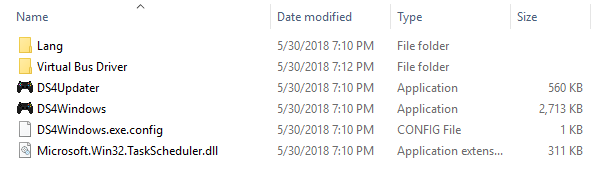
From here, double-click the DS4Windows application icon. Note, Windows may warn you that this application is from an unknown developer, be sure to click ‘Run Anyway’. There’s no way around this issue because this developer has chosen not to code sign this application.
Once you run DS4Windows, you should see a window that looks like this:
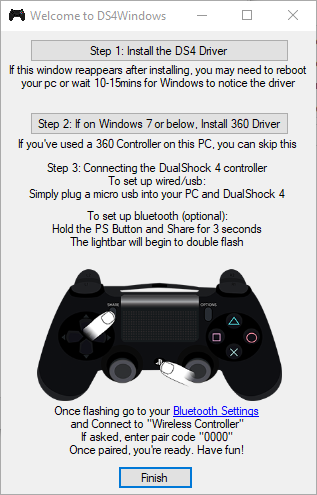
Follow these steps:
Step 1: Install the DS4 Driver — Click the Button highlighted in red

Step 2: Install the 360 driver (only needed if Windows 7 or below). Skip this step on Windows 10.
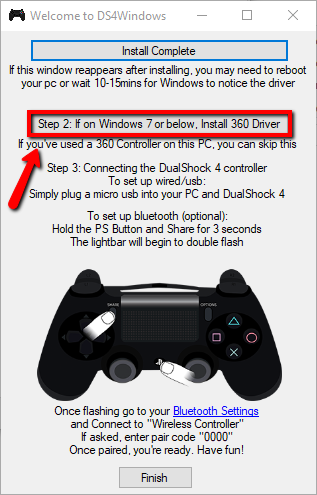
Step 3: Connect your DS4 Controller
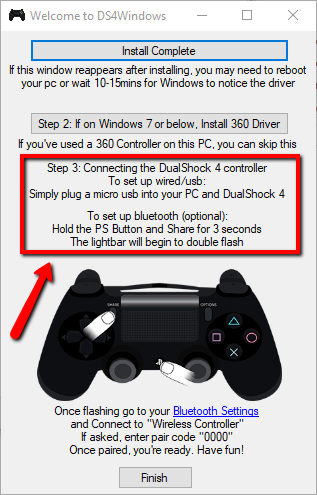
From here, you’ll need to choose if you’re going to use this controller via USB cable or via Bluetooth. If you have a USB cable, then follow the instructions at the top of the red box. If you intend to use the controller wirelessly, then follow the (optional) Bluetooth instructions at the bottom of the window above.
If you’ve chosen Bluetooth, then change settings by clicking the ‘Bluetooth Settings’ button and connect the controller to Windows through Windows’s control panel settings. Once you click on Bluetooth Settings, you should see a window appear like:

Make sure Bluetooth is enabled on your computer. Then, click add a new device. From here you should see a window like so:
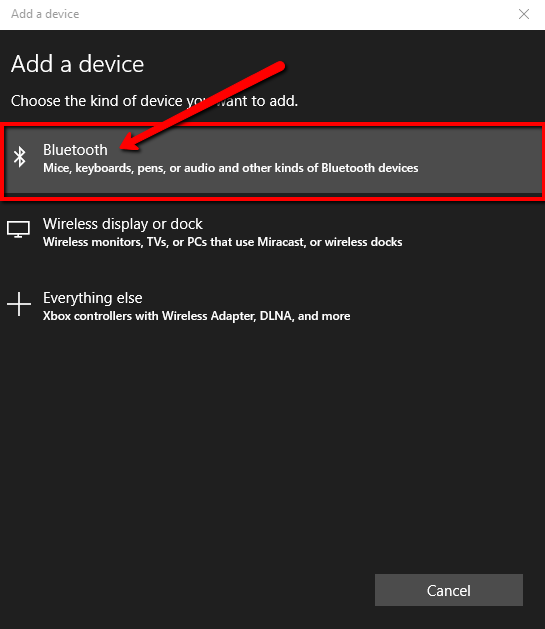
Click on Bluetooth type devices and make sure the controller is in pairing mode. It should show up as ‘Wireless Controller’. Select it and it will pair. After this, DS4Windows will ensure the proper drivers are loaded for this controller. You’ll see a few notifications pop up regarding installation of various controller drivers for this newly found controller.
Step 4 — Finished
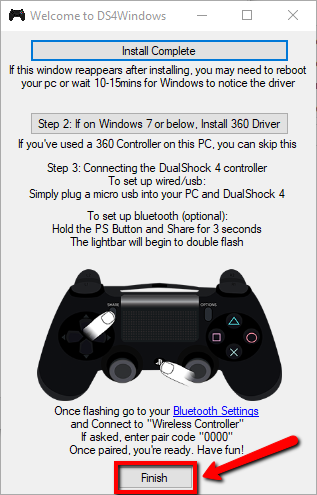
Once that’s all complete, you’ll see the DS4Windows main window now looks like this and contains your new controller:
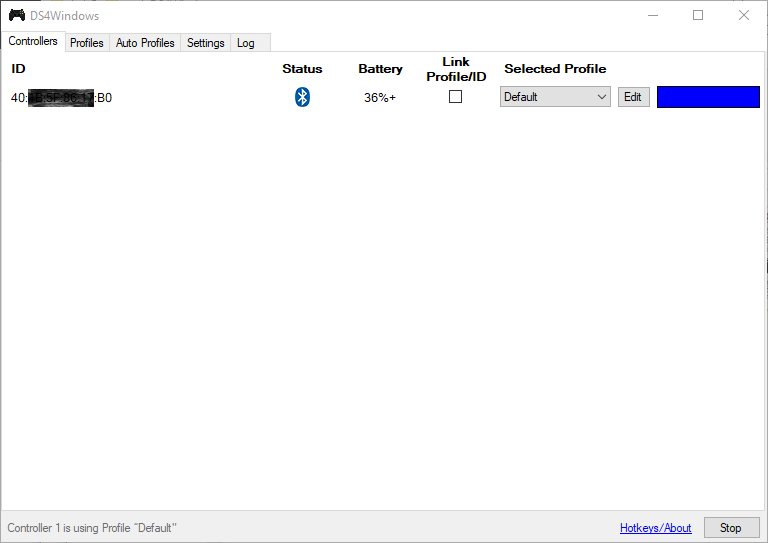
Your controller’s ID will be different than mine. Note, like the PS4, you can only connect a maximum of 4 controllers using this tool.
Using your new DS4 controller on Windows
After you get your controller set up to this point, you’ll need to select and/or create a profile. A profile maps the controller’s buttons and joysticks to actions on Windows (or a specific game). When you click on the Profiles tab across the top of the window, you can create new profiles or import existing profiles that you’ve downloaded.
I’m still on the lookout for a high quality archive of profiles for specific games. Unfortunately, I’ve not yet found any. For the time being, you’ll need to create your own. Setting up profiles goes beyond the scope of this installation tutorial. However, I will leave you with a few YouTube videos to get you started.
Note, the above video does not have sound.
Jump to 6:53 in the above video to begin the mapping setup tutorial.
Profiles
If I manage to find any preexisting game profiles, I will create a list below of their locations. If you have a specific game that needs a profile, please leave a comment below and I will attempt to locate a profile for you. Note, however, I can’t create any profiles where I don’t have the game installed. The best I can do is look for someone who has already created a profile and point you there.
Request for Profiles Bounty
For all readers, I have a request. If you have any existing DS4Windows profiles that you have successfully used on a game, please contact me. If you’re willing, I’d like to create an archive of your DS4Windows profile(s) here on Randocity. For every profile you upload, I will list your name in credit to the profile.
Now, here’s the challenge. To get this DS4Windows archive started, the first person who uploads 10 functional DS4Windows popular game profiles to this archive will receive a new Sony Dual Shock 4 controller as bounty. This offer is good throughout the world, but void where prohibited. This bounty is valid through December 31, 2018. All entries must be received before January 1, 2019. To submit your entries, leave a comment below or use the Randocity contact form. Be sure to use your contact email address in your WordPress account so I can see it to contact you. Do not leave your email address in the actual comment. Note, this bounty is separate from the 500 million limited edition controller giveaway on a separate article… which means you have the possibility of receiving 2 controllers if you submit 10 functional DS4Windows profiles here in addition to entering that giveaway.
As always, if this article is helpful to you, please leave a comment below. If you like what Randocity offers, please click the Follow button in the upper right corner to receive notification of new Randocity articles.
↩︎
Sony PS4 announced.. blah blah blah
So Sony officially announced the PS4. But, before I say anything, let’s let their specs do the some talking:
Main processor
- Single-chip custom processor
- CPU: low power x86-64 AMD “Jaguar”, 8 cores
- GPU: 1.84 TFLOPS, AMD Radeon™ Graphics Core Next engine
AV output
- Analog-AV out
- Digital Output (optical)
Communication
- Ethernet (10BASE-T, 100BASE-TX, 1000BASE-T)
- IEEE 802.11 b/g/n
- Bluetooth® 2.1 (EDR)
Optical Drive (Read only)
- BD 6xCAV
- DVD 8xCAV
Super-Speed I/O USB (USB 3.0), AUX
Hard Disk Drive Built -in
Memory GDDR5 8GB
In addition to the actual console specs, Sony also announced a Dual Shock 4 controller with a touch surface on the controller. Nothing like the Wii U controller, mind you, but a finger touch surface (like a glide pad on a notebook).
Wait.. What? Is this real?
Let me start by saying whoopee! =sarcasm off= My first thought after reading this spec sheet is, “WTF? Is this for real? This has got to be a joke, right?” And then it sank in, this wasn’t a joke and it is for real. This hardware is so 5 years ago. It’s basically a glorified PC with 8 cores and a reasonably slow one at that. I’m definitely not impressed. This is most definitely not what I expected to see from Sony. A glorified PC with a Radeon card as the new PS4?
So, why is this a problem? Let me count the ways…
1) No backwards compatibility to the PS3. The AMD chip is in no way compatible with the PS3’s cell processors. So, unless Sony has asked AMD to build in cell core backwards compatibility, the best we can hope for is emulation. And, with emulation comes slowness and games that feel sluggish, choppy and crappy. Sure, they might play, but they’re not likely to play WELL. That’s the difficulty with emulation.
B) It’s a PC. I’ll say that again, it’s a PC… and not a particularly great one at that. The graphics card might be somewhere close to a mid to mid-high end card in today’s market, but again Sony has trapped themselves into outdated graphics before the console is even released. Unless they plan to release this ‘PC’ in the next 3-6 months, this thing will be outdated and worthless when it arrives. Sure, it may be faster than the PS3 today, but what difference does that make in the grand scheme? If a then $300 netbook runs rings around the PS4 in speed, it’s a DOA device. Sure, I love consoles, but I want them to be cool, sleek and unique, not mundane and something I could buy anywhere.
What Sony should have done here is ask for a modular slot for a graphics card. Then, when the card gets outdated, pop in a new updated card. This does two things for Sony. 1) A modular slot allows the console to remain relevant independent of the processors. The processors will remain relevant far longer than the graphics processor. In addition, the GPU can be used for game processing. 2) A modular graphics card slot would allow for many uses all across the board. Placing components into modern PCs should become easier and also allow upgrading graphics cards in such devices as netbooks and notebooks easily. This is a pioneer and innovative approach to creating a new device.
iii) Ok, so I have to concede that it will be compatible with PC games IF Sony doesn’t blunder the PC part of it. That is, if they license Windows (of any variety) from Microsoft, they can at least pull in all of the PC game titles that get released (or at least have them ported much more easily). But, that’s not necessarily going to save this turd… ahem, console.
Sony’s day is Done
Sony has been the odd man out in gaming recently and their lack of innovation in gaming is very much apparent. What Sony needs is something innovative, and the PS4 isn’t it. The Wii U is innovative. Sure, it’s got issues due to launch immaturity, but that will be corrected through updates. Sony’s product is immature and it will clearly remain that way throughout its life. You can’t turn a Hyundai into a Tesla. That just doesn’t work. Sony’s product is clearly a crap attempt at a new console.
Sony, take this idea, rework it and make it loads better. Then come back and re-release the specs. This is a crap first attempt at a new console. Let’s start from here and make it better. Otherwise, your current PS3 lackluster sales will turn into no sales when the PS4 arrives.
Right now, the only thing Sony has going for their entire gaming market is the PS Vita. They better damn well hope they can get some decent games out for the Vita because the PS4 is even less attractive than the PS Vita.
Next Gen Gaming
This is definitely not what I expected to see for a next gen gaming platform. We need to move towards more realistic 3D gaming, not towards commodity hardware. The Wii-U definitely heads in the right direction with innovation. It’s not going to take much for Microsoft’s new Xbox to kick it out of the ballpark. In fact, if Microsoft can in any way integrate a Surface tablet into the gaming experience of the new Xbox, it’ll be a whole lot more innovative than this Sony console has any hope of being. Sony, take it back to the drawing board and rethink it. I think I’ll call it now, the Playstation home console brand is now officially dead. Sony better hope the PS Vita can carry SCEA onward.


 Random Thoughts - Randocity!
leave a comment