What’s wrong with Vista / Windows?
This post comes from a variety of issues that I’ve had with Vista (specifically Vista 64 Home Premium). And, chances are, these problems will not be resolved in Windows 7. Yet, here they are in all their glory.
Memory Leaks
Vista has huge and horrible memory leaks. After using Vista for a period of time (a week or two without a reboot) and using a variety of memory intensive 3D applications (Daz Studio, Carrara, The Gimp and Poser.. just to name a few), the system’s memory usage goes from 1.69GB to nearly 3GB in usage. To answer the burning question… yes, I have killed all apps completely and I am comparing empty system to empty system. Worse, there is no way to recover this memory short of rebooting. If you had ever wondered why you need to reboot Windows so often, this is the exact reason. For this reason alone, this is why Windows is not considered ‘stable’ by any stretch and why UNIX outperforms Windows for this reason alone.
Startup and Shutdown
Microsoft plays games with both of these procedures.
On Startup, Microsoft’s engineers have tricked you into thinking the system is functional even when it isn’t. Basically, once the desktop appears, you think you can begin working. In reality, even once the desktop appears, you still cannot work. The system is still in the process of starting up the Windowing interface on top of about 100 background services (on many of which the windowing interface relies). This trick makes Windows appear snappier to start up than it really is. In fact, I would prefer it to just ready the system fully, then present the Windowing interface when everything is 100% complete. I don’t want these tricks. When I see the windowing interface, I want to know I can begin using it immediately… not before.
On Shutdown, we have other issues. With Vista, Microsoft Engineers have done something to this process to make it, at times, ridiculously slow. I have seen 8-15 minute ‘Shutting Down’ screens where the hard drive grinds the entire time. I’m sorry, but shutdown time is not housekeeping time. That needs to be done when the system is running. It should not be done during shutdown procedures. A shutdown should take no more than about 1-2 minutes to complete flushing buffers to disk and killing all processes. If it can’t be done in 1-2 minutes, shut the system down anyway as there is nothing that can be done to finish those tasks anyway.
Windows Updates
Microsoft was supposed to eliminate the need to shutdown/reboot for most Windows updates. For some updates, this is true. For the majority of Windows updates, this is still not true. In fact, Microsoft has, once again, made this process multistep and tediously slow in the process. Don’t get me wrong, I’m grateful that they are now at least verbose in, sort of, what’s going on.. but that doesn’t negate the fact that it’s horribly slow. The steps now are as follows:
- Windows installation process (downloading and installation through the Windows dialog box). You think it’s over when you..
- Restart the system and it goes through finishing Step 2 of this process during shutdown… and then you think it’s over again when
- The system starts back up and goes through Step 3 of the update process.
Ok, I’m at a loss. With Windows XP, we had two steps. Those first during Windows updater and the second when the system starts back up. Now with Vista, we have to introduce another step?
Windows Explorer
For whatever reason, Windows Explorer in Vista is horribly broken. In Window XP, you used to be able to configure your Windows how you liked then lock it in with Tools->Folder Options and then View->Apply to Folders. This would lock in exactly how every window should appear (list or icon format, size of icons, etc). With Windows Vista, this is completely and utterly broken. Basically, this functionality simply no longer works. I’ve tried many many times to lock in a format and Windows just randomly changes the folders back to whatever it feels like doing.
For example, I like my windows to look like this:
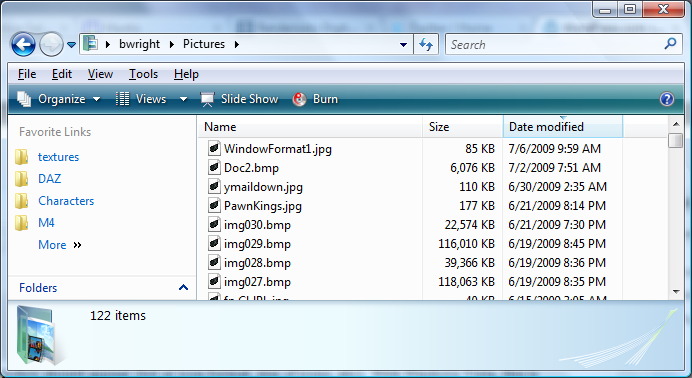
Favorite Format
Unfortunately, Windows has its own agenda. If I open a file requester (the standard Vista requester… the one that looks like the above) and I change the view to ANY other style than the one above, this change randomly changes other folder views on the system permanently. So, I might open the above folder and it will later look like any of these:

Format Changed 1

Format Changed 2
or even

Format Changed 3
All of which is highly frustrating. So, I’ll visit this folder later and see the entire headers have changed, or it’s changed to icon format or some other random format. Worse, though, is that I’ve specifically changed to the folder to be my favorite format with Tools->Options. In fact, I’ve gone through this permanent change at least 3-4 times after random changes have happened and inevitably it changes to some other format later. Again, highly frustrating.
Access Denied / Enhanced Security
For whatever reason, Microsoft has made shortcuts to certain folders. Like for example, in your profile directory they have renamed ‘My Documents’ to simply ‘Documents’. Yet, for whatever reason, Microsoft has created shortcuts that don’t work. For example, if I click on ‘My Documents’ shortcut, I see ‘Access Denied’. I don’t get why they would create a shortcut and then prevent it from working.
The only thing the enhanced security has done for Windows users is make it more of a problem to work. Security goes both ways. It helps protect you from malicious intent, but it can also get in the way of usability. Security that ultimately gets in the way, like UAC, has failed to provide adequate security. In fact, it has gone too far. UAC is a complete and utter failure. Combining this with making nearly every security issue tied to the SYSTEM user (with practically zero privileges), makes for stupid and exasperating usability.
Filesystem
To date, Windows still relies heavily and ONLY on NTFS. Linux has about 5-6 different filesystems to choose from (Reiser, VxFS, XFS, Ext2, Ext3, JFS, BSD and several others). This allows systems administrators to build an operating system that functions for the application need. For example, some filesystems perform better for database use than others. On Windows, you’re stuck with NTFS. Not only is NTFS non-standard and proprietary (written by Veritas), it also doesn’t perform as well as it should under all conditions. For database use, this filesystem is only barely acceptable. It has hidden limits that Microsoft doesn’t publish that will ultimately bite you. Microsoft wants this to become a pre-eminent datacenter system, but that’s a laugh. You can’t trust NTFS enough for that. There are way too many hidden problems in NTFS. For example, if you hit a random limit, it can easily and swiftly corrupt NTFS’ MFT table (directory table). Once the MFT table is corrupt, there’s no easy way to repair it other than CHKDSK. Note that CHKDSK is the ONLY tool that can truly and completely fix NTFS issues. And, even CHKDSK doesn’t always work. Yes, there are third party tools from Veritas and other companies, but these aren’t necessarily any better than CHKDSK. Basically, if CHKDSK can’t fix your volume, you have to format and restore.
Note, however, that this isn’t a general Vista issue. This problem has persisted back to the introduction of NTFS in Windows NT. But, Microsoft has made no strides to allow or offer better more complete filesystems with better repair tools. For example, Reiser and EXT3 both offer more complete repair tools than NTFS ever has.
Registry
The registry has got to be one of the most extensive hacks ever placed into any operating system. This kludge of a database system is so completely botched from a design perspective, that there’s really nothing to say. Basically, this system needs to be tossed and redesigned. In fact, Microsoft has a real database system in MSSQL. There is no reason why the registry is not based on MSSQL rather than that stupid hack of a thing call a hive/SAM. Whomever decided on this design, well.. let’s just hope they no longer work at Microsoft.
Failure
For the above reasons (and others), Microsoft has completely failed with Windows Vista. This failure was already in the making, though, when Longhorn was announced ages ago. In fact, Microsoft had planned even more draconian measures to enable heavy DRM on Windows. Thankfully, that was removed from Vista. But, what remains makes Vista so encumbered and exasperating to use, it’s no wonder users are frustrated using Vista. Combining that with its incredibly large footprint (1.6GB of memory just to boot the OS), and you have a complete loser of an OS.
Windows 7 is a glimmer of hope, but it is still heavily tied to Vista. If UAC and these stupid SYSTEM user security measures remain, then nothing will really change. Microsoft needs to take Windows back to the drawing board and decide what is necessary and what isn’t. Preventing the user from actually using the operating system is not and should not be a core value, let alone part of security. Yet, here we are.
Microsoft, you need to take a look at the bigger picture. This is your final chance to get Windows right. There are plenty of other unencumbered operating systems out there that do not get in the way of desktop computing. These operating systems are definitely a threat to Microsoft’s continued viability… especially with blundering mistakes like Vista. Windows will never win any awards for Best Operating System with issues such as these. Consider Microsoft’s stupid filesystem layout that allows operating system and application files to be thrown all over the hard drive and you’ll begin to understand why Windows continues to fail.
The single reason why Microsoft continues to exist is because users feel compelled to buy this antiquated dog of an operating system strictly due to application support. If developers would finally and completely jump ship to other more thoughtfully designed operating systems, then Windows would finally wither and die… eventually, this will happen.
The Microsoft Botch — Part II
In a question to The Microsoft Botch blog article, jan_j on Twitter asks, “Do you think Microsoft is going down?” In commentary to that question, I put forth this article.
I’ll start by saying, “No”. I do not think that Microsoft is ‘going down’. Microsoft is certainly in a bad way at this point in time, but they still have far too much market share with Windows XP, Windows 2000 and Windows 2003 server as well as Exchange and several other enterprise products. So, the monies they are making off of these existing installations (and licenses) will carry them on for quite some time. Combine that with Xbox Live and the licensing of the Xbox 360 games… Microsoft isn’t going anywhere for quite a while. The real question to ask, though, is.. Is Microsoft’s userbase dwindling? At this point, it’s unclear, but likely. Since the Vista debacle, many users and IT managers have contemplated less expensive alternative installations including Linux. The sheer fact that people are looking for alternatives doesn’t say good things about Microsoft.
As far as alternatives, MacOS X isn’t necessarily less expensive than Windows, but it is being considered as one possible replacement for Windows by some. Some people have already switched. MacOS X may, however, be less expensive in the long term strictly due to maintenance and repair costs. Linux can be less expensive than Windows (as far as installation software costs and continuing licenses), but it requires someone who’s knowledgable to maintain them.
In comparison…
To compare Microsoft to another company from the past, IBM comes to mind. IBM was flying high with their PCs in the early days, but that quickly crumbled when IBM started botching things up. That and PC clones took off. To date, there has not been a Windows OS clone to compete head-to-head with Microsoft. So, Microsoft has been safe from that issue. But, Linux and MacOS X do represent alternative operating systems that do function quite well in their own environments. Although, MacOS X and Linux interoperate poorly, in many specific cases, with Windows (primarily thanks to Microsoft).
Linux as a replacement
While it is possible to replace Windows with Linux and have a functional system, the Windows compatibility limitations become readily apparent rapidly. Since most of the rest of the world uses Windows, Linux doesn’t have fully compatible replacement softwares for the Windows world. Because of Microsoft’s close-to-the-vest approach to software combined with their release-just-enough-information to allow half-baked Windows compatibility. Thus, Linux (and other non-Microsoft OSes) can’t compete in a Windows world. This is a ‘glass is half empty or half full’ argument. On its own, Linux interoperates well with other Linux systems. But, when you try to pair that together with Windows, certain aspects just fall apart.
That doesn’t mean Linux is at fault. What it usually means is that Microsoft has intentionally withheld enough information so as to prevent Linux from interoperating. Note, there is no need to go into the gritty details of these issues in this article. There are plenty of sites on the Internet that can explain it all in excruciating detail.
However, if your company or home system doesn’t need to interoperate with Windows, then Linux is a perfectly suitable solution for nearly every task (i.e., reading email, browsing, writing blogs, etc). If, however, someone wants to pass you an Adobe Illustrator file or you receive a Winmail.dat file in your email, you’re kind of stuck. That’s not to say you can’t find a workable solution with some DIY Linux tools, but you won’t find these out of the box.
This is not meant to berate Linux. This is just a decision specifically by Microsoft to limit compatibility and interoperability of non-Microsoft products. This decision by Microsoft is intentional and, thus, Windows is specifically and intentionally designed that way.
Microsoft’s days ahead
Looking at Microsoft’s coming days, it’s going to be a bit rough even when Windows 7 arrives. If Windows 7 is based on Vista and also requires the same hardware requirements as Vista, Windows 7 won’t be any more of a winner than Vista.
Microsoft needs to do some serious rethinking. They need to rethink not only how their products are perceived by the public, they need to rethink what they think is good for the public. Clearly, Microsoft is not listening to their customers. In Vista, Microsoft made a lot of changes without really consulting with their target userbase and, as a result, ended up with a mostly disliked operating system.
Apple, on the other hand, is able to introduce new innovative tools that, instead of making life more of a hassle, it simplifies things. Microsoft isn’t doing this.
Rocky Road
While this flavor of ice cream might be appealing, Microsoft’s road ahead won’t be quite so much that way. They are heading for a few rocky years coming. Combine their bad software design decisions with a bad economy and you’ve got a real problem. Microsoft’s problems, though, primarily stem from lack of vision. Windows roadmap is not clear. Instead of actually trying to lay out design goals for the next several revisions, Microsoft appears to be making it up as they go along… all the while hoping that the users will like it. But, their designers really do not have much in the way of vision. The biggest change that Microsoft made to Windows was the Start button. That’s probably the single most innovative thing that Microsoft has done (note that the start button is not really that great of a design anyway).
Microsoft forces everyone else to do it the Windows way
Microsoft’s main problem with Windows stems from its lack of interoperability between Windows and other operating systems. While Windows always plays well with Windows (and other Microsoft products), it rarely plays well with other OSes. In fact, Microsoft effectively forces the other OSes and devices to become compatible with Windows. Apple has been the one exception to this with many of their products. Apple has managed to keep their own proprietary devices mostly off of Windows (with the exception of the iPhone and iPods). Even Apple has had to succumb to the pressures of Microsoft (with certain products) and compete in the Microsoft world even when Apple has its own successful operating system. Note, however, that Apple’s softwares on Windows leave a lot to be desired as far as full compatibility goes.
Microsoft has an initiative to allow open source projects access to deeper Microsoft technologies to allow for better compatibility between open source projects and Windows. There’s two sides to this ‘access’. The first is that it does help open source projects become more compatible. On the other side, the developer must sign certain legal agreements that could put the open source project in jeopardy if Microsoft were to press the legal agreements. So, to get the interoperability, it becomes a double-edged sword.
The tide is turning
Microsoft’s somewhat dwindling installations of Windows, lack of quality control and bungling of major products may lead more and more people away from Microsoft to more stable devices. But, the market is fickle. As long as people continue to generally like Microsoft products and solutions, Microsoft will never be gone.
Note, you can follow my Twitter ramblings here.
The Microsoft Botch
Well, what can I say? Microsoft has been one series of botch jobs after another recently. I guess every company goes through a spate of problems, but this series of problems seems a bit excessive (and avoidable). Consider that Windows ME more or less started the botches (ignoring Microsoft Bob). But, after ME they had the successful 2000 and XP series… then Vista. Vista is the albatross that Microsoft would like to soon forget. But, that’s not all of their problems. We’ll come back to Vista.
The Office botch
Office 2008 for the Mac has been a huge bust (just check the reviews on Amazon) by the users because of the lack of VBA (among other compatibility issues). Then, there’s Office 2007 for Windows, which some developer in their infinite wisdom decided to use Microsoft Word’s HTML parser to render HTML emails! So, when you’re viewing HTML emails in Outlook 2007, there are page breaks! I’ll say that again, “page breaks”. You read that correctly. Since when does anyone paginate web sites? What makes Microsoft think that people want to see web pages paginated?
That doesn’t even take into account the entire GUI change they made between Office 2003 and Office 2007. Sure, 2007 is supposed to look modern and streamlined. But, instead, the new GUI ends up with a huge learning curve and is basically incompatible with previous versions of Office. Instead of doing actual work, now you have to chase down the function you need because it’s not where it used to be. The addition of the stupid round Windows Flag button instead of an actual menu bar is completely assinine design. Let’s hope that whomever thought up that innovation no longer works in Redmond. There are some things that just need to be user tested and this product clearly wasn’t.
The Zune botch
Consider the Zune 30GB had a leap year bug that caused the entire unit to completely freeze up. This required the owners to wait until the battery completely drained to reset the unit. That and wait until after the new year, otherwise it would refreeze.
The infamous Xbox 360 overheating botch
To this date, Microsoft STILL has no clue what’s causing the issue or how to resolve it. They *think* it’s related to heat so they’ve added a heat sink to try and help the issue. Even still, they had to take a huge financial hit and extend the Xbox 360 warranty out to 3 years from its original 1 year.
The Origami botch
“What was Origami”, you ask? Nuff’ said. If you really want to know, read this Wiki article.
Tablet Computers
Um, where are they today? No where. People don’t want to lug tablets around. They didn’t want to lug them when Grid was around. What made Microsoft think people would want to lug them around 10 years later? Oh right, I guess they thought they would because that oh-so-heavy tablet was running such a wonderful touch screen version of Windows. Doh!
The IE7 botch
Ignoring Microsoft’s constant security flaws as a botch job, although some of them certainly qualify, another is Microsoft’s decision to remove the ability to uninstall IE7 after you install Service Pack 3 (SP3) on XP. So, for an IE repair that should have taken all of about 15 minutes, you’re now saddled with the task of whipping out the Windows installation media and running repair on the entire operating system (broken or not). Thanks Microsoft.
Note that Microsoft’s justification for this IE change stems apparently from some files that SP3 installs. The SP3 installer may overwrite either IE7 or IE6 files that, were Microsoft to allow removal of IE7, might leave the system in an unstable state if you were to use IE6. Well, hello, you guys wrote the software!! So, instead of actually taking the time to write SP3 properly to still allow software removal of IE7, you take the easy way out and leave the system owner saddled with a huge task just to repair IE7 when it breaks.
Why does this matter? Been living in a cave? IE7 is not completely stable. Much of the time the search provider installation process doesn’t work. You try and you get ‘Errors on page’ and the search providers cannot be loaded. Then you have the ‘Save Your Settings’ problem. Once you install IE7, it asks to save default settings. Yet, much of the time this process won’t save settings and always continues to present this panel on startup. I’ve searched and searched and have been unable to find a workable solution to either the search provider or the save defaults issues. The ONLY workable solution (uninstall/reinstall) was conveniently taken away by Microsoft in their infinite wisdom. So, instead of a 15 minute fix, it now takes 2-3 hours to completely repair the system, reinstall windows updates and test everything. Of course, it is possible to remove SP3, but at what risk to the system? These things rarely work once you’ve installed apps on top of the system after an SP is installed. In other words, be prepared to have things begin breaking and applications to need to be reinstalled.
The bottom line is that Microsoft made this change to make things easy for Microsoft. For the end user, however, they will now incur high priced repair bills simply because Microsoft decided to make things easy for themselves.
The Vista botch
Well, what can be said about Vista that hasn’t already been said? Vista has so many user interface problems, lackluster performance, the overreaching and underperforming Aero system and the constant flickering between various modes and resolutions that make Vista seem more like Windows 3.1 than it does a mainstream OS. Combine this with constant driver issues, Vista is completely unsuable for any real purpose. You’re forever repairing it instead of actually using it. Vista also requires a hefty powered system to even perform decently. So, it’s no wonder businesses didn’t adopt it.
Combine all of this with the marketing of Vista, it’s just been a disaster. For whatever reason, Microsoft decided to put out 5-8 different version of Windows Vista… 3-4 of which were targeted at home consumers. This is more confusing for consumers than it is helpful. This should have been paired down to 1 to at most 2 versions. Consumers don’t want 4 choices in an OS. They also don’t want to pay $400 for an operating system. Yet more botch.
Windows 7 botch or not?
If Microsoft adopts Vista’s codebase to build Windows 7, this product will be no better than Vista and will likely end up being yet another botch. Vista’s codebase for the driver subsystem is a complete disaster (and continues to be a problem even as of this blog article). By taking Vista’s codebase for Windows 7, Microsoft ensures that Windows 7 will be just as problematic as Vista. The interface is only half of Vista’s problem. People can overlook the GUI learning issues when the components under the hood simply work. But, they don’t. For example, one of the most significant problems that Vista suffers from is “Display Driver has stopped responding and recovered”. Ok, now what is this? We’ve never ever had this issue before. Granted, maybe it prevents the blue screen of death, but having the display driver stop responding means what exactly? And, why is it now that the video drivers are just now having this problem. Using Vista’s codebase practically assures this issue to contiinue in Windows 7. So, 7 will end up just as driver problematic is Vista.
Suffice it to say that Microsoft is going through a bad way. Perhaps they’ve had an exodus of people who actually knew where to take things. But, Windows has become such a bloated hodge-podge piece of trash, I don’t know if Microsoft can honestly salvage it. Vista and Windows 7 may end up being the death knell for this operating system. By Microsoft basically botching their two flagship products (Office and Windows), I don’t know if they will be able to recover easily. Combine this with stupid programming mistakes (like the Zune) and clearly, Microsoft has major internal issues that need to be addressed.
Whatever the issue, I don’t see this botch trend ending any time Zune (pun intended).


 Random Thoughts - Randocity!
leave a comment