No Man’s Sky: How to get a Sentinel Ship
 Unlike the very long tail quest line to obtain a Living Ship, the Sentinel Ship is easy to obtain by comparison. There is no long multi-day process to obtain this one, thankfully. Obtaining the Sentinel ship is fairly straightforward and easy to obtain in one game session, about an hour worth of effort, after getting the quest. Let’s explore how to get this newest ship.
Pre-Requisites
The items you’ll need to make this quest successful are:
- A well outfitted starship, for battling Sentinels successfully
- Living Glass (supplied)
- Pugneum (supplied)
- A well outfitted Multitool, for battling ground corrupted Sentinels successfully
- A hyperdrive and enough fuel to jump
- A pulse drive with enough fuel
- An Advanced Mining Laser on the Multitool (for Radiant Shards)
- One free ship slot or, alternatively, a ship that you’re willing to trade
[Update 4/14/2023] After trying for several hours across multiple saves (other than the first save, which worked), I’ve been unable to reproduce Step 1 on any save other than my very first save. The very first save actually had the pulse drive interaction occur the very first time I pulsed. I believe I have an answer.
I suspect that Hello Games may have introduced a bug in this process. It seems that Hello Games may have made this pulse interaction available one-time-only on ONLY ONE SAVE. This means that if you wish to obtain a Sentinel Ship on a second, third or any later saves, you’ll need to use the 5 Star wanted approach to get an Echo Locator OR a Dreadnought AI Fragment (via blowing up a Sentinel Freighter). I don’t know why Hello Games would have done this, but I do know that there are global variables which can be set and which are visible to across all saves (e.g., Preference Settings). It seems Hello Games may have set a global variable to indicate that the Sentinel pulse drive interaction has already occurred, thus preventing this interaction from occurring again on any other save… since every save has visibility to this variable.
What does this mean for you? If you have several saves that you regularly play, this bug means that you’ll need to choose which save where you wish to have your first Sentinel ship. Otherwise, once you’ve had this interaction on one save, on the rest of your saves, you’ll need to perform the 5 Star wanted steps for an Echo Locator device OR destroy a Sentinel Freighter for a Dreadnought AI Fragment which will lead you to a crashed Sentinel ship. [Update Complete]
Step 1 — Pulse Drive
This first step in obtaining your Sentinel ship is to grab whatever starship you have that fits the above requirements and head into space. Then, trigger the pulse drive. Remain in pulse until a distressed Sentinel ship appears in front of you. This should hopefully happen relatively quickly, but it may not. You may have to do this for a while to get it to happen. Once you get the right interaction, drop out of pulse, then a new Sentinel ship will appear and seem to be in distress. You will not be able to do anything for or to this ship, but the game will pretend to give you options. Whichever option you choose, the ship will disappear. If this pulse interaction occurs for you quickly, skip down to Step 2. If it doesn’t, please continue reading Step 1 for alternative means to get a Sentinel ship.
Alternative Ways to Begin The Salvage Quest
I had the pulse drive interaction appear almost instantly in my first attempted save. In a second save after having already had this pulse interaction previously, I tried for several hours to get it to occur and it didn’t (see more details in Update area above). Meaning, using the pulse drive to launch into this Sentinel salvage quest seems to only work one time and with one save only. Choose your save carefully.
If you wish to obtain more Sentinel ships after the first, you cannot use the pulse drive process. To begin at this point, you’ll need to fight Corrupted Sentinels (on a Corrupted Sentinel World) to a wanted level of 5 and then complete all ground kills or destroy a Sentinel Capital ship in space, which also requires a 5 star wanted level before it appears.
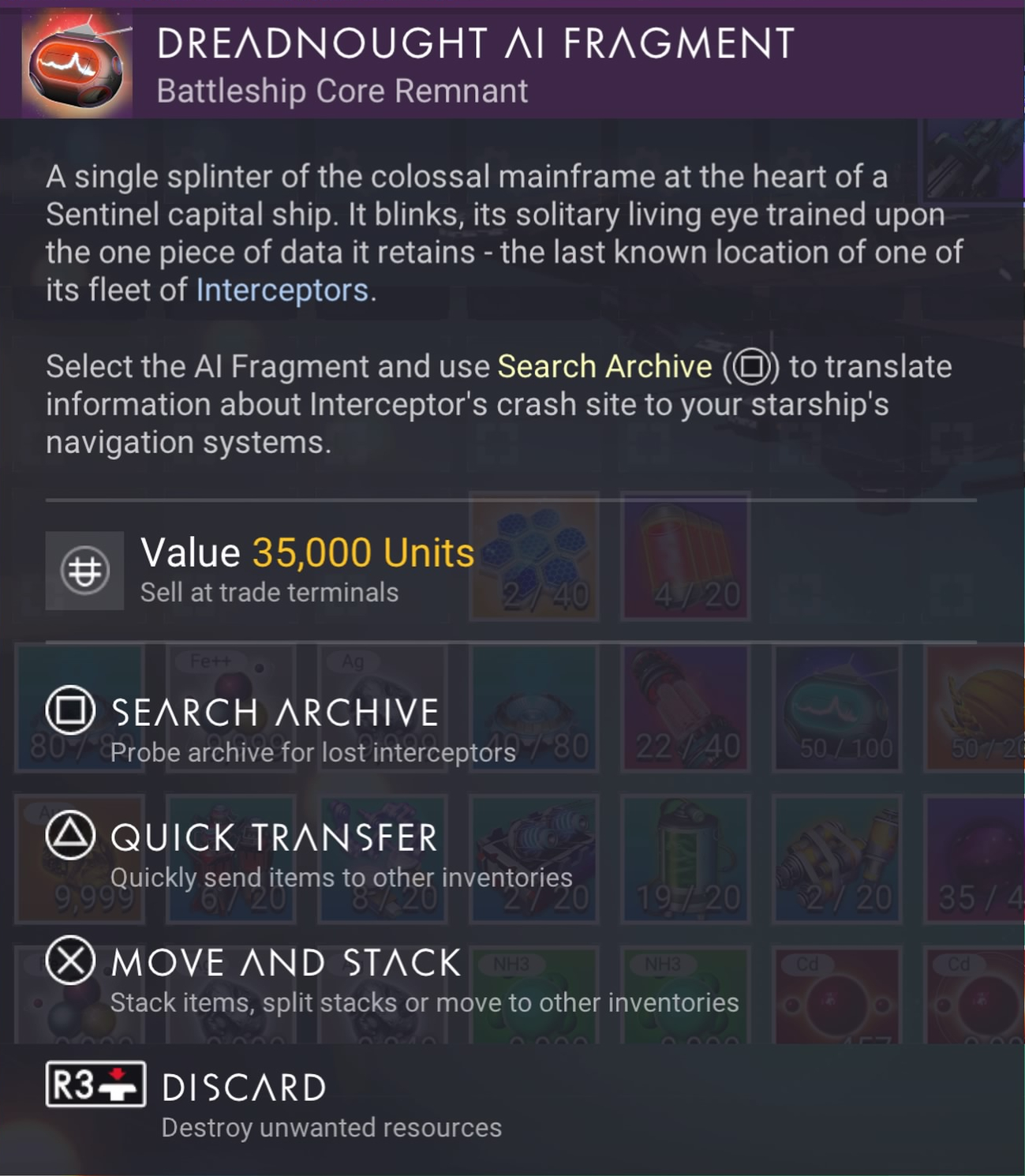
At the end of all ground based kills, your character will be awarded with a Sentinel crash site detector called an Echo Locator.
There is also the possibility of getting an Echo Locator from destroying Dissonance Resonators (the same drill structure that gives you Inverted Mirrors). You’ll need to step out of your starship or exocraft and check which type the Dissonance Resonator gives you. Also note that some Dissonant worlds are way more generous with the chances for finding Echo Locators than others. You may have to scout several dissonant worlds before you find one with Dissonance Resonators offering Echo Locators. If you find such a world, you should create a base there. Note that the easiest method of destroying a Dissonance Resonator is to use your starship’s weapons. Then, heading to space to eventually evade the sentinel wanted status.
Alternatively, you can destroy a Sentinel Freighter in a space battle and receive a Dreadnought AI Fragment. Each of these items will lead you to a new Sentinel ship crash site. Reaching that crash site, the below steps should remain the same.
To be fair, it may be easier to destroy a Sentinel capital ship in space than it is to perform ground combat with most of the crappy Multitool weapons they’ve hobbled us with… in combination with the fact that all corrupted Sentinels can heal each other at will. It simply takes a bit of time to destroy a Sentinel Capital ship, first by targeting the weapons and then by targeting the freighter itself.
For your second, third or further ships, it is strongly recommended that you leave the system where you found your first ship. If you use an Echo Locator or Dreadnought AI Fragment in that system, the game may locate a crash site to a ship model you already own. The game’s code is not intelligent enough to realize you already own a ship from your local system and will likely choose to send you there again. Don’t waste your Echo Locators or Dreadnought AI Fragments by using them in a system you’ve already visited. Hyperdrive somewhere else far away and then let the game use that new location to locate another ship.
If you’re really, really lazy and don’t want to fight Sentinels AND you have a full 30 fleet of Class-S 5 Star frigates, you can send your frigates on missions with the possibility of an expedition returning with a Dreadnought AI Fragment. I didn’t realize that these devices had been added as possible loot from frigate expeditions, but they have been included.
Note that Echo Locators may lead you to a Sentinel ground encampment which will give you a new Sentinel Multitool. You will have to dig around that encampment to find a way to reveal the crashed Sentinel Interceptor.
Note: You may have to complete the quest line “Under a Rebel Star” before the game allows this interaction to occur in pulse. The reason isn’t because the “Under a Rebel Star” quest is part of or even related to this Distressed Sentinel Pilot interaction, but because this quest line appears to take precedence over all Pulse Drive interactions until the quest is completed. Meaning, if you haven’t started or completed this quest line, your pulse drive interactions will be geared towards getting you to complete “Under a Rebel Star.” I recommend getting this quest out of the way.
Step 2 — Obtain the Salvage Quest
After the Sentinel ship disappears, the game will give you a Sentinel Salvage quest line. This quest will lead you to a Sentinel Salvage Site located on a Corrupted Sentinel planet (a new planet type). The game will either put a marker to a local planet in your current system or it will put a map marker onto the galaxy map for a different system. Most likely it will be the latter of the two options, requiring you to hyperjump into a new system. This is why you’ll need to have a Hyperdrive and the required amount of fuel.
Step 3 — HUD Marker
Once you have jumped into that new system, a HUD marker will appear on a planet. Head to the planet’s location, which will be an approximate location on the surface. When you get close to the marker, I suggest flying around the general vicinity of the marker to look for a crashed starship site. If you can’t find it, you’ll need to land and use the scanner to locate the general direction and head there on foot. For me, the crash site was quite visible and easy to spot from the starship.
Step 4 — Crash Site
Once you arrive at the crashed ship, there are many steps you’ll need to take to fully repair the ship. Though, as I said above, the steps are relatively simple with no long waiting periods in between. However, unlike other crashed starships, repairing this Sentinel ship is a bit different.
When you click-hold to open the ship the first time, you’ll see some components that, at first, you might think you need to repair. Don’t be fooled. You don’t repair these. Instead, Hello Games has added the questionable mechanic of requiring you to take those items out of the ship by grabbing them and dropping them into your inventory. It’s an odd play. I was a little confused at first because it’s the first time this mechanic has been used on a crashed ship. The items supplied by the ship are Living Glass, Pugneum and Hyaline Brain.
 Once you have taken the items from the ship (including the Hyaline Brain), a new slot will appear that you need to repair called Pilot Interface. To repair the “Pilot Interface” slot, you’ll actually need 3 items that you likely won’t have:
- 3 x Radiant Shard
- 1 x Inverted Mirror
- 1 x Harmonic Brain
Since you might not already have Living Glass or Pugneum needed for this process, remember to take the items from the ship as supplied. If you don’t take ALL of the supplied items, the process may fail to work. Take everything the game gives you. I actually had everything I needed from past Sentinel battles (in addition to the items supplied) including having already scavenged the new crystals. The only exception was that I didn’t have the Harmonic Brain.

One of the three items you’ll receive from the ship is a Hyaline Brain. This object, like a Emergency Broadcast Receiver or a Sentinel Boundary Map, allows you to activate it (“Probe”) and find a location to visit. This location will help you in repairing the Pilot Interface in Step 8.
Step 5 — Gathering Resources
Because this quest line leads you to a new “Corrupted Sentinel” world, you’re going to need to spend some quality time with your Multitool gathering both Atlantadeum from Living Fragments via the smaller purple crystals and the Radiant Shards via the bigger purple crystals (using the Advanced Mining Laser) and, of course, obtaining the Inverted Mirror (see Step 7).
Step 6 — Getting a Radiant Shard
This is the easiest and quickest of the 3 steps required to repair the Pilot Interface. Simply head out and find a pile of large purple crystals. Once you aim your reticle at the crystal, it should say ‘Radiant Shard‘. You’ll need to have an Advanced Mining Laser to obtain 3 of these, but it’s easy and quick with the mining tool. I’d suggest mining for more than you need, just in case.
Step 7 — Getting the Inverted Mirror
To get an Inverted Mirror, you’ll need to destroy a Dissonance Resonator. This is another new Sentinel creature type which looks like a moving crystal shard, but also kind of like a drill. Once you begin shooting this creature, Corrupted Sentinels will appear making you wanted. I’d suggest simply keeping up your barrage (ignoring the Sentinels) until you get the Inverted Mirror, then dive into the ground using the Terrain Manipulator and hide to get rid of the wanted stars.
If you hop into your starship and take off, your wanted status will be carried into a space battle with the Sentinels. It’s easiest to dive into the ground and wait it out.
Step 8 — Getting the Harmonic Brain
To obtain the Harmonic Brain, you’ll need to have a Hyaline Brain. The Hyaline Brain is given to you from the crashed Sentinel starship as one of three components given to you which includes Salvaged Glass, Pugneum and the Hyaline Brain. If, for some reason, you didn’t get a Hyaline Brain from the ship, you’ll need to go back and get it or, if you destroyed it, restore from a save before destroying it (the easiest way). Once you “Probe” the Hyaline Brain, it will give you coordinates and place a map marker on your HUD to an Ancient Monolith. Head there.
Once you arrive at the Monolith, you will hand over the Hyaline Brain in exchange for a Harmonic Brain.
Note, as stated above, you will need to take ALL of the components from the ship for the Hyaline Brain to activate. If you do not have any Pugneum and/or Living Glass and you fail to take these items from the crashed Sentinel Ship, the Hyaline Brain probably won’t activate. This includes having put these components into your Starship inventory and then having your Starship out of range. There is no warning why it fails to activate, it just won’t. Make sure to have ALL of the necessary components in your inventory before attempting activate the Hyaline Brain.
Step 9 — Head Back and Claim Your Starship
As the title says, it’s pretty straight forward. From the monolith and after receiving the Harmonic Brain, head back to the crash site, fix the Pilot Interface and claim your starship. Much, much simpler than the Living Starship.
Once again note, you’ll need to have at least one open starship slot or be willing to trade one of your starships for the Sentinel ship. I’d suggest salvaging a starship at the space station so you get all of the materials out of the ship and to free up the slot. Getting the materials from the ship is the far better option than giving over a starship in trade.
Step 10 — Build A Base
While this step is not required in getting your first Sentinel Ship, it is a step you should do to help you get more of these ships. Since this is a new world type and since you’re likely wanting to look for more of these ships, you’re going to need the resources available on this planet, since future crashed ships may not hand you all of the things you need like this first quest does. Since the game sent my character to a Paradise planet with otherwise no sentinels at all, it was the perfect place to establish a base to obtain these new resources.
Obviously, if your world is a charred, volcanic, radioactive or otherwise a rather inhospitable world, you might want to find a better world to establish a Corrupted Sentinel base. If the game sends you to a Paradise world, then it’s well worth establishing a base as there’s no way to know how these resources might be required in future updates.
Is the Sentinel Ship Worth It?
I’ll leave this up to you to decide. I find the ships to be rather blocky and odd shaped. There are a few sleeker design types, but many look like big tanks. When you’re going through this process, you don’t really get to pick and choose your ship’s design. The only way to sort-of pick is to go through this process multiple times, trading in the ships as you find better looking ones. You never really know what you’ll find, though. I was hoping for sleeker designs, like the Exotics. The Sentinel interceptors that fight us in combat actually look better. I was hoping to be able to get these.
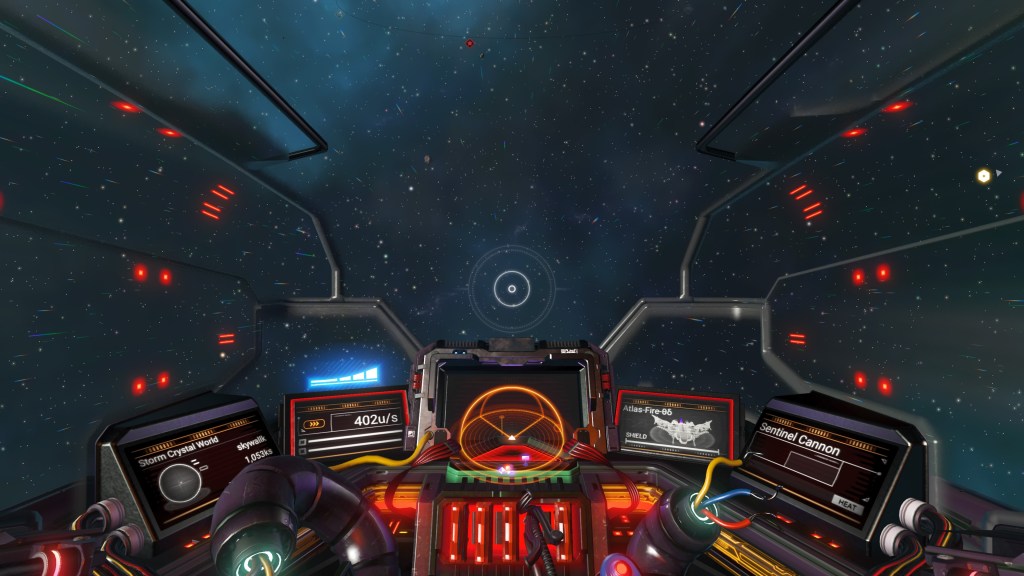
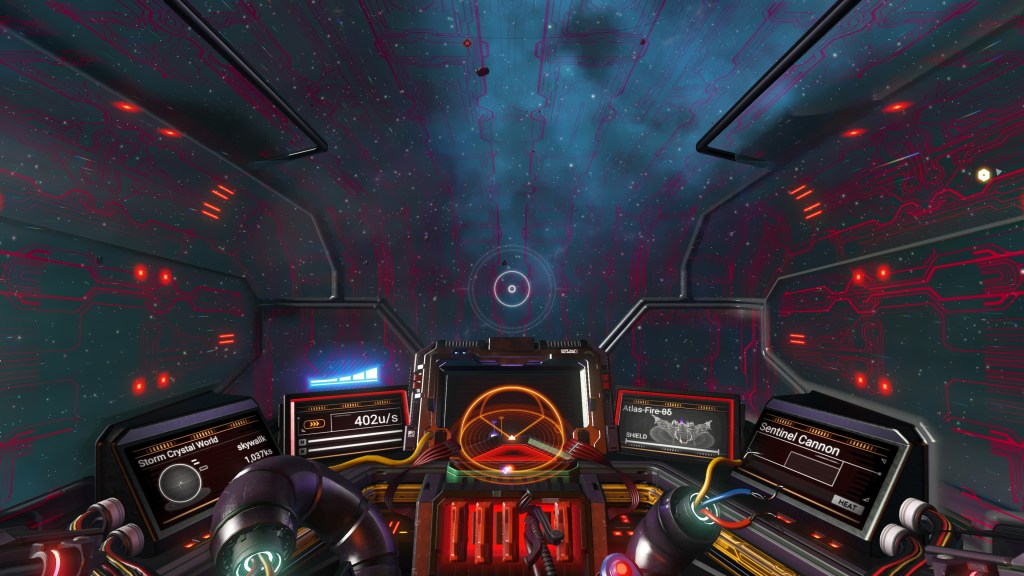
Additionally, the Sentinel ship itself has some odd qualities. When you enter the ship, the entire ceiling of the ship becomes transparent to show the outside. The transparent effect is cool, but it also pulses an odd red circuitry pattern way too frequently while flying, which is highly distracting. I cannot guarantee all Sentinel ships have this cockpit behavior, but they probably do.
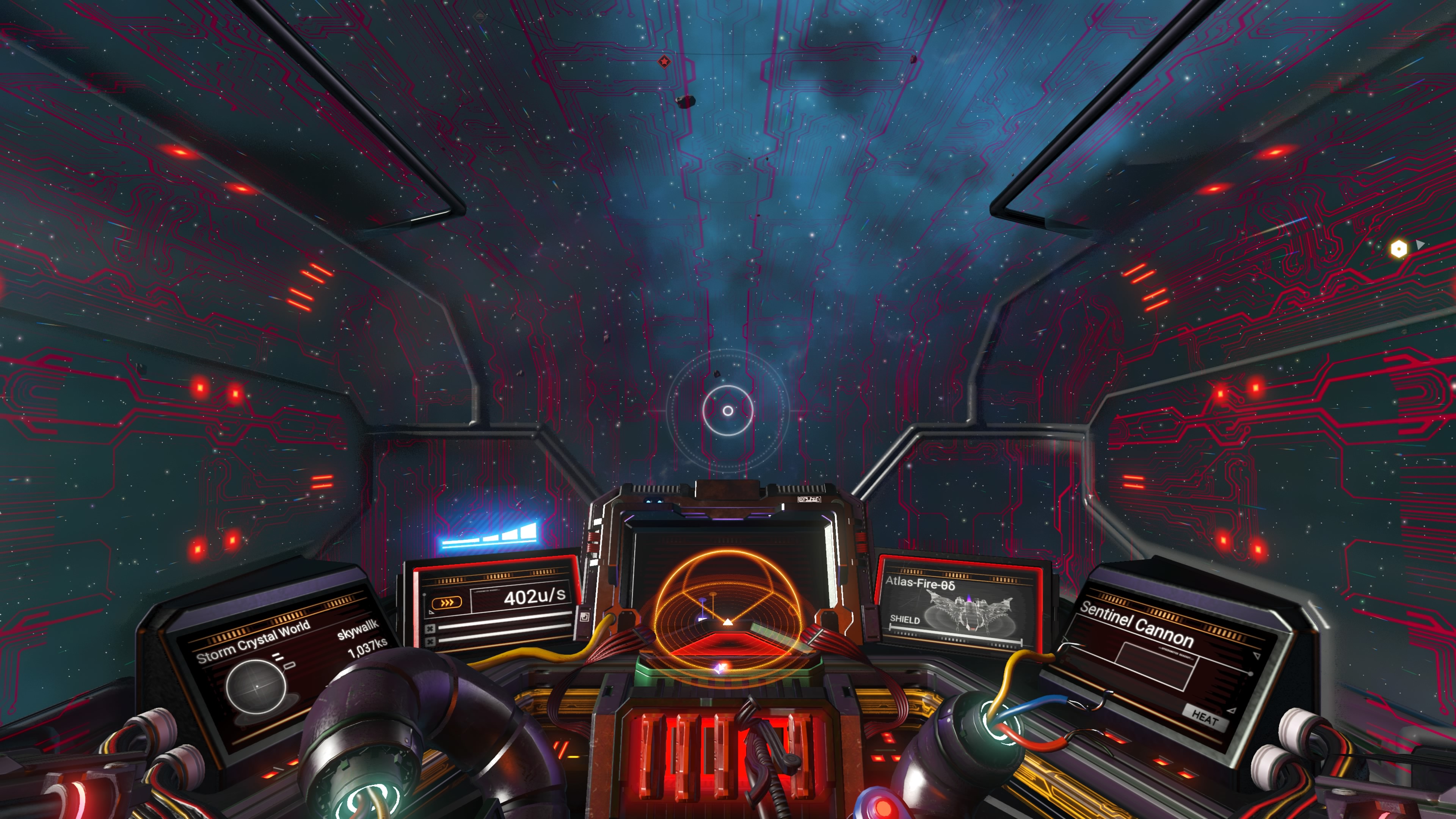
It’s not so much that the red pattern appears at all. It’s that this red pattern appears in a repeating pattern about 6 times in a row in various dimmer and brighter shades, then stops. Then the pattern repeats about every 10-20 seconds. The pattern repeats far too frequently. It would be fine if it pulsed perhaps in relation to the acceleration and/or deceleration OR with certain combat elements, like being fired upon or at most every 3-5 minutes, but it doesn’t work like this. It’s just a pattern that rotates in and out on a timer far too frequently as you fly the ship. It’s really distracting when in combat.
All-in-all, it’s an okay ship to add to your fleet, though it’s not more maneuverable than a fighter or better armored than any other class ship. Even though the slots are named oddly and the technology itself has its own special naming, it supports all of the standard technology modules, unlike the Living Ship. With that said, the Sentinel class ships don’t really have a reason to exist over other ships in the game. This is ultimately the real disappointing thing about the Sentinel ships specifically and No Man’s Sky in general… a point that Hello Games keeps missing.
Ships of various classes need to hold specific unique qualities to that class. For example, these Sentinel class ships should be better armored and better suited when used against Sentinel fleet attacks, but perhaps weaker against Korvax attacks. Focusing on these kinds of ship specialities, as a player you must plan your ship battles more thoughtfully. Instead, Hello Games keeps giving us ships that are more or less the same any other ship in the game. Even the Living Ship, which has weird technology naming and features, is really the same as every other ship. The only real differences between each of the ship classes and types are the shape of it, the size of it, the paint job and the ship’s max maneuverability. All of the ships can be modified using modules to basically become identical for use in No Man’s Sky as a Starship.
It would be great if Hello Games would get past this “sameness” and expand starships by giving us ships that both specialize in and are designed to specifically excel in certain activities, but are weak in other activities. For examples, fighters are intended to be for fighting, but they shouldn’t be at all good at anything other than fighting. Haulers are good for hauling, but not necessarily great at fighting. Shuttles should be for smuggling. Sentinel ships should be great at fighting sentinel fleets. Part of the reason for this unfortunate starship genericism is that the game makes it impossible to switch ships when in space. Only when you’re on the ground or in your freighter can you switch ships. Even then, if you’re in the middle of combat, Hello Games has made it so certain activities are impossible until the battle is over, making switching ships even more of a problem.
Know then that while the Sentinel ship may look somewhat cool, it doesn’t buy you anything more than what you already have in other ships you already own, at least not at this point in time. Here are some snaps of my ship.


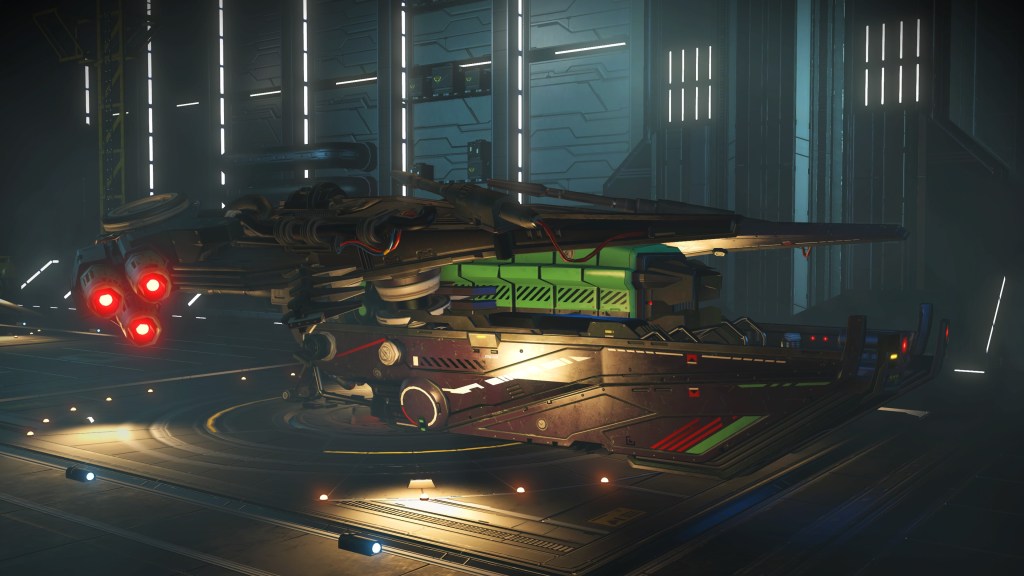
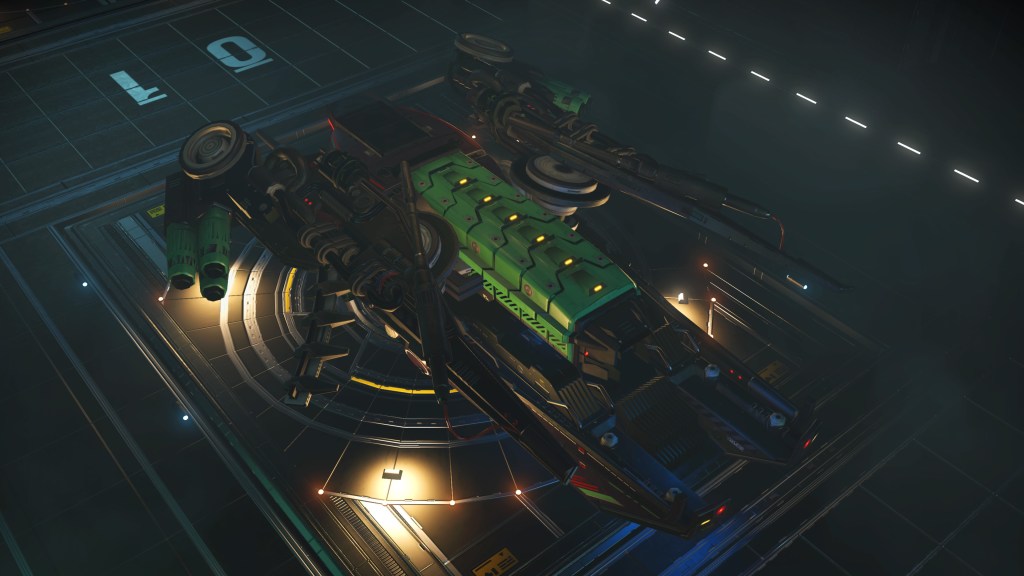
Sentinel Ship Models and Availability
After having read more about this update, I thought it would be a good idea to explain how many different model Sentinel ships there are. Because there are a myriad of different parts (wings, fins, colors, etc) that can be attached to any specific Sentinel ship, the variation in ships is probably on the order of millions. With that said, there are some basic model shapes that get created from all of that variety; basic shapes which range from large tank sized ships to flat triangular style ships. Thus, there are effectively about 6-10 basic model shapes. After seeing about 6 different ships, the remaining variations are mostly minor and won’t change the overall shape of the ship. Effectively, there are only a handful of parts that affect the overall ship’s shape with the remainder of the parts changing only minor cosmetic aspects of the ship.
As for where to find any specific model ship in NMS, it’s still way too early in the release to yet have that answer. However, Reddit is a good place to start. There are subreddits dedicated to cataloging locations of specific ships in the NMS universe. If you’re looking for a specific style Sentinel ship, heading over to Reddit is probably your best answer. Such subreddits are adding new content every day. Finding a specific model Sentinel Interceptor ship is best found in one of those subreddits. With that said, I always find it much more satisfying when I can find my own ships on my own. Locating another solar system with the help of Reddit isn’t quite as satisfying knowing that you didn’t discover that system or that ship. It’s much more satisfying to be the one to discover something new.
As for how Sentinel Interceptors spawn in the game, it goes like this. Only one model Sentinel ship is available in each solar system. Meaning, if you land in a specific system, find a ship and add it to your collection, don’t bother looking for any more ships in that system if you’re looking for a different model. You’re wasting time doing this because when you do find another, it will be identical to the one you’ve already have, with the exception of its class. The only reason to go looking in the same system for another crashed Sentinel ship is when you’re looking for that same ship you already have, but in higher class (and you don’t want to pay Nanites to upgrade it).
It’s worth noting that abandoned systems as well as dead worlds and exotic / anomaly worlds do not spawn crashed Sentinel ships, even if the world is “Corrupted”. What this means is that if you’re using an Echo Locator or a Dreadnought AI Fragment to locate a ship, be prepared to reload your game quickly if the probe doesn’t find anything.
Sentinel Bug Analysis
Hello Games’s No Man’s Sky is not a bug free experience by any stretch. A question arises then, can this bug described in the update above be fixed? Not easily. Hello Games seems to have inadvertently (or possibly intentionally) used a global variable. To fix this, attempting to turn that global variable into a local variable for each save would mean every existing save would then be converted to and marked as having had the interaction if you’ve already had this interaction on one save.
That further means that only newly created saves after the bug is fixed would be able to have this interaction, but that also means starting over from scratch on a brand new save. It also means your other saves would still be required to go through the 5 Star Wanted process to get a Sentinel ship.
The better approach to fixing this bug is to have Hello Games unset the variable entirely, convert to using a save-local-variable and allow all of our saves to again get this interaction. However, that means that one of the saves could end up with two Sentinel ships using the pulse interaction. I personally don’t see this as a problem, but Hello Games probably will. If Hello Games decides to fix this bug, they’ll likely take the first approach, meaning all existing saves won’t benefit from that fix.
And Yet More Bugs
After having dived deep into Reddit around the Interceptor update, I’ve come to realize that there are many, many MORE bugs around obtaining Sentinel ships. Some of the bugs may depend on the platform you play on. For example, PC players seem to have the most problems with this update, but that doesn’t preclude problems for console players.
Here’s a short list of problems that you may encounter when playing the No Man’s Sky Interceptor update while attempting to get a Sentinel ship:
- Bug 1: The Hyaline Brain may not work correctly. Instead of leading you to a Monolith to exchange the Hyaline Brain for a Harmonic Brain, activating the Hyaline Brain instead acts like an Echo Locator, which will lead you to another crashed Sentinel ship instead of to a Monolith.
Workaround: None. - Bug 2: Arriving at the crashed Sentinel ship goes fine, but then after returning from the Monolith, the ship has disappeared.
Workaround: Disable Multiplayer while completing the quest. Because these ships are very popular, leaving multiplayer enabled allows another player to come take the ship and leave the crash site empty. - Bug 3: Arriving at the crashed Sentinel site after the Monolith, the ship flies away on its own.
Workaround: Immediately enter the ship and fix it. Don’t dawdle when you get back from the monolith. If you idle outside of the ship for longer than a few minutes, the ship may fly up and away on its own. If this happens, reload your game from the last save point and try again. - Bug 4: The Hyaline Brain doesn’t work at all.
Workaround: Ensure that you have the necessary amounts of Pugneum and Salvaged Glass in your inventory. Without this, the Hyaline Brain may not activate. If it still doesn’t activate, there may be another bug present. - Bug 5: Locator to the crashed ship doesn’t appear. This bug is actually a bigger problem within the Interceptor update than just with Sentinel crash sites. HUD markers sometimes don’t show up on planet surfaces (and in other locations) for quests. This prevents you from finding the site where you need to be.
Workaround: None known. We’ll have to wait until Hello Games finds and fixes this problem. - Bug 6: The game locks up hard even though the sound still works.
Workaround: None. You’ll need to restart the game and hope it doesn’t lock up again. We’ll have to wait until Hello Games finds and fixes this problem.
Good luck and happy hunting!
↩︎
Should I buy a Sony PS5?
 I know that the purchase of a PlayStation 5 is a burning question on every console gamer’s mind. Let’s explore.
PS4 Launch
To help begin to answer this burning 🔥 question, we’ll need to take a look back at the PS4’s 2013 launch. When the PS4 was first launched, it was absolutely the most bare bones basic console imaginable. Consider that both the Xbox 360 and the PS3 already had tremendous feature sets included at that point. Taking a jump into the PS4 felt like taking a huge leap backwards in time. When the PS4 launched, there was no Hulu, no Netflix, no apps of any real note, no browser and a barely functional store with literally nothing to see. It was so disheartening to turn on my brand new “day one” PS4 console only and find it such a barren wasteland.
What was in the PS4 store was limited to but a handful of game titles which you likely already owned. While all of this “lite” aspect of the PS4 would only last for a longish period of time, many of the features that eventually became standard on the PS3 never even materialized on the PS4 (i.e. CD ripping). Additionally, some common standards we take for granted today have likewise never made it to the PS4.
Bluetooth
For example, the prevailing Bluetooth headphone profile (AVRCP) has never made it into the PS4. You simply can’t go buy a standard set of Bluetooth stereo headphones (or a speaker) and use them on a PS4 without purchasing additional add-ons. The only Bluetooth headset standard adopted by Sony for the PS4 is the backwards and unrealistic HSP standard… a standard that almost no headphones manufacturers actually support. This fact forces you into buying Sony’s expensive dongle-based wireless headphones rather than using Bluetooth headphones you likely already own.
To this day, Sony has STILL not implemented the widely used AVRCP headphone and speaker profile on the PS4. If you wish to use this standard, you must do it by connecting another costly device to a PS4 output port, such as relying on your TV’s audio system, an external amplifier connected via HDMI, the optical out port or by using dongles attached to the DualShock controller. It all ends up a kludgy hackjob that Sony could have resolved (and avoided) simply by updating their system software to support AVRCP … possibly even a fairly simple change to their operating system.
First Six Months
You may be thinking the six months that I am talking about applies to the PS5. In fact, I’m discussing the PS4’s first six months after launch. For the 12 months after the PS4’s lackluster launch, there remained a drought of not only apps, but name brand video games. In fact, applications were entirely non-existent, save a handful of Sony only apps. Only but a handful of launch titles kept the PS4 afloat for the first 9-12 months after launch. The PS4 remained a fairly barren wasteland other than for those first few launch titles.
After my first six months of owning a PS4, I ended up putting the system down and not using it for at least another 8 months before the next game arrived that I wanted to play. I literally couldn’t use the console because of the lack of applications. As I said, there was no Netflix, no Hulu and no Amazon Prime Video. These apps have since launched on the console, but it took ages before they finally arrived… and by ages, I mean at least 12-15 months. It was an exceedingly long amount of time before these apps fully arrived on the PS4.
Before these apps arrived, the PS4 became an exceedingly expensive paperweight. Literally months passed when I didn’t turn the PS4 on because I had completed playthroughs of all of the launch titles and there was literally nothing else to do with the console. I couldn’t watch TV. I couldn’t listen to music. I couldn’t rip music to the hard drive. I couldn’t even watch Netflix. It was a useless paperweight. This forced me to return to using my PS3 and Xbox 360 because at least Netflix and other apps were available there, along with some of my ripped music.
Looking Forward
Looking 9-10 months from this article’s publication date, Sony expects the PS5 will take the world by storm. In fact, I highly recommend not purchasing the first incarnation of the PS5. Why? Because you’ll end up finding yourself in the same exact boat as I did with the PS4. No apps, nothing to use it for after consuming the launch titles. It will become a heavy and expensive paperweight for those first 12 months. Sure, you can play the launch titles again, but that wears thin!
I’m near certain that Sony will have spent their time readying the hardware, not wooing developers to write apps (or even games) or in making their OS stable. When the PS5 does launch, it will be just as lean and lite as was the PS4. It’s pretty much guaranteed given Sony’s track record with new console introductions.
A year or two after launch, the PS5 will have all of the apps and alternative uses. But, for the first 12 months, it will likely be a paperweight for at least half of that time. In the PS5’s case, this problem might last even longer.
Don’t expect to be able to use the PS5 as a music device or anything similar for months. Plex, a home media sharing app, probably won’t appear until well after the 12 month mark. Even on the PS4, the Sony Media app took months to finally appear before you could even use DLNA. There was no DLNA support on the PS4 for over 6 months after launch. I’d fully expect the exact same problem with the PS5’s launch.
Considering that Sony is having trouble sourcing components for its PS5s, this situation seems to have driven up the price tag of the PS5. In fact, the first release of a new console is always the most expensive. After Sony can wrap its head around where and how it can trim component costs, how it can merge components and see the same functionality and when it can trim components not needed, it won’t be able to reduce the cost of the PS5.
Worse, the first console release is always the worst of the bunch. Within 6-12 months, Sony always releases an updated hardware version that is better than its initial release version. It’s always worth waiting to buy the second version rather than investing in a “day one” system that will have little use and be the most expensive, least useful version. If you’re a “must have every first edition”, then by all means buy it. However, if you’re buying it as a gamer for the gaming utility of the console, then it’s well worth waiting through this “awkward” phase… which lasts at least 12 months after a console’s launch.
Launch Titles
Sony always readies one major game title that seems to be “must play”, to get people enticed to buy into their new console. The difficulty is that that game is not going anywhere. Day one releases can be fun to play, but more recently they can be a chore to play considering all of the “day one” bugs.
With the PS5’s version 1.0 operating system coupled with version 1.0 versions of the launch games, you’re looking at a major amount of bugs. In fact, you’re looking at far too many bugs. It will take Sony to release the 2.0 version of the operating system before I’d feel comfortable enough to say Sony has even the smallest handle on its bugs. Even the PS4’s OS at version 7 still has bugs. With the PS5’s 1.0 OS version, you are guaranteed to have day one bugs requiring a huge day one patch.
While the operating system bugs may not be too bad at times, you have no idea what the game developers have in store for us. What that means is that these big, bold games may turn into big, bugged games. Games that they may not see bugs resolved until Sony updates their operating system. Even then, 1.01 and 1.02 won’t be great OS versions either. While a 1.5 version might be somewhat better, it’s guaranteed it still won’t be great.
Applications
In addition to all of the bugs, the PS5 isn’t likely to have very many apps at all, if any. Sony’s apps like Crackle and PlayStation’s own subscription services may be present, but apps like Spotify, Pandora, Hulu, Netflix and similar are highly likely to be absent for the first several months. This means that besides gaming and possibly playing Blu-ray movies, there’ll be very little to do with the console. This assumes they plan on releasing Blu-ray and not forcing the console all digital.
Further, apps are a huge part of all computing ecosystems today. Releasing a console without third party apps could be the death of sales for the PS5. In 2013, apps were a thing just coming into their own. Sony’s misstep in 2013 wasn’t that devastating for them. The PS4 still sold respectable numbers.
Releasing a console today without apps on day one may become the death of the console (at least for a while). I’m fairly certain that Sony is more worried about getting the console out to the door than how many third party apps will be available on Day One, just as they did with the PS4.
Buyer Beware
When buying anything, “Buyer Beware” is always the motto that rules. Sony is no exception to this rule. They are just as likely to rope you into a purchase, where you’ll find maybe one or two games that last you a month or two of play. But then what do you do with the PS5 after that? You wait until something else is released. You wait until apps are released. In short, you wait.
If you’re going to be waiting for stuff to appear, you might as well use that money for other purposes and wait without making a purchase. Buy a PS4 and use it. It already has a huge game library. It already has apps. It already has much of what the PS5 won’t have. The PS4 will remain a viable console for at least 1-2 more years even after the PS5’s release.
Wait and See
Sony could resolve all of this if the PS5 also offers a full PS4 compatibility mode. This means that all of the PS4 apps and games can work right out of the gate on the PS5. If Sony adopts this, then it may be worth replacing your PS4 with a PS5. However, I don’t trust that Sony will include such a mode. It cost Sony a huge sum of money to include PS2 and PS1 compatibility modes on the PS3. Eventually, it cost Sony so much they had to remove at least the PS2 mode from the PS3. They didn’t even bother to try to include these modes on the PS4.
It’s exceedingly doubtful Sony will spend the time, effort or money in building such costly modes on the PS5 unless they’re basing the PS5 directly off of the PS4. If it’s to be a sub-$500 product like it always has been, Sony simply can’t afford to build in such features. I simply won’t expect to see the PS3 compatibility effort placed into the PS5 when it didn’t even make it to the PS4.
However, Sony could include PS4 game disc and store compatibility features allowing play of existing PS4 games, as long as the hardware is similar enough to the PS4… and it probably is. Unfortunately, I simply wouldn’t expect to see the PS5 offer compatibility modes for the PS3, PS2 or PS1. It would be great to see, but I simply don’t expect Sony to spend the money to include it in a sub-$500 product. Even then, the PS4 compatibility mode might not be available day one. It may be a promised feature that actually arrives months after launch… or possibly not at all. Sony has changed their minds about features in the past.
Professional Console
If Sony were to price out a “Pro” version of the PS5 at around $1000 or $1500 (a price point that’s way out of line for a console product, I might add), Sony could include such “advanced” features. The problem is that few gamers will spend that amount of cash for such a product. A greater than $1000 price point is the same as an iPhone 11, an iPad Pro or even many notebook computers. A parent is going to find that price tag difficult when comparing it to much more useful and educational computer devices at or close to that price point. That’s a hard pill to swallow solely for a dedicated gaming console. Sony will have to majorly increase the PS5’s usefulness as a generalized computer device and/or portability to make a $1000 or $1500 price point ever become feasible.
As it is now and based on the how the PS4 looks and works, I expect the PS5 to have a similar form factor and function. In fact, I doubt that the PS5’s case will be smaller. It will likely be the same size or larger than the PS4. Larger doesn’t necessarily make a product better.
The PS5 might have an option for a solid state drive (512mb or 1TB) rather than spinning hard drives. But, that’s not really a selling point. It makes the PS5 boot up faster and the games launch faster, but it won’t make the PS5 any cheaper. In fact, adding a solid state drive is very likely to drive the price tag up by a minimum of $50. Knowing Sony’s pricing premiums, however, expect such features to raise the price by at least $100.
Price Point
The PS5’s price point is likely to be its biggest hurdle in adoption. Since Sony has made some waves at potentially breaking with the “tradition” of a sub-$500 price tag, that means I might expect the PS5 to see a price tag of at least $800-900. Games may even see a “standard edition” price increase to $69.99 per game (a price hike of $10 per game). This will further push the “Deluxe” and “Limited” editions of the games up by $10-20.
If Sony attempts to not only raise the console price to nearing the $1000 price point with games nearing the $75 price point, this could further erode sales of consoles… pushing game developers onto more defacto devices, such as the iPad and Samsung tablets. Tablets are far more entrenched and compatible version to version than consoles have ever been. It wouldn’t surprise me to see big developers jump ship from the PS5 and begin porting their games over to iOS and other tablets… leaving the PS5 without much in the way of game developers, much like what happened with the PS Vita.
Sony is playing a dangerous game by mucking with the console’s traditional price point, particularly considering how lean the PS5 is likely to be on day one. Sony will need to seriously consider all of this (and, of course, Microsoft’s console plays) to get this part right.
My Opinion
Considering the PS4’s excessively lean launch and the length of time with which the console was more-or-less useless, I personally endorse waiting for at least 12-18 months for a purchase of a PS5. Don’t buy it in 2020. Buy it in 2021 or after. Why? Because this will give both Sony and the developers time to launch many more game titles and mature their operating system. You can always go back and try the launch titles, but typically the launch titles are never worth playing once better games are released. In fact, the launch titles are mostly looked on as amateur efforts once those more mature games launch, which almost fully utilize the hardware.
For me, I felt entirely betrayed by Sony in 2013, releasing such a uselessly lean console. Because of being burned by Sony, I fully intend to wait until 2021 to buy into a PS5. That will give Sony well enough time to not only work out bugs, but solidify its app ecosystem, add more peripherals, build a video game library and woo developers on board. It will also give time for Spotify, Pandora, Netflix, Hulu and Amazon to embrace the platform and release solid, functional apps. Until that point is reached, for me the purchase of a PS5 is simply a waiting game.
So let’s answer the question, “Should I buy a PS5?” Yes, but not day one. Buy it only after the console has sufficiently matured.
This advice won’t stop YouTubers from buying and reviewing day one editions. They will do it because that’s what they do. That doesn’t make their console purchase smart, but it does make their purchase into channel fodder to rope you in as a viewer. Don’t be fooled by these YouTubers. Just because they bought it doesn’t mean you should.
I’ve told you what I plan to do. Now it’s time for you to sound off and tell me if you intend to wait or if you will buy a PS5 on day one! Let me know below.
↩︎


 Random Thoughts - Randocity!
7 comments