The Grammy Awards: What were they thinking?
 So, I’m all for mutual-admiration-societies. You know, where you’re recognized by your peers with a gaudy gold award for producing something that’s entirely your job. Though, I suppose the point is to recognize that some creative works are better than others, but no one goes around pinning awards in most professions. No, this is a phenomena pretty much strictly involving the entertainment industry, and almost exclusively limited to Hollywood. I say ‘almost’ because the Tony awards recognize outstanding theater performers (which is pretty much exclusive to New York). And yes, there are the Saturn awards for novels, but again this is still considered entertainment.
Good Work or A** Kissing? You decide.
So, I’m all for recognizing good musical work. After all, that’s what the radio is for. Listeners vote by asking for music to be played and by purchasing it. Of course, we all know that’s not exactly true. Radio stations put music into heavy rotation mostly because of things other than popular requests. Sure, sometimes it is, but most times it’s because the producer wants it played and pays for that. And you might think that consumer music purchases are what drives the ‘Gold’ and ‘Platinum’ certifications. Nope. These certifications are assigned based solely on how many copies SHIPPED to retailers. Not how many were ultimately purchased. So, if 1 million copies are shipped to retailers, that’s considered ‘Platinum’. If 500,000 copies ship to retailers, that’s considered ‘Gold’. I’m not even sure how or if digital purchases factor into these certification programs.
The assumption is that the certification implies that there is a correlation between sales and shipments, but that doesn’t explain cut-outs. Let’s just say that this certification program is a bit of a scam. It doesn’t really say anything about the quality of the music or whether the music actually sold. The sales are merely implied. If someone has deep enough pockets to print 1 million copies of an album and get them shipped to retailers (whether or not a single copy sells), that would still be certified as a platinum album.
Music is subjective
Yes, it is. But, music is also derivative of other works. Sometimes it’s outright copying. Sometimes it’s rehashing tired themes and genres that have already been tread. Let’s take the 2014 Grammy Album of the Year: Daft Punk’s Random Access Memories as an example. What’s wrong with this album? Well, it’s good, but it’s not the best album I’ve ever heard. The music on RAM is mostly derivative, tired and somewhat cliche not to mention retro. It’s not that it’s not well performed, but it’s well under the level of skills I’ve heard from Daft Punk. The 2010 Tron Legacy Daft Punk soundtrack is a much stronger work musically than Random Access Memories by far. So what does that say?
It says that of all of the albums released in 2013, Daft Punk’s was the best. In fact, I found a large number of tracks on Random Access Memories unlistenable. Not because the tracks weren’t produced or performed well, but because they are just musically weak. They just don’t hold up to repeated listens. Yet, here we have the Grammy judges selecting it as the best album of 2013.
Personally, the best album of 2013 in my eyes would have to be OneRepublic’s Native. But, this album wasn’t really even recognized, for the most part. Only a single OneRepublic track was even nominated, ‘I Lose Myself’ and it didn’t win. The album wasn’t even nominated for best album. Yet Daft Punk’s mediocre album was nominated and won… so…
What’s up with that?
So what’s up with that is that it isn’t about the best music. It’s about the notoriety of the artist. Daft Punk has been recently riding the wave of publicity. The Grammy judges are only riding that same wave along with the artists. Winning has little to do with the music and has everything to do with trying to pull in as many viewers as possible. That’s crystal clear.
Daft Punk will drag in tons of viewers. OneRepublic won’t. But, OneRepublic’s Native is a completely outstanding and consistent album of mostly fresh tracks. I will state that they do sound a little like U2, but with a much needed sound update. However, the songs are mostly original, fresh and stand up to repeated listens especially when placed into a pop playlist of other tracks.
On the other hand, the Daft Punk RAM tracks are too long, sound too dated, are chock full of interruptions & weird intros and just drone on far too long in a pop playlist. Basically, they’re not something that I want to listen to often in a playlist. On the other hand, when I get into the mood for OneRepublic, I want listen to the whole album over and over. The songs are melodic, have catchy hooks, are mixed solidly, have solid musical themes and just overall work well as pop tracks. But, it’s just not individual tracks. It’s a whole album of them. They’re all consistent, catchy and fresh from start to finish of the album. There’s really not a bad track or performance on OneRepublic’s Native and this is, if no other reason, why this album is actually better than Daft Punk’s Random Access Memories. Of course, if you don’t like bands like U2 or The Script, you may not find the music to your taste, but that doesn’t make this album any less strong production-wise or musically.
The Grammy Snub
So, not seeing a musical artist like OneRepublic recognized for their outstanding work on an album like Native is a fairly major snub. The Grammy awards simply snubbed this artist for no real reason. It also says the Grammy awards are in it for the viewers and the money, not for actually recognizing the best music released during a year. This is the reason I generally avoid watching award shows. I just don’t trust the judges to pick the best works for that year. I’d rather find the best entertainment myself. As for Bruno Mars’s win, I’m on the fence. Unorthodox Jukebox had some strengths, but his vocals were really not that strong. He’s a reasonably good vocalist, but not the best I’ve heard. Unfortunately, I found the songs on Unorthodox Jukebox themselves to be less than impressive than OneRepublic’s Native. I’m not even sure why Unorthodox Jukebox was even considered for the 2014 Grammy awards as the album was released in December of 2012. Mutual admiration societies are really not good at actually picking the most outstanding of their bunch.
Stung by the Target data breach? Here are some tips.
 Unless you’ve been living in a cave, Target stores recently disclosed that it had potentially lost up to 40 million credit and debit card numbers when their point of sale systems became infected with malicious software. Let’s explore how to protect yourself from these situations.
Knee-jerk Reactions
A lot of people who are not very tech savvy immediately jump the gun and presume all credit card systems are vulnerable and that carrying and using cash is safer. Unfortunately, this is an incorrect assumption to make. Cash, while useful, is not always safer to carry around. If you are carrying, for example, thousands of dollars on your person, when you get robbed or mugged, your money is gone and is not replaceable on top of whatever injuries you may have sustained when they robbed you.
You’re probably thinking, “How is anyone going to know I’m carrying it?” You have to open your wallet to buy things. People can easily peer in and see how many bills you have tucked in there. It’s very simple. They’re not going to mug you immediately following seeing the money. No, they’ll wait and do it a much more opportune time for them, but when you are most vulnerable (alone in a garage or someplace else similarly alone and dark). So, carrying loads of cash is not the answer. Money is also not replaceable when it’s stolen.
When and what happened in the breach?
Target confirmed that cards swiped through its terminals between November 27th and December 15th were likely exposed in the breach. However, Target hasn’t been forthcoming describing exactly how the breach was accomplished. But, what has been said is that the point of sale terminals appear to have become infected with malicious software. This would likely include both the customer card terminal reader and the register itself since both are connected together. It has also been stated that the hackers only received data contained on magnetic card stripe, which indicates that the malicious software only infected the actual card swiping hardware device.
However, if the entire register and card-reader terminal was infected with malicious code, it’s possible they also captured all input from these terminals which would include PIN codes and signature digital data. So, I’d suggest proceeding on the assumption that they did potentially obtain keyed-in data including PIN codes.
To be the absolute safest in your response to any breach announcement, always assume the worst to take the most appropriate action in anything dealing with credit or debit cards.
Who is Most Vulnerable?
Mastercard, Visa and Amex card holders or debit card holders which contain Visa or Mastercard logos are the most vulnerable card holder types in this breach. These cards can be used anywhere, especially at online sellers without signatures. So, it’s easiest to use these cards all over the Internet.
The least vulnerable cards are Target RED cards without Visa logos. These cards would actually protect you against use. Since these cards are only usable at Target and must be presented at the register to be swiped, they cannot be used at Target without creating a physical card. Because these cards do not look or feel like regular credit cards, they would be a bit harder to duplicate. Though, it’s not impossible. Because the non-Visa RED cards only work at Target, this means that the perpetrators would likely use the ‘low hanging fruit’ first. That is, the perpetrators would opt to use card numbers that can be used anywhere and can be used online without needing to print a card. Or, more specifically, Visa, Mastercard or Amex branded cards. Cards without logos, like Target’s RED cards can only be used at Target which limits where the card can be used.
The RED card can be used, however, at Target.com. This means they could use your RED card on a Target.com account.
What should I do?
If you have a credit or debit card bearing the Mastercard, Visa or Amex logos, you should flip the card over, call the number on the back and ask to have the card replaced. Don’t try to contact Target, don’t ask questions at Target, just have the card replaced immediately. Yes, I know this is the height of the holiday shopping season and may make it inconvenient for you, but just consider how much more inconvenient if the perpetrators max out your card and you have to clean up that mess in addition to not being able to shop? It’s always better to err on the side of caution and replace your card.
If you have a RED debit card, log into Target’s RED card management site and change your PIN. You can get to it from the main Target.com web site. Go ahead right now and do it. I’ll wait. You can finish reading the article when you get back.
So, now that you’re all done changing your PIN to your RED card, that’s really all you need to do. If the perpetrators obtained your RED debit card number, it cannot be used without the PIN code. By changing your PIN, you have now just protected your RED debit account from unauthorized use.
If you have a RED credit card without a Visa logo, assuming this card only requires a signature to purchase, then you are also vulnerable to easy purchases online at Target.com. Even with a non-logo Target credit card, there’s much less that can be done with it as it only works at Target. Still, I suggest you also visit the RED card management portal and choose to replace your RED credit card. There’s a link in the management site to do this. I suggest doing this online rather than trying to call the number on the back and waiting on hold. Due to the extremely high volume of calls that Target is experiencing at the moment, it’s really a whole lot faster to use their web management site. However, before you run off and request a replacement card, I suggest reading the rest of this article first.
If you own a Target Visa card, you should replace it immediately just as you would any Visa branded card.
Should I cancel my RED card?
The answer to this question is not as simple. If you use no other card than the RED debit card to make purchases at Target, you are actually more protected than any other card you can use. So, I wouldn’t recommending closing out your RED debit card if you want to continue shopping at Target. However, if you no longer wish to shop at Target after this breach, then I would suggest you close out all of your RED cards as you don’t want these cards hanging around unused.
If you own a Target Credit card and especially a Target Visa card, you might want to consider closing these cards and replacing them with a RED debit card instead. Debit cards are protected by PIN codes. Without the PIN, the card is useless. With a credit card, only a signature is required in-store. For web purchases, no verification is really required other than the security code on the back (and not always even at that). With debit cards, your PIN code protects you. With a credit card, very little protects you other than fraud liability coverage and even then you can still be held liable.
The Best Card To Use
The RED debit card is the safest card to carry into Target to shop. It’s safer than a Visa, Mastercard or Amex branded card because it can only be used at Target. It’s safer than carrying loads of cash. It also gives you a 5% discount off of purchases. You won’t even get that discount with cash. It requires a PIN code to use the card and PIN codes are relatively easy to change on the Target management site by the authorized user. It’s not so easy to change by a hacker. The one downside to using the Target RED debit card is that it requires giving Target ACH access to your bank account. But, if you set up a separate account strictly for shopping purposes as suggested in Randosity’s Don’t Trust Paypal article, you can even protect your bank account from unauthorized ACH access by Target.
How do I protect myself?
There are limits to what you can do to protect yourself against technology. We are all vulnerable to attacks every day when using our phones, our computers, at work, in our cars. Technology is everywhere and malicious code is being developed as you read this article. There is no protection against malicious code technologies. Most technologies are written for the greater good, such as checking you out at the store, helping run your phone, helping run bank ATMs, etc. These are all good uses of technologies. However, there are people who’s goal it is to disrupt these technologies for their own pleasure, for political reasons, for terror reasons or simply to disrupt the flow of society.
Basically, sh*t happens. You can’t predict it, you can’t manage it, you can’t really do much about it. This is why your bank cards have limited liabilities and why they allow you to change PIN codes and ask for replacement cards. The banks are well aware problems happen and they have safeguards in place to help prevent these problems.
However, only you can protect you. If you want to be the safest you can be, then monitor your transactions in your accounts closely. Also, choose technologies and technology strategies that help you safeguard your accounts. Don’t expect the banks to do this for you. However, some banks do offer limited monitoring services and will contact you when suspicious activities appear. But, it is up to you to make sure your account information is safe. Basically, if you don’t trust in the current payment technologies, you’ll be left behind. If you do trust the technologies, you have to take the good with the bad. Cash paper money won’t last forever. Eventually, it will be replaced with something else. But, these new payment technologies will continue onward.
For now, cash is one way to handle the technology issue, but it is not the best way. Of course, you could go back to using paper checks, but even checks are vulnerable to electronic attacks. While the paper check is an older concept, it still suffers from technology attacks because checks are scanned by computers and from there they become digitally vulnerable. It can also be difficult to buy things with cash or checks at online retailers unless they accept Paypal. The bottom line, if you choose not to participate in the new payment technologies, you will find it difficult and inconvenient to buy things, especially online. If you choose to embrace the newest payment technologies, you will need to also embrace the new security paradigm that goes along with these new technologies. Target has just unwittingly become a poster-child for these new paradigms.
The State of Gaming
I’ve been an ardent gamer since the Atari 2600 broke onto the scene. Before that, I was an avid pinball and arcade attendee. Suffice it to say, I’m a gamer. So, let’s explore what’s changed about gaming.
Early Days
In the earliest stages of gaming, experimentation was commonplace. This is not as much true in early pinball games as the physics were pretty much set, but in video games the bounds are endless. Though, the pinball technologists would definitely surprise me over what they could do with a table and with digital displays. I digress. In the beginning, games like Pong (1972) set the stage as to what could be done. A simple table tennis game seemed a good first step. It was a game everyone already recognized, but now it’s on a screen with no need to carry around real rackets. Now you just moved your finger and the paddle moved. No more physical exertion. What was born was couch entertainment.
However, you couldn’t take the arcade home with you. At least, not for a while yet. We wouldn’t see video games become true couch entertainment until after the Atari 2600 is born in 1977, five years after Pong’s release into the arcades .
Arcades
I loved visiting the arcades during the early 70s. The ambience, the music and the machines (oh so many to choose) all beckoned for that quarter. One quarter, the fuel that drove your gaming satisfaction. Of course, at the time, I was too young to have a job, so I was at the mercy of my parents to give me some money. When we visited the mall, my mother would always give us (my brother and I) a couple of bucks and off to the arcade we’d run. For her the cost was a shopping experience without a couple annoying kids constantly making trouble. For us, we got to explore the latest video games in the arcade like Atari’s Pong or US Billiard’s Shark (where you play as the shark eating the swimmer) or some of those old-style pinball games with the wheels for numbers. No digital numbers on these pinball games. Digital displays would come later.
This particular arcade (my first) was always fun and had unique games. It sat right across from a five and dime store. Some of the games even had some quirky behaviors born from carpet static. One of the pinball games would add a free game just by rubbing your feet on the carpet and zapping the coin slot. Unfortunately, living in humid Texas meant you could only do this at certain times of the year. The way-too-humid rest of the time you had to pay. That is, until the arcade owners figured out the trick.
Throughout the 70s and early 80s, I’ve visited many different arcades in malls, strip malls, at bowling alleys, at batting cages, amusement parks, convenience marts, standalone arcades, at mini-golf and at Malibu racing tracks. They all had their own ambiance and games that made each experience unique and left a lasting impression on each visit. I never tire of visiting a new arcade.
One of the arcades I would occasionally visit had a mammoth pinball machine that used what looked like a white cue ball as the pinball. This pinball game was ginormous. Though it was big, it really wasn’t one of the most exciting pinball games. Its uniqueness was in its size, not in its game board mechanics. I always thought that it played like everything was in slow motion. I always preferred the smaller pinball games. This particular arcade had a cave-like quality that made it seem like you were the only one in there.
Video Game Experimentation
During the early years of video games, many different companies experimented with video game ideas. There were even hybrid pinball and video games combined, though none of these really successfully married the two technologies.
The earliest games were flat single color games. The earliest video games also used black and white CRT screens. When color was needed, flat gel color panels were applied to top of the black and white screen. It wouldn’t been until later that color CRTs would be added to video games.
This was a great time to watch as video games progressed from being simple flat shapes on black and white screens to more complex pixel drawn characters in later games like Mortal Kombat and Gauntlet.
Arcade Video Games
As we moved into the era of video gaming, games became increasingly more complex graphically and sonically, but the games themselves remained relatively simple. Games like Pong, Space Invaders, Asteroids and Shark moved into games like Donkey Kong, Centipede, Venture, Burgertime, Dig-Dug, Mr. Do and Galaxian. All of these games had a simple level based premise. Do something to ‘win’ the level and move onto the next level. The win-the-level premise really had its roots back to pinball and simply carried over into video games. However with pinball, it was less about winning the level and more about keeping the ball in play as long as possible. With pinball, you were typically given 5 turns or balls to play. Once you used up all 5 turns, the game was over.
With video games, the premise changed from ‘playing as long as possible’ to ‘playing as short as possible’ so that arcades could maximize their profits. You really didn’t want the same kid playing the game on the same quarter for hours on end. This could easily happen with certain pinball games, but with video games that was not a goal. As we moved into video gaming, it became less about skill and more about defeating the ‘enemies’ (whatever they happened to be). Video game creators quickly learned that ‘enemies’ were the motivator for play. At the same time, the enemies got more and more complex, ingenious and harder to beat. In centipede, it happened to be a big segmented centipede squirming its way down the screen towards your ‘gun’. If you managed to destroy all of its parts of the centipede, the level was over.
Many games adopted the ‘Centipede’ approach to levels and began building more and more complex ‘waves’ of enemies, such as Galaga. So, from where did Galaga descend? From Galaxian, of course. And, Galaxian descended from Space Invaders. Space Invaders was an early somewhat higher res game depicting ‘ufo invaders’ at the top of the screen that you had to shoot until you destroyed them all. From this game alone descended a bunch of other games, some direct clones like Galaxian, Galaga and Gorf, some indirect clones like Defender (a side scroller). From Defender came some sonically similar games like Joust. Note, there are plenty of games I could reminisce over games from this time period, but I’ll move on to get to my point.
Game Innovation
As we progressed, game designers continued to push the boundaries with newer and more interesting ideas with higher res and more compelling gameplay like Paperboy, Marble Madness and Pole Position. There were also a number of vector based games like Battlezone, Tempest and Star Wars which also pushed the boundaries using vector graphics which would ultimately die as a technology. At the time, though, vector games were some of the first games to depict objects in 3D space (even though they were just wireframe drawings). The vector technology did offer, at least for me, more compelling gameplay due to the pseudo-3D experience. Unfortunately, the vector drawing method would only become a stop-gap technology to getting us to the 3D shooters of today. Though, the games that utilized vector technology were definitely one-of-a-kind and would also see produced a home arcade cartridge driven version named Vectrex in 1982. I always wanted one of these.
In among all of the flat 2D sprite based games, I applaud Atari for pushing the vector boundaries at that time. Without these innovative arcade games to keep us interested in plopping more quarters into the machines, we wouldn’t have kept playing.
Moving on, innovation continued with games like Gauntlet which took the arcades by storm. The Tron games didn’t do so bad either. Even Journey (the rock band) got in on the gaming action with the mostly horrible Journey arcade game set to Journey music from the Frontiers album. An earlier Atari 2600 console game was also released based on the Escape album. We would even see video game innovation in the form of laserdisc based games such as Don Bluth’s animated Dragon’s Lair and Space Ace titles. I have no idea how many quarters I plopped into these machines. There were even controversial video games based on movies, like Exidy’s Deathrace 2000 (1976) where you ran people over which turned into a grave.
All during this period, game designers were pushing the envelope on game ideas without much thought to the idea of game genres. That would come later. So while there were fighting games like Mortal Kombat and Street fighter and racing games like Manaco GP and Pole Position, these games would become a staple at most arcades. There would also be a few sports titles like Punch-Out! and these would introduce the idea of sports games, but the Maddens and FIFAs of the world would have to wait until consoles improved. Specifically, the later linked racing games where 4-8 players were linked and could race in unison in sit-down driving arcade cabinets. Other than racing, no other arcade games braved linking their cabinets for multiuser play. That wouldn’t happen until the dawn of home networking and later Xbox Live.
Arcade Gaming End
So, while arcade gaming has never really ended specifically, it is greatly diminished as a result of the introduction of the Atari 2600 and later the Nintendo NES and the Sega Genesis. It’s funny, Atari, Nintendo and Sega were all huge builders of arcade games. Yet they all introduced home gaming consoles that would ultimately more-or-less kill the arcade as the place to game. I guess you might say that it was inevitable looking back now, but it is interesting to consider this fact.
Keep in mind that all during the later home console period (mid 90s), home gaming on the PC would become stronger and stronger with games like Doom, Quake and Wolfenstein. Thanks to iD software, Doom would actually usher in the era of first and third person shooters and, thus, bring this genre front and center. It would be a bit later that consoles would steal the PC thunder and introduce games like Halo.
Anyway, as home gaming consoles improved from the Atari 2600 through the to Atari 5200 and then later from the Sega Genesis to the Sega Dreamcast, from the Nintendo NES to the Nintendo Gamecube and to Sony Playstation 1, this ensured that home gaming would continue to prosper and that arcades would lose ground. However, even up until the Sega Dreamcast, we continued to see innovative titles arriving at home from games like Blue Stinger to Yu Suzuki’s Shenmue series. With Shenmue being one of the first open-world free roaming games that allowed you to interact with much of the world including real-time season changes.
The Era of Home Gaming
With the introduction of the Xbox and PS2, the whole course of gaming changed. Once these consoles were introduced, the gaming landscape began to be shaped primarily by Microsoft and Sony. At this point, we began losing a lot of innovative titles. Sure, we might see one every now and then like Rez, but these were an anomaly and not the norm. Still, with the Xbox and PS2, the genres were solidified into basically a handful of names like ‘shooter’ or ‘racing’ or ‘fighting’ or ‘multiplayer’ or you get the picture. With these new branded titles, it was easy for developers to create and drop games into the slots and people would understand exactly what they meant.
Still, while the genres were pretty much set by the Xbox and PS2, there were still a few developers willing to go outside of these and produce something new and different, but rarely.
As we move forward to the introduction of the Xbox 360 and the PS3, we see undefinable genre titles diminish further and the standard genre become defined. Basically, if your game didn’t fall inside a genre, it likely wouldn’t be released. Or, it would be released as a low priced digital download game. The only real exception to this was Valve who seemed to be able to get a games like Portal released onto consoles. Still, Portal could be considered a first person shooter even though that wasn’t the primary objective of the game.
With games like Halo 3 and Gears of War on the Xbox 360 and God of War on the PS3, this era saw primarily genre based titles released. Few developers ventured outside of these tried-and-true genres, but the rule was that they could if the developer chose to and these still might happen occasionally. In fact, by the Xbox 360 and PS3, there were effectively no titles that fell outside of the genre labels.
Era of the Home Console
With the 2013 introduction of the PS4 and the Xbox One, the era of home gaming is likely coming to an end. With what I consider to be an incremental update to these consoles (Moore’s law no longer applies), these hardware updates are only minimal updates to their predecessors. There was a much bigger leap in quality from the Xbox to the Xbox 360 (moving from 480p 4:3 aspect and component video to 16:9 1080p HDMI output). Changing the video standard between the Xbox and Xbox 360 and between the PS2 ad PS3 was a huge leap. Not to mention, the cell multiprocessor system that Sony put into the PS3. At this point, the 2013 consoles are at the point of diminishing returns.
Both the PS4 and the Xbox One are simply mid-priced PCs with standard Intel processors and standard ATI graphics cards. They’re effectively mid-grade PCs running proprietary operating systems. In fact, I’d actually say the Xbox One is likely running a modified form of Windows 8 with greatly reduced features from the Xbox 360. The PS4, however, is running Sony’s own proprietary operating system similar in looks to was on the PS3, but also with greatly reduced features. Though, the Ustream/Twitch live streaming features of the PS4 are a much welcomed improvement.
Yet for the cost factor of the units, the games haven’t dramatically improved. Let’s observe the problems. With the new consoles, the genres are pretty well set in stone. At this point, no developer would be willing to stray outside of the standard defined genres: shooter, fighting, sports, real-time RPG (which is slowly being combined with shooter), turn-based RPG, puzzle, simulation, strategy, party (encapsulates dance and other party games) and creative. While there may be some sub-genres such as ‘horror’ or ‘mystery’ or ‘period’ which can apply to each of the genres, these are the top genres that are used. Sports encapsulates all forms of sports including baseball, football, racing, skiing, skateboarding, etc.
In fact, most games fall into one of the following: shooter, fighting, sports or RPG. The rest of the genres are lesser used.
The End of the Console?
As the PS4 and the Xbox One are now available, it’s becoming more and more clear. It’s expensive to create a game title on these consoles. To create a game that looks like Ryse, you need to outlay a hefty sum of cash to license the Crytek game engine. And that’s just to get the engine you need to drive the hardware. Still, once you’ve spent your wad obtaining a CryEngine license, you still need to hire a slew of programmers, artists and writers to develop a compelling story and then work to make that into some kind of a compelling play.
From concept to completion, you’re likely talking at least 3-5 years depending on the size of your staff. Of course, the more people you throw at the problem, the faster you can get it done. But, speed isn’t your only enemy here. For the example I mentioned earlier, Ryse, this game is absolutely gorgeous. The environments are amazing, the characters and armor are outstanding. So then what’s the problem?
The gameplay in Ryse is absolute trash. They could have taken the game mechanics straight from a 1990s Mortal Kombat game and plopped into to Ryse for all I know. The characters move in unrealistic ways, the game forces pauses at the most inopportune times and the gameplay is just overall bad. So, this issue is firmly the enemy of the PS4 and the Xbox One. A developer spends years and loads of cash creating a title only to produce something that plays like Ryse. In fact, Ryse is a firm example of what NOT to do on a next generation console. It is the low bar by which to make sure your game is above. Sure, it’s pretty, but that’s where Ryse all ends.
Limited Games, Longer Create Cycle
This will be the continual battle of the PS4 and the Xbox One throughout their console lifespan. Consider that the Xbox 360 and the PS3 have both been on the market for at least 8 years now. That’s 8 years of back catalog of games. Now, go look at these titles. Many of these games took less than 2 years to produce. And, of course, some of them show it (i.e., Two Worlds).
With these new console generations, the bar has now been raised again. Specifically for the graphics. To produce the graphics needed to look great at 1080p, this is not just a small amount of work. Not only does it require high res textures, it requires high res models. Producing such models and textures is not a quick process. Where the textures may have been half the size on the Xbox 360, they are now twice the size on the Xbox One. That simply takes longer time to produce.
This means that instead of the 2 year time it took for the Xbox 360, it might take 3-4 years to produce a title on the PS4 and the Xbox One. So, that means in 8 years, we’re likely to have half the number of big name titles we have on the Xbox 360. That also means it will take perhaps twice as long to produce titles for the Xbox One and the PS4. Further, this means there will also be a lot of engine reuse with new graphics dropped under the hood. In fact, I expect a lot of texture reuse across many games.
For the game studios that can afford the time it takes, these will continue. For those that can’t afford the time it takes to produce that level of a title, they will likely fold, stop producing or move to a different market.
The State of Games
Unfortunately, today we are seeing a convergence of genres. No longer do we see the new innovative titles, other than in digital downloads as small diversions. Occasionally a Japanese developer will produce a title geared toward the Asian market that will cross-over to the US market. But, that’s rare. Most titles produced today fall into one of the predetermined genres. It’s just too risky for game studios to gamble on an experiment. Game studios want to know their title is a guaranteed success. The only way that can happen is by making sure they stay within the trappings of the genres.
When games were like Pong or Shark might take a few people a several months up to a year to produce the game, it now takes many years to produce something like Halo 4. It’s too risky and expensive to gamble on experimentation. Game studios, therefore, won’t risk this. This is why we are firmly seeing more and more repetitive, trite and cliche games. Basically, we are effectively seeing games that you’ve already played at least twice already. Game studios believes having that level of familiarity with the subject matter will make it more likely to succeed. If it’s similar to a game you’ve already played, they assume, that familiarity will keep the gamers happy.
Unfortunately, the only thing this does is make the game crappy and annoying. Game studios don’t want to see or know this, but it is most definitely true. If you make your game feel like some other game or a game that you’ve played before, then it is that other game. It’s then not new or innovative and becomes an exercise in futility.
Predictions and Mobile Devices
I expect we will continue to see the smaller game studios close or be bought out. The larger game studios may continue to weather the longer cycle, but not forever. They have to see a return on their investment or they will also stop producing.
Overall, I expect that we will see less and less studios producing games for consoles. I also see this as the likely end of the ‘epic’ game. Game developers will begin go move back into smaller more easily built titles like ‘Farmville’ and move away from the epic titles like ‘Call of Duty’ and ‘Halo’. The only game studios producing such titles will be those that are subsidized by Sony, Microsoft and Nintendo.
Those game studios not being subsidized to produce such ambitious titles will move away from the consoles and begin developing titles for mobile devices. Since mobile computing is pretty much taking over, there’s really no need to own a living room console. It’s easier to play games on devices you are already carrying. Eventually, game studios will realize that it’s far more lucrative to produce games to play on what’s in your pocket than what’s in your living room. Especially considering how many devices are sitting in people’s pockets untapped.
Just a few compelling titles on iOS or Android, like Angry Birds, and you’re pretty well set. Angry Birds has already paved the way, it’s just a matter of time before studios wake up and realize what they are missing.
Xbox One is already dead before its launch?
 Wow… just wow. Infinity Ward, the developers of Call of Duty, has recently stated in this IGN article and this IGN article that Call of Duty Ghosts can only run in 720p resolution and 60hz refresh rate on the Xbox One. Let’s explore why this is yet another devastating blow to Microsoft.
Xbox One
Clearly, Microsoft is banking on Xbox One to last for another 8 years like the Xbox 360. Unfortunately, not gonna happen. The Xbox One is clearly under powered for full next gen console needs. And, you would think the Microsoft hardware engineers would have thought of this issue long before even breaking ground on new hardware. You know, like actual planning.
With all of the new TVs supporting 120 Hz refresh rates and higher and TVs running 1080p resolutions (and 4k TVs not far off), it would be natural to assume that a next gen console should be capable of producing output in a full 1080p 60hz frame rate (as its base resolution). In other words, Xbox One should start at 1080p 60hz but be able to go up to much faster speeds from here. According to Infinity Ward, this is not possible on the Xbox One. I’ll say that one more time. Infinity Ward has just said that 1080p 60hz is not even possible on the Xbox One.
Next Gen Consoles
Because of this significant and avoidable Xbox One hardware deficiency, Infinity Ward has taken the step to produce Call of Duty: Ghosts in 720p at 60hz refresh rate (upscaled to 1080p) on the Xbox One to keep the ‘experience’ similar on all platforms. Let’s compare. Every big game title produced on the Xbox 360 is already 720p 60hz upscaled to 1080p. What this ultimately says is that the Xbox One hardware is no better than the Xbox 360. This hardware is basically dead before it’s even hit the store shelves. A next gen console should not see limitations in hardware until at least 2 years following its release. A new console should never see any limitations being hit by any launch titles.
If one of the very first launch titles is already taxing this console’s hardware, this platform is dead on arrival. This means the Xbox One has no where to go but down. It also means that you might as well stick with the Xbox 360 because that’s what you’re buying in the Xbox One. It also means that the games will never provide a high quality next generation game experience no matter which game it is. Seriously, getting high resolution at full speed is why you buy a next generation console.
Granted, I can’t vouch for Infinity Ward’s programming capabilities as I don’t know any of their developers. But, I know they have been producing this franchise for years. I would also expect their software engineers to have both the knowledge and expertise to properly produce any game for any platform they set their sights on.
In other words, I cannot see that this is some agenda on the part of Infinity Ward to try to discredit the Xbox One hardware.
Xbox One vs Xbox 360
The Xbox 360 hardware is well capable of producing games in 720p at 60hz already. It’s been doing this resolution and frame rate for years. Why buy another console that also has this same exact limitation of the current hardware? You buy into a next generation console to get something new. Namely, higher resolution gaming experiences. If the Xbox One cannot provide this, there is no point to this platform and this platform is dead. DEAD.
Xbox One: Dead on Arrival?
Based on the above, the Xbox One’s lifespan has been substantially reduced to, at best, 1-2 years on the market before Microsoft must redesign it with a new processor and graphics card. This also means that early adopters will get the shaft with ultimately dead hardware and have to buy new hardware again very quickly to get the newest Xbox One experience.
If you’re considering the purchase of an Xbox One, you should seriously reconsider. I’d suggest cancelling your pre-order and wait for the newest next gen console from Microsoft. Or, alternatively, buy a PS4 if you can’t wait that long. Why spend $499 for a console that gives you the same capabilities as the Xbox 360? It makes no sense, especially considering that there are no compelling launch titles on the Xbox One that aren’t also coming to the Xbox 360. It’s worth giving the extra time to make sure your $499 investment into this console is a sound choice.
Coding to the Weakest Hardware?
For the longest time, the Xbox 360 was the weakest hardware of all of the consoles. Clearly, it is still the weakest of hardware. For the longest time, developers catered to developing their games to the weakest hardware choice. That means, lesser graphics quality, lesser texture quality, lesser everything quality. I’m hoping this is now a thing of the past.
It now appears that game developers are tired of developing to the weakest hardware. Call of Duty Ghosts hopefully proves that. And, rightly so they should. Instead of producing low-res low quality gaming experiences on all platforms, they should provide the highest quality gaming on the best platforms. Then, take that and scale it back to fit on the weaker hardware platforms.
So, this scenario has now flipped the development practices. I’m glad to see developers embracing the best hardware and delivering the highest quality gaming experience on the best hardware. Then, reducing the quality to fit the weaker hardware. It makes perfect sense. It also explains why Infinity Ward reduced the resolution on the Xbox One. But, being forced to reduce the quality of the game to a lower resolution doesn’t bode for longevity of the Xbox One hardware.
What about the PS4 and 4k gaming?
According to those same articles above, the PS4 apparently doesn’t have this 1080p limitation. Call of Duty: Ghosts will run on the PS4 in full 1080p with 60hz refresh. Whether the PS4 is capable of higher resolutions is as yet unknown. Consider this. One of the very first 4k TVs introduced was produced by Sony. I would expect the PS4 to have been built to possibly support 4k gaming experiences. That doesn’t mean it will right now, but it may in the future. The Xbox One? Not likely to provide 4k anytime soon. If Microsoft’s engineers weren’t even thinking of 1080p resolutions, then they most certainly weren’t thinking about 4k resolutions.
If you’re into future proofing your technology purchases, then the PS4 definitely seems the better choice.
Why Google’s search engine secretly sucks
While Google touts its speed in returning results, and indeed the speed is impressive, it’s not the speed that matters. What matters is quality of the results and this is why Google’s search secretly sucks. Let’s explore.
Google circa 1998
When Google first began in the late 90s, it fumbled to make a significant impact in search. It couldn’t quite figure out how to make searching that much better than what was already in place. From those early days until about 2005 and through many man hours of work, Google’s speed and results have improved. But, those improvements pretty much abruptly ended approximately 2005-2007. You know, right around the time that Android was a twinkle in someone’s eye. Since then, all we have pretty much seen is stagnation in search technology. Search hasn’t improved in recent years, and even Google acknowledges this because instead of spending time improving search, now Google spends its copious free time creating Android, Gmail, Google Apps, Google Chrome, ChromeOS, Chrome tablets, Google Play, Google Docs, Google Maps, YouTube and the list goes on. These are diversionary tactics to keep you from seeing just how bad Google search quality really is.
Searching Google Today
While Google’s search technology is still the fastest available and is still better than most other engines, it’s really become stagnant. So stagnant, in fact, that the quality of the search results really matter very little to Google. For example, I would say that at least 1-2 links out of every search I have performed in the last year is dead. Basically, it displays results for sites that are either down, sites that lead to placeholder pages or sites that lead to 404 or other unusable content.
I mean, what’s the point in that? I don’t want to look back in time at links that may have had revelance in 1998 or even 2003, I want to find links that are relevant to me today. It’s clear that while Google says they are doing quality optimizations, what they claim and what’s actually coming up in the search results is entirely different. Something about this situation isn’t working.
Dead Links
Really? I mean, come on Google. What’s the point in placing a completely dead link in the top 3 search results? What purpose does that really serve? What this says is that Google has so much cruft and garbage inside their database that’s now becoming dominant during search results. If that’s where we are today, it’s only going to get progressively worse, not better. Note, I’m finding it’s not just one link that’s bad, but several on the same set of results.
This issue is completely preventable. But, it’s going to take automation to fix this. Google needs to scour its indexed links and validate whether or not a site is actually providing the data it’s supposed to be providing. Instead, it appears Google found a page there some years ago, indexed it and that’s the way it has stayed. In reality, this cruft needs to be regularly cleaned out. If search results had index dates stamped near the results stating when the information was originally indexed, I could simply avoid clicking a link that was last indexed 5 years ago. In fact, with the right UI, I could even request it to include only results that have been indexed in the last 12 months, perhaps even in the last 3 months. Maybe this is there in the ‘advanced search area’? It’s certainly not there in the basic search results.
Fresh Content
By knowing when an indexed link was created in Google and by allowing exclusion of old links, I can then tailor my search results to the most recent and freshest content. Granted, Google should automatically be doing this on my behalf, but they aren’t. Instead, it’s just all manner of random old garbage that gets thrown up in search results… and this is exactly the reason Google’s search secretly sucks.
Can it be fixed? Yes. Will Google ever really fix this? Probably not. It’s not really worth their time at this point. They’re too interested in screwing over SEO, invading privacy in Android and doing other projects unrelated to search. All of those projects are far more attractive and cool to ever consider spending time doing ugly old janitorial work to clean up the mess they created in the first place. No one likes having to clean up a mess. Cleanup work never involves using cool new technologies, but yet it still has to get done. Unfortunately, this is the very real, very ugly secret why Google’s search sucks. It’s also the secret that Google doesn’t want you to know.
Recipe: Spicy Fusion Tuna Salad
In an effort to find lower calorie alternatives, I’m always trying things in the kitchen. Well, here’s another recipe I’ve come up with that I personally think is quite tasty. If you like somewhat sweet and hot salads, this one will fill that void for you.
Spicy Fusion Tuna Salad
- 1 can drained very low sodium tuna
- 1/4 – 1/3 cup chopped Japanese cucumber (regular cucumber will work too)
- 1/4 – 1/3 cup diced pickled Japanese radish
- 2 tablespoons horseradish mustard
- 1-2 tablespoons Tuong ot toi (chili garlic hot sauce)
- 10 drops stevia liquid (or one dry packet)
- 10 drops Sweet n Low liquid (or one dry packet)
- 1/4 teaspoon black sesame seeds
Drain the tuna, place into bowl and flake with fork until it’s more or less shredded. Add all of the ingredients except sesame seeds and sweetener into a bowl and mix. You may want to add more mustard if you prefer your salad with thicker dressing. Add less if you prefer it more dry. I prefer it slightly less wet. You can add more or less hot sauce to taste. You can also add a pinch of salt and pepper if you prefer. Once mixed, add sweetener and mix in.
Once the salad is fully mixed, place atop rice crackers, saltines, toast or eat it just as it is. Top with black sesame seeds. This will make enough salad for one person as a meal or split it between two people with other side dishes.
Enjoy!
Zazzle: An exercise in stupidity
I love the idea that Zazzle represents. Quick custom printed promotional items. The theory is that you open a store, upload an image, place it onto an item and order. You can even let other people order it. Unfortunately, that’s pretty much where the idea ends.. at least with this company. Let’s explore.
What is Zazzle?
As I said, it’s basically one big short run promotional item tool. You upload your images, plop them into a garment, mug, stein, iPad case or whatever and order. The theory is that they’ll ship you the item(s) you ordered. What is reality is far different. The reason it’s far different is because this company is completely mismanaged. In fact, it appears there’s no real management driving this listing ship at all. Certainly on the surface, there appears to be the Beaver family who started up the thing that formerly was Zazzle. Now, it’s just a topsy-turvy disaster of a company that can barely even accomplish their core business offerings.
Content Management
Let’s start with the absolute most mismanaged piece of this company. The content management team. This team sits around reviewing what’s been uploaded for ‘violations’ and ‘copyright infringement’. Unfortunately, the management team doesn’t ‘get’ copyright infringement at all. In fact, the law is fairly clear on the point of copyright infringement. It’s not actually infringement until a court of law deems it so. Remember, innocent until proven guilty? To the Zazzle team, however, that a company makes a claim that something is infringing is enough to prove guilt. To prove actual infringement requires a court of law, not Zazzle. Worse, this company is policing alleged infringement on behalf of companies like Electronic Arts. It’s not Zazzle’s responsibility to police any other party’s content. Each party who owns copyrighted material can very well police and ask for removal. Zazzle doesn’t need to intervene here.
However, because companies (especially Silicon Valley companies) are running so scared that they’ll even get the slightest hint of a lawsuit, they have begun acting on behalf of companies like Electronic Arts and taking down imagery that even has the tiniest tinge of violating copyrights. Unfortunately, this company’s team must be bunch of hired monkeys. They simply see the word ‘Crysis’ and they automatically assume infringement and take the work offline. They don’t read, ask questions or bother to even review the actual image itself (which is what is actually in question). No, it’s all run by a bunch of monkeys trained to click delete. See word, click delete.
Forget about disputing any monkey deletes. There’s no reasoning or rational thought behind this team. If you create a ticket to try and dispute, you’ll get a canned response that won’t even tell you why it was deleted. They’ll just point you to the terms and conditions and let you be on your merry way. In short, they don’t want to talk to you, a store owner. Consider for a moment just how stupid that is because store owners are what’s keeping Zazzle in business.
Just The Tip
The Content Management team is merely the tip of this iceberg. I’ve seen so many complaints regarding this company that they are even listed on Ripoff Report 20 times (so far). Worse, no one from the company even reviews Ripoff Report to post rebuttals or head off any of these disputes. As I said, this company is squarely mismanaged.
If you are in business, you would want to take that business seriously. By ‘seriously’, that means treating all consumer complaints as valid and doing something about. You don’t let complaints stew and fester unless you actually want your company to appear to be a ripoff.
Stores
Part of the way this company works is by allowing registered users to put up their own Zazzle store where they can market and sell custom items from within Zazzle’s inventory. This is, in fact, where Zazzle makes its money. Store owners put up content, Zazzle takes a cut on each item sold. Unfortunately, that’s pretty much where this story ends. Even if you do manage to get your imagery through the Content Management team’s monkey review, that doesn’t mean your item will really ship if you place an order. According to some complainants, the items never arrive. Basically, when you pay, you are taking your chances that the item will actually arrive.
Even worse, though, is that you spend your time, effort and good faith into placing your items in the Zazzle store. Yet there’s no promotional system or anything you can leverage to try and get people into your store to buy. You’re squarely left to fend for yourself to get people into your store. You would think Zazzle would offer at least some kind of promotional vehicle to feature stores with certain types of items. But, no. There is no advertising system available. Again, you are left to fend for yourself. It’s up to you to post on Facebook, Twitter and buy advertising space to get people into your Zazzle store.
Worse, even if you do manage to get people into your store to buy, those people could then have problems just getting their paid items.
No ‘About The Company’ page?
For me, this is a huge problem with any company trying to be respectable in its industry. If you aren’t willing to put up information regarding your management team, where that team is located, investor information, address information, etc.. it certainly looks like you’re not really serious about being in business. If you visit Zazzle’s corporate information page, you will find nothing there about the management team, investor information or anything pertinent to this company.
If anything, this lack of information says they are a ripoff fly-by-night. I know, they’ve been in business for several years now, but who knows how that’s happened as mismanaged as this thing is. However, even former employees have choice things to say on Glassdoor. The primary complaints seem to be high turnover, low pay and lack of upward movement. That doesn’t surprise me. Seems to me this is the McDonald’s of Silicon Valley startups.
Recommendation
If you’re a company thinking of opening a Zazzle store, you should reconsider. Attaching your company’s name to Zazzle could taint your business reputation in the long term. This is especially true if you’re trying to grow an existing business. The last thing you need is dealing with complaints from people who’ve tried to purchase from your Zazzle store only to be ripped off.
Instead, if you really do want to buy custom printed items, you will want to get them from somewhere else. There are thousands of reputable promotional item companies who create and sell printed promotional items. In fact, you can do much better in pricing on those items when you buy them in bulk. Zazzle is really to be used for extremely short runs (1-10 pieces). With short runs, you will pay a high premium price, which is quite evident in the pricing model Zazzle offers.
Instead, I highly recommend you shop around for companies whose sole business it is to sell custom printed promotional items. Promotional item companies don’t offer store fronts to people, don’t deal with content management, don’t do short runs, don’t deal with individual consumer returns, etc. No, they are solely focused on getting you your promotional items exactly as you want and shipping them directly to you. Yes, you’ll end up paying more up front for the bulk quantity, but if you’re giving the items away at a conference or event, the cost per item is much much lower. Better, you can pick the exact quality of the item you want. With Zazzle, the quality is what it is. There’s little choice. If you don’t like the t-shirt brands they are using, tough luck. If you want to buy a specific brand of polo-style shirts to give away, you’ll need to choose another company to produce your item.
iOS7: Lightning Cables vs Consumer — Who Wins?
There’s this really annoying error message that you might see if you’ve bought a third party Lightning cable and you try to use it on your iPhone under iOS7. The error message reads “This cable or accessory is not certified and may not work reliably with this iPod” (or iPhone or iPad or whatever). Let’s explore what this means.
Consumer Penalized
 Let’s start simple. You bought a Lightning cable and expected it to work. Within each Lightning cable there’s a unique identifier that an Apple device can read. It then compares the identifier to some kind of database within the iDevice to see if Apple ‘blessed’ the cable. Basically, any company producing Lightning connector cables must license the technology from Apple.
I’m fine with licensing. But, that’s a legal distinction between the cable manufacturer and Apple. The consumer should not be involved in this fight. Yet, here we are. This battle is being waged on you, the Apple consumer. You’re penalized for having bought an ‘unlicensed’ cable. Unfortunately, unlicensed cables don’t specifically come with a warning stating that they are not licensed. So, the consumer is buying blind when buying cables. There is no way to know if a cable is licensed or not. At least, not without an Apple device that tells us so.
Apple’s missteps
With the old big dock connectors, the devices were able to recognize unsupported accessories or cables and warn. And, they did. Those cables also had a method to do validation checks similar to this Lightning validation error message. Again, I’m fine with that as long is tells me immediately after I purchase a cable and plug it in. If it doesn’t work immediately after purchase, I can return cable immediately. No money lost.
Unfortunately, Apple waited all through iOS6 and the iPhone 5 allowing use of the Lightning connector without ANY warning. Instead, they waited until iOS7’s release to warn the consumer and even prevent some cables from working AT ALL. Yes, that’s what this error message actually means. It means that Apple has detected an unlicensed cable and in some cases will warn that it either cannot use it or warns you that it may not work. Apparently, that warning message may warn for a number of times before permanently disabling the cable’s use.
While these cables worked perfectly fine with iOS6, some of them don’t work at all to either charge the device or for data transfer under iOS7. Some of the cables do work, but possibly for only a short time. But, this isn’t the point. If the cables worked perfectly fine under iOS6, they will also work perfectly fine under iOS7. This means that Apple is deliberately and intentionally preventing these cables from working.
Waited Too Long

The huge misstep is that Apple waited over a year to warn consumers. And when something is finally given to us, it’s not a friendly notice. The device simply prevents some cables from outright working. Keep in mind that that’s a year of time that many people spent money buying many of these cables. Cables that can no longer be returned and can no longer be used. Apple has waged war on you, the consumer. They are not waging war on the manufacturer who produced ‘unlicensed’ cables. This action is actually causing monetary damages to the consumer for the lost money spent to purchase the cables. Some cables that previously worked no longer work and the consumer cannot return them nor can these cables be used.
Apple has effectively just slapped its very user base in the face and said, ‘F-you’. I can’t imagine any other company doing this in this way. At least give your users some advance warning this is coming. Don’t just do it, tell no one and expect us all to sit here all nice and happy. It’s not my problem that manufacturers are making ‘uncertified’ cables. That’s your problem, Apple. You need to take those manufacturers to court. Don’t penalize your paying consumers because you don’t think the cables should work.
And note, the cable I purchased is a retractable cable. I only bought it because there was no other retractable Lightning cable on the market when I purchased. If Apple had produced one, I’d have bought it from Apple.
Class Action Lawsuit
I can easily see this turn into a class action lawsuit against Apple. As a consumer, we had no way to know the cable wasn’t licensed until the warning message, a warning message that showed up over a year late. And, in fact, iOS7 doesn’t even state the cable is unlicensed, it states that it’s not certified. As a consumer, that’s not my problem. I bought the cable, it worked. iOS6 didn’t warn me of this problem and it continued to work. Now, Apple is telling me that that cable can no longer work with my device even though it worked perfectly fine with the same exact device for many months prior to iOS7.
Plain and simple, consumers have now lost money paid for these cables. Apple is to blame. If they had enforced this policy from the beginning, this wouldn’t be an issue. Because they didn’t, consumers are now literally paying the price as Apple intentionally stops these cables from working even though they are perfectly usable cables.
I’d really like to see an attorney sue the crap out of Apple for this behavior and force Apple to redress all of us consumers’ for our money that we’ve lost because Apple sat on its fat butt not saying anything. Apple just sat there letting consumers buy more and more unlicensed cables. Then, after letting consumers buy these cables for a year, they lay the whammy down and stop the cables from working right now.
Now many of us have dead cables that we can’t use, can’t sell and that we spent good money on. And many of these cables were not cheap and were not marked as not licensed. At minimum, Apple should be required to cable swap all consumer purchased now non-working unlicensed Lightning cables for an Apple licensed cable so we’re not out any money. It’s not the consumer’s fault Apple didn’t warn the consumer properly. It’s also not the consumer’s fault the manufacturer sold us an unlicensed cable. That fight is clearly between Apple and the cable manufacturer. Apple, take your fight to where it belongs.. between you and the manufacturer. Don’t take it out on the very customer that you depend upon to keep you in business. Not a smart move.
As a consumer, I simply want a fully working retractable cable without stupid warning messages or I want my money back. Apple, you clearly owe me a replacement cable for waiting a year to warn me thus losing my ability to return the cable.
IOS7: The New Android?
Note, apparently some readers think I do a lot of ranting. Sometimes I do. In this case, you better get prepared for a rant of epic proportions because here it comes.
White screens and borders, really?

Ok, so when I flipped open my iPad the first time on IOS7, I’m greeted by white screens (or nearly white screens). At first I wasn’t sure to make of it. Now, I’m quite sure. The white screens must go. If you’re trying to use the iPad in the dark, it’s like having a flashlight shining in your face. No, thanks.
Not only are the white screens extremely distracting, they’re hard on the eyes and there’s nothing quite like staring at the end of a flashlight when you’re sitting in the dark. No, bad idea. Worse, whatever happened to the light sensor? Come on Apple. You put the sensor on the unit, use the damned thing will you? If I’m in a low light environment, choose a background that complements the low light environment. If I’m in a high light environment, again, choose a brighter background to make the contrast stand out. I don’t need to be blinded in the dark and I don’t want to see a washed out screen when it’s bright outside.
Gag! the Calendar app has that white background with red letters by default. Red? Really?!? I may have to rethink my Calendaring again.Whatever happened to all of that great engineering that used to work at Apple? I think they’ve all gone to Android. Let’s put some thinking caps on shall we?
What’s worse than white screens?
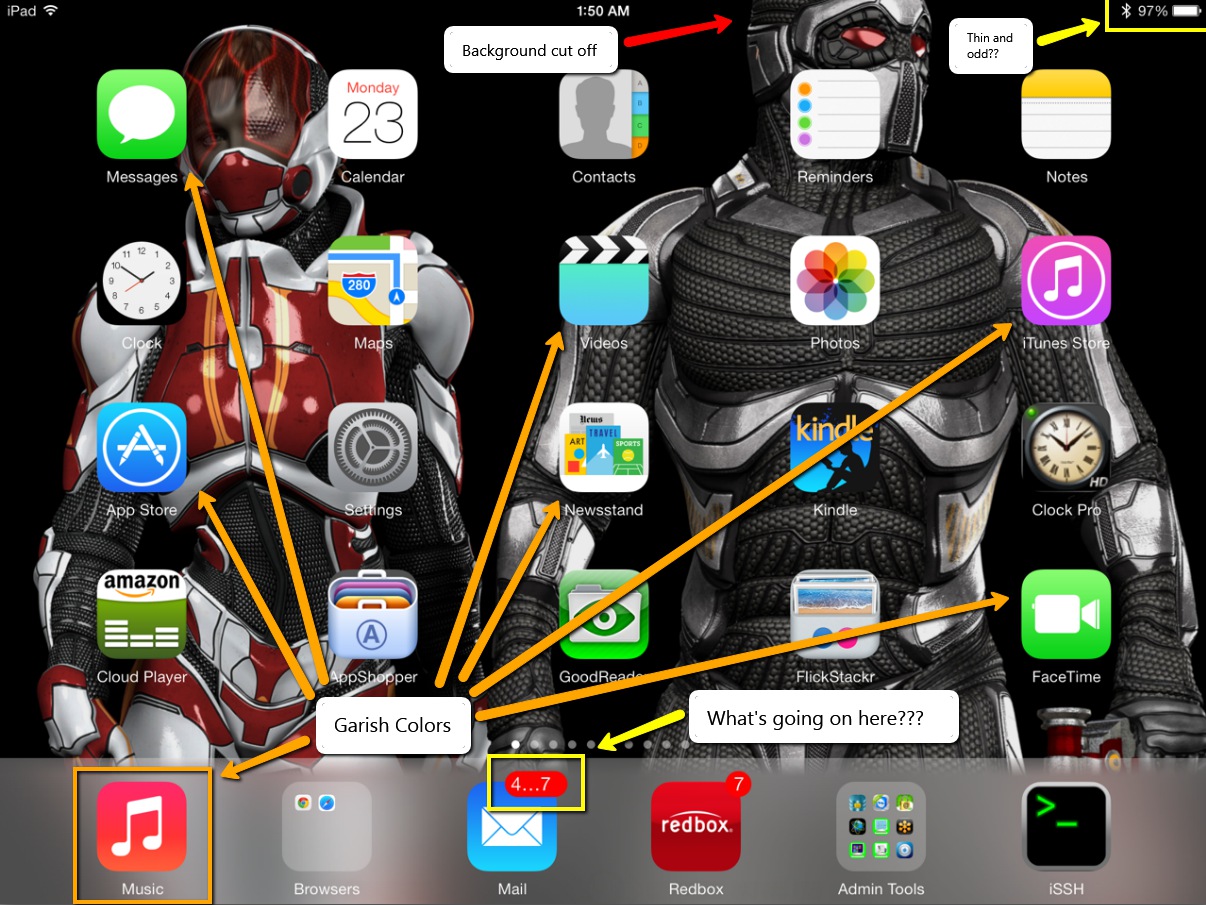
I’ll answer that question.. It’s when the OS flips back and forth between black and white screens. So, now not only do you have blinding white screens with garish colored fonts staring you in the face, now iOS has to flip between the solid white screens to solid black screens. Sure, there’s this fade transition thing, but it’s still overbearing and unnecessary. This is, in my estimation, one of the absolute worst design practices I’ve ever seen from any company. Who would ever design any application where one screen is almost solid white and the next is almost solid black. This is the absolute antithesis of good design. No graphical designer of any merit would even hint at let alone pitch such a stark transition between two elements.
An OS should be about experiences that let you get your work done. Not experiences that distract you from that purpose. If anything, the OS should blend into the background and facilitate getting the work done. Instead, the OS practically waving a red flag in your face and saying, “Here, look at me”.
Photos App is absolutely broken

When you’re just viewing photos, there’s this annoying white bar at the top of the screen that covers over the top 10% of the image. What’s that all about? I mean, can’t Apple software engineers figure out how to properly scale an image so it can be fully visible on the screen without being covered over by menu bars?
If you try to set wallpaper with the Photos app by scaling or sizing an image, be prepared for the whole app to lock up and possibly even cause your whole iPad to spontaneously reboot. This app is seriously unstable. Was this software even remotely beta tested? Once again, come on Apple. I can understand if something like Bob’s app was borked up, but the Photos app is pretty much a necessity. This has to be fixed and pronto.
And, to top it off, when you can manage to get the app not to lock the whole blasted iPad up when moving and scaling, it pushes 30% of the image off the top of the screen with no way to correct it. What crap!
Background Image movement effect
That new live motion background thing is the most worthless use of extra CPU cycles I’ve seen yet. The short and sweet of it is, let me turn it off. Don’t care about, don’t want it, don’t need it. And, the affect is so small it’s just pointless. I move my iPad 10 inches back and forth and the background moves maybe 1 pixel. Stupid waste of resources.
Lock and Unlock sounds no longer work.
Nuff said. [UPDATE] I kind of figured this one out. After the update to iOS7, these sounds are inexplicably disabled. However, if you go into the Sounds area in settings, you can turn it off and back on. This at least enables the lock sound. It does appear, though, that Apple has stripped the unlock sound from the system.
Carnival Colors
Where are we, Google? Seriously. I don’t want garish colors shining in my face at practically every turn. Some of the colors are almost like fluorescent green colors. It’s like, bad and ugly all at the same time. I don’t mind the flat look, but these colors seriously need to be muted down a whole lot.
Android Clone
Apple just ripped a page out of the Android book with IOS7, especially when it comes to the so-called streamlined fonts. This OS looks and feels more like Android than any other OS I’ve seen. We already have an Android. We don’t need another one. Do something original Apple. After all, that’s what you used to be known for. If I wanted to buy an Android tablet, I’d go buy one. I don’t want my Apple product to look and feel like an Android tablet. Of course, now we just need to wait for Google to file a lawsuit against Apple.
I’m hoping that Apple can get this quickly derailing train back on track soon with 7.0.1 as this thing called IOS7 is a hot mess. … and I thought IOS6 was bad.
Lady Gaga: Pop culture turns sour
When Lady Gaga hit the scene, like most other early Shock Artists, she pinned herself to the genre of pop music. With songs like Just Dance and Poker Face, she set the tone (or at least we thought) of what she would continue to bring to the table. Let’s explore.
Early Gaga
In the early days of Lady Gaga, we saw an artist who, not unlike many past pop artists, turned to shock art antics on the stage. Artists who fit into this same mold include David Bowie, The Tubes, Alice Cooper, Madonna, Prince (for his sexcapades on stage), Rob Zombie, Marilyn Manson and Tool. All of these bands had at least one pop hit.
Gaga has taken this same approach with The Fame. She cleverly uses straightforward pop music to rope in her fans. She then treats them to outrageous shock art antics both on stage and off, such as a raw meat dress and matching purse and hat. Or, her bubble outfit. She’s very good at both revealing parts of her body and covering them at the same time in a shocking way.
Her label hired a top-notch pop producer to produce The Fame as a classic pop album. In fact, the songs were very danceable with straightforward lyrics that most anyone can understand. Songs like Just Dance, Poker Face, Paparazzi and Love Game. She followed this album almost immediately with The Fame Monster and continued along these same lines changing the pop formula and song tone slightly, but retaining the straightforward pop lyrics with Telephone, Bad Romance and Monster. Although, by The Fame Monster, you could see hints of things to come, but it was still fun mostly pop music.
Later Gaga
With Born This Way, Lady Gaga took a decidedly different turn. This album saw a drastic change in compositions and lyrics. The music is less straightforward pop delving off into less pop formula at times. She’s now trying to push the envelope of the pop genre both musically and lyrically. Unfortunately, pop music has a very narrow range of formula and the boundaries cannot be pushed, not even by Lady Gaga. If you diverge from this narrow range in the pop genre, you are firmly outside of the genre. Meaning, Born This Way really wasn’t straightforward pop music. At best, it would be considered experimental pop. Born This Way (the album) just didn’t work as pop music as well as The Fame and The Fame Monster (and her charting of tracks from this release proved that).
By this time, though, Gaga had gained a large fanbase because of her two prior releases. Releases that were exceptionally produced and that had mass appeal. With Born This Way, she had to hope her existing fans would accept it. Thankfully, for her, they did. Unfortunately, Born This Way did little to rope in new fans as the appeal of the tracks on Born This Way would be limited.
Tracks such as Judas, Fashion of His Love and Marry The Night took a much more serious and darker tone, something which pop is generally not known for. The lyrics could be interpreted in ways that could be considered problematic by many. Unfortunately, this also means that Gaga has unpinned her roots to pop music with this release. Of course, Born This Way is her ‘second’ official album because The Fame Monster was an extension to The Fame. The fact that this album wasn’t as good follows with most artist’s sophomore releases.
Shock Art
For musical artists to utilize Shock Art properly, it requires grounding one piece of the persona to accepted social norms. For musicians, this means pinning the music and lyrics firmly to a common and popular music genre. Not only does this appear to ground the artist to some semblance of sanity, the shock art can be forgiven because of the quality music behind the shock. The pop genre also, when the music gets airplay, guarantees enough fans to continue to drive the artist forward.
Unfortunately, once Lady Gaga unpinned her music from the straightforward pop genre, she now risks losing everything she’s worked so hard to build. If people don’t listen to the music, the shock art has no place. People don’t go to the shows to see what’s on stage or watch the shock, they go to hear the music. The visuals simply come along as the frame around the music.
When you buy a painting, for example, you find a frame that suits the painting. You don’t buy some random gaudy frame that detracts from the art. You buy a frame that complements it. You buy a frame that guides your eyes into the picture and not to the frame itself. Without good music to back the shows, the only thing left to watch are the meat dresses and gooey concoctions she drapes herself in.
ARTPOP
Lady Gaga is releasing her new album ARTPOP on November 11th, 2013. One track has been ‘leaked’ called Burqa. Listening to this track, it’s clear that Gaga is pushing herself even farther away from the pop genre now more than ever. Some claim that it’s ‘club music’, but I don’t hear it. Club music is danceable. Club music has a beat that continues throughout the song. It is a 120-140 beats per minute track that gets people out of their seats and onto the dance floor. With Burqa, much of the song is devoid of beats. The sections that have beats still aren’t danceable.
The songwriting on the track is not pop formula. Most pop formula has a driving beat throughout with occasional breaks to heighten the track. Pop formula is usually ABAB or AABAABB or ABABBB similar. Where A is the straight sung parts of the song and B is the chorus or hook. Listening to Burqa, it’s difficult to find the formula because there’s not a driving beat and the chorus that’s there is not enough to get it stuck in your head. It’s structured, but not in the way that most pop songs are.
The point is that Gaga is now further pulling her music away from the pop genre and placing it into some kind of no-man’s land where it doesn’t fit rock, pop, dance or club. These types of tracks fit in the experimental category. Believe me, there are not many people out there who listen to experimental music. This genre is reserved for eclectic listeners. This is also not the demographic that tends to pay to attend concerts regularly. This is Lady Gaga’s primary mistake.
Gaga is washing herself out at a time when she could be firmly on top. Her label and her producers are not helping her either. They should be guiding her and keeping her on the pop track, but someone is giving her wrong advice (or no advice).
Ms. Germanotta, if you’re reading this, you need to head back to the studio and make sure your music remains firmly as ‘girl dumps guy’, ‘bad girl attitude’ lyrics wrapped in catchy pop tunes. This is the only way to ensure you can continue your rule at the top of pop no matter what you do on stage. The shock art may keep you in the tabloids, but the pop music keeps you on the charts and fans attending your concerts. Without The Pop, you won’t continue to have The Fame.


leave a comment