Bluetooth Mouse Pairing: Fix ‘Authentication Error’ in Windows 7
Every once in a while my bluetooth dongle decides to go whacky on me and the mouse won’t work any longer. Sometimes the keyboard also. Usually, I can unplug the dongle and replug it. This generally recovers both the mouse and the keyboard. Sometimes it requires repairing one or both of the devices. Today was a repairing day (at least for the mouse). Except, today didn’t go at all smoothly.
Note: Before proceeding with any pairing operation to battery powered devices such as mice or keyboards, always make sure your batteries are fresh. Dead or dying batteries can cause pairing problems simply because the wireless transmitter in the device may not produce a stable enough signal for the receiver. Also note that dead or dying batteries can sometimes be the source of device connectivity problems. Therefore, always make sure your batteries are fresh before attempting pairing operations with these devices.
The Problem
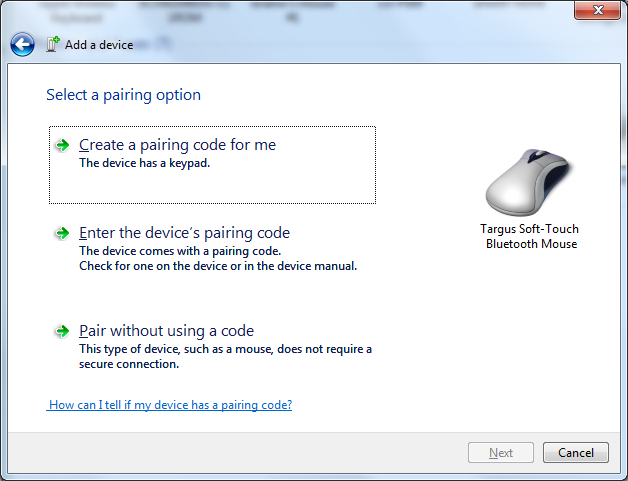
Normally I just go into ‘Devices and Printers’ and delete the device and pair it again. This usually works seamlessly. Today, not so much. I successfully delete the Targus mouse from the ‘Devices and Printers’ and that works correctly. I then put the mouse into discovery mode and start the ‘Add a Bluetooth Device’ panel. The panel finds the mouse fine. I select the mouse and click ‘Next’. I then see the next image.
 So, this is a reasonably stupid error because it’s a mouse. Mice don’t have authentication errors because they don’t use pairing codes. I have no idea why Windows would even present this. It’s clear that something is completely borked in Windows. And, you know, this is one of the things about Windows I absolutely hate. It gives stupid errors like this without any hope for resolution. Note that clicking the little blue link at the bottom of the window is completely worthless. Clicking that link won’t help you resolve this issue. It leads you to some worthless help page that leaves more questions than answers and only serves to waste time. I digress.
So, now that I’ve received this error, I proceed to Google to find an answer. Well, I didn’t find one. After traversing through several forums where people are asking the same questions, no answers here. Then, I proceed to search the registry thinking it left some garbage in the registry from the previous pairing. Nope, that search was a waste. So now, I’m basically at the trial and error phase of resolution.
I finally get to Microsoft’s knowledgebase which is probably where I should have visited first. Unfortunately, even that didn’t help, but I did find that Windows Server doesn’t support Bluetooth devices (not that that’s very helpful for my issue because I’m on Windows 7). What visiting this page at Microsoft did is give me an idea of how to proceed based on some images I saw. Not images of what I’m about to show you, though. Just an image of something that triggered a thought about how silly Microsoft is which lead to another thought and so on leading to the below.
The Fix
So, I go back to trying to pair again. I set the mouse up into pairing mode and then start ‘Add a Bluetooth Device’. Instead, this time I decide to right click the device about to be added:

You’ll need to do this pretty quickly as the device won’t stay in pairing mode for very long. So, click ‘Properties’ and you’ll see the following window:

Now, check the box next to the ‘Drivers for keyboard, mice, etc (HID)’ and click ‘OK’. This should immediately pair the device without the ‘Authentication Error’ panel appearing. At least, this fix worked perfectly for my situation. I can’t guarantee this will work with every Bluetooth mouse or every Bluetooth hardware. So, your results may vary. It’s definitely worth giving it a try, though.
Note: The differences in Bluetooth drivers may prevent this fix from working across the board. So, you will have to try this and relay your experience of whether or not it works for you.
Note, after I unpaired the mouse and repaired it after having done the above, I now see the following panel instead of the authentication error panel. This is the correct panel for the mouse. Clicking ‘Pair without using a code’ works perfectly now for this device. I have no idea what caused the other panel to present above. Note that once Windows gets into that state above, it stays there. Not sure why Windows would cache an error, but apparently it does. I’m at a complete loss why Microsoft would cache anything to do with real-time device connection activities like this! However, the mouse now unpairs and pairs correctly again. Whatever causes this issue, the Windows development team needs to fix it.
 My Rant
These are the stupid little things that make Windows such a hacky time-wasting experience. It’s these stupid quirky behaviors that give Microsoft a bad wrap and that continue to make Microsoft perceived as an inept operating system development company. It’s problems like this that make Windows a 1990’s level computer experience.
And, I’m not just talking about the error itself. I’m talking about the overall experience surrounding the error to the lack of any help in finding an answer. It’s having to resort to searching Google to find answers when Microsoft’s knowledgebase has nothing and offers no answers. It’s the having to guess using trial and error to find an answer. It’s the bad experience and bad taste that this experience leaves. Microsoft get your sh*t together. It’s long time for Windows to be done with experiences like this and time wasting experiences. If there are resolutions to a problem, then the time has long past to lead your users who see errors like this one to an exact resolution page with step-by-step instructions that work. Clearly, there is a resolution to my issue and I present it here. Why can’t your team do the same?
Seriously, I don’t understand why Microsoft relies on sites like mine to help users fix problems that Microsoft cannot be bothered to document properly. Yes, I realize I’m contributing to the problem by writing this article and ‘helping’ Microsoft out. Note, however, it’s not so much about helping Microsoft as it is helping users who run into this same stupid experience. The purpose of this article is to show just how stupid this experience is. It’s clear that Microsoft has no want in helping its own users who PAID for this product to actually give them real support and documentation. So, why do we continue to use Windows?
How to format NTFS on MacOS X
This article is designed to show you how to mount and manage NTFS partitions in MacOS X. Note the prerequisites below as it’s not quite as straightforward as one would hope. That is, there is no native MacOS X tool to accomplish this, but it can be done. First things first:
Disclaimer
This article discusses commands that will format, destroy or otherwise wipe data from hard drives. If you are uncomfortable working with commands like these, you shouldn’t attempt to follow this article. This information is provided as-is and all risk is incurred solely by the reader. If you wipe your data accidentally by the use of the information contained in this article, you solely accept all risk. This author accepts no liability for the use or misuse of the commands explored in this article.
Prerequisites
Right up front I’m going to say that to accomplish this task, you must have the following prerequisites set up:
- VirtualBox installed (free)
- Windows 7 (any flavor) installed in VirtualBox (you can probably use Windows XP, but the commands may be different) (Windows is not free)
For reading / writing to NTFS formatted partitions (optional), you will need one of the following:
- For writing to NTFS partitions on MacOS X:
- Tuxera NTFS (not free) or
- ntfs-3g (free)
- For reading from NTFS, MacOS X can natively mount and read from NTFS partitions in read-only mode. This is built into Mac OS X.
If you plan on writing to NTFS partitions, I highly recommend Tuxera over ntfs-3g. Tuxera is stable and I’ve had no troubles with it corrupting NTFS volumes which would require a ‘chkdsk’ operation to fix. On the other hand, ntfs-3g regularly corrupts volumes and will require chkdsk to clean up the volume periodically. Do not override MacOS X’s native NTFS mounter and have it write to volumes (even though it is possible). The MacOS X native NTFS mounter will corrupt disks in write mode. Use Tuxera or ntfs-3g instead.
Why NTFS on Mac OS X?
If you’re like me, I have a Mac at work and Windows at home. Because Mac can mount NTFS, but Windows has no hope of mounting MacOS Journaled filesystems, I opted to use NTFS as my disk carry standard. Note, I use large 1-2TB sized hard drives and NTFS is much more efficient with space allocation than FAT32 for these sized disks. So, this is why I use NTFS as my carry around standard for both Windows and Mac.
How to format a new hard drive with NTFS on Mac OS X
Once you have Windows 7 installed in VirtualBox and working, shut it down for the moment. Note, I will assume that you know how to install Windows 7 in VirtualBox. If not, let me know and I can write a separate article on how to do this.
Now, go to Mac OS X and open a command terminal (/Applications/Utilities/Terminal.app). Connect the disk to your Mac via USB or whatever method you wish the drive to connect. Once you have it connected, you will need to determine which /dev/diskX device it is using. There are several ways of doing this. However, the easiest way is with the ‘diskutil’ command:
$ diskutil list
/dev/disk0
   #: TYPE NAME SIZE IDENTIFIER
   0: GUID_partition_scheme *500.1 GB disk0
   1: EFI 209.7 MB disk0s1
   2: Apple_HFS Macintosh HD 499.8 GB disk0s2
/dev/disk1
   #: TYPE NAME SIZE IDENTIFIER
   0: GUID_partition_scheme *2.0 TB disk1
/dev/disk2
   #: TYPE NAME SIZE IDENTIFIER
   0: Apple_partition_scheme *119.6 MB disk2
   1: Apple_partition_map 32.3 KB disk2s1
   2: Apple_HFS VirtualBox 119.5 MB disk2s2
Locate the drive that appears to be the size of your new hard drive. If the hard drive is blank (a brand new drive), it shouldn’t show any additional partitions. In my case, I’ve identified that I want to use /dev/disk1. Remember this device file path because you will need it for creating the raw disk vmdk file. Note the nomenclature above: The /dev/disk1 is the device to access the entire drive from sector 0 to the very end. The /dev/diskXsX files access individual partitions created on the device. Make sure you’ve noted the correct /dev/disk here or you could overwrite the wrong drive.
Don’t create any partitions with MacOS X in Disk Utility or in diskutil as these won’t be used (or useful) in Windows. In fact, if you create any partitions with Disk Utility, you will need to ‘clean’ the drive in Windows.
Creating a raw disk vmdk for VirtualBox
This next part will create a raw connector between VirtualBox and your physical drive. This will allow Windows to directly access the entire physical /dev/disk1 drive from within VirtualBox Windows. Giving Windows access to the entire drive will let you manage the entire drive from within Windows including creating partitions and formatting them.
To create the connector, you will use the following command in Mac OS X from a terminal shell:
$ vboxmanage internalcommands createrawvmdk \
-filename "/path/to/VirtualBox VMs/Windows/disk1.vmdk" -rawdisk /dev/disk1
It’s a good idea to create the disk1.vmdk where your Windows VirtualBox VM lives. Note, if vboxmanage isn’t in your PATH, you will need to add it to your PATH to execute this command or, alternatively, specify the exact path to the vboxmanage command. In my case, this is located in /usr/bin/vboxmanage. This command will create a file named disk1.vmdk that will be used inside your Windows VirtualBox machine to access the hard drive. Note that creating the vmdk doesn’t connect the drive to your VirtualBox Windows system. That’s the next step. Make note of the path to disk1.vmdk as you will also need this for the next step.
Additional notes, if the drive already has any partitions on it (NTFS or MacOS), you will need to unmount any mounted partitions before Windows can access it and before you can createrawvmdk with vboxmanage. Check ‘df’ to see if any partitions on drive are mounted. To unmount, either drop the partition(s) on the trashcan, use umount /path/to/partition or use diskutil unmount /path/to/partition. You will need to unmount all partitions on the drive in question before Windows or vboxmanage can access it. Even one mounted partition will prevent VirtualBox from gaining access to the disk.
Note, if this is a brand new drive, it should be blank and it won’t attempt to mount anything. MacOS may ask you to format it, but just click ‘ignore’. Don’t have MacOS X format the drive. However, if you are re-using a previously used drive and wanting to format over what’s on it, I would suggest you zero the drive (see ‘Zeroing a drive’ below) as the fastest way to clear the drive of partition information.
Hooking up the raw disk vmdk to VirtualBox
Open VirtualBox. In VirtualBox, highlight your Windows virtual machine and click the ‘Settings’ cog at the top.
- Click the Storage icon.
- Click the ‘SATA Controller’
- Click on the ‘Add Hard Disk’ icon (3 disks stacked).
- When the ? panel appears, click on ‘Choose existing disk’.
- Navigate to the folder where you created ‘disk1.vmdk’, select it and click ‘Open’.
- The disk1.vmdk connector will now appear under SATA Controller
You are ready to launch VirtualBox. Note, if /dev/disk1 isn’t owned by your user account, VirtualBox may fail to open this drive and show an error panel. If you see any error panels, check to make sure no partitions are mounted and then check the permissions of /dev/disk1 with ls -l /dev/disk1 and, if necessary, chown $LOGNAME /dev/disk1. The drive must not have any partitions actively mounted and /dev/disk1 must be owned by your user account on MacOS X. Also make sure that the vmdk file you created above is owned by your user account as you may need to become root to createrawvmdk.
Launching VirtualBox
Click the ‘Start’ button to start your Windows VirtualBox. Once you’re at the Windows login panel, log into Windows as you normally would. Note, if the hard drive goes to sleep, you may have to wait for it to wake up for Windows to finish loading.
Once inside Windows, do the following:
- Start->All Programs->Accessories->Command Prompt
- Type in ‘diskpart’
- At the DISKPART> prompt, type ‘list disk’ and look for the drive (based on the size of the drive).
- Note, if you have more than one drive that’s the same exact size, you’ll want to be extra careful when changing things as you could overwrite the wrong drive. If this is the case, follow these next steps at your own risk!
DISKPART> list disk
Disk ### Status Size Free Dyn Gpt
 -------- ------------- ------- ------- --- ---
 Disk 0 Online 40 GB 0 B
 Disk 1 Online 1863 GB 0 B *
- In my case, I am using Disk 1. So, type in ‘select disk 1’. It will say ‘Disk 1 is now the selected disk.’
- From here on down, use these commands at your own risk. They are destructive commands and will wipe the drive and data from the drive. If you are uncertain about what’s on the drive or you need to keep a copy, you should stop here and backup the data before proceeding. You have been warned.
- Note, ‘Disk 1’ is coincidentally named the same as /dev/disk1 on the Mac. It may not always follow the same naming scheme on all systems.
- To ensure the drive is fully blank type in ‘clean’ and press enter.
- The clean command will wipe all partitions and volumes from the drive and make the drive ‘blank’.
- From here, you can repartition the drive as necessary.
Creating a partition, formatting and mounting the drive in Windows
- Using diskpart, here are the commands to create one partition using the whole drive, format it NTFS and mount it as G: (see commands below):
DISKPART> select disk 1
Disk 1 is now the selected disk
DISKPART> clean
DiskPart succeeded in cleaning the disk.
DISKPART> create partition primary
DiskPart succeeded in creating the specified partition.
DISKPART> list partition
Partition ### Type Size Offset
 ------------- ---------------- ------- -------
* Partition 1 Primary 1863 GB 1024 KB
DISKPART> select partition 1
Partition 1 is now the selected partition.
DISKPART> format fs=ntfs label="Data" quick
100 percent completed
DiskPart successfully formatted the volume.
DISKPART> assign letter=g
DiskPart successfully assigned the drive letter or mount point.
DISKPART> exit
Leaving DiskPart...
- The drive is now formatted as NTFS and mounted as G:. You should see the drive in Windows Explorer.
- Note, unless you want to spend hours formatting a 1-2TB sized drive, you should format it as QUICK.
- If you want to validate the drive is good, then you may want to do a full format on the drive. New drives are generally good already, so QUICK is a much better option to get the drive formatted faster.
- If you want to review the drive in Disk Management Console, in the command shell type in diskmgmt.msc
- When the window opens, you should find your Data drive listed as ‘Disk 1’
Note, the reason to use ‘diskpart’ over Disk Management Console is that you can’t use ‘clean’ in Disk Management Console, this command is only available in the diskpart tool and it’s the only way to completely clean the drive of all partitions to make the drive blank again. This is especially handy if you happen to have previously formatted the drive with MacOS X Journaled FS and there’s an EFI partition on the drive. The only way to get rid of a Mac EFI partition is to ‘clean’ the drive as above.
Annoyances and Caveats
MacOS X always tries to mount recognizable removable (USB) partitions when they become available. So, as soon as you have formatted the drive and have shut down Windows, Mac will likely mount the NTFS drive under /Volumes/Data. You can check this with ‘df’ in Mac terminal or by opening Finder. If you find that it is mounted in Mac, you must unmount it before you can start VirtualBox to use the drive in Windows. If you try to start VirtualBox with a mounted partition in Mac OS X, you will see a red error panel in VirtualBox. Mac and Windows will not share a physical volume. So you must make sure MacOS X has unmounted the volume before you start VirtualBox with the disk1.vmdk physical drive.
Also, the raw vmdk drive is specific to that single hard drive. You will need to go through the steps of creating a new raw vmdk for each new hard drive you want to format in Windows unless you know for certain that each hard drive is truly identical. The reason is that vboxmanage discovers the geometry of the drive and writes it to the vmdk. So, each raw vmdk is tailored to each drive’s size and geometry. It is recommended that you not try to reuse an existing physical vmdk with another drive. Always create a new raw vmdk for each drive you wish to manage in Windows.
Zeroing a drive
While the clean command clears off all partition information in Windows, you can also clean off the drive in MacOS X. The way to do this is by using dd. Again, this command is destructive, so be sure you know which drive you are operating on before you press enter. Once you press enter, the drive will be wiped of data. Use this section at your own risk.
To clean the drive use the following:
$ dd if=/dev/zero of=/dev/disk1 bs=4096 count=10000
This command will write 10000 * 4096 byte blocks with all zeros. This should overwrite any partition information and clear the drive off. You may not need to do this as the diskpart ‘clean’ command may be sufficient.
Using chkdsk
If the drive has become corrupted or is acting in a way you think may be a problem, you can always go back into Windows with the data1.vmdk connector and run chkdsk on the volume. You can also use this on any NTFS or FAT32 volume you may have. You will just need to create a physical vmdk connector and attach it to your Windows SATA controller and make sure MacOS X doesn’t have it mounted. Then, launch VirtualBox and clean it up.
Tuxera
If you are using Tuxera to mount NTFS, once you exit out of Windows with your freshly formatted NTFS volume, Tuxera should immediately see the volume and mount it. This will show you that NTFS has been formatted properly on the drive. You can now read and write to this volume as necessary.
Note that this method to format a drive with NTFS is the safest way on Mac OS X. While there may be some native tools floating around out there, using Windows to format NTFS will ensure the volume is 100% compliant with NTFS and Windows. Using third party tools not written by Microsoft could lead to data corruption or improperly formatted volumes.
Of course, you could always connect the drive directly to a Windows system and format it that way. ;)
How not to run a business (Part 3) — SaaS edition
So, we’ve talked about how not to run a general business, let’s get to some specifics. Since software as a service (SaaS) is now becoming more and more common, let’s explore software companies and how not to run these.
Don’t add new features because you can
If a customer is asking for something new, then add that new feature at some appointed future time. Do not, however, think that that feature needs to be implemented tomorrow. On the other hand, if you have conceived something that you think might be useful, do not spend time implementing it until someone is actually asking for it. This is an important lesson to learn. It’s a waste of time to write code that no one will actually use. So, if you think your feature has some merit, invite your existing customers to a discussion by asking them if they would find the proposed feature useful. Your customers have the the final say. If the majority of your customers don’t think they would use it, scrap the idea. Time spent writing a useless feature is time wasted. Once written, the code has to be maintained by someone and is an additional waste of time.
Don’t tie yourself to your existing code
Another lesson to learn is that your code (and app) needs to be both flexible and trashable. Yes, I said trashable. You need to be willing to throw away code and rewrite it if necessary. That means, code flows, changes and morphs. It does not stay static. Ideas change, features change, hardware changes, data changes and customer expectations change. As your product matures and requires more and better infrastructure support, you will find that your older code becomes outdated. Don’t be surprised if you find yourself trashing much of your existing code for completely new implementations taking advantage of newer technologies and frameworks. Code that you may have written from scratch to solve an early business problem may now have a software framework that, while not identical to your code, will do what your code does 100x more efficiently. You have to be willing to dump old code for new implementations and be willing to implement those ideas in place of old code. As an example, usually early code does not take high availability into account. Therefore, gutting old code that isn’t highly available for new frameworks that are is always a benefit to your customers. If there’s anything to understand here, code is not a pet to get attached to. It provides your business with a point in time service set. However, that code set must grow with your customer’s expectations. Yes, this includes total ground-up rewrites.
Don’t write code that focuses solely on user experience
In software-as-a-service companies, many early designs can focus solely on what the code brings to the table for customer experience. The problem is that the design team can become so focused on writing the customer experience that they forget all about the manageability of the code from an operational perspective. Don’t write your code this way. Your company’s ability to support that user experience will suffer greatly from this mistake. Operationally, the code must be manageable, supportable, functional and must also start up, pause and stop consistently. This means, don’t write code so that when it fails it leaves garbage in tables, half-completed transactions with no way to restart the failed transactions or huge temporary files in /tmp. This is sloppy code design at best. At worst, it’s garbage code that needs to be rewritten.
All software designs should plan for both the user experience and the operational functionality. You can’t expect your operations team to become the engineering code janitors. Operations teams are not janitors for cleaning up after sloppy code that leaves garbage everywhere. Which leads to …
Don’t write code that doesn’t clean up after itself
If your code writes temporary tables or otherwise uses temporary mechanisms to complete its processing, clean this up not only on a clean exit, but also during failure conditions. I know of no languages or code that, when written correctly, cannot cleanup after itself even under the most severe software failure conditions. Learn to use these mechanisms to clean up. Better, don’t write code that leaves lots of garbage behind at any point in time. Consume what you need in small blocks and limit the damage under failure conditions.
Additionally, if your code needs to run through processing a series of steps, checkpoint those steps. That means, save the checkpoint somewhere. So, if you fail to process step 3 of 5, another process can come along and continue at step 3 and move forward. Leaving half completed transactions leaves your customers open to user experience problems. Always make sure your code can restart after a failure at the last checkpoint. Remember, user experience isn’t limited to a web interface…
Don’t think that the front end is all there is to user experience
One of the mistakes that a lot of design teams fall into is thinking that the user experience is tied to the way the front end interacts. Unfortunately, this design approach has failure written all over it. Operationally, the back end processing is as much a user experience as the front end interface. Sure, the interface is what the user sees and how the user interacts with your company’s service. At the same time, what the user does on the front end directly drives what happens on the back end. Seeing as your service is likely to be multiuser capable, what each user does needs to have its own separate allocation of resources on the back end to complete their requests. Designing the back end process to serially manage the user requests will lead to backups when you have 100, 1,000 or 10,000 users online.
It’s important to design both the front end experience and the back end processing to support a fully scalable multiuser experience. Most operating systems today are fully capable of multitasking utilizing both multiprocess and multithreaded support. So, take advantage of these features and run your user’s processing requests concurrently, not serially. Even better, make sure they can scale properly.
Don’t write code that sets no limits
One of the most damaging things you can do for user experience is tell your customers there are no limits in your application. As soon as those words are uttered from your lips, someone will be on your system testing that statement. First by seeing how much data it takes before the system breaks, then by stating that you are lying. Bad from all aspects. The takeaway here is that all systems have limits such as disk capacity, disk throughput, network throughput, network latency, the Internet itself is problematic, database limits, process limits, etc. There are limits everywhere in every operating system, every network and every application. You can’t state that your application gives unlimited capabilities without that being a lie. Eventually, your customers will hit a limit and you’ll be standing there scratching your head.
No, it’s far simpler not to make this statement. Set quotas, set limits, set expectations that data sets perform best when they remain between a range. Customers are actually much happier when you give them realistic limits and set their expectations appropriately. Far fetched statements leave your company open to problems. Don’t do this.
Don’t rely on cron to run your business
Ok, so I know some people will say, why not? Cron, while a decent scheduling system, isn’t without its own share of problems. One of its biggest problems, however, is that its smallest level of granularity is once per minute. If you need something to run more frequently than every minute, you are out of luck with cron. Cron also requires hard coded scripts that must be submitted in specific directories for cron to function. Cron doesn’t have an API. Cron supports no external statistics other than by digging through log files. Note, I’m not hating on cron. Cron is a great system administration tool. It has a lot of great things going for it with systems administration use when utilizing relatively infrequent tasks. It’s just not designed to be used under heavy mission critical load. If you’re doing distributed processing, you will need to find a way to launch in a more decentralized way anyway. So, cron likely won’t work in a distributed environment. Cron also has a propensity to stop working internally, but leave itself running in the process list. So, monitoring systems will think it’s working when it’s not actually launching any tasks.
If you’re a Windows shop, don’t rely on Windows scheduler to run your business. Why? Windows scheduler is actually a component of Internet Explorer (IE). When IE changes, the entire system could stop or fail. Considering the frequency with which Microsoft releases updates to not only the operating system, but to IE, you’d be wise to find another scheduler that is not likely to be impacted by Microsoft’s incessant need to modify the operating system.
Find or design a more reliable scheduler that works in a scalable fault tolerant way.
Don’t rely on monitoring systems (or your operations team) to find every problem or find the problem timely
Monitoring systems are designed by humans to find problems and alert. Monitoring systems are by their very nature, reactive. This means that monitoring systems only alert you AFTER they have found a problem. Never before. Worse, most monitoring systems only alert of problems after multiple checks have failed. This means that not only is the service down, it’s been down for probably 15-20 minutes by the time the system alerts. In this time, your customers may or may not have already seen that something is going on.
Additionally, for any monitoring for a given application feature, the monitoring system needs a window into that specific feature. For example, monitoring Windows WMI components or Windows message queues from a Linux monitoring system is near impossible. Linux has no components at all to access, for example, the Windows WMI system or Windows message queues. That said, a third party monitoring system with an agent process on the Windows system may be able to access WMI, but it may not.
Always design your code to provide a window into critical application components and functionality for monitoring purposes. Without such a monitoring window, these applications can be next to impossible to monitor. Better, design using standardized components that work across all platforms instead of relying on platform specific components. Either that or choose a single platform for your business environment and stick with that choice. Note that it is not the responsibility of the operations team to find windows to monitor. It’s the application engineering team’s responsibility to provide the necessary windows into the application to monitor the application.
Don’t expect your operations team to debug your application’s code
Systems administrators are generally not programmers. Yes, they can write shell scripts, but they don’t write code. If your application is written in PHP or C or C++ or Java, don’t expect your operations team to review your application’s code, debug the code or even understand it. Yes, they may be able to review some Java or PHP, but their job is not to write or review your application’s code. Systems administrators are tasked to manage the operating systems and components. That is, to make sure the hardware and operating system is healthy for the application to function and thrive. Systems administrators are therefore not tasked to write or debug your application’s code. Debugging the application is the task for your software engineers. Yes, a systems administrator can find bugs and report them, just as anyone can. Determining why that bug exists is your software engineers’ responsibility. If you expect your systems administrators to understand your application’s code in that level of detail, they are no longer systems administrators and they are considered software engineers. Keeping job roles separate is important in keeping your staff from becoming overloaded with unnecessary tasks.
Don’t write code that is not also documented
This is a plain and simple programming 101 issue. Yes, it’s very simple. Your software engineers’ responsibilities are to write robust code, but also document everything they write. That’s their job responsibility and should be part of their job description. If they do not, cannot or are unwilling to document the code they write, they should be put on a performance review plan and without improvement, walked to the door. Without documentation, reverse engineering their code can take weeks for new personnel. Documentation is critical to your businesses continued success, especially when personnel changes. Think of this like you would disaster recovery. If you suddenly no longer had your current engineers available and you had to hire all new engineers, how quickly could the new engineers understand your application’s code enough to release a new version? This ends up a make or break situation. Documentation is the key here.
Thus, documentation must be part of any engineer’s responsibility when they write code for your company. Code review is equally important by management to ensure that the code not only seems reasonable (i..e, no gotos), but is fully documented and attributed to that person. Yes, the author’s name should be included in comments surrounding each section of code they write and the date the code was written. All languages provide ways to comment within the code, require your staff to use it.
Don’t expect your code to test itself or that your engineers will properly test it
Your software engineers are far too close to the code to determine if the code works correctly under all scenarios. Plain and simple, software doesn’t test itself. Use an independent quality testing group to ensure that the code performs as expected based on the design specifications. Yes, always test based on the design specifications. Clearly, your company should have a road map of features and exactly how those features are expected to perform. These features should be driven by customer requests for new features. Your quality assurance team should have a list of new all features being placed into each new release to write thorough test cases well in advance. So, when the code is ready, they can put the release candidate into the testing environment and run through their test cases. As I said, don’t rely on your software engineers to provide this level of test cases. Use a full quality assurance team to review and sign off on the test cases to ensure that the features work as defined.
Don’t expect code to write (or fix) itself
Here’s another one that would be seemingly self-explanatory. Basically, when a feature comes along that needs to be implemented, don’t expect the code to spring up out of nowhere. You need competent technical people who fully understand the design to write the code for any new feature. But, just because an engineer has actually written code doesn’t mean the code actually implements the feature. Always have test cases ready to ensure that the implemented feature actually performs the way that it was intended.
If the code doesn’t perform what it’s supposed to after having been implemented, obviously it needs to be rewritten so that it does. If the code written doesn’t match the requested feature, the engineer may not understand the requested feature enough to implement it correctly. Alternatively, the feature set wasn’t documented well enough before having been sent to the engineering team to be coded. Always document the features completely, with pseudo-code if necessary, prior to being sent to engineering to write actual code. If using an agile engineering approach, review the progress frequently and test the feature along the way.
Additionally, if the code doesn’t work as expected and is rolled to production broken, don’t expect that code to magically start working or that the production team has some kind of magic wand to fix the problem. If it’s a coding problem, this is a software engineering task to resolve. Regardless of whether or not the production team (or even a customer) manages to find a workaround is irrelevant to actually fixing the bug. If a bug is found and documented, fix it.
Don’t let your software engineers design features
Your software engineers are there to write the code based features derived from customer feedback. Don’t let your software engineers write code for features not on the current road map. This is a waste of time and, at the same time, doesn’t help get your newest release out the door. Make sure that your software engineers remain focused on the current set of features destined for the next release. Focusing on anything other than the next release could delay that release. If you’re wanting to stick to a specific release date, always keep your engineers focused on the features destined for the latest release. Of course, fixing bugs from previous releases is also a priority, so make sure they have enough time to work on these while still working on coding for the newest release. If you have the manpower, focus some people on bug fixing and others on new features. If the code is documented well enough, a separate bug fixing team should have no difficulties creating patches to fix bugs from the current release.
Don’t expect to create 100% perfect code
So, this one almost goes without saying, but it does need to be said. Nothing is ever bug free. This section is here is to illustrate why you need to design your application using a modular patching approach. It goes back to operations manageability (as stated above). Design your application so that code modules can drop-in replace easily while the code is running. This means that the operations team (or whomever is tasked to do your patching) simply drops a new code file in place, tells the system to reload and within minutes the new code is operating. Modular drop in replacements while running is the only way to prevent major downtime (assuming the code is fully tested). As an SaaS company, should always design your application with high availability in mind. Doing full code releases, on the other hand, should have a separate installation process than drop in replacement. Although, if you would like to utilize the dynamic patching process for more agile releases, this is definitely an encouraged design feature. The more easily you design manageability and rapid deployment into your code for the operations team, the less operations people you need to manage and deploy it.
Without the distractions of long involved release processes, the operations team can focus on hardware design, implementation and general growth of the operations processes. The more distractions your operations team has with regards to bugs, fixing bugs, patching bugs and general code related issues, the less time they have to spend on the infrastructure side to make your application perform its best. As well, the operations team also has to keep up with operating system patches, software releases, software updates and security issues that may affect your application or the security of your user’s data.
Don’t overlook security in your design
Many people who write code, write code to implement a feature without thought to security. I’m not necessarily talking about blatantly obvious things like using logins and passwords to get into your system. Although, if you don’t have this, you need to add it. It’s clear, logins are required if you want to have multiple users using your system at once. No, I’m discussing the more subtle but damaging security problems such as cross-site scripting or SQL injection attacks. Always have your site’s code thoroughly tested against a suite of security tools prior to release. Fix any security problems revealed before rolling that code out to production. Don’t wait until the code rolls to production to fix security vulnerabilities. If your quality assurance team isn’t testing for security vulnerabilities as part of the QA sign off process, then you need to rethink and restructure your QA testing methodologies. Otherwise, you may find yourself becoming the next Sony Playstation Store news headline at Yahoo News or CNN. You don’t really want this type of press for your company. You also don’t want your company to be known for losing customer data.
Additionally, you should always store user passwords and other sensitive user data in one-way encrypted form. You can store the last 4 digits or similar of social security numbers or the last 4 of account numbers in clear text, but do not store the whole number in either plain text, with two-way encryption or in a form that is easily derived (md5 hash). Always use actual encryption algorithms with reasonably strong one-way encryption to store sensitive data. If you need access to that data, this will require the user to enter the whole string to unlock whatever it is they are trying to access.
Don’t expect your code to work on terabytes of data
If you’re writing code that manages SQL queries or, more specifically, are constructing SQL queries based on some kind of structured input, don’t expect your query to return timely when run against gigabytes or terabytes of data, thousands of columns or billions of rows or more. Test your code against large data sets. If you don’t have a large data set to test against, you need to find or build some. It’s plain and simple, if you can’t replicate your biggest customers’ environments in your test environment, then you cannot test all edge cases against the code that was written. SQL queries have lots of penalties against large data sets due to explain plans and statistical tables that must be built, if you don’t test your code, you will find that these statistical tables are not at all built the way you expect and the query may take 4,000 seconds instead of 4 seconds to return.
Alternatively, if you’re using very large data sets, it might be worth exploring such technologies as Hadoop and Cassandra instead of traditional relational databases to handle these large data sets in more efficient ways than by using databases like MySQL. Unfortunately, however, Hadoop and Cassandra are noSQL implementations, so you forfeit the use of structured queries to retrieve the data, but very large data sets can be randomly accessed and written to, in many cases, much faster than using SQL ACID database implementations.
Don’t write islands of code
You would think in this day and age that people would understand how frameworks work. Unfortunately, many people don’t and continue to write code that isn’t library or framework based. Let’s get you up to speed on this topic. Instead of writing little disparate islands of code, roll the code up under shared frameworks or shared libraries. This allows other engineers to use and reuse that code in new ways. If it’s a new feature, it’s possible that another bit of unrelated code may need to pull some data from another earlier implemented feature. Frameworks are a great way to ensure that reusing code is possible without reinventing the wheel or copying and pasting code all over the place. Reusable libraries and frameworks are the future. Use them.
Of course, these libraries and frameworks need to be fully documented with specifications of the calls before they can be reused by other engineers in other parts of the code. So, documentation is critical to code reuse. Better, the use of object oriented programming allows not only reuse, but inheritance. So, you can inherit an object in its template form and add your own custom additions to this object to expand its usefulness.
Don’t talk and chew bubble gum at the same time
That is, don’t try to be too grandiose in your plans. Your team has limited time between the start of a development cycle and the roll out of a new release. Make sure that your feature set is compatible with this deadline. Sure, you can throw everything in including the kitchen sink, but don’t expect your engineering team to deliver on time or, if they do actually manage to deliver, that the code will work half as well as you expect. Instead, pair your feature sets down to manageable chunks. Then, group the chunks together into releases throughout the year. Set expectations that you want a certain feature set in a given release. Make sure, however, that that feature set is attainable in the time allotted with the number of engineers that you have on staff. If you have a team of two engineers and a development cycle of one month, don’t expect these engineers to implement hundreds of complex features in that time. Be realistic, but at the same time, know what your engineers are capable of.
Don’t implement features based on one customer’s demand
If someone made a sales promise to deliver a feature to one, and only one customer, you’ve made a serious business mistake. Never promise an individual feature to an individual customer. While you may be able to retain that customer based on implementing that feature, you will run yourself and the rest of your company ragged trying to fulfill this promise. Worse, that customer has no loyalty to you. So, even if you expend the 2-3 weeks day and night coding frenzy to meet the customer’s requirement, the customer will not be any more loyal to you after you have released the code. Sure, it may make the customer briefly happy, but at what expense? You likely won’t keep this customer as a customer any longer. By the time you’ve gotten to this level of desperation with a customer, they are likely already on the way out the door. So, these crunch requests are usually last-ditch efforts at customer retention and customer relations. Worse, the company runs itself ragged trying desperately to roll this new feature almost completely ignoring all other customers needing attention and projects, yet these harried features so completely end up as customized one-offs that no other customer can even use the feature without a major rewrite. So, the code is effectively useless to anyone other than the requesting customer who’s likely within inches of terminating their contract. Don’t do it. If your company gets into this desperation mode, you need to stop and rethink your business strategy and why you are in business.
Don’t forget your customer
You need to hire a high quality sales team who is attentive to customer needs. But, more than this, they need to periodically talk to your existing clients on customer relations terms. Basically, ask the right questions and determine if the customer is happy with the services. I’ve seen so many cases where a customer appears completely happy with the services. In reality, they have either been shopping around or have been approached by competition and wooed away with a better deal. You can’t assume that any customer is so entrenched in your service that they won’t leave. Instead, your sales team needs to take a proactive approach and reach out to the customers periodically to get feedback, determine needs and ask if they have any questions regarding their services. If a contract is within 3 months of renewal, the sales team needs to be on the phone and discussing renewal plans. Don’t wait until a week before the renewal to contact your customers. By a week out, it’s likely that the customers have already been approached by competition and it’s far too late to participate in any vendor review process. You need to know when the vendor review process happens and always submit yourself to that process for continued business consideration from that customer. Just because a customer has a current contract with you does not make you a preferred vendor. More than this, you want to always participate in the vendor review process, so this is why it’s important to contact your customer and ask when the vendor review process begins. Don’t blame the customer that you weren’t included in any vendor review and purchasing process. It’s your sales team’s job to find out when vendor reviews commence.
← Part 2 | Chapter Index | Part 4 →
Amazon Kindle: Buyer’s Security Warning
 If you’re thinking of purchasing a Kindle or Kindle Fire, beware. Amazon ships the Kindle pre-registered to your account in advance while the item being shipped. What does that mean? It means that the device is ready to make purchases right from your account without being in your possession. Amazon does this to make it ‘easy’. Unfortunately, this is a huge security risk. You need to take some precautions before the Kindle arrives.
Why is this a risk?
If the package gets stolen, it becomes not only a hassle to get the device replaced, it means the thief can rack up purchases for that device from your Amazon account on your registered credit card without you being immediately aware. The bigger security problem, however, is that the Kindle does not require a login and password to purchase content. Once registered to your account, it means the device is already given consent to purchase without any further security. Because the Kindle does not require a password to purchase content, unlike the iPad which asks for a password to purchase, the Kindle can easily purchase content right on your credit card without any further prompts. You will only find out about the purchases after they have been made through email receipts. At this point, you will have to dispute the charges with Amazon and, likely, with your bank.
This is bad on many levels, but it’s especially bad while the item is in transit until you receive the device in the mail. If the device is stolen in transit, your account could end up being charged for content by the thief, as described above. Also, if you have a child that you would like to use the device, they can also make easy purchases because it’s registered and requires no additional passwords. They just click and you’ve bought.
What to do?
When you order a Kindle, you will want to find and de-register that Kindle (may take 24 hours before it appears) until it safely arrives into your possession and is working as you expect. You can find the Kindles registered to your account by clicking (from the front page while logged in) ‘Your Account->Manage Your Kindle‘ menu then click ‘Manage Your Devices‘ in the left side panel. From here, look for any Kindles you may have recently purchased and click ‘Deregister’. Follow through any prompts until they are unregistered. This will unregister that device. You can re-register the device when it arrives.
If you’re concerned that your child may make unauthorized purchases, either don’t let them use your Kindle or de-register the Kindle each time you give the device to your child. They can use the content that’s on the device, but they cannot make any further purchases unless you re-register the device.
Kindle as a Gift
Still a problem. Amazon doesn’t recognize gift purchases any differently. If you are buying a Kindle for a friend, co-worker or even as a giveaway for your company’s party, you will want to explicitly find the purchased Kindle in your account and de-register it. Otherwise, the person who receives the device could potentially rack up purchases on your account without you knowing.
Shame on Amazon
Amazon should stop this practice of pre-registering Kindles pronto. All Kindles should only register to the account after the device has arrived in the possession of the rightful owner. Then, and only then, should the device be registered to the consumer’s Amazon account as part of the setup process using an authorized Amazon login and password (or by doing it in the Manage devices section of the Amazon account). The consumer should be the sole responsible party to authorize all devices to their account. Amazon needs to stop pre-registering of devices before the item ships. This is a bad practice and a huge security risk to the holder of the Amazon account who purchased the Kindle. It also makes gifting Kindles extremely problematic. Amazon, it’s time to stop this bad security practice or place more security mechanisms on the Kindle before a purchase can be made.
How not to run a business (Part 2) — General Don’ts 2
As a second article follow-on to the first part of the series How not to run a business (Pt. 1), I will keep the momentum going. So, without further adieu…
Don’t keep non-producers on the payroll longer than 3 months
Three months is enough time to understand if the person you’ve recently hired can do the job for you. If they are not producing within 3 months, they are either in over their head, they simply don’t understand the job or they don’t really want to do the work. Whatever the problem, performance plans to improve probably won’t help. If you’re a small business, you can’t really afford having non-producers on the payroll for long periods of time. However, for longer term employees, that leads into …
Think twice before letting people go without warning
While I know that it’s common to reduce your payroll burden by letting people go, think twice before you do this. More specifically, don’t do it unless you fully understand the consequences of that change to your business. Letting certain people go can cause short-term damage if that person is entrenched in certain aspects of your business. Basically, make sure that your knowledge base is well spread out. This means, making sure that if you have a software engineer who is the only person who understands a crucial bit of code, that this person does a proper hand-off to another person before they depart. I know that it’s common to let people go without warning to them or to anyone else, but this is the worst way to handle letting people go for many reasons. First, you may lose a brain-trust you didn’t know you had or that your company needed. Second, you’re opening your company up to wrongful termination lawsuits. Both of these can be short term damaging to your business. Third, surprise firings don’t always go over well. You don’t know who is capable of temperamental outbursts and who may show up at your doorstep with a firearm ready to take retaliatory measures. Workplace violence is on the rise, be careful whom you let go and how. In the long term, your business will likely recover, but in the short term your customers may feel the pain. It’s entirely up to you to determine if that pain is worth the hassle of walking people to do the door without warning.
The best plan for non-producers is to give them one chance to step up and begin producing. Explain in very explicit terms what you expect to see in the next 30, 60 and 90 days. Set goals and expect improvements. Make it completely clear that this is their only chance to rectify their performance issues or they will be asked to leave. Basically, give the person fair warning in writing, document it, have them sign it, give them a copy and place the original in their personnel file. So, if they choose not to improve their performance issues, you have a documented copy of what you expect and that they failed to meet those expectations. This also means that when you do walk them to the door, this is not a surprise to them. It also gives you the opportunity to hedge your bets and hire someone to be trained by this person. If they refuse to train anyone, explain that it is part of their performance improvement plan and their job. If they choose not to train someone, then explain that they have failed their performance improvement plan and they need to pack their belongings and leave the premises. You can’t make someone do the work, but you can encourage them. If they choose not to work even after you have asked them to, it’s time for them to leave.
Don’t buy email marketing lists and don’t send spam
The quickest way to tank your business on the Internet and give it a bad reputation is by buying lists of people whom you have never met. If your business is important to you, find people who are interested in your services in other ways than by sending spam email. One of the best ways is by using services like D&B to locate companies that might have need of your services. Then, have your sales people cold call them. Note, that while cold calling isn’t always warmly received by many, it is more favorably tolerated than sending email spam. Cold calling is only between you and the called party. Spam, on the other hand, ends up not only between you and the other party, but all parties in between that delivered the email. The recipient may forward the email to other parties which then involve even more people. This is how reputations get ruined. The bottom line is, don’t send email spam and, more specifically, do not buy email lists.
On the other hand, attending trade shows is a great way to initiate interest in your product or service, is a way to collect email addresses and is the primary way to build your email list. Other ways to build your list is by blogging and simply by selling your product on the web.
Don’t acquire companies without fully understanding what they bring to the table
In the start-up phase when there’s lots of capital floating around, it is tempting to bring in what appears to be a good marriage of technologies into your company through acquisition. There are lots of reasons why you should think and rethink any acquiring plan. While you may bring in technologies you don’t otherwise have, it does a lot of other things at the same time. The merging of two companies is a pretty severe culture shock for the company being acquired. Their business methodologies, sales strategies, employment practices, dress code and lots of other subtle culture issues may clash with your current culture. Bringing in a new company can bring with it things your company may not be ready to handle.
Additionally, it well increases the workload for people who may already be overworked. For example, pulling in a whole crew of new staff requires human resources to hire these people in. It requires adding them to payroll and to benefits. It requires IT staff to procure assets like computers, phones, desks, logins, ID cards, etc. The new company will have accounting books that need to be folded into the parent company’s books. There’s all of the duplicated staff that are probably not necessary (finance, IT, operations, marketing… both personnel and management) that will either have to be let go or given alternative positions.
On top of the logistics of simply folding in one company to another, which requires a substantial amount of time and effort from staff, the products themselves also have to be rolled into your current core business that have yet to be determined useful. For example, if your company is primarily a Business to Business seller and you acquire a Business to Consumer company, you need to understand if that marriage works for your present business model. The questions you need to ask yourself… “Am I planning to sell B2C now?” “Can this acquired company’s technology be used in the B2B space?” “Will this new company provide the revenue needed to justify the purchase?” These are all important questions that materially impact whether you should or should not do the deal. Don’t jump into buying a business solely because it appears to be a ‘hot new technology’. The technology itself does not indicate that that product or service is long-term sellable, viable or, more importantly, sellable to your B2B customers and prospects. Yes, having a vision does help here, but remember that Business to Consumer products generally don’t generate near the amount of revenue that Business to Business products do. Also recognize, as in this example, that selling Business to Business is an entirely different beast than selling Business to Consumer. So, this also means learning curves and retraining for those folks tasked to manage both sales models.
Basically, this single section could fill an entire book. There are lots of considerations when contemplating the acquisition of other businesses. Unless you are completely certain that you are gaining something that your company desperately needs, it may be simpler and cheaper to hire people to construct a similar technology without the additional hassles of folding two companies together. In other words, it may take longer and be more costly to fold together both the companies and the technologies than it would have cost to hire engineers and construct a similar technology yourself. Weigh the costs, think about the outcome and determine if acquisition is truly the right choice.
Don’t give away something you can sell
I’ve seen this so many times now that I’ve lost count. Good will is an important aspect of the sales process. It makes the customer feel like the are getting a good deal. I understand this aspect of the sales process. So, discounts, incentives and giveaways are all good methodologies to managing a prospect’s ‘feel good’ aspect of the deal you are proposing. However, remember that you are in business to make money. You’re not in business to give good will gestures, that is unless your company happens to be a charity or non-profit. Assuming that you are a for-profit entity and not managing a charity, you should never give away things you can sell. This is true of not only goods, but services as well. I know it’s easy to think that your professional services team’s or other team’s time is not worth much, but don’t give professional services away for free. Controlling your sales staff, however, is another matter. Don’t allow your sales team to make deals without understanding the deal and someone in management signing off on the deal. Never allow sales persons to make deals without a managerial approval process. When sales people can make deals without approvals, they will make bad deals for your company that you will have to support for years to come.
Worse, giveaways encourage future giveaways. Basically, once you’ve given something to a customer for free, they will expect it for free at subsequent renewals. Don’t set that precedent. Always charge for every line item. Discount it by a small percent, but never discount anything by 100%. Once you agree to any freebie, you are saddled with that freebie for the rest of that customer’s contract with you no matter how much you find out it is really costing you. Believe me, freebies can easily become some of the most costly parts of a business.
Don’t believe everything you hear from prospects or clients
Prospects are good at finagling the best deal possible. One of the most common tactics is to suggest that your direct competitor gave away a service for free that you are selling. They are then expecting you to give them this service for free. So, here’s the common problem with this scenario. First, you are placing 100% trust into what they are saying should you decide to comply. Don’t do this. Check and double check any statements made by prospects when they ask for freebies. Second, when you cannot find that their statement is true, be prepared to take a hard line with them and discount it by only a small percent. Do not give it away for free. If they decline the deal, you may be better off. Don’t do a deal with freebies simply because you need the deal. In the long run, that contract will become unsupportable. Further, any freebie you do agree to will become a permanent never ending freebie. You cannot undo a freebie once done. Take your business seriously and charge for everything. Again, remember that to make money is why you are in business. If you give away any freebies, five years later you will still be giving that freebie to that customer. Don’t believe everything you hear.
Don’t do giveaways, trips and other incentives for the sales team alone
At least, don’t do it without including the rest of the company in the incentives. It’s quite common in many companies for the sales team to be offered trips, giveaways and incentives to close deals (or whomever gets the most deals). So here’s the problem. You’re already paying your sales team commission on deals they’ve closed (and hopefully after the checks have cleared). This is already an incentive. If they close a $1 million deal (or $1 million in deals) and they get 10%, they’ve gotten a $100k check out of that. That’s a lot of money for a sales person in addition to whatever salary you are paying them. Why are you trying to incent them further by flying them to Barbados or by giving them an iPad? It’s their job to keep up the sales. Giving them trips and giveaways sends the wrong message to the rest of your company’s departments who aren’t involved in these incentive programs. It’s also a very exclusionary practice so that most other parts of the company don’t get these incentives. Yet, these other departments work equally hard at their jobs. If you’re planning on offering these types of incentives, involve the entire company, not just your sales team (which, as mentioned, already have incentives in the form of commission).
Don’t plan releases of products or services on company pre-designated holiday weekends
So while this one may not apply to every single business out there, it is a general rule that applies to most businesses. Let’s talk about which businesses to which this doesn’t apply. If you are a consumer product, like an iPad or the latest cell phone, releasing on a holiday weekend is probably a good idea. Unless, however, your product falls into this category (which most businesses do not), do not release your products and services on national holiday weekends. Do it either the weekend before or the weekend after. Why? Nationally respected holiday weekends has nearly everyone out on that holiday. If your service is business to business, for example, no one will be around to review the changes you’re making. So, if your release breaks something crucial to your customers, they won’t know about it until after the holiday. Specifically, it will be too late for them to fix any problems that may have arisen over the weekend. For example, if your release doesn’t work correctly and sends out a bunch of email unintentionally to a list of your customers’ people, this may end up with a lot of angry people on your hands. Your customers won’t find this out until days after the incident occurred.
Out of common courtesy for your customer’s holidays (let alone asking your staff to hang around on a holiday weekend to release), delay releases to weekends that are not holiday weekends. Asking people to give up a holiday weekend (whether customers or employees) is most definitely not good for morale. Additionally, if you do ask employees to give up their holiday weekend, then expect to make up for that weekend through comp time on another weekend later.
By expecting people to give up a holiday weekend without any payback, you are setting your company up for huge morale issues, staff will come to disrespect you and your decisions and the company will become known for these unnecessary practices in the industry. It also means that employees will see that your company doesn’t respect their home family lives. What you do with your employees does get around the industry and can easily make it a challenge when it comes time to hire new qualified staff. Basically, word of mouth gets around quickly and people simply will not look at your company when looking for employment. Small things like these make a huge difference to your staff, especially to prospective employees and recruiters. These are also the types of actions that prevent your company from being placed on lists like Forbes top 100 places to work. Your company must respect the home and family lives of your employees. Forcing people to work company designated holiday weekends is like handing the employees a cookie and then unceremoniously yanking it back moments before they can grab it and quipping, “just kidding”. Don’t do this. Respect your employees more than this.
Don’t use the company to pay your personal bills
Being the CEO, CFO or any other C-level exec doesn’t entitle you to use the company as your own personal bank account. While there is nothing but your own personal moral compass stopping you (and adamant finance employees) from using the company in this way, eventually this information will leak out to the rest of the company. Some things just can’t be kept a secret, especially the longer your business runs and the more personnel changes that happen. So, unless you want your employees to know that you’re paying $6k a month for your house or $3k a month in car payments or $2k a month in child care costs, pay your home expenses from your own personal checking account. Don’t use the accounts payable people to pay your personal bills for you. Note, to those entrepreneurs who don’t understand computers, technology or the internet, yes, there are banks now that have automatic bill pay that you can set up online.
← Part 1 | Chapter Index | Part 3 →
Stupid Security Measures: autocomplete=off – How To Turn Off or Disable

While I’m all for some browser related security, this one feature is completely asinine because it’s so unpredictable, uncontrollable and stupidly implemented. This is the complete opposite anyone should expect from a quality user experience. Let’s explore.
What is auto-completion?
Most browsers today will automatically fill forms and password fields from locally saved browser login and password information (usually the field is yellow when automatically filled). This is called autofill or autocompletion. While I admit that storing passwords inside a browser is not the smartest of ideas, specifically if it happens to be connected to your bank account. With that said, it is my choice. Let me emphasize this again loudly. Saving passwords IS MY CHOICE! Sorry for yelling, but some people just don’t listen or get this… hello Chrome, Firefox and IE, you guys (especially Chrome) need to take notes here.
So what’s this autocomplete=off business?
As a result of autocompletion, the browser creators have decided to give web site creators the ability to disable this mechanism from within their own web pages. So, when they create forms, they can add the tag “autocomplete=off” to the form which prevents the browser from storing (or offering to store) passwords or other sensitive information. This is fine if the browser would give the user the choice still. It doesn’t.
I’m fine with browsers trying to prevent stupid behavior from users, but always provide an override. Never implement features like this, however, at the expense of a frustrating and inconsistent browser experience. This is exactly what autocomplete=off does. Why? The browser doesn’t give the user control over this web page mechanism nor does it even warn of it. If the site sets this flag on their form, the browser won’t offer to store anything dealing with this form. That’s fine IF I can disable this behavior in the browser. I can’t. As I so loudly said above, this is MY choice. Make this a preference. If I want to store logins and passwords for any site on the Internet, it’s my choice. This is not Chrome’s choice or Wells Fargo’s choice or any other site’s choice. If you offer to store and save passwords, you need to let me do it under all conditions or don’t offer to do it at all. Don’t selectively do it based on some random flag that’s set without any warning to the user.
Inconsistent Browser Experience
When autocomplete=off is set on a form, there is no warning to the user that this value is set. The browser just doesn’t save the password. You have no idea why, you don’t know what’s going on. You expect the browser to offer to save and it doesn’t. This just makes the browser look broken. And, frankly, it is. If the browser can’t warn that autocomplete=off is set by the site through changing the color of the bar, flashing, an icon or some other warning mechanism (like the lock when https is in use) the user experience has been compromised and the browser is broken. This affects not only Chrome, but IE, Safari and Firefox. Yes, and this is extremely bad browser behavior. It’s also taking a step back in time before web 2.0 when the browser experience became more positive than negative. We’re heading back into negative territory here.
Browser Developers Hear Me
Not warning the user that the experience is about to change substantially is not wanted behavior. For auto-completion, we already have mechanisms to shut it off entirely. We have mechanisms to exclude sites from saving credentials. Why do we need to change the browser experience just to satisfy Wells Fargo or some other site? I’m all for letting these sites set this flag, but just like overriding bad certificates at https sites, users should be able to override autocomplete=off. There is no need to break the browser experience because you want to allow sites stop saving of passwords. No, again, hear me, it’s MY CHOICE. It’s not your choice as a developer. It’s not Wells Fargo’s choice. It’s not PayPal’s choice. It’s MY CHOICE. If I want to save passwords into my browser, allow me t0 always override this setting.
Hacks Galore
Yes, there are browser hacks available as browser extensions (Chrome or Firefox) to disable autocomplete=off on forms on sites. While these hacks work, they require updating, can break on browser updates and can be generally problematic under some conditions. No, this is an issue that firmly needs to be addressed in the core browser, not through clever browser add-on hacks. Let the sites set autocomplete=off, that’s fine. But, warn me that it’s turned on and let me override it. I shouldn’t need a hack to fix a bug in the browser.
Always Warn of Browser Experience Changes
Why am I going down on this issue so hard? Because this is a completely crappy implementation of this feature. Why? Because it breaks the user’s browsing experience without any warning. If this the page is attempting to prevent me from saving credentials, then this information should be marked clearly in the browser somewhere. Perhaps by adding a special icon to the address bar indicating that credential saving is not allowed on this site. Then, when I click that small icon, I should be able to override this behavior immediately. Again, this is my choice to store or not store passwords to the browser. There should never be any defacto security mechanisms which cannot be overridden by a user control. Never!
If the user chooses to do something stupid, that’s the user’s choice. No, it’s not a bank’s, chrome’s or any other company’s responsibility to ensure the safety of user data. It’s entirely the user’s responsibility and those choices should be completely left up to the user to decide, for better or worse.
[Update] Safari is now warning when autocomplete=off is set on a page. Safari now tells you that the site you are visiting doesn’t allow saving of passwords. Bravo to at least Apple for getting this one right.
I have also found that Firefox with the Greasemonkey plugin and this Greasemonkey script works best for completely disabling all pieces of autocomplete=off. While the above plugins do at least allow saving passwords, the plugins don’t always allow autocomplete to work. This means that if you want to see your credentials autopopulate into the fields on page load, you may have to use Greasemonkey instead. I have found that the Greasemonkey solution is the most complete at disabling autocomplete=off. The reason this works is that Greasemonkey actually removes this autocomplete=off pieces from the page before Firefox renders it. The other plugins just tweak the browser to ignore the setting for password saving, but it still exists in the page source and, thus, the pieces that manage the autocomplete parts are left unhandled. So, these pieces still don’t populate the fields.
Analyzing the bad Mass Effect 3 ending
 So, when you next head over to Amazon, but not right now, you will find a bunch of very negative reviews of Mass Effect 3. Apparently, there’s somewhat of a backlash going based the last 10 minutes of Mass Effect 3. It seems, though, that most gamers including myself have found the lead up to the ending reasonably enjoyable if not overly short. As I said in my previous article on this subject, it wasn’t until the very end where it all fell apart. So, I’m going to analyze why this ending sucked so much. Again, spoilers ahead so stop reading now if you want to play..
My Analysis of the Backlash
When you create a multi-part game, you have to keep in mind the goal and outcome for the final character. Players have invested substantial time into not only the story, but in building out their own character in that universe. At the same time, the story being built needs to slowly introduce new concepts along the way so we’re not surprised at the end by something unexpected. Unexpected is what we got from Mass Effect 3. Unfortunately too, it was the result of an Ex Deus Machina late addition to the story at the final few minutes of the game. In fact, the character that was introduced seemed added as afterthought, but at the same time didn’t fit at all within the concept of the game.
The Citadel Entity
This character was introduced in the final 10 minutes of the game. I’m actually fine with introducing characters, but not immortal, unkillable, omnipotent characters. Unfortunately, this is what we got from the entity on the Citadel. Why is this a problem? Omnipotent characters (characters with unlimited and extraordinary powers) can almost certainly not be defeated by an ordinary human. However, assuming that Shepard was rebuilt from both machine and man, he might have been able to overcome his human side and fulfill that destiny. Unfortunately, though, the game designers also decided to make this character as a spirit and immortal. How do we know he’s immortal? He clearly explains that he has gone through this cycle multiple times in the galaxy. That is, wiping organics out and letting them flourish back. How do we know he’s omnipotent? He also admitted that he’s the one who builds the reapers… from humans! Basically, he subjugates the humans into becoming reapers to do his bidding. So, unless there’s a reaper factory out there turning humans into reapers, he’s got some severely fantastical powers.
The entity also states he’s living ‘in’ the Citadel, for whatever that means. There’s nothing that says he can’t live somewhere else, though. So, even if the Citadel structure may be destroyed, that doesn’t mean the entity will be destroyed also.
The Real Enemy
Actually, this wasn’t even discussed and should have been. Once Shepard reaches the Citadel and begins getting the full story from the entity, it should have been clear as glass. The reaper threat paled next to the threat that this entity poses. If this entity is truly at the bottom of the whole reaper invasion and if he can make them at will and do it time and time again throughout eons, then nothing that Shepard can do with the Crucible will have any effect on that entity. Basically, killing the reapers was completely and utterly futile. The entity can wait an infinite amount of time to start his task over again. He simply needs to wait past everyone who remembers the Shepard era, rebuild the reapers (perhaps even ironically out of Shepard, Chakwas and other crew members) and have these new reapers start the cycle over.
That the writers completely failed to see the danger that this entity poses and, worse that they failed to let Shepard recognize it is a serious lack of judgement. Any person who is military trained would have clearly spotted the danger that this entity poses, specifically after hearing this entity’s explanation. Of course, if this entity is truly omnipotent, he could have been playing with Shepard’s mind and making him believe and do as he wished. So, Shepard may not have been able to control his own actions against this entity. And that’s the number one problem with using an immortal omnipotent being in any story.
This is a total cop-out method for story closure. It means that the writers did not have enough confidence in their own abilities to write a satisfying conclusion and instead had to rely on a ‘trick’ to pull off the end. That ‘trick’ cost them their review status on Amazon and severely damaged this franchise’s reputation, probably permanently. EA/Bioware will be lucky if they can salvage this franchise for any use after this.
Can this be fixed?
That’s debatable. Possibly. However, it will take the writers to venture again into Ex Deus Machina territory to explain off the previous ending as nothing more than a mirage, illusion, dream sequence or other type of fantasy. The one way I can even hope to see it work at all is by using the time when Shepard goes unconscious just after the ground reaper attack, but before he crawls to the portal. That’s the time right before meeting the omnipotent immortal entity. This could be explained off as simply as Shepard was fished from the surface of the planet in a coma and allowed to wake up. Basically, the entire ending was simply a coma dream. He simply fantasized it all because he wanted it to be over.
This would allow three things. One, it will completely get rid of the immortal omnipotent entity from the story line (a totally unnecessary Ex Deus Machina character introduced way too late and without any previous setup). Two, it allows the writers to completely regroup and come up with an actual ending that works. It also allows EA/Bioware to continue this entire story into Mass Effect 4. Three, even though using a ‘dream sequence’ is about as Ex Deus Machina as you can get, it does fit with ME3’s setup just enough that it could work. The entire game kept revolving around Shepard’s dreams of chasing a boy. So, the boy omnipotent entity could have simply been an extension of those dreams during his coma.
The trouble is, you can’t do this setup in ME3 at all. It has to be done in ME4. So, this will leave the fans hanging on this bad ending quite for some time before ME4 comes into existence. So, the problem is solved and Mass Effect 4 can continue. But, how to undo the reputation issues quickly? EA/Bioware will need to leak details of ME4 very very soon. Specifically, a video trailer to YouTube that shows Shepard waking up from his Coma, then some short dialog about what happened and an even shorter explanation that he never made it into the Citadel that gets immediately cut off by an explosion rocking the Normandy and off to work they go.
Of course, the reapers still need to be stopped as the relays are still active. This could also lead into a very active opening for Mass Effect 4 and would allow Shepard to jump immediately into action to stop the heavy reaper invasion already in play. So, he can’t remain in a coma very long or the Galaxy would be consumed by the huge reaper attack. They’ll need Chakwas to find a way to snap him out of it really fast. Note that this also means that the Elusive Man is still alive.
How not to run a business (Part 1) — Don’ts
While there are tons of articles out there describing exactly what you need to do to start and operate a business, here are tips on what not to do when operating your business. I come from a background of years working in IT and, thus, this article is born from that perspective. Please view the index page to view all parts in this series.
Don’t treat your customers as burdens
So many businesses see only dollar signs next to a customer’s account. They’re more than dollars, they are your livelihood. Without them, you don’t have a business. Always treat your customers with respect and never as a burden. With that said, some people are difficult to manage in their mannerisms, manners, speech or phone etiquette. These types of people can be difficult. If you know that you cannot work with a given customer or client based on their behaviors, you may have to let them go as a customer. There is nothing that says you have to continue to do business with everyone that comes to you for services. If the client cannot show your business and your staff the same level of courtesy, respect and professionalism that you show them, then they don’t deserve to use your products or services.
On the other hand, your staff should always remain professional, courteous and friendly at all times. Word gets around quickly when your people are rude, improper or treat customers disrespectfully. Don’t do it and make sure your employees don’t.
Don’t burn your employees out
It’s very easy to lose sight of what your employees are doing day to day. If all you are seeing is the work being done, but you aren’t understanding how that work is getting done or by whom, you need to stop and smell the roses. In other words, find out what they are doing. Don’t assume that you have enough employees simply because the work is getting done. What you may not see is that your employees could be working after hours and on weekends to get the work done that couldn’t be done on shift. This is both unfair to your employees and causes burnout. Eventually, the employee will leave and you’ll be forced to hire and train someone new.
You’ll also find that after hiring someone new, the work output dramatically drops because the new person won’t carry the same work load as the person who left. Don’t blame the new hire, don’t chastise them and don’t expect the same level of work. You’ll only end up with a revolving door. If your ex-employee was doing the work of two, you need to find that out and hire the appropriate amount of staff to cover the expected workload. You should never expect the same level of work output from a new hire, especially if the person who left was using their own time to finish the work.
Treating your employees fairly and understanding their workload is how you get better productivity. Cracking the whip and expecting immediate results only pushes other work aside for your fire drill. As more and more fire drills result, the less and less other work gets done. This then means the employee is backlogged with some work that will never get done. If getting all work done is important, make sure that you understand the ramifications of a fire drill before you start it.
Additionally, you may have spent a fair amount of time recruiting the talent to your business. If you’ve got talented employees doing a bang-up job, but they are way over worked, they’re eventually going to leave. You don’t want to have to replace that brain trust. It’s expensive, time consuming and can leave your business vulnerable until you find someone and get them trained. It’s cheaper to keep your existing talent by treating them right the first time out. Keeping track of and managing your employees’ burn level goes a long way towards employee retention.
Do not categorize every customer issue as a fire drill
This goes back to the point above. Every customer issue isn’t a fire drill. Be professional, be courteous, but most of all, be realistic with your customers. Don’t promise immediate results when it’s not possible. Doing so throws employees into fire drill mode and other work gets pushed aside. Fire drills result in much lost productivity. Learn to triage and manage these customer situations appropriately.
Don’t expect professional results from fire drill mode
When employees go into ‘fire drill’ mode, all productivity stops. That is, all productivity stops for each employee consumed by the fire drill. The only thing that a fire drill employee is focused on is in fixing what caused the fire drill whether or not they have the tools to do so. Worse, as employees jump into fire drill mode, they also enter the get-it-done-as-fast-as-possible mode. This mode is problematic on many levels. It can leave the issue only partially resolved or temporarily resolved. This means that someone will have to go back later and fix the problem properly and permanently.
Moving too fast can cause mistakes or lead to even bigger problems later. Moving too fast can bypass rational and critical thinking. Moving too fast can halt logic thought processes and prevent people from seeing the bigger picture. These are all important aspects to realize of fire drills. For example, is the problem just for a single customer or is it impacting all customers? Is the problem something that the product or service caused, is it caused by the customer interaction or is it something introduced by a third party vendor? Getting thrown into fire drill mode keeps some of these thought processes from materializing and, instead, employees tend to put blinders on instead of rationally thinking through the entire issue from top to bottom.
Fire drills burn people out rapidly. Eventually, employees get fed up with the fire drill mode and they leave the company. Don’t expect to keep employees for longer than a year or two if your entire business runs on fire drills daily. Note, successful businesses do not operate in fire drill mode all of the time. Yes, fire drills happen, but not all of the time. Treating every issue as a fire drill leads employees to feel unproductive and eventually they burn out and leave.
Don’t expect perfection from employees
We are all human and we are all fallible. Running a business, you have to expect occasional mishaps. That’s not to say that you can’t strive for your employees to reduce mistakes. But, it does mean that you need to set your expectations accordingly to avoid thinking that perfection is the way the company should run.
On the flip side, do treat your employees with proper and necessary fringe benefits. For your business to be considered on Forbes top 100 best places to work, you need to offer a whole lot of perks to your employees. Perks can be costly, but happy employees keep the productivity flowing. Unhappy and dissatisfied employees do the minimum and go home. Employees that are happy to work for your company will turn in a lot more carefully completed work than employees who are dissatisfied or are getting burned out.
Don’t play games with your website
If you intend to do business on the Internet (and who doesn’t at this point?), your web site is the new storefront. It shows off your business and how it works. It is the single most important portal for both your customers and prospects. Without a solid well designed web site, don’t expect high quality traffic or even the right traffic. This means, let professional design firms design your site tuned to the correct keywords. Don’t build the web site yourself from scratch (unless you happen to also be a well known web designer). Let professionals do this work and provide your site with a fresh look. Additionally, trust your web designer. Don’t think you know better than your web designers (unless you happen to have a degree in commercial art). Yes, flaws in the way something works on the site, these need to be corrected. For the look and feel, trust that they know what they are doing. If you are uncertain of a certain image, flow or feature on your web site, do an A/B test (your idea vs the designers’s idea) to find out which one your visitors like better. Visitors always speak loader than you. Treat your visitors with the respect they deserve. Don’t assume that because it’s how you want it that it’s the correct move. Note that that goes for everything in your business, not just websites.
Additionally, once you establish a web site with reasonbly high ranking in Google, don’t up and change it just because ‘it’s old’. Don’t do this unless you are absolutely certain you know what you are doing. If you roll the site out incorrectly, you can easily lose all page rankings you have in Google. If your intent is to target new keywords, then maybe that’s what you want. But, if you had a page 1 or page 2 ranking, by changing key words and content incorrectly, you can expect to drop down to the 20-50 page area (or lower). This is immediately damaging to any business. Note, page rankings move down far faster than move up. So, you’ll pretty much lose your rankings overnight, but your new keywords might take a year or longer to get even close to page 4. You’ve lost a lot of ground and you’ve lost a lot of visitors because your new site is now ranked very low. You can always pay for AdWords to help your business, but pay-per-click is very costly and may not help your page rankings in any substantial way.
Don’t use content management systems for your web site
I know, I know. A lot of people are using WordPress for their home pages. This is way overkill for a home site. Why? First, your content doesn’t change that often on your home site. It’s mostly static. WordPress and other content management systems are designed for adding new content often and rapidly (just like this very blog article you are reading). Corporate web sites don’t change frequently enough to justify all that’s necessary to run a CMS (i.e., Linux, Apache, MySQL and PHP for starters). On top of that, WordPress requires you to build the graphics inside of a specially designed theme which requires specialized coding knowledge. Additionally, for Linux, Apache, MySQL and PHP, someone will also need to understand all of these technologies for when things break and when redundancy is required. This means hiring someone knowledgeable to manage the CMS site, not to mention someone who’s knowledgable with WordPress management.
Second, there’s page delivery speed. For each additional technology layer you add, there’s a performance hit to deliver that page to the browser. The slower the page load, the lower the Google page ranking. Statically designed web sites are the fastest to load. Why? No databases to pull data from, no PHP to interpret and process commands, no extra layers of networks to pull data through, etc. The pages and content are immediately there to download rapidly. Ultimately, a CMS is simply delivering an HTML page to the browser. So does a static web site. The less layers involved, the faster a page can deliver. The faster the delivery, the higher the page ranking. Of course, you can also throw super fast hardware and caching mechanisms in front of your CMS to help speed up delivery, but that can cause other issues for some types of content and, at the same time, cost you more money. The only downside to static web sites is management and deployment. However, tools like Dreamweaver can solve some of these deployment issues. It’s also far easier to hire someone knowledgeable about HTML and Apache alone than it is to find someone who additionally understands PHP and MySQL databases and permissions, let alone WordPress.
Don’t send mixed messages to your customers and prospects
The worst thing you can do is have a muddy browsing and sales experience. Customers want to know what things cost and what they will get in return for that money they spend with you. If you don’t have a clear and concise list of your products or services, then define them before ever allowing a salesperson on the phone. Mixed messages are the quickest way to lose prospects before getting to stage one in the sales process. Clearly define what you offer before getting any prospect on the phone. Additionally, mixed messages can come from different sales people also. For example, based on commission rates, one sales person might offer once price while another offers another. Keep your sales people consistent on pricing. If a prospect calls and is given pricing, make sure that pricing is documented in a quote somewhere. If the prospect calls back, even a different representative who answers the phone can find the pricing they were given.
Don’t overhire
This is a huge problem in Startups. Startup companies tend to overhire in places like sales and under hire in critical technical positions needed to support those sales properly. So, you might have 50 sales people all closing deals, but you have one or two operations people to enable and train those 50 (or more) new customers each month. This goes back to, don’t burn your employees out. Lopsided hiring is a phenomena that upper management rarely sees or chooses to ignore, but continues to be a problem in nearly every startup I’ve seen.
Don’t pay out commissions before receiving customer payment
We all know that closing a deal is great. However, the trap that many startups fall into is paying out commissions on the close of the deal rather than after the customer’s check has cleared. This is a problem for so many reasons. First, it allows your sales staff to game your commission system by finding any deal to close and closing it even if it never has hope of actual payment. This means they will always get their commission, but new the customer never actually makes any payment. Second, you’ve paid out commission to the salesperson, but you’ve never collected a dime from the customer. Don’t do this. Always pay out commissions only after the customer’s check has cleared the bank and only based on the length of the term only after the payment is received. If it’s a 12 month deal paid monthly, pay the employee commissions after receipt of payment by the customer and only pay the sales person on what the customer has paid. If it’s a 10% commission, they will get their 10% of that monthly check after the check has arrived and cleared. Never pay any commissions before the check clears. Never pay out the full commission payment on the deal until all customer monies on that contract have been collected.
Paying commissions in this way does several things at once. It forces the salesperson to make sure the payment is properly received, it forces the salesperson to accurately document the contract to get the correct payment amount from the customer, it prevents paying out commissions without receiving payment by the customer first (which means you aren’t dipping into cash reserves to make payroll), it reduces the amount of work necessary by your receivables person, it prevents claw backs through salary reduction of future pay checks from sales persons if deals fall through after-the-fact, and it just plain makes good business sense. Running your sales department’s commission program based solely on when deal closes is just ripe for major cash flow problems.
You know, you’d think this specific Don’t would be a no-brainer in the business world. In fact, it isn’t and I don’t know why that is. I’ve worked for multiple startups that have chosen this money-burning commission approach. I know, some people have said, “Other startups do it this way”. This is a non-argument and offers no justification for this stupid practice. This rationalization also doesn’t make it sane for your business or the bottom line. It just means the insanity runs deep in other companies. Because another business chooses a high cash burn approach to their sales operations doesn’t mean you need to follow that same cash burn approach. Instead, save that money and invest it places that bring money in rather than lose it. Your sales people don’t need to become millionaires off of bad commission practices. Sure, you can use claw backs to get the money back, but only if the sales person is still working for you. It doesn’t work if the employee has quit and left with money in hand.
Don’t let your sales people promise things that cannot be delivered
Your sales people are primarily working for their commissions. That’s why they are sales people. Once you acknowledge this fact, you can do the things to protect your business from dire sales mistakes. Basically, your sales people are looking for 10% of that million dollar deal. They are not concerned whether your product or service actually is capable of doing what they have sold. Overselling is one of the biggest problems that any organization faces, especially growing startups that have little experience. It takes work, training and proper management to keep this problem in check. Don’t turn a blind eye to this part of your business. Yes, your sales people do bring in the business, but they need to bring in the business based on what is currently offered, not what can be built. This goes back to fire drills. If your sales people are constantly selling vapor products, your business will always be in fire drill mode trying to build something a sales person has promised. Don’t get into this mode or you’ll never get out of it.
When a sales person sells something that doesn’t exist, their commissions should be eliminated for that sale. This immediately deters sales persons from selling non-existent features (even if it’s part of a larger deal). If even part of the product doesn’t exist, neither does their commission on that sale. Commissions are like rewards. Don’t reward your sales people for promising things that are not possible and then rushing to try and fulfill that promise by building something really fast ‘to cover the promise’. This is a bad bad business practice to fall into.
Don’t play games with the books
With Sarbanes-Oxley in play, it’s rather difficult to do… especially in public companies. However, in private companies, all bets are off. If you (or any of your staff) play games with the books, you may never be able to recover from this if you intend to IPO. The quickest way to tank your company is by playing games with the books. It’s pretty simple, hire an accountant, a CPA or someone who’s honest and is willing to do the right thing. At the same time, keep close tabs on your books (payments in, out and general ledger). If you are a C-level exec, don’t use the company coffers as your own personal bank account. While this is extremely tempting, unless you intend for the company to close its doors at some point, don’t do this.
Don’t hop around trying to find the next big idea
It’s great to explore new things, but don’t abandon your tried and true services thinking you have the next big thing. If you have something that’s selling well, keep it in play. Don’t get rid of it simply because you think you have a new idea that is better. Make sure you market test all new ideas before you dump services in replacement for that new idea. You may have dumped your bread and butter for an idea that doesn’t work. Your customers will tell you that really quick.
Don’t rely on self-service business models to sustain a large corporation
Self-service is an adjunct to your business and is not intended to be used to sustain the business itself. If you plan to be in business and sell business-to-business services, don’t expect self-service pay-by-credit-card services to win over large corporations. First, most corporations don’t (and can’t) pay by credit cards and, instead, they prefer net 30, 45, 60 or 90 day terms. Credit cards are almost always intended for small transactions, usually under $1000. Although, some consumer cards allow charges up to $3-4k. Some business cards can go even higher. Yes, some cards like the government P-cards have high limits, but most cards don’t. For the most part, though, credit cards are intended primarily for small transactions. If you are looking for $30k-$1mil contracts, cards are not really the place for this size of transaction. You will need salespeople, you need to extend credit and set up payment terms and you need to hire a finance team to send invoices and collect and book payments.
Second, big corporations expect some level of spoon feeding with regards to the sales and support processes. Expect to assign salespeople to corporations as single points of contact. Corporations expect to talk to the same salesperson each and every time they call. If your sales people change constantly, be sure to do proper turnover and have your new sales people contact those corporations explaining the transition. If you prefer not to assign salespeople to accounts, you may do more harm than good for your business, so don’t do this. Corporations want to feel like their accounts are being handled properly. For the amount of money that a corporation is spending on their contract to your business, this is the least you can do to secure their peace of mind. This goes back to treating businesses and people with respect and courtesy.
Don’t think email invoices alone suffice as for notification of outstanding debt
Email invoices, while convenient, are not always admissible in court. Always send a paper bill for second notices to pay. Yes, this means printing and mailing paper invoices, but that’s just one cost of doing business. Expect to incur this cost.
Don’t think your employees know how to act
Write an employee handbook. Not only is this book a great reference for how to act, how to dress, how to conduct business and simple business etiquette information, it is also a good place to set expectations so when you do have to let someone go, you have a document that states unacceptable conduct. You can also state things such as ‘at will’ terms so that employees know exactly where they stand with their employment with you. Employee handbooks are good places to keep all kinds of information not otherwise easily documented. Sure, you can use a Wiki or other digital media (PDF) for this information, but printing this document to paper and placing it on every employee’s desk with a page to ‘read and sign’ means that at least they cracked open the book enough to read and sign the signature page. Digital documents are not always enough for this. This is a way to protect your business from employee issues when you need to let someone go for inappropriate behavior or when performance issues are at work.
Don’t become fascist about the use of electronic devices
Employees carry iPhones, iPads and portable electronic devices. They’re going to carry them whether you like it or not. It’s a way of life today. You’re not going to change that behavior by mandating a no-cellphone policy in the office. People rely on cell phones for critical personal communications. Don’t expect that you can take away cell phone privileges from them and they’ll be happy working for you. This goes back to perks. Let that be a perk for your employees. You can mandate in the employee handbook (discussed just above) about over usage of devices. Basically, let employees exercise common sense on usage (for example, on breaks, at lunch time, etc). But, if it consumes their day and they’re not productive, that’s a problem that needs to be discussed and addressed.
Some employees also like to listen to music while working, so allowing this is also a perk. If an employee is more productive while listening to music, let them listen. If it allows them to tune out other office noises such as other phone conversations, ringing phones, typing, printer noises and other distracting office sounds, all the better. Of course, if the person happens to be the receptionist, use of headphones may not be an option. Note that anything that calms an employee, let’s them remain happy at work and helps them to concentrate is never a bad thing.
Don’t expect people to give up their weekends for your business
This goes back to burning employees out. If you have so much work that one person cannot get the job done or it requires weekend work to get things done, expect to offer extra salary or comp time. Comp time costs you nothing additional. It’s a straight trade. One weekend day for one weekday off. Don’t expect your employees to work 6-7 days on a 5 day a week salary. Eventually, you may find yourself in a lawsuit for backpay. Don’t do it.
Don’t expect technology to solve every problem
Technology is made by humans. It is, therefore, fallible. It has bugs, it crashes, it doesn’t always work as expected. It doesn’t matter if the software is from your developers or from Apple. Nothing is perfect, expect that it will become a problem at some point. This goes back to fire drills above. Take failure in stride and work through it. Don’t pressure your employees for 5 minute fixes when things go wrong. Let the employees work through the issue properly. The question is, do you want it done right or do you want it done fast? Fast may get you a fix, but it may not be a fix that you’ll ultimately like several days later. Giving enough breathing room to let the technical employees work through a proper fix is critical to ensure proper resolution to problems. Expecting fast fixes only leads to more problems later. This even goes for writing code. Pressing to get software releases out the door ‘fast’, especially if you are a software company, is the only real way to tank your business. If you’re a software business, your brand is built on quality, not quantity. You want your software to work as expected. Rushing to get software out the door, more often than not, leads to failure somewhere along the way for someone. It means your developers have missed critical edge cases that can make the difference between being known for mediocre software and being known for high quality software.
If you think that there’s a way to write speedy software that’s high quality, you’ve deluded yourself. Quality software comes only from producing code that covers 98-99% of every edge case out there and that simply takes time to produce. Basically, this requires bulletproofing the software so that no matter how a user may use the software that it always does what’s expected. Increasing speed of software delivery reduces the ability to test edge cases leaving dangling code that doesn’t always do the correct thing under error conditions. This means the code could run wild, do the wrong thing or, worst case, corrupt data irrevocably. This situation puts technical staff in fire drill mode. Again, you cannot run your business in constant fire drill mode. You hired your technical staff to write high quality code, let them. Yes, by all means set delivery dates, but if a feature is too complex for a release, pull it and release it later. Don’t rush them to get that feature into any specific release.
Don’t let the sales team drive your business
Your sales department is your front end the public. It’s how you sell and do business. But, it is not what drives your business ahead. Your products and services drive your business. The solutions that you create are what become the face of what your business is and does. As an entrepreneur, you may have forgotten that the reason you went into business is to solve a problem. You wrote a piece of software or designed a product to solve a business problem, perhaps even for yourself. Then, you realized you could sell that solution to many different people. It’s the solution that drives the business, not your sales team. Basically, your technical team’s ability to deliver a functioning solution is what matters. The sales team is irrelevant in this equation other than the fact that they answer the phone, make the sale and take payment. Far too many businesses rely on the sales department to drive their business forward. This is the wrong approach and uses wrong thinking. Sure, the sales team is the one reaching out to prospects and locating interested new parties. That’s the sales team’s job. But, when sales begins selling a square peg to fit a round hole that’s where problems begin. This goes back to overselling. The solution is what sells, not the sales team. The sales team is the mouthpiece for the solution, not the other way around. So, the sales team must be trained to sell what is there, not what isn’t. It is not the sales team’s job to make up new features or imply that a feature a customer may be looking for exists. It’s the sales team’s job to understand the solution offered and find prospects where that solution fits their problem.
In this goal, always have a technical person who knows the limits of the solution on every sales call. They are the voice of clarity to keep the sales team from overselling. The technical person can step in and say, “That’s not exactly correct, our product doesn’t do X yet”. This sets customer expectations. However, if X feature is important, it should be added to the list of new features to be added into a future release.
Your business and you
As the owner and/or CEO of your business, you are the champion of your business. Only you can do the right thing for your business. Stop, think and use common sense. Rushing employees to get things done fast is not the answer. Slow down the pace. Let the employees catch up and catch their breath. Let them finish critical projects. If you’re consistently compressing time lines, some tasks will never get done. Compressed time lines are usually driven by customers and this, in turn, is usually driven by a salesperson over promising. These are all practices that must be tempered. Setting the correct pace for your business is the only way your business will succeed. Too fast a pace and your business will never be known for quality. Too slow and the competition will outdo you. Critical, of course, to your business is having creative thinkers on your team. You need a constant flow of new ideas to keep the business fresh and keep your products and services new and innovative. Without critical thinkers producing new fresh ideas, your business will keep wrapping pretty new bows on old ideas. Keep your old ideas the way they are. Don’t wrap pretty new bows into them. Your customers will appreciate that you respect them. Wrapping pretty new bows on old ideas can be insulting to old customers if you’re trying to play it off as a new service. This is the quickest way to lose customers. Keep your existing customers happy and don’t insult them by playing off something old as something new.
Start | Chapter Index | Part 2 →
Google Android: How to fix Speech to Text “Couldn’t Connect” error
 [UPDATE: 2019-06-25]: Google seems to have retired its legacy speech-to-text (S2T) services for older Android versions including Gingerbread (2.4) and below. If you have Gingerbread and S2T is no longer functioning for you, this is likely the cause. This service retirement likely impacts some newer Android versions, which also rely on this older service. Because Google has retired the service, it will no longer function ever. If you need this feature, you’ll need to upgrade to a device that can run a newer version of Android which supports the “Ok, Google” assistant. It seems that Google is moving forward by replacing this older S2T functionality with its newer “Ok, Google” voice assistant. If you have a Samsung, you may be able to use Bixby. This is Samsung’s own voice assistant. On with the article…
While this isn’t an overly common problem that I’ve found with Android, it is a problem that I have run into that has entirely baffled me.. until now. Note, I am running Android 6.0.1 on my Samsung S5. Even on my S5, the keyboard microphone button links to and uses the “Ok, Google” engine, not the legacy service. Note that this article was written in 2012. Some of the below, particularly as it pertains to downloading keyboard packages likely won’t help older devices. However, the portion discussing why this feature doesn’t work (i.e., Internet) is still valid. If you have an older device, you may find this functionality no longer works even if you DO have Internet available. This is because Google seems to have retired its legacy Android S2T service as of spring 2019.
To use the speech to text functionality (specifically voice search or voice keyboard input), you are required to download a package onto Android initially. After downloading, I thought that I would be able to use this functionality all of the time. Let’s explore why this isn’t true.
Text to Speech Input Troubles
On the Android Keyboard (that is, the non-Swype keyboard input), there is a small microphone symbol. Why this isn’t on the Swype keyboard is anyone’s guess? If you click the little microphone, the microphone feature activates and allows you to speak your text. The phone is then supposed to convert your speech into text. This is particularly handy while driving. Unfortunately, most of the time I always seemed to see the error ‘Couldn’t Connect’ when attempting using this functionality. After all, I had downloaded the necessary packages. At first I thought it had something to do with the microphone. So, I plugged in different headsets and different bluetooth devices, but it still only randomly works. Sometimes it works perfectly and other times not. I also tried restarting my phone thinking there was some kind of service that was not working properly. No luck with any of this. For a while, I had given up on even using it. However, I finally decided to get to the bottom of this issue.
This would seem to be a very handy feature while in the car. And, it is, when it works. In my car, however, most of the time it doesn’t work. I couldn’t figure this one out at all. I kept thinking how lame it is that the one feature you absolutely need while driving is Speech to Text. Yet, it is the single feature that is the most unreliable. However, today I have finally realized why this functionality only intermittently works. It requires the Internet to function.
The Internet?
Why would this service need the internet? Apparently, whatever data was downloaded only enables the feature, but it doesn’t actually do the speech to text conversion in the phone. Apparently, the audio input is sent off to one of Google’s servers on the Internet (can you say, “Privacy Issue”) to be processed and the text sent back to the phone after conversion. The phone doesn’t actually do the conversion.
My Rant

While I understand the audio processing needed to decode an audio file may not be capable within the phone (although, Siri seems to do a great job offline in the iPhone), the phone should at least have some offline capabilities. However, the error message here is just absolutely stupid. It doesn’t explain anything. If the Internet is not available and this service requires it, the phone should pop up a message that either explains that no Internet is available or it should simply remove that functionality from the keyboard (grey it out) until the Internet is available. Why try to allow use of this functionality when the Internet is not available? This is both a confusing and stupid design. Google, you need to fix this design fast.
So, you’re probably asking why it periodically worked in my car? First, my phone is not Internet enabled. Second, I refuse to pay $80 a month for a 3G data plan that’s half the speed of my cable service and offers half or less the amount of data at twice the price. Instead, I pay for an ‘unlimited’ MiFi device that I don’t always turn on in my car. Sometimes it’s on, sometimes it isn’t. That explains why this functionality sometimes works and sometimes not.
I use the MiFi specifically because it works with all of my devices and is not locked to only one device. It allows for more data throughput, due to the plan rate. It is also a non-contract prepaid service, so I don’t have to worry about being stuck in a hugely long contract. If something better comes along, I just stop payment and walk away with no penalties. Specifically, I use Virgin Mobile’s MiFi that is actually using the Sprint 3G Network. I digress.
How To Fix
If you’ve been searching all over the Internet trying to figure out why this functionality only sparsely works and how to fix it, this feature requires the Internet. If your phone is not 24/7 Internet capable and you use WiFi for connectivity in select places, like myself, you will run into this problem when trying to use ‘Speech to Text’ from the Android keyboard while there is no Internet connectivity. To fix this issue, you either need to subscribe to a phone dataplan so you have ‘Always On’ Internet service or carry a MiFi device around with you and turn it on when you want to use Speech to Text. A hassle yes, but complain to Google as they are the ones that designed it to require the use of a Google server to decode the audio.
So, there you have it. Problem solved, mostly. At least, it’s solved for Android 2.2. If your have a later version of Android, your mileage may vary.
[UPDATE: 2012-05-04]
My bad. It appears that Siri does, in fact, require the Internet for Speech to Text conversion just like Android. This also goes for Alexa, Bixby, Cortana and even “Ok, Google”. So, I guess this article applies to the iPhone and all other voice assistant devices as well.
Security tip: Don’t sign-up for sites without ‘delete account’ function
 As security of data becomes more and more important and as security breaches become more and more frequent, the ‘delete account’ link becomes very important. So many sites today allow you to import information such as credit cards, birth dates and other sensitive information, but many times they don’t allow you to delete that information (or your account) easily. In some cases, you can’t delete your data at all. It’s important to understand why it’s critical to have the option to delete your account (and all data associated with it). Let’s explore.
Account Security
Few people consider account security when signing up for an internet service like Facebook, Twitter, MySpace or even Yahoo or Google. As more and more sites become victims of security breaches, without deletion of old dormant accounts, your data is sitting out there ripe for the picking. In some cases, these accounts may have stored credit card, social security or other potentially sensitive or revealing data. So, when you begin that sign-up process, it’s a good idea to check the help pages on how to delete your account information before you sign up.
Old Dormant Accounts
We all have them. We signed up for a site 4 years ago and then either never used it or used it only a few times. Don’t leave old dormant accounts sitting unattended. Delete them. You don’t need some random hacker gaining access to the account or, worse, obtaining the password through a break-in to that site. If they obtain an old password, it’s possible that they may now have access to all of your accounts all over the net (assuming you happen to use a single password at all sites).
If you are using a single password, change them to all be unique. If you can’t do this, then find the delete button on all these old accounts. If you can’t remember what you’ve signed up for, then that’s beyond the scope of this article. Still, deletion is the best option at avoiding unintended intrusion into other important accounts, so delete old accounts.
No Delete Function?
Two ways to handle this one.
- Delete all data that you can from the account, then find a random password generator and change the password to a randomly generated password. Do not keep a copy of the password and never use it again. Basically, you have locked the account yourself. If someone does access the account through the web, they won’t get anything. If they break into the site and gain access to the passwords, they will get a randomly generated password that leads them nowhere.
- Contact the site administrator and ask to have the account completely deleted without a trace. Sometimes they can, sometimes they can’t. Depends on how the site was designed. It’s always worth asking.
New Accounts at New Sites
When signing up with new accounts, if you cannot find a way to delete the account, then contact the administrator and explain that you would join the site, but you cannot find a way to delete the account when you no longer wish to have one. If they state that there isn’t a deletion function, explain to them that until they implement this function, you can’t use the site.. and walk way. Note that there is nothing more important than your own personal data security and you have to be the champion of that security because no one else will. If sites refuse to implement deletion functionality, then don’t use the site. There is no site functionality that is more important than your data security.
No Reason for Lack of Delete Function
In fact, there is absolutely no reason, other than sheer laziness, to not implement a delete function in any internet web site. If it can be added, it can be deleted. It’s very simple. I know, some developers are going to say, “Well, it’s not that easy”. That’s a total crock. It is that easy. If you have developed software that is incapable of deleting user account information, then you are either seriously inept as a programmer or you simply don’t understand what you are doing. There is no excuse at all for not adding a delete function to any site (including deletion of a user account). To my knowledge, there is no operating system or database that does not have the ability to delete data. Not adding this feature is just not acceptable. Always demand this feature if you cannot find it.
Pre-existing Site Accounts
I know that some of you may have joined sites ages ago when data security breaches were less common than today. Back then, account delete functions may not have been available. This may have been carried forward and these sites may still not have delete functions. Demand that the developers add this functionality. If you are an avid user, you should always demand this functionality. You never know when something may change that may require you to delete your account at that site… like a data breach. Security is important and your personal ability to delete your account is your right and should not be undermined. Again, always demand this feature from the sites you frequent if it is not present.
I challenge you to visit all of the sites you regularly use and locate the delete account function. I’ll bet that more than 50% of the time, it’s not there. Demand that this feature be implemented if, for nothing else, than your own personal peace of mind in case you need it. It’s like that insurance policy you buy, this is the same. The delete account feature is your insurance policy to prevent unauthorized access whenever you need to exercise this option. However, you cannot delete your data if the functionality is not there, so always make sure the delete feature exists before you sign-up.


76 comments